⏱ 7 min read
Recommended Reading
Assumptions / unspecified constraints: No organization structure is presumed; the mapping is a generic “concept-to-tool” bridge that you tailor by role definitions, cadence, and regulatory needs.
Executive summary
Many “TOGAF adoptions” fail at the bridge from abstract governance concepts to daily practice. TOGAF defines governance structures such as architecture boards (executive-level groups responsible for reviewing and maintaining strategic architecture) and formal architecture compliance review processes. It also defines architecture contracts as joint agreements on deliverables, quality, and fitness for purpose.
Sparx EA provides concrete mechanisms to operationalize those concepts in a tool-backed, evidence-producing workflow. Model Reviews enable formal collaborative assessment of model content (elements and diagrams), functioning as a practical “compliance review workspace.” Baselines snapshot approved package states and support compare/revert, enabling “architecture release” semantics. Auditing records who changed what and when, providing accountability trails. Finally, model security permissions define who can update what, supporting separation of duties. Sparx EA training
The bridge succeeds when you explicitly map TOGAF governance events (board decisions, compliance review outcomes, contract approvals) to EA artifacts: baselines, review records, decision elements, and audit logs—so governance is not a meeting series but a traceable operating system. ArchiMate in TOGAF ADM
Background and context
TOGAF governance is designed to ensure architectures are managed and controlled at enterprise level, including compliance review practices.

But TOGAF implementations often drift into one of two failure modes:
- Tool-less governance: decisions and approvals happen outside the architecture repository, so traceability and evidence are weak.
- Tool-only governance: teams model artifacts but governance bodies don’t use them, so modeling becomes disconnected from decisions.
EA is useful specifically because it can keep decisions, review evidence, and approved architecture states inside the same system-of-record.
Design patterns and reference architectures
Pattern: “TOGAF governance events become EA workflows”
Map core TOGAF governance events to EA mechanisms:
| TOGAF governance concept | Intended outcome | EA implementation mechanism |
|---|---|---|
| Architecture Board | Strategic oversight and maintenance | Review packs + model review sessions + published views |
| Architecture Compliance Review | Verify compliance to architecture | Formal model reviews + checklist + baseline approval |
| Architecture Contract | Agreement on deliverables, quality | Baseline “contracted architecture state” + audit log + linked decisions |
Pattern: “Architecture releases” via baselines
Baselines provide snapshot/compare/revert at package level and can be used to represent approved releases across governance milestones.
This is particularly powerful for compliance reviews because you can demonstrate “approved state” and “current drift.”
Pattern: “Accountability trail” via auditing
Auditing records changes to packages, elements, connectors, and diagrams and records who made changes and when—crucial for governance credibility.
In practice: enable auditing continuously for high-assurance repositories or at least for governance-sensitive phases.
Implementation playbook
Step one: define governance artifacts as first-class EA elements
Define element types (or stereotypes via MDG) for:
- Principles
- Standards
- Decisions
- Compliance reviews
- Contracts (or contract references)
Profiles and MDG packaging enable consistent creation and metadata capture across teams.
Step two: define the compliance review workflow inside EA
Use Model Reviews to run a repeatable process:
- “Review pack” package contains the architecture scope (diagrams, matrices, decisions).
- Review participants comment and assess within the review tool.
- Outcome recorded and linked to the reviewed content.
Step three: baseline approvals
When a review is approved, baseline the package to create a frozen reference. Baselines can include child packages and allow reversion if required.
Step four: implement separation of duties via security permissions
Enable security so governance actions (baselining approvals, changing enterprise standards packages) are restricted to appropriate roles. EA’s security model defines update permissions; users can still view all information by default.
Step five: publish governance outputs
Use WebEA for stakeholder consumption where appropriate; its installation and configuration are documented.
Governance, checklists, and controls
“Bridge health” checklist
- Architecture board decisions are captured in the repository (not only in slides).
- Compliance review outcomes are stored as model review records.
- Approved architectures have baselines with dates and version tags.
- Audit logs are enabled to support accountability if challenged.
- Permissions prevent unauthorized changes to approved standard packages.
Workflow diagram (TOGAF governance execution loop)
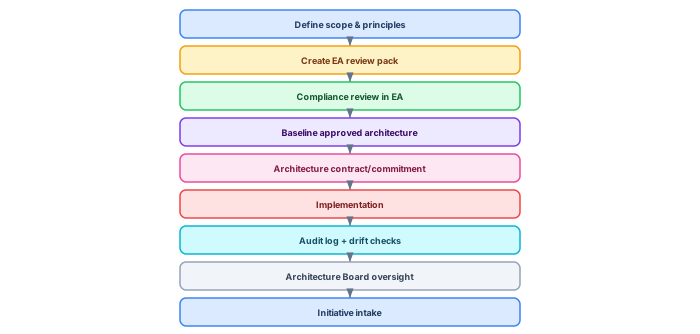
The compliance review and board concept are TOGAF-defined, and baselines/auditing/model reviews are EA mechanisms that supply tool-based evidence.
Pitfalls and anti-patterns
Anti-pattern: “Compliance review without evidence.” If approvals are not tied to baselines or review records, you cannot prove what was approved.
Anti-pattern: “EA as diagram archive.” Governance bodies must consume the repository outputs (WebEA views, review packs), otherwise modeling becomes disconnected.
Anti-pattern: “No permissions.” Without security controls, any “approved” state can be changed silently; permissions are the practical guardrail.
Examples and case scenarios
Scenario: architecture compliance at a delivery milestone
- Architecture team submits review pack.
- Compliance review executed as a model review.
- Approved baseline created; audit trail remains available.
Scenario: contract enforcement via baselines
- Baseline is taken at contract signature point.
- Subsequent drift detected via baseline comparison; review triggered.
Key takeaways
The practical bridge from TOGAF governance to EA execution is built by mapping: compliance reviews → model reviews; approvals → baselines; accountability → auditing; and separation of duties → permissions. When those mappings are explicit, architecture governance becomes evidence-based and scalable rather than reliant on meetings and memory.
- TOGAF compliance review concept.
- TOGAF architecture board definition.
- TOGAF architecture contracts definition.
- EA model reviews.
- EA review elements discussion capture.
- EA baselines (snapshot, compare, revert).
- EA auditing (who/what/when).
- EA model security/permissions.
- WebEA configuration context.
Mapping TOGAF concepts to Sparx EA implementation
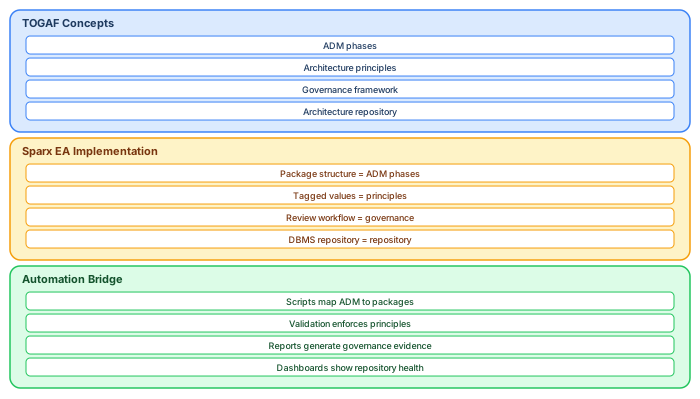
The bridge between TOGAF governance and Sparx EA implementation requires explicit mapping at three levels. TOGAF concepts (ADM phases, principles, governance framework, architecture repository) must map to Sparx EA artifacts (package structure, tagged values, review workflows, DBMS repository). The automation bridge (scripts, reports, dashboards) ensures the mapping is maintained continuously rather than documented once and forgotten. Sparx EA best practices
The most common failure in bridging TOGAF and Sparx EA is treating them as separate activities — the TOGAF process produces documents, and someone separately maintains a Sparx EA model. The model and the process must be the same thing: ADM phase deliverables ARE ArchiMate views in the repository. Governance decisions ARE tagged elements with approval status. The architecture repository IS the Sparx EA DBMS. When this unity is achieved, the bridge disappears — there is nothing to bridge because there is only one system. ArchiMate relationship types
If you’d like hands-on training tailored to your team — Sparx Enterprise Architect, BPMN, SysML, Apache Kafka or the Archi tool — or modelling coaching in ArchiMate and TOGAF-aligned governance, you can reach us via our contact page.
Frequently Asked Questions
What is Sparx Enterprise Architect used for?
Sparx Enterprise Architect (Sparx EA) is a comprehensive UML, ArchiMate, BPMN, and SysML modeling tool used for enterprise architecture, software design, requirements management, and system modeling. It supports the full architecture lifecycle from strategy through implementation.
How does Sparx EA support ArchiMate modeling?
Sparx EA natively supports ArchiMate 3.x notation through built-in MDG Technology. Architects can model all three ArchiMate layers, create viewpoints, add tagged values, trace relationships across elements, and publish HTML reports — making it one of the most popular tools for enterprise ArchiMate modeling.
What are the benefits of a centralised Sparx EA repository?
A centralised SQL Server or PostgreSQL repository enables concurrent multi-user access, package-level security, version baselines, and governance controls. It transforms Sparx EA from an individual diagramming tool into an organisation-wide architecture knowledge base.