⏱ 7 min read
Introduction

In today's complex project environments, the gap between stakeholder expectations and delivered solutions remains one of the primary causes of project failure. Sparx Systems Enterprise Architect (EA) addresses this challenge by providing a comprehensive, model-based approach to requirements management that bridges business needs with technical implementation. Unlike standalone requirements tools or simple diagramming software, EA integrates requirements engineering directly into the modeling environment, enabling true end-to-end traceability from strategic objectives to deployed code. Sparx EA training
This covers how Enterprise Architect transforms requirements management from a documentation exercise into a dynamic, traceable, and collaborative discipline that ensures project success.
- The Foundation: Understanding EA's Requirements Management Capabilities
Enterprise Architect's requirements management capabilities are built directly into its core architecture, distinguishing it from tools that treat requirements as an afterthought. The platform enables teams to define structured, hierarchical models of requirements that mirror organizational complexity while maintaining clarity and traceability .
Key Capabilities at a Glance
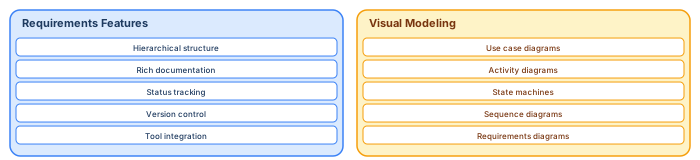
EA's requirements management functionality spans the entire project lifecycle:
Hierarchical Organization: Structure requirements from high-level business objectives down to detailed system specifications using nested packages and elements
Rich Documentation: Capture requirement descriptions, notes, constraints, and structured scenarios within each element
Status Tracking: Monitor requirement states (Proposed, Approved, Implemented, Verified) through customizable workflows and visual indicators
Version Control: Maintain baselines and track changes to requirements over time with full audit trails
Integration Ready: Synchronize with external tools like Jira, DOORS, and Excel through Pro Cloud Server
- Visual Modeling: Beyond Text-Based Requirements
Traditional requirements management often relies on text-heavy documents that obscure relationships and dependencies. Enterprise Architect revolutionizes this approach by embedding requirements within visual models that make complex relationships immediately apparent.
Requirements Diagrams
EA provides dedicated Requirements Diagrams that visualize how requirements relate to each other and to other model elements. These diagrams support:
Aggregation and Composition: Show how high-level requirements decompose into specific functional and non-functional requirements
Dependency Mapping: Illustrate relationships between requirements, identifying potential conflicts or prerequisites
Stereotype Customization: Extend the basic requirement element with domain-specific attributes using UML profiles
Use Case Integration
One of EA's strengths is the seamless connection between requirements and use case modeling. Use case diagrams in EA don't exist in isolation—they serve as the bridge between business requirements and system design
- Each use case can link directly to the requirements it fulfills
- Actors represent stakeholders whose needs are documented as requirements
- Scenarios within use cases can generate activity diagrams, sequence diagrams, and test cases
- Preconditions and postconditions ensure alignment with requirement constraints
This integration ensures that when requirements change, the impact on system functionality is immediately visible, and vice versa. integration architecture diagram
- End-to-End Traceability: The Heart of EA
Traceability is where Enterprise Architect truly distinguishes itself from conventional requirements tools. EA provides multiple visualization methods to track requirements across the development lifecycle.
The Relationship Matrix
The Relationship Matrix offers a spreadsheet-like view of relationships between requirements and other model elements, making it ideal for impact analysis:
- This matrix view allows teams to:
- Verify that every requirement maps to at least one design element
- Identify orphaned requirements that lack implementation
- Assess the impact of requirement changes on downstream components
- Generate compliance reports for auditors and stakeholders
Traceability Diagrams and Windows
For more complex analysis, EA offers dedicated traceability diagrams that visualize the complete chain from business requirements through to deployment:
The Traceability Window provides a dynamic, interactive view that updates as you navigate through the model, showing all relationships for the currently selected element in real-time
Status Management and Visual Governance
Effective requirements management requires clear visibility into the current state of each requirement. EA employs sophisticated visual indicators to communicate status at a glance.
Color-Coded Status Indicators
Requirements can be configured to display different colors based on their status, priority, or custom properties:
This visual approach enables stakeholders to instantly assess project health without diving into detailed documentation. Teams can customize these color schemes to align with organizational standards or specific project needs
Workflow and Change Management
EA supports formal change management processes through:
Baseline Management: Capture snapshots of the requirements model at specific milestones
Time-Aware Modeling: Maintain parallel "as-is" and "to-be" states for migration planning
Audit Logging: Track who changed what and when, with the ability to compare versions
Approval Workflows: Route requirements through review and approval processes using integrated task management
Integration and Collaboration
Modern requirements management doesn't happen in isolation. Enterprise Architect serves as a central hub that connects with the broader tool ecosystem.
Pro Cloud Server and Prolaborate
The Sparx Systems Architecture Platform extends EA's capabilities through: Sparx EA best practices
Pro Cloud Server: Provides secure, centralized repository access for distributed teams, enabling real-time collaboration on requirements models
Prolaborate: Offers web-based dashboards that transform complex requirements data into accessible visualizations for non-technical stakeholders
This combination allows business analysts to work in EA's rich modeling environment while executives and external stakeholders review requirements through intuitive web interfaces.
External Tool Integration
EA's Automation API enables integration with popular development and project management tools: modeling integration architecture with ArchiMate
Jira: Synchronize requirements with agile development workflows
DOORS: Import and export requirements for aerospace and defense projects
Excel/CSV: Bulk import existing requirements and export reports for external analysis
Version Control Systems: Link requirements to code repositories for full lifecycle traceability
Best Practices for Requirements Management in EA
To maximize the value of Enterprise Architect's requirements capabilities, consider these proven approaches:
1. Establish Clear Hierarchies
Organize requirements in a logical structure that mirrors business architecture. Start with business requirements, decompose into user requirements, and finally specify system requirements. This hierarchy makes traceability natural rather than forced
2. Model by Project
Avoid the temptation to model everything at once. Develop your requirements architecture incrementally, focusing on specific domains or projects. This approach prevents data overload and ensures that the model remains relevant and manageable
3. Maintain Logical Models
Keep requirements at a logical level for as long as possible. Physical implementation details change frequently, but the underlying business needs remain stable. Logical models stand the test of time and reduce maintenance overhead
4. Leverage Traceability Early
Establish traceability relationships as soon as requirements are captured, not as an afterthought. When requirements link to use cases, test cases, and components from the start, impact analysis becomes a real-time capability rather than a time-consuming audit.
5. Engage Stakeholders Through Visualization
Use EA's diagramming capabilities to communicate with non-technical stakeholders. A well-constructed requirements diagram often communicates more effectively than a lengthy document, and Prolaborate dashboards extend this accessibility to the entire organization
Conclusion
Sparx Enterprise Architect transforms requirements management from a static documentation task into a dynamic, integral part of the systems engineering process. By embedding requirements within a unified modeling environment, EA ensures that stakeholder needs remain visible and traceable throughout the entire project lifecycle—from initial concept through design, implementation, testing, and deployment. free Sparx EA maturity assessment
The platform's combination of hierarchical organization, visual traceability, and robust integration capabilities makes it uniquely suited for organizations seeking to align IT delivery with business strategy. Whether managing a small software project or coordinating enterprise-wide transformation, EA provides the structure and visibility necessary to ensure that what gets built is exactly what was needed.
For teams ready to elevate their requirements practice, Enterprise Architect offers not just a tool, but a comprehensive methodology for bridging the gap between business intent and technical reality.
Frequently Asked Questions
What is Sparx Enterprise Architect used for?
Sparx Enterprise Architect (Sparx EA) is a comprehensive UML, ArchiMate, BPMN, and SysML modeling tool used for enterprise architecture, software design, requirements management, and system modeling. It supports the full architecture lifecycle from strategy through implementation.
How does Sparx EA support ArchiMate modeling?
Sparx EA natively supports ArchiMate 3.x notation through built-in MDG Technology. Architects can model all three ArchiMate layers, create viewpoints, add tagged values, trace relationships across elements, and publish HTML reports — making it one of the most popular tools for enterprise ArchiMate modeling.
What are the benefits of a centralised Sparx EA repository?
A centralised SQL Server or PostgreSQL repository enables concurrent multi-user access, package-level security, version baselines, and governance controls. It transforms Sparx EA from an individual diagramming tool into an organisation-wide architecture knowledge base.