⏱ 6 min read
Recommended Reading
Executive summary
Scaling Sparx EA to 200+ architects typically fails for non-technical reasons: unclear ownership, inconsistent modeling language, and review processes that either don’t exist or are too heavy to sustain. At this scale, the repository becomes an enterprise platform that requires an operating model: clear domain ownership, a controlled meta-model distribution mechanism, and a collaboration workflow that brings stakeholders into reviews without exporting architecture into slides. EA provides specific governance primitives that map well to this need: model security (permissions controlling who can update what), auditing (recording who changed what and when), and package-level baselines (snapshots that can be compared and reverted). ArchiMate modeling guide
For distributed organizations, Pro Cloud Server and WebEA are often the difference between “EA as a shared system” and “EA as a local tool,” because Sparx describes secure encrypted links and WAN-optimized access for remote teams. Sparx EA training
A scalable governance design is therefore: federated ownership of domain packages, centralized ownership of standards and meta-models (packaged as MDG), lightweight continuous review processes (model reviews), and a baseline/audit discipline that supports accountability and controlled releases. ArchiMate for architecture governance
- Background and scale drivers (why 200+ changes everything)
- Repository and access topology (DBMS vs cloud access)
- Governance operating model (roles, ownership, permissions)
- Review and release workflow (model reviews, baselines, audits)
- Performance and change boundaries (package strategies, controlled packages)
- Pitfalls (shadow modeling, over-customization, review bottlenecks)
Mermaid to include (scale operating model):

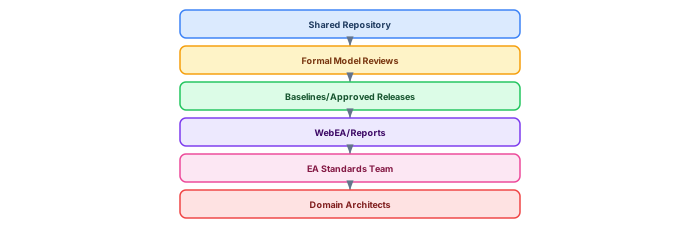
Tables to include: roles vs permissions; repository topology options.
- DBMS repositories support and setup context.
- Pro Cloud Server cloud repository overview (WAN optimization, encrypted links).
- WebEA installation/config context.
- Model security overview.
- Permissions list (access control).
- Auditing feature (who/what/when changes).
- Baselines definition (snapshot, compare, revert).
- Model reviews (formal assessment collaboration).
- Developing profiles + MDG packaging for scalable standards.
Architecture for scale: the four-layer deployment model

Scaling Sparx EA to 200+ architects requires a layered deployment architecture where each layer is independently tunable. Sparx EA best practices
Repository layer: SQL Server in a high-availability cluster (Always On or failover). Partition the repository by domain using separate databases per architecture domain — this prevents one domain's heavy modeling from degrading performance for others. Apply targeted indexes on the most-queried tables: t_object (Name, Object_Type, Stereotype), t_connector (Start_Object_ID, End_Object_ID), t_diagramobjects (Diagram_ID), and t_objectproperties (Property, Object_ID). Schedule index maintenance weekly during off-hours.
Access layer: Deploy Pro Cloud Server behind a load balancer with at least two PCS instances for failover. Configure connection pooling (50–100 connections per PCS instance). Enable WebEA for stakeholders who need read access without the thick client. Expose OSLC endpoints for integration with Jira, ServiceNow, or CI/CD pipelines.
Client layer: Architects use the EA thick client for modeling. Reviewers and stakeholders use WebEA for viewing published content. Automated systems (CI/CD, reporting) use the COM API or REST endpoints via PCS. Each client type has different performance characteristics and security requirements.
Governance layer: Package-level security mapped to Active Directory groups ensures architects can only modify their domain. Validation scripts run on commit (or on a nightly schedule) to enforce naming conventions, required properties, and relationship rules. Quality dashboards display model health metrics per domain, visible to architecture leadership.
Performance at scale: metrics and optimization

Performance degradation is the most common reason large-scale EA deployments fail. Users who experience 15-second diagram loads stop using the tool within weeks. Define and monitor these targets:
Diagram load time under 3 seconds. The primary optimization is indexing t_diagramobjects on Diagram_ID. If diagrams are still slow, check for oversized diagrams (50+ elements) and split them. Embedded images (pasted screenshots) are a major performance killer — replace with linked images.
SQL queries under 2 seconds. All repository queries should use parameterized SQL with proper indexing. The most expensive query is typically the full-text search across t_object.Note — consider adding a full-text index if architects frequently search by description.
200+ concurrent users supported. PCS connection pooling is the key enabler. Without pooling, each user holds a persistent database connection — 200 users means 200 connections. With pooling, connections are shared and recycled. Configure the pool size to 2–3x the expected peak concurrent sessions.
-- SQL Server: Monitor connection and performance
SELECT DB_NAME() AS DatabaseName,
       COUNT(*) AS ActiveConnections,
       SUM(CASE WHEN status = 'running' THEN 1 ELSE 0 END) AS RunningQueries
FROM sys.dm_exec_sessions
WHERE database_id = DB_ID();

-- Identify slow queries against EA repository
SELECT TOP 10
    qs.total_elapsed_time / qs.execution_count AS avg_elapsed_ms,
    qs.execution_count,
    SUBSTRING(qt.text, 1, 200) AS query_text
FROM sys.dm_exec_query_stats qs
CROSS APPLY sys.dm_exec_sql_text(qs.sql_handle) qt
WHERE DB_NAME() = 'EARepository'
ORDER BY avg_elapsed_ms DESC;
Governance at scale: preventing model chaos
With 200 architects, governance cannot rely on manual review — it must be automated. Implement three layers of automated governance: ArchiMate modeling standards
Preventive: Package security ensures architects can only modify their assigned domain. MDG Technology enforces valid element types and relationships. Naming convention validation runs at save time.
Detective: Nightly quality reports identify naming violations, missing required properties, orphan elements, and oversized diagrams. Reports are emailed to domain leads with a 2-week remediation window.
Corrective: Quarterly cleanup sprints address accumulated quality debt. Scripts identify and archive elements not modified in 12+ months. Baseline comparisons highlight unauthorized structural changes.
If you’d like hands-on training tailored to your team — Sparx Enterprise Architect, BPMN, SysML, Apache Kafka or the Archi tool — or modelling coaching in ArchiMate and TOGAF-aligned governance, you can reach us via our contact page.
Frequently Asked Questions
What is Sparx Enterprise Architect used for?
Sparx Enterprise Architect (Sparx EA) is a comprehensive UML, ArchiMate, BPMN, and SysML modeling tool used for enterprise architecture, software design, requirements management, and system modeling. It supports the full architecture lifecycle from strategy through implementation.
How does Sparx EA support ArchiMate modeling?
Sparx EA natively supports ArchiMate 3.x notation through built-in MDG Technology. Architects can model all three ArchiMate layers, create viewpoints, add tagged values, trace relationships across elements, and publish HTML reports — making it one of the most popular tools for enterprise ArchiMate modeling.
What are the benefits of a centralised Sparx EA repository?
A centralised SQL Server or PostgreSQL repository enables concurrent multi-user access, package-level security, version baselines, and governance controls. It transforms Sparx EA from an individual diagramming tool into an organisation-wide architecture knowledge base.