⏱ 20 min read
Let’s start with the unpopular truth: most enterprise architecture repositories are graveyards.
They look impressive in steering committee demos. Hundreds of diagrams. Thousands of elements. Color-coded capability maps. Maybe even a metamodel someone spent six months “socializing.” And then? Nobody trusts it, nobody updates it, and delivery teams go right back to Confluence pages, Visio screenshots, and tribal knowledge.
Sparx Enterprise Architect—usually just called Sparx EA—can absolutely become that kind of graveyard. Sparx EA training
It can also become one of the most practical architecture tools in the enterprise, especially if you work in a large environment with banking systems, IAM sprawl, Kafka event flows, and cloud migration chaos. But only if you approach it like an architect, not like a diagram collector.
That’s the point of this beginner tutorial.
If you’re new to Sparx EA, here’s the simple explanation early: Sparx EA is a modeling and architecture repository tool. You use it to create diagrams, define architecture building blocks, connect them with relationships, and keep architectural knowledge in one place. It supports UML, ArchiMate, BPMN, data models, requirements, traceability, and a lot more. In plain English: it helps you describe how the enterprise works, how systems fit together, and what needs to change.
That’s the official answer.
The real answer is this: Sparx EA is useful because it forces structure. If you use it well, it becomes a shared map of your enterprise. If you use it badly, it becomes a polished lie.
So this article is not going to read like product documentation. I’m going to show you how beginners should approach Sparx EA, what matters in real architecture work, what to ignore at first, and where people routinely waste time. Sparx EA guide
What Sparx EA Is, in Practical Terms
At a beginner level, Sparx EA gives you four things: free Sparx EA maturity assessment
- A repository for architecture content
- A way to model systems, processes, interfaces, data, and technology
- Traceability between business need, solution design, and implementation
- Governance support so architecture isn’t just PowerPoint theater
That’s the high-level view. But let’s make it more concrete.
Imagine you’re in a bank.
You have:
- a customer onboarding process
- IAM services for authentication and authorization
- Kafka topics carrying customer and payment events
- core banking platforms
- cloud-hosted APIs
- compliance requirements around data handling and auditability
Now imagine trying to answer very normal architecture questions:
- Which systems publish customer profile events?
- Which applications depend on the IAM platform for SSO?
- Which workloads are still on-prem and which moved to cloud?
- What breaks if we retire a legacy integration hub?
- Which business capability is impacted by a Kafka cluster outage?
If your architecture tool can’t help answer those questions, it’s not doing architecture work. It’s doing illustration.
Sparx EA can answer them—if you model relationships, not just boxes.
That distinction matters more than beginners realize.
The First Beginner Mistake: Treating Sparx EA Like Fancy Visio
This is the classic failure pattern.
A new architect opens Sparx EA, creates a package called “Architecture,” starts dropping applications onto a diagram, draws some arrows, exports a PNG, and feels productive. Sparx EA best practices
That’s not nothing. But it’s also not the point.
The power of Sparx EA is not the diagram itself. The power is the underlying model:
- one application element reused across many diagrams
- defined interfaces
- relationships between business capabilities and applications
- ownership information
- lifecycle status
- technology deployment mapping
- requirements traceability
If your “Payments API” appears as five separate objects in five separate diagrams, you’re not building an architecture repository. You’re drawing five disconnected pictures.
That sounds harsh, but it’s where most teams go wrong.
What beginners should do instead
Think in this sequence:
- First define the element
- Then place it on diagrams
- Then connect it to other elements
- Then add attributes that make it useful later
This is a very different mindset from freeform diagramming.
For example:
- Create one application component called Customer Identity Service
- Reuse it in:
- Link it to:
- an IAM landscape view
- a customer onboarding process view
- a cloud deployment view
- a security architecture view
- business capability: Identity and Access Management
- technology service: OAuth2 / OIDC
- data object: Customer Credential Metadata
- Kafka topic if applicable
- cloud deployment node
- owner/team
- lifecycle state
That’s architecture. Not just diagramming.
Getting Started in Sparx EA Without Drowning in Features
Sparx EA has a lot of features. Too many, frankly, for a beginner. One reason people bounce off it is because the tool invites over-modeling almost immediately.
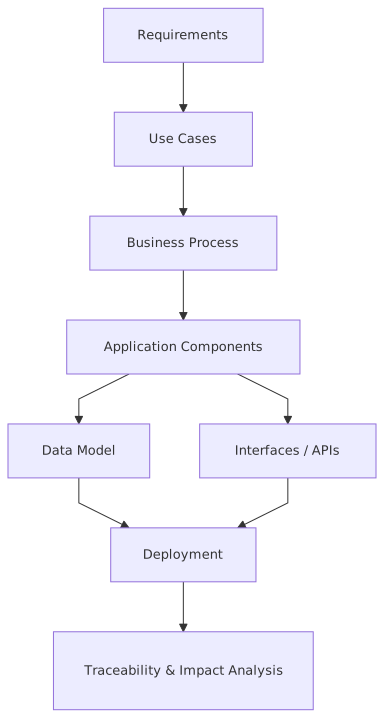
My strong advice: ignore 70% of the product in your first month.
You do not need to master every notation. You do not need to customize the perfect metamodel on day one. You do not need to launch a grand repository transformation program because someone in governance said “single source of truth.”
Start small and useful.
A sensible beginner setup
If you’re just learning Sparx EA, focus on these basics:
That’s enough to start doing serious work.
Suggested package structure for beginners
A simple repository structure might look like this:
- Enterprise Architecture
- Business
- Capabilities
- Processes
- Application
- Application Portfolio
- Interfaces
- Integration
- Data
- Data Domains
- Key Information Objects
- Technology
- Platforms
- Cloud
- Networks
- Security
- IAM
- Controls
- Change Initiatives
- Program A
- Program B
- Reference Architectures
Not elegant. Good enough. And that phrase—good enough—is important. Architects often delay useful modeling because they want a perfect taxonomy. That’s a vanity problem.
The Right Way to Think About Diagrams
A diagram is not “the architecture.” It is a view of the architecture for a purpose.
That’s a subtle shift, but it changes how you model.
Before you create a diagram, ask:
- Who is this for?
- What decision should it support?
- What level of detail is appropriate?
- What relationships matter here?
If you don’t know the audience, the diagram will drift into abstraction soup.
The four beginner diagram types I recommend
1. Application landscape diagram
Use this to show major systems and how they relate.
Example in banking:
- Mobile Banking App
- Customer Identity Service
- API Gateway
- Kafka Platform
- Core Banking System
- Fraud Engine
- CRM
This is your “what exists” view.
2. Business-to-application mapping
Use this to connect capabilities or processes to supporting systems.
Example:
- Capability: Customer Onboarding
- Process: Account Opening
- Applications:
- Mobile App
- IAM Platform
- KYC Service
- Customer Master
- Kafka event pipeline
This is where architecture becomes relevant to business stakeholders.
3. Integration diagram
Use this to show APIs, events, message flows, and dependencies.
Example:
- Customer Identity Service publishes
customer.identity.verified - KYC Service consumes event
- CRM subscribes to customer update topic
- Fraud Engine consumes onboarding event stream
- API Gateway routes REST traffic to onboarding services
This is one of the most valuable views in modern enterprises.
4. Deployment / cloud diagram
Use this to show where workloads run.
Example:
- API Gateway in cloud
- Kafka managed service in cloud
- IAM federation service hybrid
- Core banking remains on-prem
- Secure connectivity between cloud VPC and data center
This matters because architecture decisions are often constrained by hosting reality, not strategy slides.
How Sparx EA Applies in Real Architecture Work
This is where many beginner tutorials fail. They explain menus and notation but not the actual job.
In real enterprise architecture work, Sparx EA is useful in five recurring scenarios.
1. Impact analysis
A business leader asks: “What happens if we replace the IAM platform next year?”
If your model is decent, you can identify:
- applications using SSO
- systems consuming authorization data
- API products dependent on token validation
- customer journeys affected
- security controls tied to the platform
- cloud services integrated via federation
That’s not theoretical. In large banks, IAM is one of the highest blast-radius domains in the enterprise.
2. Rationalization
You need to reduce application sprawl.
A portfolio review asks:
- Why do we have three customer profile services?
- Which ones publish to Kafka?
- Which one is system of record?
- Which are cloud-ready?
- Which support regulated workloads?
Sparx EA helps if your application catalog is real and tied to interfaces, ownership, and lifecycle.
3. Solution architecture traceability
A delivery team proposes a new onboarding service.
Architecture needs to show:
- which business capability it supports
- which applications it integrates with
- which IAM patterns it uses
- which Kafka topics it publishes
- where it deploys in cloud
- what standards it must comply with
This is where repository discipline pays off.
4. Governance without bureaucracy
Good governance is not forcing people to fill in 48 metadata fields. That’s process cosplay.
Good governance means:
- architecture standards are visible
- approved patterns are reusable
- relationships are explicit
- exceptions are documented
- impact is assessable
Sparx EA can support that. But only if the repository is focused on things people actually need.
5. Reference architecture reuse
This is one of the best uses of Sparx EA and one of the least mature in many organizations.
You can define reusable patterns for:
- cloud-native API deployment
- event-driven integration using Kafka
- IAM integration using OIDC
- secure service-to-service authentication
- regulated data handling zones in cloud
Then delivery teams can reference these patterns instead of reinventing architecture every sprint.
That’s where architecture starts scaling.
A Real Enterprise Example: Banking, Kafka, IAM, and Cloud
Let’s walk through a realistic example.
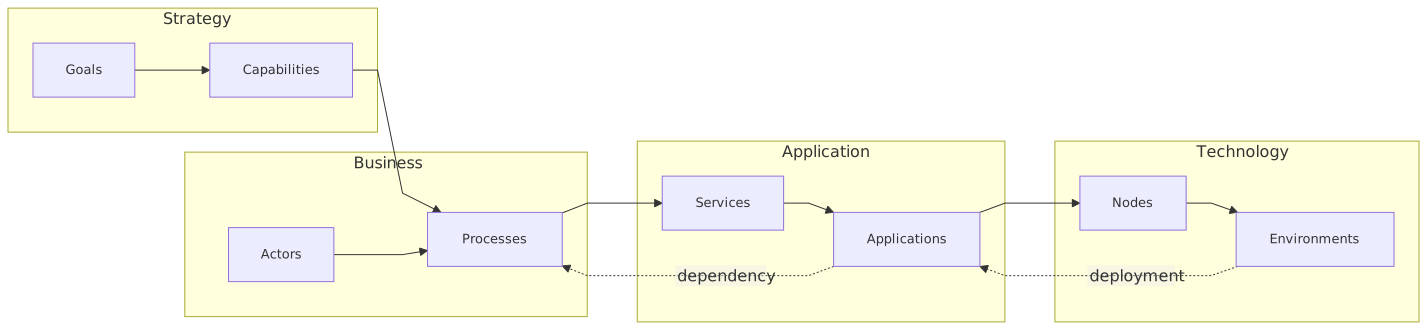
A retail bank wants to modernize customer onboarding. The old process is fragmented:
- branch onboarding uses one system
- digital onboarding uses another
- customer identity checks happen through separate vendor integrations
- fraud screening is asynchronous and poorly tracked
- IAM is inconsistent between channels
- data updates to downstream systems are batch-based
The target state is:
- a unified onboarding journey
- centralized IAM
- event-driven integration using Kafka
- cloud-hosted onboarding APIs
- gradual coexistence with on-prem core banking
How you would model this in Sparx EA
Business layer
Create:
- Capability: Customer Onboarding
- Capability: Identity and Access Management
- Capability: Fraud Management
- Process: Digital Account Opening
- Process: Customer Verification
Application layer
Create:
- Mobile Banking App
- Web Onboarding Portal
- Customer Identity Service
- IAM Platform
- KYC Vendor Gateway
- Fraud Decision Engine
- Customer Master
- Core Banking Platform
- Notification Service
- API Gateway
Integration layer
Create:
- REST interfaces for onboarding APIs
- Kafka topics such as:
- customer.onboarding.started
- customer.identity.verified
- customer.account.created
- customer.risk.assessed
Technology layer
Create:
- Cloud Kubernetes Platform
- Managed Kafka Cluster
- IAM Federation Service
- On-Prem Core Banking Host
- Secure Network Connectivity
Relationships
Connect:
- Digital Account Opening process is supported by Web Onboarding Portal and Mobile Banking App
- Customer Identity Service uses IAM Platform
- Onboarding APIs are exposed via API Gateway
- Customer Identity Service publishes
customer.identity.verified - Fraud Decision Engine consumes identity and onboarding events
- Customer Master subscribes to account creation outcomes
- Core Banking Platform remains system of record for account creation
- Cloud Kubernetes hosts onboarding microservices
- Managed Kafka supports event streaming between services
- IAM Federation integrates cloud apps with enterprise identity
Now you have something useful.
Why this matters in practice
Suppose the bank asks:
- Can we move onboarding fully to cloud?
- What still depends on on-prem?
- What systems need IAM federation?
- What downstream consumers rely on onboarding events?
- If Kafka has a failure, which business process degrades?
A proper Sparx EA model gives you a path to answer those questions.
Not perfectly. No repository is ever perfect. But far better than a pile of disconnected slides.
That’s the standard architects should hold.
Common Mistakes Architects Make in Sparx EA
Let’s be honest. Architects are often the problem here, not the tool.
Mistake 1: Modeling everything
Beginners often think rigor means completeness.
It doesn’t.
If you try to model every server, every table, every API field, every process exception, and every security control from day one, the repository will collapse under its own ambition.
Architecture is about decision-relevant abstraction.
Model what helps answer important questions. Ignore the rest until needed.
Mistake 2: Mixing viewpoints carelessly
I see this constantly:
- business capabilities
- deployment nodes
- control objectives
- Kafka topics
- user roles
- cloud regions
…all dumped onto one diagram.
That’s not rich architecture. That’s visual panic.
One diagram should have a clear purpose. If you need six concerns represented, create multiple views.
Mistake 3: Duplicating elements
This is probably the biggest operational mistake.
If “IAM Platform” exists as three separate elements because three architects created it independently, traceability falls apart.
You need naming discipline, ownership discipline, and repository discipline.
Mistake 4: No metadata standards
A repository without basic standards turns into archaeology.
At minimum, define:
- naming conventions
- mandatory fields
- ownership
- lifecycle status
- approved relationship types
- package placement rules
Not too many rules. But enough so content stays coherent.
Mistake 5: Treating Sparx EA as an EA team tool only
This is a strategic mistake.
If only enterprise architects touch the repository, it will become detached from delivery reality. Solution architects, integration architects, security architects, and sometimes senior engineers need to contribute or at least validate content.
Otherwise the model becomes ceremonially correct and operationally wrong.
Mistake 6: Building a metamodel nobody understands
This one is very common in architecture teams that enjoy theory a little too much.
A metamodel should enable consistency. It should not require a translator.
If your notation and stereotypes are so customized that new architects need a two-hour briefing just to draw a valid integration view, you’ve gone too far.
Contrarian view: most enterprises need a simpler metamodel than they think.
A Beginner Workflow That Actually Works
If I were coaching a new architect using Sparx EA, I’d suggest this workflow.
Step 1: Pick one real business problem
Not “document the enterprise.” That’s nonsense.
Pick something concrete:
- customer onboarding modernization
- IAM platform replacement
- Kafka adoption for event integration
- cloud migration of a lending platform
Step 2: Identify the minimum architecture objects
For example:
- business capabilities
- key applications
- interfaces
- major data flows
- deployment locations
Step 3: Create canonical elements first
Before drawing, create the reusable elements in the repository.
Step 4: Build 3–4 purposeful diagrams
For example:
- business capability to application map
- application interaction view
- Kafka event flow view
- cloud deployment view
Step 5: Add metadata
At least:
- owner
- lifecycle
- description
- system type
- environment/hosting
- security classification if relevant
Step 6: Review with real stakeholders
This matters a lot.
Review with:
- product owner
- security architect
- integration architect
- platform team
- lead engineer
If they say “that’s not how it works,” good. Fix it. Reality beats elegance.
Step 7: Use the model in a decision forum
If the model never gets used in governance, planning, or design review, it won’t survive.
Use it to answer:
- impact
- dependency
- target state
- migration sequencing
- technology standard compliance
That’s how the repository earns legitimacy.
What Beginners Should Learn First in Sparx EA Notation
You do not need to become a notation purist.
In fact, some of the worst architecture repositories I’ve seen were technically “correct” and practically unreadable.
Still, a beginner should understand a few basics.
UML
Useful for:
- component diagrams
- sequence diagrams
- class/data models
- deployment views
ArchiMate
Useful for:
- capability mapping
- business/application/technology layering
- motivation and strategy linkage
- portfolio and target-state modeling
BPMN
Useful for:
- business process flows
- operational handoffs
- workflow understanding
My opinion: for most enterprise architects, ArchiMate plus a bit of UML is enough to get serious value. BPMN is useful when process detail matters. Don’t start by trying to master everything equally.
And another contrarian thought: if a simple, clear diagram helps stakeholders make a decision, I do not care if it wins notation purity awards.
Architecture communication matters more than notation tribalism.
How to Use Sparx EA for Kafka Architecture
Kafka deserves specific mention because many architects model event-driven systems badly.
They draw one box called “Kafka” in the middle of a diagram and arrows everywhere. That tells you almost nothing.
A better approach in Sparx EA is to model:
- producer applications
- consumer applications
- event topics
- event purpose
- ownership
- schema responsibility
- criticality
- deployment platform
For example:
This is useful architecture data.
In Sparx EA, you can represent topics as information flows, interface elements, or modeled messaging artifacts depending on your standards. The important thing is not the perfect notation choice. The important thing is that:
- the topic exists as a reusable object
- producers and consumers are explicit
- ownership is clear
- the topic is linked to business value
That’s what helps with operational resilience and change impact.
How to Use Sparx EA for IAM Architecture
IAM is another domain where hand-wavy diagrams are dangerous.
A lot of organizations say “we have SSO” as if that means the architecture is coherent. Usually it means there are seven identity patterns, four trust models, and a lot of hidden risk.
In Sparx EA, model IAM architecture with enough structure to answer:
- which applications authenticate via which mechanism
- where authorization decisions are made
- which identity providers are in use
- which apps are federated
- which apps still use local credentials
- where privileged access is managed
For a banking example, you might model:
- enterprise identity provider
- customer IAM platform
- workforce IAM
- API gateway token validation
- privileged access management platform
- cloud-native secret management
- application-level roles and entitlements
Then connect those to:
- mobile banking app
- onboarding portal
- branch systems
- fraud systems
- admin consoles
- cloud workloads
This matters because IAM architecture is usually one of the biggest hidden dependencies in modernization programs. Teams think they are replacing an application. In reality they are disturbing a trust fabric.
Sparx EA can make that visible.
How to Use Sparx EA for Cloud Architecture
Cloud architecture in Sparx EA should not stop at “this app is in AWS” or “this service is in Azure.” That’s decorative.
Model:
- workload placement
- platform dependencies
- network boundaries
- managed services
- resilience zones
- integration back to on-prem
- security controls
- data residency constraints
In banking, cloud decisions are rarely just technical. They are tied to:
- regulatory constraints
- audit requirements
- encryption standards
- IAM integration
- vendor concentration risk
- operational support maturity
So if you model cloud in Sparx EA, tie it back to:
- business capability
- application criticality
- security classification
- integration patterns
- migration roadmap
That’s when the repository starts supporting actual enterprise planning.
The Best Mindset for Beginners
Here’s the mindset I’d recommend:
Sparx EA is not where you go to make architecture look sophisticated. It is where you go to make complexity navigable.
That sounds simple. It isn’t.
It means:
- being selective
- preferring clarity over completeness
- modeling relationships carefully
- reusing elements consistently
- validating with real teams
- accepting that architecture is always partly unfinished
And yes, it also means resisting some of the habits architects are weirdly proud of:
- over-abstracting
- over-standardizing
- over-modeling
- worshipping frameworks instead of solving problems
A beginner who learns practical repository discipline will be more valuable than a notation expert who produces beautiful but disconnected diagrams.
That’s another strong opinion, but I stand by it.
Final Advice: Start Useful, Stay Honest
If you’re just beginning with Sparx EA, don’t aim to build the perfect enterprise model.
Aim to build a trusted one.
Trusted means:
- people recognize the systems shown
- relationships reflect reality
- diagrams answer real questions
- metadata is maintained enough to matter
- stakeholders use it in planning and design
That’s a much better target than “comprehensive.”
Because in architecture, comprehensive and useless is still useless.
Sparx EA can be a very good tool. Especially in enterprises with complex banking platforms, Kafka-driven integration, IAM dependencies, and cloud transformation programs. But the tool will not rescue weak architecture habits. If anything, it exposes them.
So learn the basics. Model the essentials. Reuse elements. Keep diagrams purposeful. Tie everything back to business change. And don’t let the repository become a museum.
That’s the beginner tutorial I wish more architects got.
FAQ
1. Is Sparx EA only for enterprise architects, or can solution architects use it too?
Definitely not just for enterprise architects. Solution architects, integration architects, security architects, and even senior technical leads can get value from it. In fact, if only the EA team uses Sparx EA, the repository usually drifts away from delivery reality.
2. Should beginners start with UML, ArchiMate, or BPMN in Sparx EA?
Start with what solves your immediate problem. For most enterprise architecture work, ArchiMate plus some UML is enough. BPMN is useful if you need real process detail. Don’t turn notation choice into a religious war. ArchiMate modeling best practices
3. How detailed should a Sparx EA model be?
Detailed enough to support decisions, not detailed enough to document the universe. If your model helps with impact analysis, dependency mapping, target-state design, and governance, you’re probably at the right level.
4. Can Sparx EA handle modern architecture topics like Kafka, IAM, and cloud?
Yes, absolutely. But you need to model them properly. Don’t just draw a Kafka box, an IAM box, and a cloud box. Define producers, consumers, trust relationships, deployment locations, and business relevance.
5. What is the biggest mistake beginners make in Sparx EA?
Using it like a drawing tool instead of a repository. The diagram is only the visible layer. The real value comes from reusable elements, consistent relationships, metadata, and traceability across the architecture.
Frequently Asked Questions
What is Sparx Enterprise Architect used for?
Sparx Enterprise Architect is a comprehensive modeling tool supporting UML, ArchiMate, BPMN, SysML, and TOGAF. It is used for enterprise architecture, software design, requirements management, and systems engineering. Its strength lies in combining a centralised shared repository with formal notation support and powerful automation capabilities.
How do I get started with Sparx EA?
Start by setting up a database repository (SQL Server or PostgreSQL) rather than a local file. Learn the package structure, then begin with ArchiMate or UML depending on your primary use case. Focus on relationships and traceability from the start — not just diagrams. NILUS offers Sparx EA training from beginner to advanced levels.
What is the difference between Sparx EA and Archi?
Sparx EA is a comprehensive multi-notation commercial tool (UML, ArchiMate, BPMN, SysML) with a centralised database repository, scripting, and automation. Archi is a free, open-source tool that supports ArchiMate only. Sparx EA scales better for large teams and complex enterprise repositories; Archi is ideal for individual architects or small teams focused solely on ArchiMate.