⏱ 21 min read
Most beginners fail with Sparx Enterprise Architect for the same reason teams fail with architecture in general: they start drawing boxes before they know what decision they’re trying to make. Sparx EA training
That’s the blunt truth.
Enterprise Architect—usually just called EA—is not hard because the tool is complicated. It’s hard because it exposes bad architecture habits. People open it, create a few application components, throw in some arrows, maybe color a few things blue, and then wonder why nobody in the business cares. Or worse, why delivery teams ignore the model entirely.
If you’re a beginner, here’s the simple explanation early: Sparx Enterprise Architect is a modeling tool used to document, analyze, and communicate enterprise architecture, solution architecture, business processes, systems, interfaces, requirements, and decisions. You use it to create structured architecture models instead of random PowerPoint diagrams. It supports UML, ArchiMate, BPMN, data models, requirements, traceability, and repositories that multiple architects can use.
That’s the SEO-friendly version.
The real version? EA is useful when you treat it as an architecture decision system, not a drawing app.
This tutorial is step-by-step for beginners, yes. But I’m going to say the quiet part out loud too: if you learn Sparx without learning how real architecture work happens—governance, delivery constraints, cloud trade-offs, IAM sprawl, event-driven integration, legacy banking systems—you’ll become very good at making diagrams nobody trusts.
So let’s do this properly.
What Sparx Enterprise Architect actually is
Sparx Enterprise Architect is a model-based architecture tool. It lets you store architecture content in a repository and relate things to each other:
- business capabilities
- applications
- services
- APIs
- data entities
- integration flows
- technology platforms
- requirements
- risks
- controls
- projects
- implementation states
That matters because architecture is not just “what systems exist.” It’s also:
- why they exist
- what they depend on
- who owns them
- what changes are planned
- what policies constrain them
- how they support business outcomes
A Visio file can show a picture. EA can show a picture and maintain relationships behind it.
That’s the difference.
Why beginners struggle with EA
Let me save you some pain. New users usually make one of these mistakes:
- They start with notation instead of intent
They ask “Should I use ArchiMate or UML?” before they know whether they’re mapping a payment domain, cloud migration scope, or IAM control boundary. enterprise architecture guide
- They model everything
This is classic junior-architect behavior. If the repository can hold 20,000 elements, they try to create 20,000 elements. Terrible idea.
- They confuse completeness with usefulness
A model that tells a delivery team what to build next is useful. A model that documents every interface from 2008 is mostly archaeology.
- They create disconnected diagrams
Pretty views, no traceability. Looks polished. Operationally worthless.
- They don’t model decisions
This one annoys me. Teams spend weeks debating Kafka vs REST, cloud-native IAM vs federated legacy IAM, event choreography vs orchestration—and none of that rationale gets captured.
If you avoid those five things, you’re already ahead of a lot of architecture teams.
Step 1: Start with the architecture question, not the tool
Before you even open EA, write down one sentence:
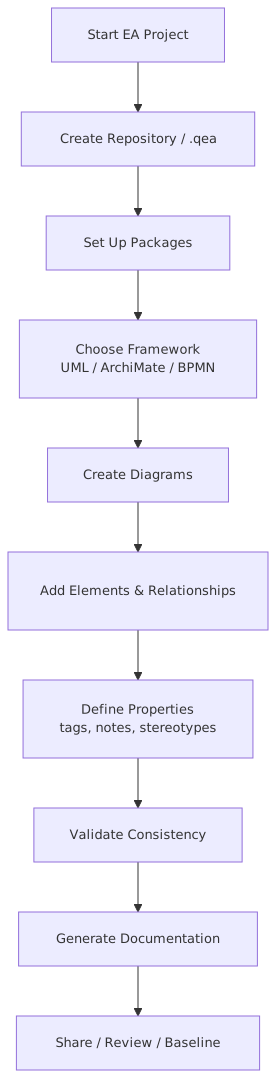
What architecture question am I trying to answer?
Examples:
- “What applications support customer onboarding in the retail bank?”
- “How do IAM services integrate with cloud apps and on-prem systems?”
- “Which systems publish and consume Kafka events in payments?”
- “What is moving to AWS this year, and what dependencies block migration?”
- “How do fraud controls trace to business processes and technology components?”
This matters because the right model depends on the question.
If your question is about business process and application support, use a capability/application/process view.
If your question is about event streaming, use application, interface, and information flow views.
If your question is about cloud migration, use baseline/target/transition architecture views.
A lot of bad EA work starts because the architect never defined the question. So the model becomes vague and generic. Generic architecture is usually just expensive wallpaper.
Step 2: Create a repository structure that won’t collapse later
Inside EA, you need some structure. Beginners often dump everything into one package called “Architecture.” Don’t do that.
A simple starter structure looks like this:
This is not the only valid structure. But it’s practical.
Strong opinion: repository structure should mirror how architecture decisions are consumed, not how frameworks are taught. A repository that makes sense only to architecture purists is a failed repository.
Step 3: Pick one notation and keep it boring
EA supports a lot: UML, BPMN, ArchiMate, SysML, and more. That flexibility is useful, but it’s also a trap. ArchiMate modeling guide
For most enterprise beginners, I’d recommend this:
- ArchiMate for enterprise and solution architecture views
- BPMN for business process flows when process precision matters
- UML sequence or component diagrams only when solution detail genuinely needs it
That’s enough.
You do not need six notations in your first month.
Contrarian thought: architects often overrate notation purity. Stakeholders do not care whether your connector type is academically perfect. They care whether the model answers real questions. Use consistent notation, yes. But don’t become one of those people who spends 30 minutes debating symbol semantics while the delivery team is trying to understand a broken customer onboarding flow.
Step 4: Create your first real model — business capability to application mapping
This is the best beginner exercise because it teaches traceability quickly.
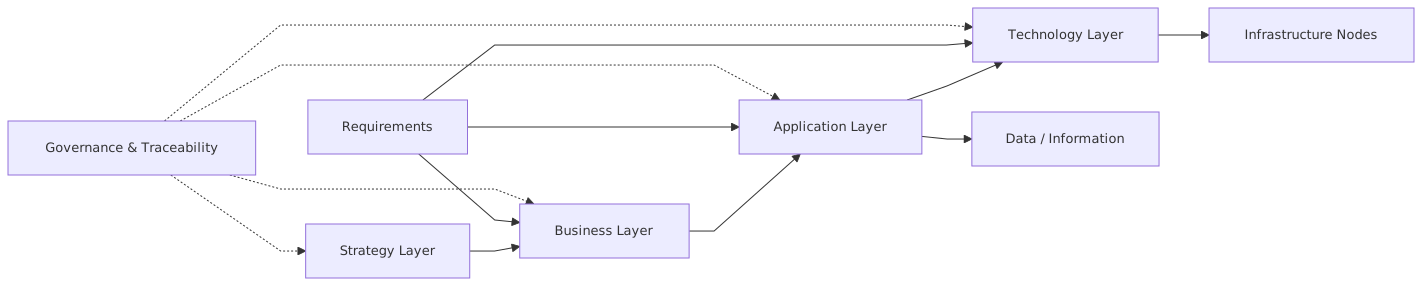
Let’s use a banking example.
Imagine you’re working in a retail bank. The CIO wants clarity on the architecture supporting customer onboarding because onboarding is fragmented across mobile banking, branch systems, IAM, sanctions screening, and core banking.
What to model
Create these elements:
Business capabilities
- Customer Onboarding
- Identity Verification
- Account Opening
- Fraud Screening
- Consent Management
Applications
- Mobile Banking App
- Branch Teller Platform
- IAM Platform
- KYC Screening Service
- Core Banking System
- CRM Platform
- Document Management Service
Relationships
- capability realized by application
- application interfaces with application
- application owns or accesses data object
Then create a simple diagram that shows which applications support which capabilities.
This sounds basic. Good. Basic is underrated.
In real architecture work, this kind of view helps answer:
- where duplication exists
- where critical capabilities depend on legacy systems
- where modernization should start
- who must be involved in change
Why this matters in practice
Suppose both the Mobile Banking App and Branch Teller Platform perform identity verification, but one uses the new IAM platform and the other still calls a legacy directory service. That’s not just a modeling fact. That’s an operational risk:
- inconsistent onboarding outcomes
- duplicated control logic
- audit headaches
- customer friction
- hidden technical debt
This is where EA starts becoming useful. You’re not just drawing systems. You’re exposing architectural inconsistency.
Step 5: Add interfaces and integration flows
Once the business-to-application mapping exists, the next step is to model how systems actually talk.
This is where many beginner models stay too shallow. They show boxes but no movement. Real architecture work lives in the movement.
For our banking onboarding example, define interfaces such as:
- Mobile Banking App → API Gateway
- API Gateway → IAM Platform
- API Gateway → KYC Screening Service
- API Gateway → Core Banking System
- IAM Platform → MFA Service
- Core Banking System → Kafka Event Publisher
- CRM Platform → Kafka Consumer
- Fraud Service → Kafka Consumer
Now your diagram starts showing more than static ownership. It shows behavior and dependency.
Kafka example in real enterprise architecture
Let’s say the bank is moving toward event-driven integration. When a new account is opened, the Core Banking System publishes an AccountOpened event to Kafka. Downstream systems consume it:
- CRM updates customer profile
- Fraud platform triggers behavioral monitoring
- IAM platform updates entitlements
- Data lake ingests the event for analytics
In EA, model:
- the producer application
- the Kafka platform or topic abstraction
- the consumer applications
- the information objects or event payloads
- trust/security boundaries if relevant
This matters because event-driven architecture is where hand-wavy architecture gets exposed. Teams say “we use Kafka” as if that solves integration by magic. It doesn’t.
A proper model should clarify:
- who publishes what
- who owns the schema
- what guarantees exist
- whether consumers are tightly coupled to event structure
- what happens on failure
- which events are business events vs technical events
Common mistake: beginners model Kafka as one giant box in the middle with arrows everywhere. That tells me almost nothing. Better to show event domains, producers, consumers, and ownership boundaries.
Step 6: Model IAM properly, because most organizations don’t
IAM is one of the best examples of where architecture diagrams often lie.
They show one “Identity Service” box and pretend identity is centralized. In reality, enterprises usually have:
- one corporate directory
- one customer identity platform
- several application-level user stores
- federated SSO for SaaS
- privileged access tooling
- API authentication patterns
- role models that nobody fully understands
If you’re a beginner using EA, IAM is a fantastic domain to practice because it forces you to model trust relationships, not just apps.
Example IAM model for a bank
Create elements for:
- Customer Identity Provider
- Workforce Identity Provider
- MFA Service
- API Gateway
- Mobile Banking App
- Internet Banking Portal
- CRM Platform
- Core Banking System
- AWS IAM / cloud account boundary
- Privileged Access Management Platform
Then connect:
- user channels to identity provider
- identity provider to MFA
- identity provider to applications through federation or token issuance
- privileged access tooling to admin interfaces
- cloud boundaries where workload identities and human identities differ
Real-world architecture application
Suppose the bank is migrating customer-facing apps to the cloud, but workforce IAM remains on-prem. In architecture terms, that creates design questions like:
- where token validation happens
- whether identity federation crosses cloud boundaries
- how service-to-service authentication works
- what happens during directory outage
- how audit logs are centralized
In EA, these relationships can be modeled and traced to risks, controls, and projects.
That’s the point. Architecture is not just system inventory. It’s controlled understanding.
Step 7: Use baseline, target, and transition states
This is one of the most important habits to learn early.
A beginner often creates one diagram called “Target Architecture” and thinks the job is done. But real architecture work is mostly about how you move from today to tomorrow without breaking the bank, the regulators, or production.
In EA, model at least three states:
- Baseline: current state
- Target: desired future state
- Transition: realistic intermediate stage
Example: cloud migration in banking
A bank wants to modernize onboarding.
Baseline
- Branch and digital onboarding are separate
- Legacy IAM handles authentication for some channels
- Core banking is on-prem
- KYC is called synchronously via point-to-point integration
- CRM updates happen overnight in batch
Target
- Unified onboarding capability across channels
- Customer IAM platform provides centralized authentication and consent
- API-led integration for onboarding services
- Kafka events distribute onboarding outcomes in near real time
- CRM and fraud systems consume events
- selected services run in AWS
Transition
- API Gateway introduced first
- KYC and document services externalized
- Kafka introduced for downstream notifications only
- IAM federation added before full identity consolidation
- CRM moves from batch to event consumption before core banking changes
That transition view is where architecture earns its salary.
Anyone can draw an ideal target. Real architects explain how to get there under budget, under policy, with delivery constraints, while legacy still exists.
Step 8: Capture decisions, not just diagrams
This is the most underused part of EA.
If you choose Kafka over direct REST for onboarding events, capture the decision.
If you decide customer IAM must be separate from workforce IAM, capture the decision.
If you decide cloud-native services can use managed Kafka but regulated workloads stay on self-managed infrastructure for now, capture the decision.
Why? Because six months later, someone will ask:
- why did we do it this way?
- what alternatives were rejected?
- what assumptions were made?
- what risks were accepted?
And if the answer is “I think it was discussed in a workshop,” then your architecture practice is weaker than it looks.
A lightweight decision record should include:
- decision statement
- context
- options considered
- selected option
- consequences
- owner
- date
- review trigger
Strong opinion: an architecture model without decision records is often just architecture theater.
Step 9: Keep diagrams audience-specific
One of the worst habits in architecture is making one master diagram and showing it to everyone.
The CIO doesn’t need sequence-level detail.
The delivery team doesn’t need a capability heatmap only.
Security doesn’t need a vague cloud picture with no trust zones.
EA is powerful because one repository can support multiple views for different audiences.
Typical audience views
- Executives: capability maps, application portfolios, roadmaps
- Delivery leads: application interactions, dependencies, transition states
- Security architects: trust boundaries, IAM flows, control mappings
- Engineers: interface, event, and deployment details
- Risk/compliance: data classification, control traceability, policy exceptions
The underlying model can be shared. The diagrams should not be identical.
Contrarian thought: some architects are too proud of complexity. If your executive view requires a legend the size of a restaurant menu, you’ve failed.
Step 10: Validate with real stakeholders early
Don’t build architecture in isolation for three weeks and then reveal it like a sculpture.
Show early drafts to:
- domain SMEs
- application owners
- security teams
- platform teams
- delivery leads
- operations
- sometimes even business owners
Why? Because the first version is always wrong in some important way.
Maybe the IAM platform is not the actual system of record.
Maybe Kafka is planned but not production-approved.
Maybe the “core banking system” is actually three platforms with different ownership.
Maybe the cloud landing zone doesn’t yet support the network pattern your model assumes.
EA lets you refine models quickly, but only if you expose them to reality.
This is a real architect lesson: modeling is not documentation after the fact; it’s a way to discover where your assumptions are wrong.
Common mistakes architects make in Sparx Enterprise Architect
Let’s be specific. These are the mistakes I see repeatedly.
1. Modeling the repository like a CMDB
Architecture is not just an inventory list. If all you store is systems and owners, you’ve built a weak asset register.
2. No relationship discipline
Elements are created, but relationships are vague or inconsistent. Then traceability breaks and reports become useless.
3. Too much detail too early
Beginners often model every API operation before they have even agreed the application boundaries.
4. Ignoring lifecycle states
If the diagram doesn’t show what is strategic, tactical, legacy, or sunset, it gives false clarity.
5. Mixing current and future state in one view
This is incredibly common and incredibly confusing.
6. Not modeling integration honestly
People hide ugly point-to-point dependencies because they want the target architecture to look clean. That’s dishonest architecture.
7. No ownership metadata
If nobody owns the application, event schema, IAM role model, or cloud service, then change governance becomes fiction.
8. Treating Kafka like a silver bullet
Event-driven architecture creates as many governance problems as it solves if ownership and schema evolution are weak.
9. Treating IAM like a single component
Identity is a set of trust relationships, lifecycle processes, authentication methods, and policy controls. One box won’t do.
10. Building diagrams nobody updates
A stale repository is worse than no repository. It gives false confidence.
A real enterprise example: retail bank onboarding modernization
Let’s pull this together in a realistic scenario.
A mid-sized retail bank has these problems:
- customer onboarding takes too long
- branch and digital channels are inconsistent
- IAM is fragmented across old and new systems
- fraud screening is bolted on late in the process
- CRM updates are delayed by batch processing
- cloud migration is happening, but unevenly
- architecture diagrams exist, but none agree
How a beginner architect could use EA properly
Phase 1: establish the baseline
Create:
- business capabilities for onboarding, identity verification, sanctions/fraud, account creation, consent
- applications supporting each capability
- current interfaces between channels, IAM, KYC, core banking, CRM
- current pain points and risks
What you’ll likely find:
- duplicate identity checks
- multiple customer records
- inconsistent consent capture
- branch process bypasses some digital controls
- overnight batch causes delayed downstream updates
Phase 2: define the target
Model:
- centralized customer IAM
- API gateway as controlled entry point
- onboarding orchestration service
- KYC and fraud as reusable services
- account opening event published to Kafka
- CRM, analytics, fraud, and notification systems as consumers
- selective cloud deployment in AWS for customer-facing services
Now the architecture tells a coherent story:
- one onboarding capability
- shared identity control
- reusable services
- event-driven downstream updates
- cleaner integration boundaries
Phase 3: define transition architecture
This is where realism matters.
You may decide:
- core banking remains on-prem for now
- Kafka is introduced only for post-account-open events
- IAM federation is implemented before full migration
- branch onboarding continues using legacy UI for six months
- CRM consumes events before fraud platform does
That transition plan is what delivery teams can actually execute.
What EA gives you here
In one repository, you can trace:
- business capabilities to applications
- applications to interfaces
- interfaces to event patterns
- target state to transition projects
- IAM changes to security controls
- cloud deployment choices to technology standards
That’s real architecture work. Not glamorous. But very useful.
How this applies in real architecture work
Let’s make this practical, because beginners often ask, “Okay, but what do architects actually do with this day to day?”
Here’s the answer.
1. Impact analysis
A new regulation affects customer authentication. Which channels, IAM services, APIs, and onboarding processes are impacted?
If your EA model is decent, you can answer quickly.
2. Project governance
A team wants to build a direct integration from mobile onboarding to CRM. Your architecture model shows the strategic pattern is event publication via Kafka after account creation. Now you can challenge the exception properly.
3. Rationalization
You discover three applications support overlapping onboarding functions. Now you have evidence for consolidation.
4. Security design
By modeling IAM trust boundaries and cloud identity flows, you can identify where token handling, MFA, or privileged access controls are weak.
5. Roadmapping
By comparing baseline and target, and associating work packages to architecture elements, you can sequence change sensibly.
6. Stakeholder communication
Different views from the same model reduce the usual architecture argument where every team has a different “truth.”
That’s where EA earns its keep. Not in making polished diagrams. In creating reusable architectural understanding.
Practical advice for beginners
A few direct recommendations.
Keep your first scope narrow
Don’t model the whole enterprise. Pick one domain:
- onboarding
- payments
- IAM
- fraud
- cloud platform services
Name things consistently
If one diagram says “Customer IAM” and another says “CIAM Platform” and another says “Identity Provider,” you’ll create confusion fast.
Use properties and tags wisely
Add metadata like:
- owner
- lifecycle status
- environment
- criticality
- deployment location
- data classification
But don’t create 40 mandatory fields no one will maintain.
Separate logical and physical views
Logical application interaction is not the same as physical deployment in AWS or Kubernetes. Keep that distinction clean.
Don’t over-automate too early
Yes, EA can generate reports and support governance workflows. First make sure the underlying model is actually trusted.
Review monthly
Architecture repositories decay quickly. Regular review is not optional.
My honest view on Sparx Enterprise Architect
Here’s the slightly opinionated part.
Sparx EA is powerful, affordable compared to some competitors, and capable of supporting serious enterprise architecture work. It is also, at times, awkward. The user experience is not exactly elegant. Some parts feel like they were designed by people who believe menus are a form of character building.
But don’t dismiss it for that reason.
In architecture, tooling aesthetics matter less than whether the repository can support disciplined modeling, traceability, and governance. EA can absolutely do that.
The bigger problem in most organizations is not the tool. It’s the lack of architectural discipline:
- unclear scope
- no ownership
- no decision capture
- no transition planning
- no stakeholder validation
- too much abstraction
- too little honesty about legacy
If you fix those habits, Sparx Enterprise Architect becomes very effective.
If you don’t, even the fanciest tool on earth won’t save you.
Final thoughts
If you’re a beginner, the best way to learn Sparx Enterprise Architect is not to memorize features. It’s to model one real problem well.
Start with a business question.
Build a small, structured repository.
Model capabilities, applications, interfaces, and decisions.
Separate baseline from target.
Show transition states.
Validate with stakeholders.
Update the model as reality changes.
And please—this is my strongest advice—don’t use EA to produce architecture that only architects admire. Use it to make change easier, risk clearer, and decisions more defensible. TOGAF roadmap template
That’s the job.
FAQ
1. Is Sparx Enterprise Architect good for beginners?
Yes, but only if you start small. The tool has a lot of features, which can overwhelm new users. Begin with one domain and one notation—usually ArchiMate for enterprise views. Don’t try to learn everything at once. ArchiMate tutorial
2. Should I use UML or ArchiMate in Sparx EA?
For most enterprise architecture work, start with ArchiMate. Use UML only when you need more detailed software or solution design views. Beginners often overuse UML when a simpler enterprise view would be clearer.
3. How is Sparx EA used in real enterprise architecture projects?
It’s used to model current and target states, map business capabilities to applications, document integrations, capture architecture decisions, support governance, and analyze change impact. In real work, it helps architects answer practical questions about dependencies, risks, and modernization paths.
4. Can Sparx Enterprise Architect model Kafka, IAM, and cloud architecture?
Yes. It works well for these areas if you model relationships properly. For Kafka, focus on producers, consumers, event ownership, and schemas. For IAM, model trust boundaries and federation flows. For cloud, separate logical architecture from deployment architecture and show transition states.
5. What is the biggest mistake beginners make in Enterprise Architect?
Treating it like a diagramming tool instead of a modeling repository. If you only create isolated pictures, you lose the main value of EA: traceability, consistency, and reusable architectural knowledge.
Frequently Asked Questions
What is Sparx Enterprise Architect used for?
Sparx Enterprise Architect is a comprehensive modeling tool supporting UML, ArchiMate, BPMN, SysML, and TOGAF. It is used for enterprise architecture, software design, requirements management, and systems engineering. Its strength lies in combining a centralised shared repository with formal notation support and powerful automation capabilities.
How do I get started with Sparx EA?
Start by setting up a database repository (SQL Server or PostgreSQL) rather than a local file. Learn the package structure, then begin with ArchiMate or UML depending on your primary use case. Focus on relationships and traceability from the start — not just diagrams. NILUS offers Sparx EA training from beginner to advanced levels.
What is the difference between Sparx EA and Archi?
Sparx EA is a comprehensive multi-notation commercial tool (UML, ArchiMate, BPMN, SysML) with a centralised database repository, scripting, and automation. Archi is a free, open-source tool that supports ArchiMate only. Sparx EA scales better for large teams and complex enterprise repositories; Archi is ideal for individual architects or small teams focused solely on ArchiMate.