What Is a Metamodel in Enterprise Architecture?
A metamodel defines the structure, relationships, and constraints of the models used within enterprise architecture tools like Sparx Enterprise Architect (EA). In simpler terms, a metamodel is a model of models — it describes how different types of elements (e.g., requirements, capabilities, systems) can be defined and connected in a modeling repository.
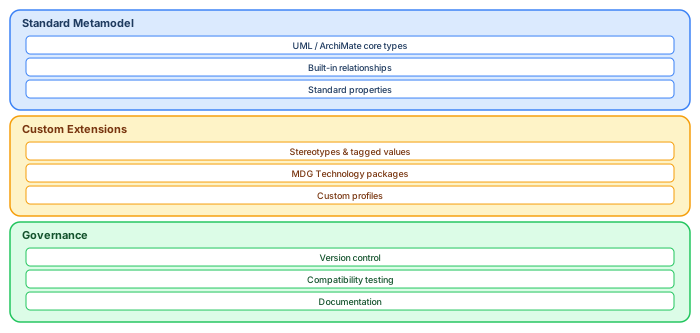
Each EA tool comes with a core metamodel — for example, Sparx EA supports UML, BPMN, ArchiMate, SysML, and its own profiles — but organizations often extend this metamodel to reflect their domain-specific needs using stereotypes, tagged values, custom toolboxes, and MDGs (Model-Driven Generation). ArchiMate modeling best practices
Example: Metamodel for Requirements Management
Let’s say we want to manage requirements in Sparx EA. The core metamodel allows us to use a “Requirement” element. But to reflect real-world needs, we can extend the metamodel like this: Sparx EA training
+ Requirement (abstract)
  + BusinessRequirement
     - tagged values: Priority, Stakeholder, Justification
  + SystemRequirement
     - tagged values: Module, Risk Level, Traceability ID
  + InterfaceRequirement
     - tagged values: Format, Protocol, Data Volume
In this extended metamodel, we define stereotypes for each type of requirement and enrich them with tagged values (metadata) that make querying, filtering, reporting, and governance possible at scale. architecture decision records
How We Used the Metamodel in a National Government Architecture Project
Our team supported a government-wide digital transformation initiative involving thousands of EA repositories from different agencies. Each repository modeled different systems, processes, and requirements — but with inconsistent naming, structure, and organization.
Our mission: build a searchable inventory that could help identify:
- All systems supporting a specific business capability
- All projects processing personal data under GDPR
- Interfaces shared across ministries
- Projects in deprecated or sunset phases
The Challenge
There were over 4,800 Sparx EA repositories across the landscape, many containing tens of thousands of elements with little or no common structure.
Our Solution: Implementing and Querying a Unified Metamodel
1. Designing a Shared Metamodel
We developed a minimal metamodel that could be implemented across existing repositories and supported the government’s reporting and planning needs. This included:
- Project Metadata: Domain, Region, Owner, Phase, ArchitectureStatus
- System Attributes: Lifecycle stage, Hosting type (on-prem/cloud), Legacy flag
- Interface Classification: Internal, External, Cross-border, API-based
- Requirement Types: Functional, Non-Functional, Legal, Security, Accessibility
- Capability Links: Which business capabilities are supported by which systems
We used Stereotypes to define new types of elements and Tagged Values to assign structured metadata fields to each element.
2. Applying the Metamodel Using Automation
Using Sparx EA’s scripting interface (JavaScript and VBScript), we created scripts to: Sparx EA best practices
- Identify existing model elements and reclassify them using new stereotypes
- Inject tagged values into selected elements or packages
- Populate fields with default or detected values (e.g., system owner from file path)
This allowed us to standardize structure across thousands of disparate repositories without manual intervention .
3. Extracting Metadata for Central Querying
Once the unified metamodel was in place, we developed a metadata extractor that:
- Opened each EA file (.eapx or .qea) in headless mode
- Extracted all elements with stereotypes of interest
- Captured their tagged values and associations
- Exported everything into structured JSON and CSV
We ran these extractors across a secured internal network, logging exceptions and skipping corrupt repositories automatically.
4. Indexing Metadata in a Searchable Inventory
We imported all extracted data into a PostgreSQL database to allow full-text and structured querying. This enabled use cases such as:
- “Show me all applications in the Justice domain hosted in the cloud”
- “List all systems in Sunset phase that lack a security classification”
- “Find all cross-border interfaces involving Country X”
Using Prolaborate and Power BI, we created dashboards to visualize:
- Capability coverage maps
- Data flow and interface inventories
- Compliance exposure and lifecycle risk
Benefits of the Metamodel-Driven Approach
By establishing and enforcing a simple metamodel with automation, we achieved:
- Consistent Semantics: Projects used common terminology and structure
- Automated Traceability: From requirements to systems to risks
- Inventory Visibility: One-click access to metadata for any system
- Scalability: Apply changes and extract insights across thousands of models
Lessons Learned
- Don't wait for perfection — define a metamodel you can enforce with automation
- Tag early and tag often — metadata is only useful if consistently applied
- Traceability without a metamodel is fiction — structure first, then relationships
- Use existing tools (like Sparx EA’s scripting and SQL queries) to scale
Conclusion: Metamodels Enable Metadata, and Metadata Powers Architecture Insight
Modeling is not just about diagrams. A good metamodel lets you structure meaning. Metadata lets you analyze and scale. And together, they make the difference between isolated diagrams and a true enterprise architecture knowledge base. free Sparx EA maturity assessment
In our project, the combination of a lightweight metamodel, scalable scripting, and structured querying helped a national architecture office gain visibility, control, and strategic direction from thousands of distributed EA projects. Without it, they’d still be chasing spreadsheets and hoping someone remembers where that critical dependency was documented.
If you’d like hands-on training tailored to your team — Sparx Enterprise Architect, BPMN, SysML or the Archi tool — or modelling coaching in ArchiMate and TOGAF-aligned governance, you can reach us via our contact page.
Frequently Asked Questions
What is Sparx Enterprise Architect used for?
Sparx Enterprise Architect (Sparx EA) is a comprehensive UML, ArchiMate, BPMN, and SysML modeling tool used for enterprise architecture, software design, requirements management, and system modeling. It supports the full architecture lifecycle from strategy through implementation.
How does Sparx EA support ArchiMate modeling?
Sparx EA natively supports ArchiMate 3.x notation through built-in MDG Technology. Architects can model all three ArchiMate layers, create viewpoints, add tagged values, trace relationships across elements, and publish HTML reports — making it one of the most popular tools for enterprise ArchiMate modeling.
What are the benefits of a centralised Sparx EA repository?
A centralised SQL Server or PostgreSQL repository enables concurrent multi-user access, package-level security, version baselines, and governance controls. It transforms Sparx EA from an individual diagramming tool into an organisation-wide architecture knowledge base.