⏱ 16 min read
- Introduction: The Hidden Crisis in Enterprise Architecture
Enterprise Architecture (EA) teams across the globe are facing an existential crisis. Despite increased investment in digital transformation, architecture teams struggle to demonstrate value, maintain consistency, and keep documentation synchronized with rapidly evolving business realities. The root cause isn't lack of talent or methodology—it's fundamentally flawed repository strategies.
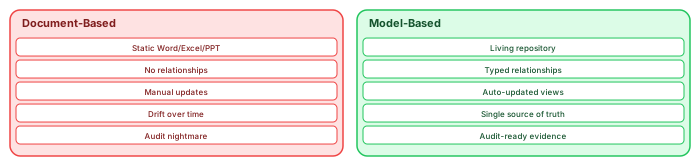
Most organizations today operate in a document-based EA repository: a chaotic collection of Microsoft Word documents, Excel spreadsheets, PowerPoint decks, and Confluence pages. These tools, designed for individual productivity, become liabilities when scaled to enterprise architecture needs. Version conflicts, stale information, broken traceability, and search failures plague teams attempting to manage complex organizational knowledge through documents.
Conversely, model-based EA repositories—using tools like Sparx Enterprise Architect, Archi, BiZZdesign, or Mega—treat architecture as interconnected models rather than static documents. This shift from document-centric to model-centric thinking represents the most significant evolution in EA practice since the introduction of TOGAF itself.
This analysis examines why document-based repositories consistently fail, the specific limitations of popular tools like Word and Confluence, and how model-based approaches deliver sustainable architecture value. Drawing from real-world case studies and industry research, we'll demonstrate why the transition to model-based EA isn't merely preferable—it's essential for organizations serious about architecture-driven transformation. ArchiMate for digital transformation
Part 1: The Document-Based EA Repository—A House of Cards
The Seductive Trap of Familiar Tools

Document-based EA repositories emerge from understandable organizational pressures. Microsoft Word, Excel, and PowerPoint are ubiquitous. Confluence integrates seamlessly with Jira, already used by agile teams. These tools require minimal training, offer immediate productivity, and satisfy procurement's preference for standard software licenses.
Architecture teams typically begin with the best intentions. A TOGAF-compliant Architecture Repository structure is defined. Templates are created for Architecture Definition Documents, Architecture Requirements Specifications, and Implementation Migration Plans. Confluence spaces are organized by architecture domain—Business, Information Systems, Technology. ArchiMate in TOGAF ADM
The illusion of control persists until scale destroys it.
The Fundamental Architecture of Document-Based Failure
Document-based repositories suffer from structural deficiencies that no amount of governance can overcome:
- 1.1 The Identity Crisis: Documents vs. Data
Documents are unstructured containers. A Word file describing a business process mixes narrative text, embedded diagrams, tables, and metadata. While human-readable, this structure prevents machine processing. You cannot query "show all applications supporting the Order-to-Cash process" across 500 Word documents.
The model-based alternative: Architecture elements exist as discrete data objects with unique identifiers, attributes, and relationships. A Business Process object links to Application Components, Data Entities, and Organizational Units through formal relationships. Queries become possible: "SELECT Applications WHERE supportedProcess = 'Order-to-Cash'".
1.2 Version Control Nightmares
Document version control in EA contexts creates impossible coordination challenges:
- Scenario: The Architecture Review Board Meeting
- The CTO references "Application Portfolio v3.2" in their pre-read
- The Enterprise Architect presents "Application Portfolio v3.4_FINAL"
- A Domain Architect circulates "Application Portfolio v3.4_FINAL_REVISED" during the meeting
- Post-meeting, someone finds "Application Portfolio v4.0_DRAFT" that superseded all versions
Confluence compounds this problem. While offering page history, Confluence lacks architectural versioning. You cannot baseline an entire architecture state—business processes, applications, data models, technology infrastructure—as a coherent snapshot. Individual pages version independently, destroying cross-domain consistency.
1.3 The Traceability Mirage
TOGAF and other frameworks emphasize traceability: requirements trace to architecture, architecture trace to solutions, solutions trace to implementations. Document-based repositories make this theoretically possible but practically impossible.
Manual traceability maintenance requires architects to:
- Manually update reference IDs across documents
- Verify link consistency during reviews
- Reconstruct impact analysis through manual search
- Maintain separate traceability matrices in Excel
Result: Traceability matrices are created once for compliance, then abandoned. When a business requirement changes, no one updates the 47 downstream references across architecture documents. The traceability chain breaks, and impact analysis becomes guesswork.
1.4 The Searchability Paradox
Organizations adopt Confluence specifically for "findability"—the promise that architecture knowledge becomes discoverable. The reality disappoints:
- Confluence Search Limitations:
- Searches text content, not architectural meaning
- Cannot distinguish between "CRM" as application, project, or vendor
- Returns 200 results for "customer data" with no relevance ranking
- Ignores diagram content (images aren't searchable)
- Fails across space boundaries without explicit configuration
Enterprise Search Woes: Even with sophisticated search platforms (Elastic, SharePoint Search), document-based repositories present insurmountable challenges. Documents lack semantic markup. An "Application Component" in one document bears no machine relationship to the same component referenced elsewhere. Search finds text matches, not architectural entities.
Part 2: Tool-Specific Failure Modes—Word, Excel, and Confluence
- Microsoft Word: The Architecture Anti-Pattern
Word documents remain the default EA repository for organizations lacking dedicated tools. This choice guarantees architectural failure at scale. free Sparx EA maturity assessment
2.1.1 The Diagram Disaster
Architecture requires visual communication. Word handles diagrams through:
Embedded Visio objects: Break when Visio versions change, require separate licenses
Copy-paste images: Lose editability, become stale immediately
SmartArt: Insufficient for ArchiMate, UML, or technical architecture
Linked files: Break when moved, create path dependency nightmares
The Model-Based Solution: Native diagramming with ArchiMate, UML, or BPMN notation. Diagrams are views of the underlying model, not separate files. Change the model, all views update automatically.
2.1.2 Formatting as Architecture
Word architects spend 30-40% of their time on formatting—styles, headings, tables of contents, cross-references. This effort produces no architectural value. Time invested in making a document attractive is time not spent analyzing architecture.
Worse, formatting inconsistencies emerge across authors. One architect uses Heading 2 for application names; another uses Heading 3. The "Application Inventory" becomes unparseable.
2.1.3 Collaboration Collapse
Word's track changes and comments enable adversarial collaboration:
- Redlined documents circulate for weeks
- Comments debate formatting, not architecture
- "Accept all changes" destroys audit trails
- Merge conflicts require manual resolution
Real-World Case: A European pharmaceutical company maintained their application portfolio in a 400-page Word document. Twelve architects held "edit rights." Monthly "lockdown periods" prevented changes during reviews. Architecture decisions queued for weeks. Meanwhile, shadow IT deployments proceeded undocumented because the formal process was too slow.
2.1.4 The Template Trap
Organizations attempt standardization through Word templates. These templates become straitjackets:
- Sections irrelevant to specific architectures remain empty
- Workarounds emerge (appendices, "see separate document")
- Template versions proliferate (v1, v1.1, v2, v2_FINAL)
- Innovation is discouraged—"that's not in the template"
- Microsoft Excel: The Spreadsheet of Lies
Excel serves as the duct tape of architecture repositories—used for everything, appropriate for nothing.
2.2.1 The Application Inventory Illusion
Excel's grid seems perfect for application portfolios:
- The problems emerge immediately:
Multi-valued attributes: Which of 12 business processes does CRM support? Comma-separated values in a cell? Separate rows (duplication)? Hidden columns?
Relationships: CRM interfaces with ERP, Marketing Automation, and Data Warehouse. Excel represents this as... what, exactly? Separate "Interfaces" sheet with foreign keys that break when rows sort?
Hierarchies: Parent/child relationships (e.g., CRM module structure) require recursive lookups or flattened denormalization.
2.2.2 Formula Fragility
Excel architects inevitably create house-of-cards analytics:
- Pivot tables summarizing application costs
- VLOOKUPs connecting business capabilities to applications
- Conditional formatting highlighting technical debt
- Then someone:
- Inserts a row (breaks absolute references)
- Renames a sheet (breaks formulas)
- Sorts data (breaks VLOOKUP assumptions)
- Copies to a new workbook (breaks external links)
Silent failures propagate. The "Technical Debt Dashboard" shows green because formulas reference wrong cells. Decisions are made on corrupted data.
2.2.3 The Multi-User Meltdown
Excel's "shared workbook" feature is architecturally unusable:
- Limited to 256 users (theoretical; practically, 5+ users causes corruption)
- No merge capability—last save wins
- Change tracking is primitive
- No concept of "check out" specific rows
Result: Application inventories become read-only reference documents updated monthly by a single "Excel owner." Real-time architecture is impossible.
2.2.4 The Integration Impossibility
- Excel integrates poorly with enterprise systems:
- Manual exports from ServiceNow, SAP, Azure
- Copy-paste data transformation
- No API for real-time synchronization
- CSV exports lose formatting and formulas
Architecture becomes a point-in-time snapshot, outdated before the meeting ends.
- Atlassian Confluence: Collaboration Theater
Confluence promises "the enterprise wiki that connects your teams." For EA, it delivers collaboration theater—the appearance of teamwork without architectural coherence.
2.3.1 The Page Hierarchy Problem
Confluence organizes content hierarchically: Spaces → Pages → Child Pages. This structure conflicts with architectural relationships.
Architecture is a network, not a tree. A Business Capability maps to multiple Applications, which run on multiple Technology Nodes, which support multiple Business Processes. This many-to-many graph cannot be represented in Confluence's strict parent-child hierarchy.
- Workarounds fail:
Labels: Uncontrolled vocabularies, no relationship semantics
Page properties: Flat metadata, no referential integrity
Include macros: Create maintenance nightmares when source pages change
Links: Manual, unidirectional, unverified
2.3.2 The Diagramming Disaster
Confluence's diagramming options are architecturally inadequate:
Critical flaw: Diagrams are images, not models. A "Business Process Flow" in Draw.io shows boxes and arrows. The system doesn't know these represent BusinessProcess_017 and ApplicationComponent_042. When the application name changes, the diagram becomes a lie.
2.3.3 The Macro Madness
Confluence macros attempt to add structure:
Page Properties Report: Aggregates metadata but requires manual configuration per page
Children Display: Shows hierarchy, not relationships
Excerpt/Include: Fragile content reuse
Jira Issues: Links to tickets, not architecture elements
These macros create maintenance debt. A "Business Capability Overview" page using Page Properties Report must be manually updated when new capability pages are added. The report doesn't auto-discover; it references explicit page lists.
2.3.4 The Scale Ceiling
Confluence performance degrades with architecture scale:
Real-World Case: A financial services firm created a Confluence-based EA repository with 2,000+ pages across 15 spaces. The "Application Portfolio" space contained 300 pages—one per application. Finding "which applications support Wealth Management" required manually checking 300 pages or maintaining a separate Excel index. The repository was abandoned after 18 months.
2.3.5 The Jira Mirage
Confluence's Jira integration creates false traceability confidence:
- Jira epics link to Confluence pages (URLs)
- Confluence pages describe architecture (narrative)
- No semantic connection between Jira "user story" and Confluence "business capability"
The gap: A developer sees a Jira ticket linked to a Confluence page. The page describes a business process. But which application component implements this process? Which API? Which database? The Confluence page doesn't know—it's text and images.
Part 3: The Model-Based EA Repository—A New Paradigm
What Is Model-Based Architecture?
Model-based EA treats organizational knowledge as interconnected data objects rather than documents. Architecture elements—Business Actors, Application Components, Technology Services, Data Entities—exist as typed instances with properties and relationships.
- Key Characteristics:
The Repository Architecture
Model-based EA tools (Sparx EA, Archi, BiZZdesign, Mega, IBM AD) implement a repository architecture:
- ┌─────────────────────────────────────────┐
- │ Presentation Layer │
- │ (Diagrams, Matrices, Lists, Reports) │
- ├─────────────────────────────────────────┤
- │ Model Layer │
- │ (Elements, Relationships, Attributes) │
- ├─────────────────────────────────────────┤
- │ Repository Layer │
- │ (Database: File, Server, Cloud) │
- ├─────────────────────────────────────────┤
- │ Integration Layer │
- │ (APIs, Imports, Exports, Sync) │
- └─────────────────────────────────────────┘
Critical insight: The model layer persists independently of presentations. Multiple diagrams, reports, and analyses reference the same underlying elements.
Core Capabilities of Model-Based EA
3.3.1 Formal Metamodels
Model-based tools implement architecture metamodels—formal definitions of element types and allowed relationships:
- ArchiMate Metamodel Example:
Business Actor assigns to Business Role
Business Role performs Business Process
Business Process uses Application Service
Application Service realizes Application Component
Application Component hosted on Technology Node
Constraints enforce validity: You cannot link a Business Actor directly to a Technology Node (bypassing intermediate layers). The tool prevents architectural nonsense.
3.3.2 Multiple Views, Single Truth
The view concept separates model content from visualization:
The Model: Contains ApplicationComponent_042 with attributes {name: "CRM System", status: "Production", owner: "Sales"}
View 1 (Application Landscape): Shows CRM System connected to ERP, Marketing Automation
View 2 (Business Process Support): Shows CRM System supporting Lead-to-Order process
View 3 (Technology Stack): Shows CRM System hosted on AWS EC2, using PostgreSQL
Change the model, all views update. Rename "CRM System" to "Customer 360 Platform"—every diagram updates. Document-based repositories require manual find-and-replace across dozens of files.
3.3.3 Query and Analysis
Model repositories enable structured queries impossible with documents:
- Example Queries in Sparx EA:
sql
- -- Find orphaned applications (no business process support)
- SELECT a.Name FROM t_object a
- WHERE a.Object_Type = 'ApplicationComponent'
- AND a.Object_ID NOT IN (
- SELECT r.Start_Object_ID FROM t_connector r
- WHERE r.Connector_Type = 'Realization'
- AND r.End_Object_ID IN (
- SELECT Object_ID FROM t_object WHERE Object_Type = 'BusinessProcess'
)
)
- -- Calculate technical debt by domain
- SELECT d.Name, SUM(a.TechnicalDebt) as TotalDebt
- FROM t_object d
- JOIN t_object a ON a.Domain = d.Name
- WHERE a.Object_Type = 'ApplicationComponent'
- AND a.Status = 'Production'
- GROUP BY d.Name
Impact Analysis: When "Regulation X" changes, query: "Show all Business Processes affected → Applications supporting those processes → Technology components hosting those applications → Projects modifying those components." Document-based EA requires weeks of manual analysis; model-based EA delivers in seconds.
3.3.4 Traceability as First-Class Citizen
Model-based tools implement relationship objects with metadata:
Relationship Type: Realization, Composition, Aggregation, Flow, Assignment
Relationship Properties: Weight, criticality, validity period
Relationship Verification: Orphan detection, circular dependency prevention
Impact Propagation: Change notifications, automatic status updates
Traceability matrices are generated, not maintained. The tool creates relationship tables on demand, always current.
3.3.5 Integration and Automation
Model repositories expose APIs and automation interfaces:
ServiceNow: Synchronize CMDB with application portfolio
Azure/AWS: Import cloud resource configurations
Jira: Link architecture elements to epics and stories
BI Tools: Power BI, Tableau dashboards from model data
CI/CD Pipelines: Architecture validation gates
Document-based integration: Manual copy-paste, outdated immediately.
Part 4: Comparative Analysis—Real-World Scenarios
- Scenario 1: Merger Integration Architecture
Challenge: Two banks merge. Must integrate application portfolios, rationalize 40% redundancy, maintain regulatory compliance.
- Document-Based Approach:
- Week 1-2: Exchange Excel application inventories (different formats, 30% data mismatch)
- Week 3-4: Create "integration architecture" PowerPoint (static, immediately outdated)
- Week 5-8: Manual traceability analysis for regulatory reporting (error-prone)
- Month 3: Discovery that critical payment system dependencies were missed in Excel analysis
- Month 6: Abandoned repository, external consultants engaged to rebuild from scratch
- Model-Based Approach:
- Week 1: Import both application portfolios into shared repository (automated mapping)
- Week 2: Model integration scenarios, run dependency analysis algorithms
- Week 3: Generate regulatory traceability reports from live model
- Month 2: Real-time dashboard showing integration progress against architecture
- Result: 60% faster integration, $2M saved in consultant fees
- Scenario 2: Cloud Migration Assessment
Challenge: Assess 500 applications for cloud suitability, prioritize migration waves.
- Document-Based Approach:
- Create "Cloud Assessment" Word template (50 questions)
- Architects interview application owners, fill individual documents
- Compile results in "Master Assessment" Excel (pivot table summaries)
- Discover inconsistent scoring—one architect's "High Risk" = another's "Medium"
- Migration Wave 1 fails because undocumented mainframe dependency emerges
- Model-Based Approach:
Define CloudAssessment stereotype with standardized attributes (CloudReadiness, DataSensitivity, LatencyRequirements) enterprise cloud architecture patterns
Assessment values constrained (1-5 scale, specific definitions)
Dependency analysis identifies all mainframe connections automatically
Migration waves generated by query: "Applications WHERE CloudReadiness > 3 AND Dependencies.Cloud = True" hybrid cloud architecture
Result: Zero failed migrations due to architectural surprises
- Scenario 3: Regulatory Compliance (GDPR)
Challenge: Demonstrate GDPR Article 30 compliance—data processing activities, data flows, legal basis.
- Document-Based Approach:
- Create "Data Processing Register" Excel (300 rows, 50 columns)
- Maintain "Data Flow Diagrams" in Visio (20 diagrams, unlinked to register)
- Write "Privacy Impact Assessments" in Word (separate documents per system)
- Regulatory audit: Cannot prove consistency between register and diagrams
- Fine imposed: €2M for incomplete records
- Model-Based Approach:
Model Data Processing Activities as elements with GDPR attributes (LegalBasis, DataSubjectCategories, RetentionPeriod)
- Data Flow Diagrams are views of these elements—automatically consistent
- Generate Article 30 register directly from model (always current)
- Regulatory audit: Single source of truth demonstrated, zero findings
Part 5: Transition Strategies—Moving from Documents to Models
- Phase 1: Assessment and Pilot (Months 1-3)
- Current State Analysis:
- Inventory existing document repositories (quantity, types, freshness)
- Identify pain points (search failures, version conflicts, stale data)
- Map critical architecture decisions made on potentially outdated information
- Tool Selection:
- Pilot Scope:
- Select one domain (e.g., Application Architecture)
- Import existing Excel inventory into model
- Create views replacing top 5 PowerPoint slides
- Demonstrate query capabilities to stakeholders
- Phase 2: Foundation Building (Months 4-6)
- Metamodel Definition:
- Adapt standard framework (ArchiMate, UML, TOGAF) to organizational needs
- Define stereotypes and tagged values for domain concepts
- Establish naming conventions and modeling standards
- Migration Strategy:
Big Bang: High risk, requires freeze on document updates
Incremental: Lower risk, parallel operation period
Greenfield: Start fresh for new initiatives, legacy documents archived
Recommended: Incremental migration by architecture domain:
- Application Portfolio (highest value, Excel-based)
- Business Capabilities (strategic alignment)
- Technology Infrastructure (CMDB integration)
- Data Architecture (governance priority)
- Phase 3: Operationalization (Months 7-12)
- Process Integration:
- Architecture Review Board uses model-based views, not documents
- Project initiation requires model updates (governance gate)
- Automated reporting replaces manual document creation
- Change Management:
- Training: "Model Thinking" for architects (not just tool training)
- Incentives: Recognize model contributions, not document production
- Support: Help desk for modeling questions, pattern libraries
- Integration Implementation:
- ServiceNow/CMDB synchronization
- Jira traceability for agile teams
- BI dashboard publication
- Phase 4: Optimization (Year 2+)
- Advanced Capabilities:
- Simulation (capacity planning, scenario analysis)
- Automated architecture validation (rules checking)
- AI-assisted modeling (pattern recognition, suggestion)
- Ecosystem Expansion:
- Supplier architecture model exchange
- Industry reference model adoption
- Customer-facing architecture transparency
Part 6: Cost-Benefit Analysis
Total Cost of Ownership (5-Year)
- ROI: 30% cost reduction plus strategic benefits unquantified above.
Strategic Benefits (Qualitative)
- Conclusion: The Architecture of Architecture
The choice between document-based and model-based EA repositories is not merely technical—it is philosophical. Document-based approaches treat architecture as literature: narrative descriptions that humans read and interpret. Model-based approaches treat architecture as engineering: formal structures that machines can analyze, validate, and transform.
Organizations clinging to Word documents and Confluence pages for enterprise architecture are choosing intentional obsolescence. They accept that their architecture repository will be outdated, inconsistent, and unsearchable. They accept that architecture decisions will be made on partial information. They accept that regulatory compliance will require heroic manual effort.
The transition to model-based EA requires investment, learning, and organizational change. But the alternative—continuing to manage complex enterprise transformation through tools designed for memos and spreadsheets—is no longer tenable in an era of digital acceleration.
The architecture of your architecture repository determines the architecture of your enterprise. Choose model-based thinking, or accept the limitations that document-based chaos imposes on your strategic capabilities.
Frequently Asked Questions
What is enterprise architecture?
Enterprise architecture is a discipline that aligns an organisation's strategy, business operations, information systems, and technology infrastructure. It provides a structured framework for understanding how an enterprise works today, where it needs to go, and how to manage the transition.
How is ArchiMate used in enterprise architecture practice?
ArchiMate is used as the standard modeling language in enterprise architecture practice. It enables architects to create consistent, layered models covering business capabilities, application services, data flows, and technology infrastructure — all traceable from strategic goals to implementation.
What tools are used for enterprise architecture modeling?
Common enterprise architecture modeling tools include Sparx Enterprise Architect (Sparx EA), Archi, BiZZdesign Enterprise Studio, LeanIX, and Orbus iServer. Sparx EA is widely used for its ArchiMate, UML, BPMN and SysML support combined with powerful automation and scripting capabilities.