⏱ 15 min read
- Introduction: Why Database Choice Matters for Enterprise Architect
Sparx Enterprise Architect (EA) is the world's most widely deployed UML and systems modeling platform, with over 850,000 licenses across 160 countries. While EA's file-based repositories (.eapx, .qea) suffice for individual architects, serious enterprise deployment demands a solid database management system (DBMS) backend Sparx EA training
The database powering your EA repository directly impacts:
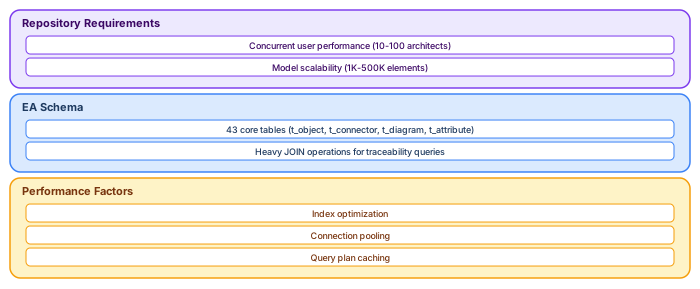
Concurrent user performance (10 vs. 100 architects)
Model scalability (1,000 vs. 500,000 elements)
Query response times for impact analysis and reporting
Integration capabilities with BI tools and DevOps pipelines
Total cost of ownership over 5-10 year lifecycles
This comprehensive guide examines the three leading open-source and commercial databases for Sparx EA: PostgreSQL, Microsoft SQL Server, and MySQL. Drawing from performance benchmarks, production deployments, and Sparx Systems' official recommendations, we provide definitive guidance for architecture teams selecting their repository foundation.
Part 1: Understanding Sparx EA Repository Requirements
The EA Schema Architecture
Before comparing databases, understand what EA demands from its repository. Sparx EA uses a relational schema (version 1558 as of EA 17) consisting of approximately 130 tables storing:
Critical insight: EA's workload pattern differs from typical web applications. It features:
Complex read queries with 5-10 table joins for impact analysis
Frequent small writes (element updates, diagram changes)
Long-running transactions during model imports/exports
Ad-hoc analytical queries from BI tools and scripts
Performance Characteristics
Based on Sparx Systems documentation and community benchmarks: Sparx EA best practices
Part 2: PostgreSQL—The Open-Source Powerhouse
Overview and Positioning
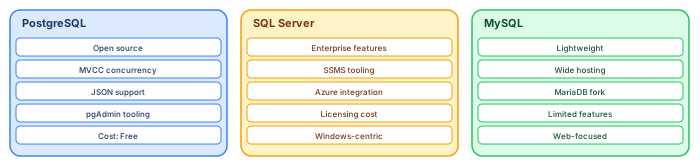
PostgreSQL has emerged as the preferred open-source database for Sparx EA deployments, particularly in Linux-centric environments and organizations prioritizing standards compliance and extensibility. With 45.55% developer adoption versus MySQL's 41.09%, PostgreSQL's momentum reflects its technical sophistication
Sparx Systems Recommendation: PostgreSQL is explicitly supported with native connections (recommended) and ODBC alternatives. The native driver, introduced in EA 16, eliminates ODBC configuration complexity
Performance Characteristics
Recent independent benchmarks demonstrate PostgreSQL's performance advantages:
- SQLPipe Reserva Benchmark (2025):
PostgreSQL processed 474% more transactions than MySQL in a high-concurrency payment simulation
Superior performance in complex multi-table joins (typical of EA impact analysis) architecture traceability in Sparx EA
Better handling of read-write mixed workloads
- Bytebase Analysis (2026):
PostgreSQL 18 introduces asynchronous I/O (AIO) delivering 2-3x performance improvement for sequential scans and vacuum operations
Query optimizer superiority for complex analytical queries
Performance comparable to MySQL within 30% for most workloads, with significant advantages in complex scenarios
PostgreSQL Advantages for Sparx EA
2.1.1 Advanced Query Capabilities
PostgreSQL's SQL standard compliance and advanced features directly benefit EA use cases:
- Common Table Expressions (CTEs) for Recursive Queries:
sql
- -- Find all elements transitively related to a requirement
- WITH RECURSIVE traceability AS (
- SELECT Start_Object_ID, End_Object_ID, 1 as level
- FROM t_connector
- WHERE Start_Object_ID = 12345
UNION ALL
- SELECT c.Start_Object_ID, c.End_Object_ID, t.level + 1
- FROM t_connector c
- JOIN traceability t ON c.Start_Object_ID = t.End_Object_ID
- WHERE t.level < 10
)
SELECT * FROM traceability;
Critical for EA: Impact analysis queries that traverse relationship chains—impossible in MySQL before version 8.0, still limited compared to PostgreSQL
- Window Functions for Reporting:
sql
- -- Rank applications by technical debt within each domain
- SELECT o.Name as Application, p.Name as Domain, td.Value as TechnicalDebt,
- RANK() OVER (PARTITION BY p.Name ORDER BY td.Value DESC) as DebtRank
- FROM t_object o
- JOIN t_package p ON o.Package_ID = p.Package_ID
- LEFT JOIN t_objectproperties td ON o.Object_ID = td.Object_ID
- AND td.Property = 'TechnicalDebt'
- WHERE o.Object_Type = 'Application';
2.1.2 JSON and Semi-Structured Data
Modern EA practices increasingly leverage tagged values and stereotypes with complex metadata. PostgreSQL's JSONB support enables:
Flexible property storage without schema migration
Indexed JSON queries for custom attributes
Aggregation of tagged values across model elements
sql
- -- Extract and aggregate custom properties from JSON
- SELECT
- Object_Type, jsonb_object_keys(TaggedValues) as PropertyName,
- COUNT(*) as UsageCount
- FROM (
- SELECT Object_Type, to_jsonb(t_objectproperties) as TaggedValues
- FROM t_objectproperties
- ) sub
- GROUP BY Object_Type, PropertyName;
2.1.3 Concurrency and Isolation
PostgreSQL's Multiversion Concurrency Control (MVCC) implementation provides:
Non-blocking reads: Architects can query models while others update
Transaction isolation: Prevents dirty reads during complex operations
Deadlock prevention: Better handling of concurrent diagram edits
Process-per-Connection Model: While consuming more memory than MySQL's thread-per-connection, PostgreSQL provides superior isolation—an architecture crash affects only one connection, not the entire server
2.1.4 Extensibility and Ecosystem
PostGIS for Geospatial Architecture: For organizations modeling physical infrastructure (utilities, telecommunications, transportation), PostgreSQL with PostGIS extension enables:
- Geographic visualization of architecture elements
- Spatial queries ("find all data centers within 50km of Brussels")
- Integration with GIS tools (QGIS, ArcGIS)
pgvector for AI-Assisted Architecture: Emerging use cases leverage pgvector for similarity search:
- Find architecture patterns similar to current design
- Semantic search across requirement descriptions
- Recommendation engines for reusable components
PostgreSQL Limitations
Deployment Recommendations
- When to Choose PostgreSQL:
- Linux-based infrastructure
- Complex analytical queries and reporting
- Integration with geospatial or AI/ML pipelines
- Preference for open-source with permissive licensing (PostgreSQL License)
- Need for advanced SQL features (CTEs, window functions, LATERAL joins)
- Optimal Configuration:
ini
# postgresql.conf for EA repository shared_buffers = 4GB # 25% of RAM effective_cache_size = 12GB # 75% of RAM work_mem = 256MB # Complex sorts/joins
Maintenance_work_mem = 1GB # Index creation random_page_cost = 1.1 # SSD optimization
Effective_io_concurrency = 200 # SSD optimization max_connections = 100 # Adjust based on pooling
Part 3: Microsoft SQL Server—The Enterprise Standard
Overview and Positioning
Microsoft SQL Server remains the dominant commercial database for Sparx EA in Windows-centric enterprises. Its integration with Active Directory, comprehensive management tools, and enterprise support make it the conservative choice for organizations with existing Microsoft investments.
Sparx Systems Support: SQL Server enjoys first-class support with native OLE DB connections and optimized schema scripts
Performance Characteristics
- SQL Server 2022/2025 Improvements:
Intelligent Query Processing: Automatic plan correction and batch mode adaptive joins
Accelerated Database Recovery (ADR): Faster crash recovery—critical for large EA repositories
Columnstore indexes: Potential 10x compression for historical model data
In-Memory OLTP: For high-frequency write scenarios (rarely needed in EA)
- Comparative Performance:
- Generally comparable to PostgreSQL for EA workloads
- Superior performance for Windows-integrated authentication scenarios
- Better handling of large result sets (>100,000 rows) in SSMS vs. pgAdmin
SQL Server Advantages for Sparx EA
3.1.1 Windows Ecosystem Integration
- Active Directory Authentication:
sql
- -- Windows-integrated security eliminates password management
- CREATE USER [DOMAIN\EA_Architects] FOR LOGIN [DOMAIN\EA_Architects];
- ALTER ROLE db_datareader ADD MEMBER [DOMAIN\EA_Architects];
- ALTER ROLE db_datawriter ADD MEMBER [DOMAIN\EA_Architects];
- Group Policy Management:
- Centralized user provisioning and deprovisioning
- Password policy enforcement
- Audit logging integration with Windows Event Log
3.1.2 Enterprise Management Tools
- SQL Server Management Studio (SSMS):
- Superior graphical query execution plans for optimization
- Built-in index tuning advisor
- Database Engine Tuning Advisor for workload optimization
- Integrated backup/restore management
Critical for EA: The Database Engine Tuning Advisor can analyze actual EA query patterns and recommend indexes specific to your model structure
3.1.3 High Availability and Disaster Recovery
- Always On Availability Groups:
- Synchronous replication for zero data loss
- Automatic failover for repository continuity
- Readable secondary replicas for reporting (offload primary)
- Database Snapshots:
- Point-in-time copies for architecture baseline comparison
- Zero-storage-copy implementation (via sparse files)
- Quick revert for model experimentation
3.1.4 Reporting and BI Integration
- SQL Server Reporting Services (SSRS):
- Native integration for EA repository reports
- Subscription-based report delivery
- Interactive parameterization for architecture dashboards
- Power BI DirectQuery:
- Real-time architecture dashboards without data replication
- Row-level security for sensitive architecture data
- Natural language Q&A ("show me high-risk applications")
SQL Server Limitations
Deployment Recommendations
- When to Choose SQL Server:
- Existing Microsoft infrastructure and licensing agreements
- Requirement for Windows-integrated authentication
- Enterprise support and SLA requirements
- Heavy reliance on SQL Server BI stack (SSRS, SSAS, Power BI)
- DBA team with SQL Server expertise
- Optimal Configuration:
sql
- -- Database settings for EA repository
- ALTER DATABASE [EA_Repository] SET
- RECOVERY FULL, -- For point-in-time recovery
- READ_COMMITTED_SNAPSHOT ON, -- Non-blocking reads
- AUTO_UPDATE_STATISTICS ON, -- Keep statistics current
- QUERY_STORE = ON; -- Query performance monitoring
- -- Filegroup configuration for large repositories
- ALTER DATABASE [EA_Repository] ADD FILEGROUP [EA_DATA];
- ALTER DATABASE [EA_Repository] ADD FILE
- (NAME = 'EA_Data_1', FILENAME = 'D:\SQLData\EA_Data_1.ndf', SIZE = 10GB)
- TO FILEGROUP [EA_DATA];
Part 4: MySQL—The Web-Scale Contender
Overview and Positioning
MySQL, now owned by Oracle, remains the world's most widely deployed open-source database, powering the LAMP stack and countless web applications. For Sparx EA, MySQL offers simplicity and familiarity, though recent benchmarks suggest it lags PostgreSQL for complex analytical workloads free Sparx EA maturity assessment
Sparx Systems Support: MySQL is fully supported with both native (recommended) and ODBC connections
Performance Characteristics
- MySQL 8.0/9.x Improvements:
Window functions and CTEs: Finally matching PostgreSQL's analytical capabilities
JSON enhancements: Better indexing and query functions
InnoDB improvements: Better concurrency and crash recovery
- Performance Reality Check:
Read-heavy workloads: Competitive with PostgreSQL
Complex joins: Significantly slower (474% difference in some benchmarks)
Write performance: Advantage for pure write scenarios (rare in EA)
Query optimizer: Less sophisticated than PostgreSQL for complex queries
MySQL Advantages for Sparx EA
4.1.1 Simplicity and Familiarity
- Easier Administration:
- Simpler configuration (fewer tuning parameters)
- Widely understood by developers and DBAs
- Extensive hosting availability (AWS RDS, Azure Database for MySQL)
- Quick Deployment:
sql
- -- Basic EA repository setup
- CREATE DATABASE ea_repository CHARACTER SET utf8mb4 COLLATE utf8mb4_unicode_ci;
- CREATE USER 'ea_user'@'%' IDENTIFIED BY 'secure_password';
- GRANT ALL PRIVILEGES ON ea_repository.* TO 'ea_user'@'%';
4.1.2 Replication and Read Scaling
- Binary Log Replication:
- Straightforward master-slave configuration
- Read replicas for reporting (offload primary)
- Cross-region replication for distributed teams
- Group Replication (InnoDB Cluster):
- Automatic failover
- Multi-master capabilities (use with caution for EA)
- Built-in load balancing
4.1.3 Cloud-Native Options
- Managed MySQL Services:
AWS RDS for MySQL: Automated backups, patching, scaling
Azure Database for MySQL: Microsoft-managed with Azure integration
Google Cloud SQL: Fully managed with automatic storage increases
These services reduce operational overhead for teams without dedicated DBAs.
MySQL Limitations for Sparx EA
Critical Issue for EA: MySQL's query optimizer struggles with the complex 5-10 table joins typical of EA impact analysis. Queries that execute in milliseconds on PostgreSQL may take seconds on MySQL for large repositories.
Deployment Recommendations
- When to Choose MySQL:
- Existing MySQL infrastructure and expertise
- Simple EA deployments without complex analytical queries
- Preference for managed cloud services (RDS, Azure)
- Budget constraints (slightly lower resource requirements than PostgreSQL)
- Legacy application integration requirements
- When to Avoid MySQL:
- Large repositories (>100,000 elements) with complex traceability queries
- Heavy reporting and BI integration requirements
- Need for advanced geospatial or JSON processing
- Optimal Configuration:
ini
# my.cnf for EA repository
[mysqld]
Innodb_buffer_pool_size = 4G # 50-75% of RAM innodb_log_file_size = 1G # Large for write batching
Innodb_flush_log_at_trx_commit = 2 # Balance safety/performance query_cache_type = 1 # Enable query cache
Query_cache_size = 256M # Cache repeated EA queries max_connections = 100 # Adjust based on need
Tmp_table_size = 128M # Large temp tables for sorts max_heap_table_size = 128M # Match tmp_table_size
Part 5: Comparative Analysis and Decision Matrix
Performance Benchmark Summary
Feature Comparison Matrix
Total Cost of Ownership (5-Year, 50-User Deployment)
Note: Costs are illustrative and vary by organization size and support requirements.
Part 6: Deployment Architecture Recommendations
Small Teams (1-10 Users, <50,000 Elements)
Recommendation: PostgreSQL or MySQL on shared infrastructure
- Architecture:
- Single database instance on existing application server
- Daily automated backups
- File-based repository as DR fallback
Why not SQL Server: Licensing overhead unjustified for small scale; PostgreSQL/MySQL provide equivalent functionality at lower cost.
Medium Teams (10-50 Users, 50,000-200,000 Elements)
Recommendation: PostgreSQL with connection pooling or SQL Server Standard
- Architecture:
- Dedicated database server (physical or VM)
- Connection pooling (PgBouncer for PostgreSQL)
- Read replica for reporting queries
- Weekly full backups, hourly transaction log backups
- Configuration Priority:
- Connection pooling essential for PostgreSQL (process overhead)
- Adequate RAM for buffer cache (25% of repository size)
- SSD storage mandatory for acceptable performance
Enterprise Teams (50+ Users, 200,000+ Elements)
Recommendation: PostgreSQL with advanced tuning or SQL Server Enterprise
- Architecture:
Primary database server with failover replica
Separate reporting replica (PostgreSQL logical replication or SQL Server Always On readable secondary)
Pro Cloud Server for web-based access and load distribution enterprise cloud architecture patterns
Automated monitoring and alerting
- Critical Optimizations:
sql
- -- PostgreSQL: Partitioning for large t_object tables
- CREATE TABLE t_object_partitioned (
- LIKE t_object INCLUDING ALL
- ) PARTITION BY RANGE (ModifiedDate);
- -- SQL Server: Columnstore for historical data
- CREATE CLUSTERED COLUMNSTORE INDEX cci_t_object
- ON t_object_history (Object_ID, Object_Type, ModifiedDate);
Part 7: Migration Strategies and Best Practices
From File-Based to Database Repository
- Step 1: Preparation
- Compact and repair .eapx/.qea file (Project > Integrity > Compact)
- Verify model integrity (Project > Integrity > Check)
- Baseline current state for rollback
- Step 2: Database Creation
- Execute Sparx-provided schema script for chosen DBMS
- Create dedicated service account with appropriate permissions
- Configure connection pooling if applicable
- Step 3: Data Migration
- Use EA's Project Transfer wizard (File > Manage Project > Transfer)
- Select "File to DBMS" transfer type
- Verify row counts post-transfer (Project > Integrity > Project Compare)
- Step 4: Validation
- Compare element counts between source and target
- Verify diagram rendering
- Test concurrent access with multiple architects
Between Database Platforms
Scenario: Migrating from MySQL to PostgreSQL for performance
- Approach:
- Export to .qeax (native XML format) from source database
- Create new repository on target database platform
- Import .qeax to target
- Verify with Project Compare
Alternative: Use ETL tools (Talend, Pentaho) for complex transformations, though EA's native transfer is preferred for fidelity.
Part 8: Monitoring and Optimization
Key Performance Indicators
Query Optimization for EA Schema
- Indexing Strategy:
sql
- -- Essential indexes for all platforms
- CREATE INDEX idx_object_package ON t_object(Package_ID);
- CREATE INDEX idx_object_type ON t_object(Object_Type);
- CREATE INDEX idx_object_stereotype ON t_object(Stereotype);
- CREATE INDEX idx_connector_start ON t_connector(Start_Object_ID);
- CREATE INDEX idx_connector_end ON t_connector(End_Object_ID);
- CREATE INDEX idx_diagramobjects_object ON t_diagramobjects(Object_ID);
- -- Composite index for common queries
- CREATE INDEX idx_object_type_status ON t_object(Object_Type, Status);
- Maintenance:
- Weekly index reorganization (SQL Server) or REINDEX (PostgreSQL)
- Monthly statistics update
- Quarterly query plan review
- Conclusion: The Definitive Recommendation
After comprehensive analysis of performance characteristics, feature capabilities, and real-world deployment scenarios, our recommendations are:
- Primary Recommendation: PostgreSQL
- For most Sparx EA deployments, PostgreSQL offers the optimal balance of:
Performance: Superior complex query execution for impact analysis
Features: Advanced SQL capabilities (CTEs, window functions, JSON)
Cost: Zero licensing with optional commercial support
Flexibility: Extensible for geospatial, AI/ML, and custom requirements
Future-proofing: Fastest-growing database ecosystem with cloud-native options (Neon, Supabase, AWS Aurora PostgreSQL)
- Choose PostgreSQL when:
- Starting new EA initiatives without legacy database constraints
- Linux infrastructure is available or preferred
- Complex analytical queries and reporting are priorities
- Cost optimization is important
- Long-term strategic flexibility matters
- Secondary Recommendation: SQL Server
- For Windows-centric enterprises with existing Microsoft investments:
Seamless integration with Active Directory and Power BI
Enterprise support with defined SLAs
Familiar tooling for Windows-focused IT teams
Advanced HA/DR with Always On Availability Groups
- Choose SQL Server when:
- Existing Microsoft licensing and support agreements
- Windows-integrated authentication is mandatory
- SQL Server BI stack (SSRS, SSAS) is already deployed
- Enterprise support requirements override cost considerations
- Conditional Recommendation: MySQL
- MySQL remains viable for:
- Simple EA deployments without complex analytical needs
- Teams with deep MySQL expertise
- Budget-constrained environments prioritizing simplicity over performance
- Integration with existing MySQL-based application ecosystems
- Avoid MySQL for:
- Large repositories (>100,000 elements) with complex traceability requirements
- Heavy reporting and BI integration
- Organizations planning advanced analytical capabilities
Final Decision Framework
- Is Windows infrastructure mandatory with AD integration?
- ├── YES → SQL Server Standard/Enterprise
- └── NO → Is complex analytical querying a priority?
- ├── YES → PostgreSQL
- └── NO → Is MySQL already deployed/known?
- ├── YES → MySQL 8.0+
- └── NO → PostgreSQL (default recommendation)
The database powering your Sparx EA repository is a strategic decision affecting performance, scalability, and total cost of ownership for years. PostgreSQL's technical superiority for analytical workloads, combined with its open-source advantages, makes it the recommended foundation for modern enterprise architecture programs. Sparx EA guide
Frequently Asked Questions
What is Sparx Enterprise Architect used for?
Sparx Enterprise Architect (Sparx EA) is a comprehensive UML, ArchiMate, BPMN, and SysML modeling tool used for enterprise architecture, software design, requirements management, and system modeling. It supports the full architecture lifecycle from strategy through implementation.
How does Sparx EA support ArchiMate modeling?
Sparx EA natively supports ArchiMate 3.x notation through built-in MDG Technology. Architects can model all three ArchiMate layers, create viewpoints, add tagged values, trace relationships across elements, and publish HTML reports — making it one of the most popular tools for enterprise ArchiMate modeling.
What are the benefits of a centralised Sparx EA repository?
A centralised SQL Server or PostgreSQL repository enables concurrent multi-user access, package-level security, version baselines, and governance controls. It transforms Sparx EA from an individual diagramming tool into an organisation-wide architecture knowledge base.