⏱ 19 min read
Most ArchiMate diagrams are bad. Not because ArchiMate is bad. Because architects love drawing boxes before they understand what the boxes mean.
That’s the uncomfortable truth.
The ArchiMate metamodel is supposed to help us model the enterprise in a disciplined way. In practice, a lot of teams use it like corporate whiteboard art: applications connected to business capabilities with vague arrows, technology nodes floating underneath, and a few strategic buzzwords sprinkled on top so it looks “enterprise-grade.” It impresses nobody who actually has to build or operate the thing.
If you’re an architect and the ArchiMate metamodel feels abstract, over-academic, or suspiciously detached from reality, I get it. The standard is cleaner than real life. Enterprises are not. But the metamodel is still useful—very useful—if you treat it as a thinking tool, not a compliance artifact.
So let’s make this practical.
What is the ArchiMate metamodel, in simple terms?
The ArchiMate metamodel is the structure behind ArchiMate. It defines:
- what kinds of things you can model
- how those things relate to each other
- what belongs in which layer
- what relationship types actually mean
Put simply: it is the grammar of enterprise architecture diagrams.
If ArchiMate is the language, the metamodel is the set of rules that stops you from saying nonsense.
At a high level, ArchiMate organizes architecture into layers such as: ArchiMate modeling guide
- Strategy
- Business
- Application
- Technology
- Physical (less common in many digital-first shops, but still useful)
- Implementation & Migration
And across those layers, it gives you behavior elements, structure elements, and passive structure elements. That sounds more complicated than it is.
In plain English:
- Structure = the thing that exists
- Behavior = what it does
- Passive structure = the thing being used or moved around, like data or objects
Example:
- A Business Role like “Fraud Analyst” is structure
- A Business Process like “Investigate suspicious transaction” is behavior
- A Business Object like “Fraud Case” is passive structure
That same pattern repeats in the application and technology layers.
This consistency is the best thing about ArchiMate. It gives architects a way to move from business thinking to system thinking without changing modeling language every five minutes. ArchiMate tutorial
Why the metamodel matters more than the notation
A lot of architects focus on notation. Wrong priority.
Notation matters, yes. But the metamodel matters more because it forces better architectural decisions. Or at least it exposes bad ones.
For example:
- If you model an application as directly “doing” a business process, you may be hiding the actual services and responsibilities.
- If you connect every system to every other system using generic association lines, you’ve basically admitted you don’t understand the integration landscape.
- If your business capabilities are linked to technical components without any application or service layer in between, you’re probably skipping the architecture and jumping into wishful mapping.
The metamodel is useful because it asks: what is this thing, really?
Is it:
- a capability?
- a process?
- a service?
- a function?
- a component?
- an interface?
- data?
- an event?
- a node?
- a requirement?
- a work package?
Those distinctions are not academic. They are exactly the distinctions that save programs from collapsing into ambiguity.
The core idea: layers with traceability
The real power of the ArchiMate metamodel is traceability across layers.
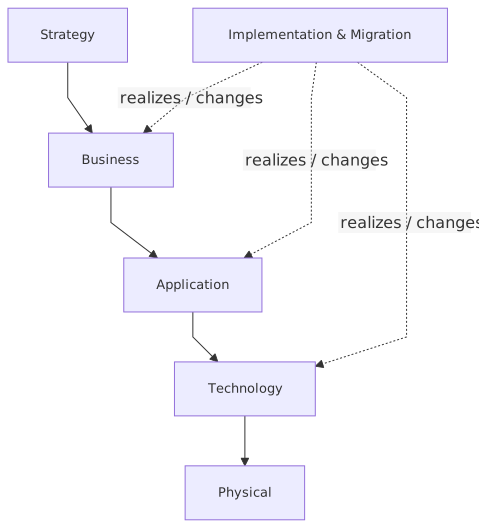
That’s the practical value.
A business executive says:
“We need real-time fraud detection for instant payments.”
An architect should be able to trace that through:
- Strategy: value stream, capability, outcome
- Business: fraud operations process, compliance responsibilities
- Application: fraud scoring service, case management application, event streaming platform
- Technology: Kafka clusters, IAM platform, cloud networking, compute, observability
- Implementation & Migration: work packages, deliverables, transition architectures
That’s architecture. Not isolated drawings. Not layer-by-layer PowerPoint decks. Traceability.
If your metamodel usage doesn’t help connect business change to delivery and operating reality, then you’re doing decorative modeling.
The metamodel in practical terms
Let’s break down the main element types the way real architects use them.
1. Strategy layer: why the enterprise is changing
This is where people often get too vague.
The strategy layer includes concepts like:
- Capability
- Resource
- Course of Action
- Value Stream
- Outcome
This layer is useful for framing why investment is happening.
In a bank, for example:
- Capability: Fraud Management
- Value Stream: Process Customer Payment
- Outcome: Reduced fraud loss on instant payments
- Course of Action: Introduce event-driven fraud scoring before settlement
The mistake many architects make: they treat capabilities as just another org chart. Capabilities are not departments. “Retail Banking IT” is not a capability. “Identity and Access Management” can be a capability. “Real-Time Payment Risk Assessment” can be a capability. It should describe what the enterprise can do, not who owns a budget line.
Contrarian view: capability maps are often overrated. They become executive wallpaper. Useful when tied to investment, weak when used as generic taxonomy. If your capability model doesn’t influence prioritization, stop pretending it’s strategic. ArchiMate capability map
2. Business layer: how the enterprise operates
This layer models business behavior and structure:

- Business Actor
- Business Role
- Business Collaboration
- Business Process
- Business Function
- Business Service
- Business Event
- Business Object
This is where you model what the business actually does.
For example in banking:
- Business Role: Customer Service Agent
- Business Process: Handle Account Access Issue
- Business Service: Customer Identity Verification
- Business Event: Suspicious Login Detected
- Business Object: Customer Authentication Case
One thing architects regularly mess up: they confuse process, function, and service.
Here’s the practical distinction:
- Business Process = sequence of activities with flow and outcome
- Business Function = grouping of behavior by capability or expertise
- Business Service = externally visible behavior offered to consumers
So “Onboard Customer” is a process.
“Compliance Operations” may be a function.
“Customer Due Diligence Service” is a service.
If you model everything as process, you flatten the enterprise into workflow. That’s not architecture; that’s BPM with a fancier font.
3. Application layer: what software provides
This is where architecture gets real for most digital transformation efforts.
Main concepts:
- Application Component
- Application Collaboration
- Application Interface
- Application Function
- Application Process
- Application Service
- Data Object
Example:
- Application Component: IAM Platform
- Application Service: Token Issuance Service
- Application Interface: OAuth API
- Data Object: Access Token Metadata
- Application Component: Fraud Decision Engine
- Application Service: Real-Time Fraud Scoring
- Application Component: Kafka Event Backbone
And here’s an opinion I hold strongly: architects underuse application services. They jump from application component straight to business process or capability. That skips the most important abstraction in modern architecture: what the application actually offers.
In cloud-native and API-heavy environments, the service abstraction matters a lot.
Take Kafka. In many enterprise diagrams, Kafka is drawn as a box labeled “integration layer.” That’s lazy. In ArchiMate terms, Kafka-related modeling could include:
- Application Component: Event Streaming Platform
- Application Service: Event Publication Service
- Application Service: Event Subscription Service
- Data Object: Payment Event
- Application Interface: Topic/API access conventions
If you only draw Kafka as middleware, you miss the architectural meaning: event contracts, producers, consumers, ownership, resilience patterns, retention obligations.
4. Technology layer: what runs the applications
This layer includes:
- Node
- Device
- System Software
- Technology Service
- Technology Interface
- Artifact
- Communication Network
- Path
This is where cloud and platform architecture belong.
Example:
- Node: Kubernetes Cluster
- System Software: Kafka Broker Runtime
- Technology Service: Managed Encryption Service
- Communication Network: VPC Network
- Node: IAM Cloud Tenant Runtime
- Artifact: Fraud Scoring Container Image
One mistake I see constantly: architects either ignore the technology layer completely or drown it in infrastructure trivia.
The right level is not every subnet and VM. It’s the deployment and runtime structure that matters for architectural reasoning.
For cloud, model things like:
- identity boundaries
- network trust zones
- managed platform dependencies
- runtime locations
- resilience topology
- data residency implications
Not every security group. Please.
5. Implementation & Migration: how change actually happens
This layer is neglected because many architects stop at target state diagrams and call it a day.
That’s irresponsible.
ArchiMate gives you:
- Work Package
- Deliverable
- Plateau
- Gap
- Implementation Event
This is where you connect architecture to planning.
Example:
- Plateau: Current state batch fraud monitoring
- Plateau: Target state real-time fraud controls
- Gap: No event-driven scoring before payment settlement
- Work Package: Deploy Kafka-based payment event stream
- Work Package: Integrate IAM with partner authentication
- Deliverable: Fraud decision API and event schema catalog
Without this layer, architecture drifts into fantasy. Every target architecture looks clean if you never model the migration mess.
A practical table: how to choose the right ArchiMate concept
Here’s a quick guide I wish more teams used.
This table alone clears up half the confusion in most modeling workshops.
Relationships: the part people fake
Now let’s talk about relationships, because this is where diagrams become nonsense.
ArchiMate has many relationship types, but in practice the most important ones are:
- Serving
- Realization
- Assignment
- Access
- Triggering
- Flow
- Composition
- Aggregation
- Association
And yes, association is the most abused line in enterprise architecture.
If you use association everywhere, you are avoiding precision.
A few practical interpretations:
- Serving: one element provides functionality to another
Example: Fraud Scoring Application Service serves Payment Authorization Process
- Realization: one element implements or fulfills another
Example: OAuth API realizes Token Issuance Service
- Assignment: responsibility or allocation
Example: Fraud Analyst role assigned to Investigate Fraud Case process
- Access: reads/writes/uses passive structure
Example: Case Management Application accesses Fraud Case data object
- Triggering: temporal or causal sequence
Example: Suspicious Login Detected event triggers Step-Up Authentication process
- Flow: transfer from one behavior/structure element to another
Example: Payment Event flows from Core Banking to Fraud Engine via event stream
- Composition: strong whole-part
Example: Fraud Operations process composed of Review Alert, Investigate Case, Escalate Decision
My opinion: if your model has more than 20% association lines, it’s probably under-modeled or under-thought.
A real enterprise example: bank modernization with Kafka, IAM, and cloud
Let’s make this concrete.
Imagine a mid-sized retail bank modernizing its digital payments and identity architecture. The bank has three immediate goals:
- Reduce fraud in instant payments
- Improve customer login experience with modern IAM
- Move key digital workloads to cloud without creating a governance disaster
The business problem
Today, the bank processes fraud checks in batches or with partial synchronous integrations. Instant payments are growing, fraud losses are rising, and customer authentication is inconsistent across channels.
The executive statement is simple:
“We need secure, low-friction, real-time payments and authentication.”
Fine. But that sentence spans strategy, business, application, and technology. This is exactly where the ArchiMate metamodel helps.
Strategy view
You might model:
- Capability: Payments Processing
- Capability: Fraud Management
- Capability: Identity and Access Management
- Outcome: Reduced fraud loss
- Outcome: Faster customer authentication
- Course of Action: Introduce event-driven fraud detection and centralized IAM federation
- Value Stream: Fulfill Customer Payment
This is the strategic framing. Still abstract, but useful.
Business view
Now connect to operations:
- Business Process: Authorize Payment
- Business Process: Assess Payment Risk
- Business Process: Authenticate Customer
- Business Service: Customer Authentication Service
- Business Service: Payment Authorization Service
- Business Event: Payment Initiated
- Business Event: Suspicious Authentication Attempt
This reveals something important: fraud and identity are not just technical domains. They are business behaviors with regulatory and customer consequences.
Application view
Now the software landscape:
- Application Component: Mobile Banking App
- Application Component: Core Banking Platform
- Application Component: IAM Platform
- Application Component: Fraud Decision Engine
- Application Component: Kafka Event Streaming Platform
- Application Component: Case Management System
Services:
- Application Service: Authentication Token Service
- Application Service: Risk Scoring Service
- Application Service: Payment Event Publication Service
- Application Service: Alert Case Creation Service
Data:
- Data Object: Payment Event
- Data Object: Authentication Context
- Data Object: Fraud Alert
- Data Object: Customer Session Record
Now the relationships matter:
- Mobile Banking App uses Authentication Token Service
- IAM Platform realizes Authentication Token Service
- Core Banking Platform publishes Payment Event
- Kafka Event Streaming Platform serves Payment Event Publication Service
- Fraud Decision Engine consumes Payment Event and realizes Risk Scoring Service
- Risk Scoring Service serves Assess Payment Risk business process
- Case Management System accesses Fraud Alert data object
Now we have traceability. We can explain how the business objective is enabled by actual application services.
Technology view
This is where cloud and deployment architecture appear:
- Node: Cloud Kubernetes Cluster
- Node: Managed Kafka Cluster
- Node: IAM SaaS Tenant
- Communication Network: Secure Cloud Network
- System Software: Container Runtime
- Technology Service: Secrets Management Service
- Technology Service: Central Logging Service
A realistic model would show:
- Fraud Decision Engine deployed on Kubernetes in cloud
- Kafka as managed cloud platform
- IAM as SaaS or hybrid deployment
- Core banking remaining partially on-prem for now
- Secure network path between on-prem payment systems and cloud event streaming
This is where the metamodel prevents nonsense. For example, if your IAM service is SaaS, don’t draw it like an internal custom app unless there’s a good reason. If Kafka is a managed platform, model it as such. If trust boundaries exist, show them via technology structure and interfaces, not buried in a note.
Implementation & Migration view
And now, finally, the part leadership actually needs:
Current Plateau
- Batch fraud checks
- Channel-specific login flows
- Point-to-point payment integrations
Target Plateau
- Event-driven payment risk evaluation
- Centralized IAM federation
- Cloud-hosted fraud services with managed streaming backbone
Gaps
- No canonical payment event model
- Weak IAM integration across channels
- No real-time decisioning before settlement
- Limited cloud operational controls
Work Packages
- Establish Kafka event backbone for payment domain
- Introduce canonical payment event schema
- Integrate digital channels with IAM federation
- Build fraud scoring microservice
- Implement cloud observability and secrets management
- Migrate alerting workflow to case management platform
That is architecture work. Not just diagrams. Coherent, traceable, actionable architecture.
How this applies in real architecture work
This is the part people care about after the training course ends.
In real architecture work, the ArchiMate metamodel helps with five things.
1. It forces better stakeholder conversations
When someone says “we need an identity solution,” the metamodel helps you ask:
- Is this a business service problem?
- A process problem?
- An application integration problem?
- A technology platform problem?
- A migration sequencing problem?
Without that structure, architecture discussions become vague and political very quickly.
2. It helps separate concerns without isolating them
Business, application, and technology are different concerns. That sounds obvious, but many organizations still mix them in a single sentence and a single budget line.
The metamodel lets you separate concerns while preserving traceability.
For example:
- business wants stronger authentication
- application architecture defines token, session, and federation services
- technology architecture defines cloud identity runtime, network controls, logging, and secrets
Different layers. Same change.
3. It improves impact analysis
A good metamodel-based architecture can answer practical questions like:
- What business services depend on IAM?
- Which applications consume payment events from Kafka?
- What technology nodes support the fraud engine?
- What migration work packages are affected if the cloud landing zone is delayed?
This is where architecture earns its keep.
4. It reduces accidental complexity in diagrams
Good modeling is reduction. Not accumulation.
The metamodel helps architects decide what not to show. If you know what category an element belongs to, you can choose the right viewpoint and leave out the rest.
That matters. Most architecture artifacts fail because they try to say everything at once.
5. It supports governance without becoming bureaucracy
Used badly, ArchiMate becomes a gatekeeping mechanism. Used well, it becomes a shared language for design reviews, investment cases, and roadmap alignment. ArchiMate in TOGAF ADM
Big difference.
Common mistakes architects make with the ArchiMate metamodel
Let’s be blunt.
Mistake 1: Modeling everything at the same level of abstraction
A capability, an app, an API, a cloud region, and a project are not peers. Yet many diagrams put them side by side with equal visual weight.
This creates false clarity. Keep abstraction levels coherent.
Mistake 2: Treating capabilities as processes
Capabilities are stable “what we can do.” Processes are “how we do it.” If you confuse them, your strategy maps become workflow maps.
Mistake 3: Skipping services
This is a huge one.
Architects often jump from business process to application component. That hides the service contracts and operating responsibilities in the middle. In modern architectures—especially API, event, and IAM-heavy ones—that middle layer is where the truth lives.
Mistake 4: Using generic associations for everything
Already said it, but it’s worth repeating. Association is the “I got tired” relationship.
Use more precise relationships unless you genuinely mean loose, unspecified connection.
Mistake 5: Creating target-state fantasies with no migration model
If your target architecture assumes all legacy constraints disappear at once, it’s fiction.
Real banks run hybrid estates. IAM is often partly legacy, partly SaaS, partly custom. Kafka adoption happens domain by domain. Cloud networking and security controls take longer than slide decks suggest.
Model transition honestly.
Mistake 6: Over-modeling infrastructure
Not every technical detail belongs in ArchiMate. If you are reproducing Terraform or Kubernetes manifests in architecture notation, you have lost the plot.
Mistake 7: Confusing ownership with architecture
A common anti-pattern in enterprises: the architecture model mirrors team boundaries instead of enterprise logic.
That’s understandable, but dangerous. Your architecture should show how the enterprise works, not just who shouts loudest in planning meetings.
A contrarian thought: you do not need to model everything
This needs saying because architecture communities sometimes drift into model maximalism.
You do not need a complete enterprise metamodel repository before doing useful architecture.
You need enough model precision to support a decision.
That may mean:
- one capability map
- two or three focused viewpoints
- a transition architecture
- a dependency matrix for a critical initiative
That’s enough if it helps make a real decision with lower risk and better alignment.
Architecture that nobody uses is waste, even if it is metamodel-compliant waste.
How I’d recommend using ArchiMate on a real program
For a real transformation—say, banking modernization involving IAM, Kafka, and cloud—I’d use the metamodel in this sequence:
- Start with business outcomes and capabilities
Not because executives love capability maps, but because funding and prioritization need a stable frame.
- Model 2–3 critical business processes or services
Don’t model the whole bank. Model the value-heavy and risk-heavy areas.
- Map the application services that enable them
This is where architecture gets operationally useful.
- Model only the technology elements that affect risk, resilience, security, or cost
Cloud node placement, IAM tenancy, Kafka platform boundaries, trust zones.
- Create a migration view early
Earlier than most teams do. It will expose unrealistic assumptions fast.
- Use viewpoints tailored to stakeholders
Executives do not need your full metamodel. Engineers do not need your strategy bubbles. Pick the right slice.
That’s practical ArchiMate. Not pure, but useful.
Final thought
The ArchiMate metamodel is not magic. It will not make weak architects strong. In fact, it often exposes weak thinking faster.
That’s a good thing.
Used well, the metamodel gives you a disciplined way to connect business intent, software design, platform reality, and change planning. That’s the actual job. Especially in complex enterprise environments like banking, where IAM, event streaming, cloud platforms, and legacy systems all collide in the same initiative.
Used badly, ArchiMate becomes sterile documentation.
So the question is not “Should we use the ArchiMate metamodel?”
The question is: “Are we willing to model with enough honesty and precision that the diagrams can challenge our assumptions?”
If yes, it’s one of the most useful tools architects have.
If no, save everyone the time and just draw boxes in PowerPoint.
FAQ
1. What is the ArchiMate metamodel in plain English?
It’s the rule set behind ArchiMate that defines what kinds of architecture elements exist and how they relate. Think of it as the grammar for enterprise architecture models.
2. Why do architects struggle with ArchiMate?
Usually because they learn the notation before learning the modeling intent. They memorize symbols but don’t understand the difference between capability, process, service, component, and node. Then everything ends up as boxes and generic arrows.
3. How is the ArchiMate metamodel useful in real projects?
It helps connect strategy to implementation. In a real banking program, for example, it can trace a goal like “reduce payment fraud” through business processes, fraud services, Kafka event streams, IAM controls, cloud deployment, and migration work packages.
4. Should I model cloud platforms like AWS, Kafka, or IAM in ArchiMate?
Yes, but at the right level. Model the architectural role they play: application services, technology services, nodes, interfaces, trust boundaries, and dependencies. Don’t turn ArchiMate into an infrastructure inventory.
5. What is the most common mistake in using the ArchiMate metamodel?
Skipping the service layer and overusing generic associations. That usually means the model looks connected but says very little. Precise relationships and service abstractions are what make the model useful.
ArchiMate Metamodel — Core Layers
Typical Dependency Flow for Architects
- Top-down traceability: strategy drives business, which drives applications and technology.
- Cross-layer dependency: business processes consume application services; applications rely on technology services and nodes.
- Change planning: implementation elements realize or modify target architecture elements across layers.
Frequently Asked Questions
What is the ArchiMate metamodel?
The ArchiMate metamodel formally defines all element types (Business Process, Application Component, Technology Node, etc.), relationship types (Serving, Realisation, Assignment, etc.), and the rules about which elements and relationships are valid in which layers. It is the structural foundation that makes ArchiMate a formal language rather than just a drawing convention.
How does the ArchiMate metamodel support enterprise governance?
By defining precisely what each element type means and what relationships are permitted, the ArchiMate metamodel enables consistent modeling across teams. It allows automated validation, impact analysis, and traceability — turning architecture models into a queryable knowledge base rather than a collection of individual diagrams.
What is the difference between using ArchiMate as notation vs as an ontology?
Using ArchiMate as notation means drawing diagrams with its symbols. Using it as an ontology means making formal assertions about what exists and how things relate — leveraging the metamodel's semantic precision to enable reasoning, querying, and consistency checking across the enterprise model.
Boxes that know what they are
The failure this article opens with — drawing boxes before deciding what the boxes mean — is hard to correct in a tool where a box is only ever a box. Nothing pushes back, so the metamodel stays in the architect's head rather than in the artefact.
Mooodels takes the opposite starting point: elements and relationships are typed objects in one model, with the ArchiMate metamodel applied as a profile, so an invalid relationship is caught rather than quietly drawn.