⏱ 19 min read
Most enterprise architecture problems are not technology problems. They’re representation problems.
That’s the uncomfortable truth. In large enterprises, especially the ones with too many platforms, too many committees, and too many “strategic” PowerPoints, the real failure is usually this: people try to describe everything at once. Every process, every application, every API, every cloud account, every Kafka topic, every IAM role, every exception. Then they wonder why nobody uses the architecture.
ArchiMate is supposed to help with that. But a lot of teams use it like a glorified stencil pack. They draw boxes. They connect boxes. They produce diagrams so dense they look like a subway map designed by someone with a grudge. And then they say the business “doesn’t understand architecture.”
No. The architecture isn’t understandable.
That’s where abstraction layers matter. Not as a modeling nicety. Not as a textbook concept. As survival.
If you work in a large enterprise, abstraction layers in ArchiMate are how you stop complexity from swallowing the conversation. They let you show the right truth to the right audience at the right level. Done well, they create alignment. Done badly, they create fake certainty and diagram theater.
I have a fairly strong opinion here: the quality of an enterprise architecture practice is visible in how it handles abstraction. Not in how many repositories it has. Not in how many framework terms it can quote. In whether it can move cleanly from strategy to implementation without either lying or drowning.
Let’s make this concrete early.
What abstraction layers in ArchiMate actually mean
Simple version first.
Abstraction layers in ArchiMate are different levels of detail used to represent an enterprise. They help architects describe the same environment from multiple viewpoints: ArchiMate modeling guide
- High-level business context: what the enterprise is trying to do
- Application/service level: what systems support that
- Technology/infrastructure level: what platforms and components run it
- Detailed implementation level: what specific interfaces, events, roles, deployments, and configurations are involved
The point is not to draw more diagrams. The point is to separate concerns so each stakeholder sees a useful model instead of a wall of noise.
In real architecture work, this means:
- executives don’t need to see Kafka partitions
- security teams do need to see IAM trust boundaries
- delivery teams need to see application services and dependencies
- platform teams need to see cloud runtime, networking, and operational ownership
- architects need to connect all of those without pretending they’re the same conversation
That’s abstraction.
ArchiMate gives you structure for this because it already organizes concepts across business, application, and technology domains, with strategy and implementation/migration on top. But the real value is not in the metamodel itself. The value is in using those layers intentionally.
And that’s where many teams fail.
The first mistake: confusing ArchiMate layers with abstraction itself
A lot of architects assume that because ArchiMate has business, application, and technology layers, they’ve handled abstraction. They haven’t. ArchiMate tutorial
Those are domain layers, not automatically abstraction levels.
You can create a business-layer diagram that is far too detailed. You can create a technology-layer diagram that is still too abstract to support engineering decisions. You can create an application view that mixes strategic capability planning with container-level deployment. I see this all the time.
Abstraction is about decision relevance.
If the audience cannot act on the model, the abstraction level is wrong.
That sounds obvious. It apparently isn’t.
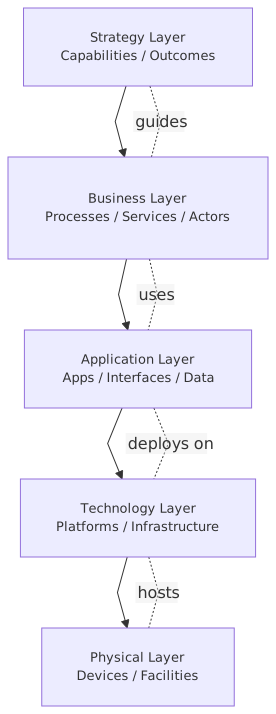
In practice, you should think in at least four usable levels in enterprise architecture work:
That table is more useful than half the architecture repositories I’ve inherited.
Because it gets to the point: what is this model for?
Why large enterprises need abstraction more than small ones
In a startup, you can sometimes get away with one whiteboard. Everyone knows the systems. The CTO still remembers which engineer created that awful service account. The blast radius of misunderstanding is limited.
In a large bank? Not even close.
You have dozens or hundreds of applications. Shared IAM platforms. Kafka clusters serving multiple domains. Cloud landing zones split by regulatory constraints. Legacy core banking systems no one wants to touch. Three generations of integration patterns coexisting in mutual resentment.
In that environment, complexity is not just high. It is layered, political, and unevenly understood.
A retail banking domain might need to explain:
- customer onboarding as a business capability
- KYC and fraud screening as business processes
- onboarding APIs and case management as application services
- event-driven propagation over Kafka
- IAM integration for workforce and customer identity
- cloud deployment across regulated and non-regulated zones
- resilience and audit controls for compliance
If you try to show all of that in one ArchiMate view, you create a diagram nobody trusts. The business sees gibberish. Engineers see missing detail. Security sees omitted controls. Compliance sees ambiguity. Everyone is right.
The only way through is abstraction discipline.
A real enterprise example: digital onboarding in a bank
Let’s use a realistic example.
A large bank is modernizing customer onboarding for current accounts and small business accounts. The old process runs across a branch platform, a call center application, a mainframe customer master, and several manual verification steps. The target state introduces:
- a digital onboarding journey
- API-based orchestration
- Kafka for event distribution
- centralized IAM with customer identity and workforce federation
- cloud-hosted onboarding services
- integration back to core banking and compliance systems
This is exactly the sort of architecture that goes wrong if abstraction is sloppy.
Level 1: Strategic view
At the top level, the architecture should show something like:
- Capability: Customer Onboarding
- Business outcomes: reduced onboarding time, increased straight-through processing, improved compliance evidence
- Value stream stages: identify customer, verify identity, assess risk, create account, activate services
- Major enabling initiatives: digital onboarding platform, IAM modernization, event-driven integration backbone
Notice what is not shown:
- Kafka
- Azure or AWS
- OAuth flows
- API gateway vendor
- IAM role mappings
Good. None of that belongs here.
This level is where architecture earns credibility with business stakeholders. It connects investment to operating change. If you skip this and start with application diagrams, you’ve already narrowed the conversation too early.
Level 2: Operational service view
Now we move down.
Here we show business services and application services:
- Business Service: Customer Verification
- Business Service: Account Opening
- Application Service: Identity Verification API
- Application Service: Risk Screening Service
- Application Service: Onboarding Orchestration Service
- Application Service: Customer Notification Service
We also show ownership, major dependencies, and maybe key data objects like Customer Profile, Verification Result, and Account Request.
Still not too technical. But now we are at a level where product and domain teams can discuss service boundaries and accountability.
This is where a lot of architecture work actually happens. Not in the executive map. Not in the deployment details. In this middle zone where business intent becomes operating design.
Level 3: Solution and platform view
Now the useful technical conversation begins.
The onboarding orchestration service runs in cloud-managed Kubernetes. It publishes events to Kafka:
customer.identity.verifiedcustomer.risk.assessedaccount.opening.requestedaccount.opened
IAM is no longer just “identity management” in a box. At this level, we show:
- customer authentication via CIAM platform
- workforce access via enterprise IdP
- service-to-service authentication using workload identity
- authorization boundaries between onboarding, risk, and account servicing domains
- privileged access controls for operations teams
Cloud is no longer just “the cloud.” We show:
- regulated landing zone
- managed Kafka service or self-managed cluster
- API gateway
- secrets management
- logging and audit services
- network segmentation between internet-facing and internal workloads
Now the model starts to support real design decisions:
- does onboarding publish canonical customer events or domain-specific events?
- where is authorization enforced?
- what systems are synchronous versus event-driven?
- which services are internet-facing?
- what data crosses regulated boundaries?
This is architecture. Not generic boxes. Trade-offs.
Level 4: Implementation and deployment view
At the lowest relevant level, we can model:
- specific deployment nodes
- runtime containers
- ingress points
- Kafka brokers or managed service endpoints
- IAM trust relationships
- environment separation
- failover topology
- operational ownership
This is where delivery and platform teams need precision.
But here’s the contrarian point: not every enterprise architecture team should model this level directly. Sometimes solution architecture or platform engineering owns it. Enterprise architecture should only go this deep when the cross-cutting decision actually matters at enterprise level.
That distinction matters. Enterprise architects who insist on modeling every pod and every subnet usually become diagram custodians, not decision-makers.
How abstraction layers work in real architecture work
Let’s leave theory for a second.
In practice, abstraction layers help with five things that matter every week, not just in architecture reviews.
1. They let you talk to different stakeholders without changing the truth
This is the core job.
The CIO wants to know whether onboarding modernization reduces time to revenue and regulatory risk.
The security architect wants to know whether IAM centralization creates a bottleneck or a stronger control plane.
The engineering lead wants to know whether Kafka introduces eventual consistency issues for account activation.
The cloud platform owner wants to know whether the service belongs in a regulated landing zone and what operational dependencies it creates.
These are different questions. One model cannot answer all of them at once. But a set of related ArchiMate views, each at a deliberate abstraction level, can.
Same architecture. Different lens.
2. They expose where the enterprise is hand-waving
One of the best uses of abstraction is diagnostic.
When you move from strategic to operational to implementation views, gaps become obvious:
- the business capability exists, but no owning application service is defined
- the application service exists, but no technology platform supports required resilience
- Kafka events are shown, but no data ownership or schema governance exists
- IAM is shown as centralized, but no trust model exists for machine identities
- cloud deployment is shown, but operational support boundaries are unclear
A good abstraction stack reveals missing architecture. A bad one hides it.
3. They improve governance without turning governance into bureaucracy
Architecture governance gets a bad reputation because, frankly, a lot of it deserves one.
Review boards often ask the wrong questions because the artifacts are at the wrong level. A strategic investment review should not be debating topic naming conventions in Kafka. A production readiness review should not be debating whether “customer intimacy” is a strategic differentiator.
Abstraction lets governance focus: ArchiMate for governance
- strategy boards review capabilities and outcomes
- domain architecture reviews check services, dependencies, and ownership
- security reviews inspect IAM, trust boundaries, and control points
- platform reviews inspect runtime topology and cloud compliance
That’s sane governance. Layered, purposeful, and not theatrical.
4. They make roadmaps more honest
A lot of enterprise roadmaps are lies told with color coding. EA governance checklist
Why? Because they show “move to cloud,” “adopt event-driven architecture,” or “modernize IAM” as if these are single actions. They’re not. They are layered transformations.
For the bank onboarding example:
- strategic layer says improve digital acquisition and control evidence
- service layer says separate onboarding orchestration from legacy account opening
- platform layer says introduce Kafka for event propagation and modern IAM for access control
- implementation layer says deploy new services in regulated cloud zone, integrate with mainframe via API facade, establish audit pipelines
If your roadmap only exists at one layer, it will either be too vague to implement or too detailed to steer.
5. They stop architects from becoming accidental solution designers for everything
This one is painful because I’ve done it myself.
When abstraction is weak, enterprise architects get dragged into implementation arguments because nobody can see where enterprise concerns stop and solution concerns begin. Suddenly you’re arguing over Kafka consumer group design when the real unresolved question is whether account activation belongs in the onboarding domain at all.
Abstraction layers create boundaries of responsibility. Not rigid ones, but useful ones.
Common mistakes architects make with abstraction layers
Let’s be blunt. Most problems here are self-inflicted.
Mistake 1: Putting everything in one diagram
This is the classic failure mode.
Architects often think completeness equals quality. So they produce one “integrated view” of the enterprise. It contains capabilities, apps, interfaces, servers, controls, and migration phases all in one place.
It’s useless.
A model should reduce cognitive load, not prove that you know many nouns.
Mistake 2: Being abstract because the details are messy
This is the opposite problem. Some teams stay at high level because the lower layers expose uncomfortable facts:
- duplicate IAM stores
- Kafka used as point-to-point integration with no event ownership
- cloud services deployed without clear support models
- business capabilities with no real product ownership
So they keep the diagrams “strategic.”
That’s not strategy. That’s avoidance.
Mistake 3: Treating ArchiMate like a compliance exercise
If the team is modeling just to say it has modeled, abstraction becomes performative. Views are created because the framework allows them, not because a decision requires them.
Real architecture work starts with a question:
- what are we trying to decide?
- who needs to understand it?
- what level of detail changes the decision?
Then you model.
Not the other way around.
Mistake 4: Failing to connect layers
Another common issue: nice separate diagrams with no traceability.
The capability map says customer onboarding is strategic. The application map shows onboarding applications. The technology map shows cloud services and Kafka. But there’s no explicit relationship between them. So the repository becomes a filing cabinet, not an architecture.
You need connection:
- which application services realize which business services?
- which technology services support which application services?
- which IAM controls protect which business-critical flows?
- which implementation elements are part of which transition state?
Without that, abstraction becomes fragmentation.
Mistake 5: Using vendor labels too early
I know why architects do this. Vendors are concrete. “Kafka,” “Azure AD,” “AWS EKS,” “Okta,” “Confluent,” “Apigee.” People feel progress when they see brand names.
But if you introduce vendor specifics at the wrong abstraction level, you distort the conversation. Business stakeholders start reacting to implementation choices instead of operating needs. Architects start defending products instead of architecture.
Use vendor labels where they matter. Not before.
Mistake 6: Ignoring time
Abstraction is not just vertical. It is temporal.
Current state, transition state, and target state often need different abstraction levels. Current state may require ugly implementation detail because that’s where risk sits. Target state may stay more abstract until decisions mature.
Architects who force the same level of detail across all time horizons usually create either fantasy targets or unreadable current-state maps.
Banking, Kafka, IAM, and cloud: where abstraction gets tested
These four areas are a perfect stress test because they cut across domains.
Banking
Banking architecture is constrained by regulation, legacy dependency, and operational risk. That means abstraction must preserve control meaning.
If your business-layer model says “Account Opening” but your lower layers don’t show where sanction screening, consent capture, and audit evidence happen, your abstraction has removed the very things that matter.
In regulated environments, abstraction should simplify the picture without deleting accountability.
Kafka
Kafka is where many architecture models become weirdly religious. Some teams model it as magic event-driven modernization dust. Others model every topic and connector like they’re drafting a wiring diagram.
Both are wrong at the wrong level.
At enterprise level, what matters is:
- which domains publish and consume events
- what business events are significant
- where asynchronous patterns are appropriate
- who owns schemas and event contracts
- what resilience and replay implications exist
At implementation level, yes, topics, brokers, partitions, and connectors matter. But don’t drag that into strategic conversation unless you enjoy losing the room.
IAM
IAM is one of the most consistently under-modeled areas in enterprise architecture.
People draw a single box labeled “IAM” and move on. That’s not architecture. That’s a confession.
Real IAM abstraction should distinguish:
- customer identity vs workforce identity
- human access vs machine identity
- authentication vs authorization
- federation vs provisioning
- privileged access vs standard access
- policy decision points vs policy enforcement points
In the bank example, these distinctions drive actual risk. If service-to-service trust for onboarding and risk systems is vague in the model, it will be vague in delivery too.
Cloud
Cloud creates a strange effect in architecture diagrams. It tempts people to become either too generic or too specific.
Too generic: one cloud box solves all sins.
Too specific: every managed service icon appears in the enterprise model.
The right abstraction depends on the decision:
- enterprise level: cloud operating model, landing zones, regulatory placement, resilience principles
- solution level: runtime platforms, managed services, network boundaries, observability, IAM integration
- implementation level: exact services, regions, failover, deployment patterns
Cloud is not a layer by itself. It is a context that affects multiple layers.
A practical way to structure ArchiMate models
If you want this to work in a large enterprise, build your model set intentionally.
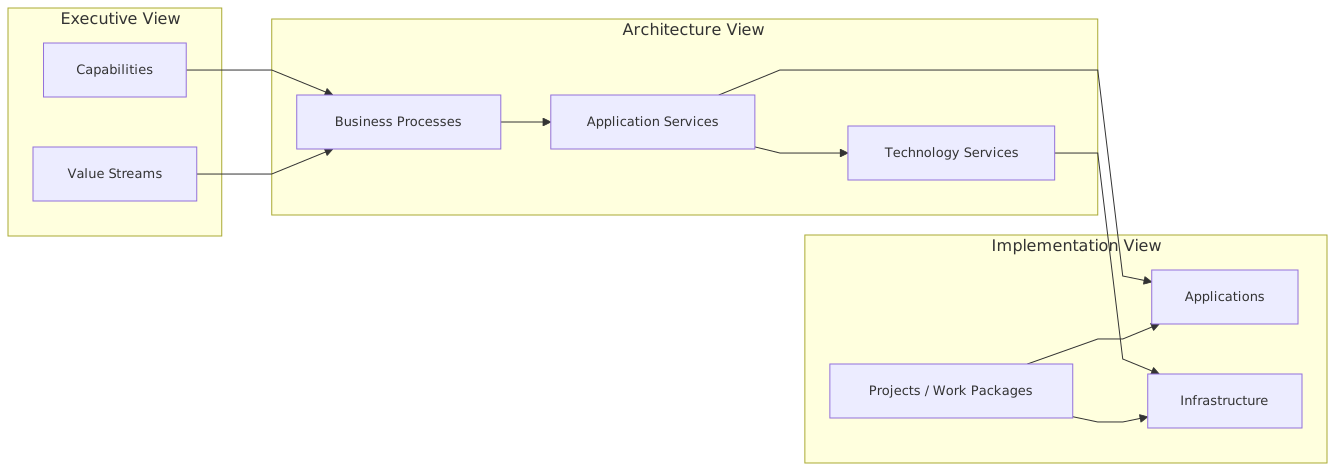
I usually recommend a small core stack for each major domain or initiative:
That’s enough to support most real discussions. Not everything. But enough.
And here’s another strong opinion: if your architecture repository cannot produce these views quickly and consistently, the repository is not helping. It’s just storing nouns.
Contrarian thought: sometimes less ArchiMate is better ArchiMate
I like ArchiMate. I use it. But let’s not pretend every problem needs a pure metamodel expression.
Sometimes a simple layered diagram with a few ArchiMate concepts used consistently is more valuable than a fully formal model that nobody reads. Purity is overrated. Clarity is not.
There’s a strain of enterprise architecture that treats notation fidelity as moral virtue. It isn’t. If the model is technically correct and practically useless, it has failed.
Use enough ArchiMate to create rigor, traceability, and shared meaning. Don’t use so much that the notation becomes the main event.
That may annoy some tool vendors and framework purists. I can live with that.
How to know your abstraction layers are working
You know abstraction is working when:
- executives can explain why a platform change matters to a business outcome
- engineers can trace a technical dependency back to a business service
- security can identify trust boundaries without reverse-engineering implementation
- roadmaps show meaningful transitions, not slogans
- architecture reviews focus on decisions, not diagram interpretation
- teams stop asking for “the one architecture diagram”
That last one matters. There should not be one diagram. There should be a coherent set of views.
If your team keeps asking for a single picture of the whole enterprise, what they usually want is reassurance, not architecture. Don’t give false reassurance. Give navigable truth.
Final thought
Abstraction layers in ArchiMate are not about making architecture prettier. They are about making complexity governable.
In large enterprises, especially banks and other regulated organizations, the challenge is not lack of information. It’s too much of it, at the wrong level, in the wrong conversation. Kafka, IAM, cloud platforms, legacy systems, compliance controls, product boundaries — all of it matters. But not all at once.
Good architects know when to zoom in and when to stop. They know that every model is an argument about what matters. They know that hiding detail can be as dangerous as exposing too much. And they know that architecture becomes useful only when abstraction is deliberate.
So yes, use ArchiMate layers. But more importantly, use abstraction like you mean it.
Because if you can’t manage complexity in the model, you definitely won’t manage it in the enterprise.
FAQ
1. What is the difference between ArchiMate layers and abstraction layers?
ArchiMate layers are formal domains like business, application, and technology. Abstraction layers are levels of detail. They overlap, but they are not the same thing. You can have a very abstract technology view or a very detailed business view.
2. How many abstraction levels should an enterprise architecture team use?
Usually four is enough: strategic, service/operational, solution/platform, and implementation/deployment. More than that is often overkill unless you are in a very large or highly regulated environment.
3. How do you model Kafka in ArchiMate without overcomplicating things?
At higher levels, model event-driven relationships, application services, and business-significant events. At lower levels, model messaging infrastructure, interfaces, and runtime components only when those details affect design or risk decisions.
4. How should IAM appear in enterprise architecture models?
Not as one box. Separate customer identity, workforce identity, machine identity, authentication, authorization, and privileged access where relevant. IAM should show trust boundaries and control points, not just a platform label.
5. What is the biggest mistake architects make when using ArchiMate in large enterprises?
Trying to create one diagram for everyone. That almost always results in a model that is too detailed for business stakeholders and too shallow for engineers. Use multiple connected views instead.
Frequently Asked Questions
What is enterprise architecture?
Enterprise architecture is a discipline that aligns an organisation's strategy, business processes, information systems, and technology. Using frameworks like TOGAF and modeling languages like ArchiMate, it provides a structured view of how the enterprise operates and how it needs to change.
How does ArchiMate support enterprise architecture practice?
ArchiMate provides a standard modeling language that connects strategy, business operations, applications, data, and technology in one coherent model. It enables traceability from strategic goals through business capabilities and application services to the technology platforms that support them.
What tools are used for enterprise architecture modeling?
The main tools are Sparx Enterprise Architect (ArchiMate, UML, BPMN, SysML), Archi (free, ArchiMate-only), and BiZZdesign Enterprise Studio. Sparx EA is the most feature-rich option, supporting concurrent repositories, automation, scripting, and integration with delivery tools like Jira and Azure DevOps.