⏱ 20 min read
Let me start with an unpopular opinion.
Most UML diagrams in enterprises are useless.
Not because UML is useless. It isn’t. UML can be a very practical tool. The problem is that a lot of teams use it like a compliance ritual, or worse, like a substitute for thinking. They produce giant diagrams nobody reads, covered in tiny boxes and arrows, then act surprised when delivery teams ignore them completely. UML modeling best practices
That’s not UML’s fault. That’s architecture theater.
So if you’re asking what is UML? the simple answer is this:
UML stands for Unified Modeling Language. It’s a standard way to visually describe software systems, their structure, behavior, and interactions.
That’s the SEO-friendly definition. Fine. Necessary. But not enough.
In real architecture work, UML is not about drawing pretty pictures. It’s about making complexity discussable. It gives architects, engineers, analysts, and sometimes security teams a shared visual language so they can stop talking past each other. UML for microservices
Used well, UML helps you answer practical questions:
- What are the main parts of this system?
- How do services talk to each other?
- Where does identity flow?
- What happens when an event is published to Kafka?
- Which component owns which responsibility?
- Where are the risky dependencies?
- What exactly did we mean when we said “integrated”?
Used badly, UML creates noise, false certainty, and diagrams that age like milk.
This guide is for beginners, but I’m going to write it from the perspective of real enterprise architecture work. Not textbook UML. Not exam-prep UML. The kind that shows up when you’re trying to modernize a banking platform, untangle IAM dependencies, or explain a cloud event flow to six teams who all think they’re the center of the universe.
UML in plain English
At its core, UML is a visual modeling language for software systems.
A few words matter there.
- Visual: it uses diagrams instead of only prose.
- Modeling: it represents reality in a simplified way. A model is not the system itself.
- Language: it has conventions and notation, so other people can understand what you meant.
UML was created to standardize how people describe software designs. Before that, every architect had their own boxes-and-arrows style. To be honest, many still do. But UML gave the industry a common baseline.
You do not need to memorize all UML diagram types to be useful.
In fact, one of my stronger opinions is this:
If you try to “do all of UML,” you’ll probably fail to communicate anything important.
Beginners should focus on a handful of diagrams that solve real problems. In enterprise settings, that usually means:
- Use case diagrams
- Sequence diagrams
- Class diagrams
- Component diagrams
- Deployment diagrams
- Sometimes activity diagrams
That’s enough to be dangerous in a good way.
Why UML still matters, even now
There’s a recurring argument that UML is outdated. Too heavy. Too formal. Too 2000s.
I get where that comes from. A lot of modern teams prefer whiteboard sketches, C4 diagrams, architecture decision records, event storming, and direct code reading. Good. They should. Those are useful.
But saying UML is obsolete is lazy.
Because enterprises still have problems that require precision:
- regulated environments
- long-lived systems
- outsourced delivery
- multiple vendors
- cross-team integration
- security and audit concerns
- architecture review boards
- migration planning
When you’re in a bank moving customer onboarding from a monolith to cloud-native services, “we kind of sketched it in Miro” is not enough. At some point, you need a clearer model of behavior, ownership, interactions, and deployment.
That’s where UML still earns its place.
Not as religion. As a tool.
The big idea: UML helps you describe different views of a system
One reason beginners get confused is that they expect one diagram to explain everything.
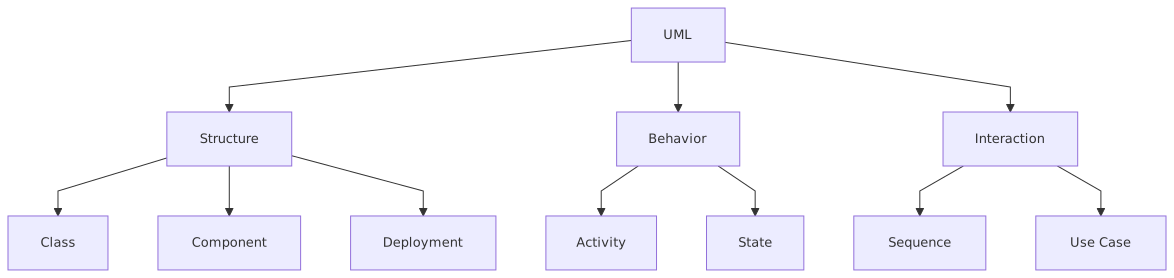
That’s impossible.
A system has multiple dimensions:
- what users want to do
- what components exist
- how objects relate
- how services interact over time
- how software is deployed
- how workflows move from step to step
UML gives you different diagram types for different questions.
Here’s the simplest way to think about it.
That table is half the battle. If you understand what each diagram is for, you’ll already be ahead of many architects.
The UML diagrams beginners should actually learn
1. Use case diagrams: start with intent
A use case diagram is one of the simplest UML diagrams. It shows:
- actors: users or external systems
- use cases: things they want to do with the system
Think of it as a scope and interaction map.
If you’re designing a banking onboarding platform, your actors might be:
- Customer
- Branch Agent
- Identity Provider
- Credit Bureau
- Fraud Service
And use cases might be:
- Submit application
- Verify identity
- Check credit
- Approve account
- Send welcome notification
This is useful early because it forces a basic question many projects avoid:
Who is actually using this thing, and for what purpose?
That sounds obvious. It isn’t. In enterprise projects, teams often jump straight into APIs and cloud services before they’ve agreed on user intent.
Common mistake: architects make use case diagrams too abstract or too detailed.
Too abstract and they say nothing. Too detailed and they turn into process spaghetti.
Use case diagrams are for scope and external interactions, not every business rule.
2. Sequence diagrams: probably the most useful UML diagram in enterprise architecture
If I had to keep only one UML diagram type for architecture work, I’d pick the sequence diagram.

A sequence diagram shows how participants interact over time. It answers:
- who talks to whom
- in what order
- synchronously or asynchronously
- what happens next
- where a process starts and ends
This is where UML becomes very practical.
Example: banking onboarding with IAM and Kafka
Let’s say a customer opens an account through a mobile banking app.
A simplified sequence might look like this:
- Customer logs in through IAM platform
- Mobile app gets OAuth token from identity provider
- App sends onboarding request to API gateway
- Onboarding service validates request
- Onboarding service calls customer profile service
- Onboarding service publishes
CustomerOnboardingRequestedevent to Kafka - Fraud service consumes the event
- KYC service consumes the event
- Notification service waits for completion event
- If checks pass, account service creates account
- Account service publishes
AccountCreated - Notification service sends welcome message
That’s real architecture material. Not theory.
A good sequence diagram here helps teams discuss:
- whether token validation happens at gateway or service level
- whether Kafka is event-carried state transfer or just notification
- what happens on fraud timeout
- whether account creation is synchronous or event-driven
- how retries work
- where audit logging happens
This is exactly the kind of thing architects need to explain.
Common mistake: people draw sequence diagrams that are 5 feet wide and include every internal method call. Don’t.
Stay at the level of decision-making. If the diagram doesn’t help a team make a design choice, it’s too detailed or too vague.
3. Class diagrams: useful, but often overused
Class diagrams show classes, attributes, operations, and relationships.
They’re good for:
- domain modeling
- understanding core business entities
- clarifying relationships between concepts
For example, in retail banking you might model:
- Customer
- Account
- Product
- Application
- Transaction
- Consent
- IdentityCredential
You can show relationships like:
- a Customer owns one or more Accounts
- an Application results in zero or one Account
- a Consent belongs to a Customer
- a Product defines rules for an Account
That can be helpful. Especially early in domain design.
But here’s the contrarian bit:
A lot of enterprise architects use class diagrams when they should be using domain maps, capability maps, or service models.
If you’re designing distributed systems, class diagrams are often not the main thing. They can give a false sense that the world is neatly object-oriented when your real problems are service boundaries, data ownership, event contracts, and operational flows.
So yes, learn class diagrams. Just don’t assume they are “architecture” by default.
4. Component diagrams: where architecture usually starts to look like architecture
Component diagrams show the major parts of a system and how they depend on each other.
This is often the most natural diagram for architects because it deals with building blocks:
- channels
- services
- databases
- integration components
- IAM platforms
- event brokers
- external systems
In a cloud banking platform, a component diagram might include:
- Mobile App
- Web Portal
- API Gateway
- IAM / Identity Provider
- Customer Service
- Account Service
- KYC Service
- Fraud Service
- Kafka Cluster
- Notification Service
- Audit Service
- Core Banking Adapter
This gives people a high-level map.
It’s especially useful when teams need to discuss:
- service ownership
- integration points
- bounded contexts
- external dependencies
- where cross-cutting controls sit
- what is in scope and out of scope
Common mistake: architects turn component diagrams into inventory dumps. Every library, every queue, every sidecar, every cloud service icon. Result: nobody can see the architecture anymore.
A component diagram should reduce complexity, not reproduce it.
5. Deployment diagrams: underrated in cloud architecture
Deployment diagrams show where software runs.
Historically that meant physical servers and runtime nodes. In modern enterprise work, it often means:
- cloud regions
- VPCs / VNets
- Kubernetes clusters
- managed services
- subnets
- security zones
- on-prem to cloud connectivity
If you’re dealing with regulated banking workloads, deployment matters a lot.
For example:
- IAM might run as a managed identity service
- API gateway in a public subnet
- application services in private Kubernetes nodes
- Kafka as managed streaming in a restricted network segment
- audit logs shipped to immutable storage
- core banking adapter in a hybrid connectivity zone
- secrets managed through cloud KMS or vault services
That is not “just infrastructure.” It’s architecture. It affects latency, resilience, compliance, and security posture. EA governance checklist
Common mistake: some architects avoid deployment diagrams because “the platform team handles infra.” That’s a mistake. You don’t need to own every Terraform file, but you absolutely need to understand runtime placement and trust boundaries.
6. Activity diagrams: useful for workflow, but don’t force them everywhere
Activity diagrams show flow:
- steps
- decisions
- branching
- parallel actions
- start and end points
They’re useful for business or orchestration logic.
Example:
- receive onboarding request
- validate identity
- if high risk, route to manual review
- else continue automated KYC
- if KYC fails, reject
- if KYC passes, create account
- send notification
These can be good for discussing process behavior with business stakeholders.
But another strong opinion:
If your real need is business process modeling across departments, BPMN is often a better fit than UML activity diagrams.
UML can do workflow. It just isn’t always the clearest tool for enterprise process design. Architects should know the difference.
How UML applies in real architecture work
This is where many beginner articles go soft. They explain notation but not actual use.
So let’s be practical.
In enterprise architecture, UML helps in five real ways.
1. It makes ambiguity visible
Architecture problems usually start as language problems.
One team says “integration” and means synchronous REST.
Another means Kafka events.
A third means nightly file transfer.
A fourth means “we bought a SaaS product and hope it works.”
A sequence or component diagram forces clarity. Suddenly people have to say:
- who initiates
- who owns
- who persists
- who authenticates
- who retries
- who fails
That’s valuable.
2. It helps align technical and non-technical stakeholders
A good UML diagram sits in the middle ground:
- more precise than prose
- less overwhelming than code
- more structured than a sketch
Executives won’t read a class diagram in detail, sure. But they can understand a component diagram showing that customer identity depends on a central IAM platform and that Kafka is the event backbone between onboarding, fraud, and account services.
That shared picture matters.
3. It supports design reviews and architecture decisions
When a review board asks:
- Why is this synchronous?
- Why does this service need direct database access?
- Why is IAM embedded in the app rather than externalized?
- Why does the fraud service subscribe to all customer events?
A UML model gives you something concrete to discuss.
Without it, reviews become opinion contests.
4. It helps with legacy modernization
This is a huge one.
In enterprise transformation, UML is often more useful for understanding the current mess than designing the future state.
You can reverse-engineer:
- current service dependencies
- legacy module interactions
- IAM trust flows
- deployment constraints
- handoffs between systems
Then compare current and target states.
That’s how you make migration plans credible.
5. It helps expose risk
Good models reveal:
- single points of failure
- identity bottlenecks
- data duplication
- chatty interactions
- hidden dependencies
- trust boundary violations
And that’s what architects are supposed to do. Not just draw, but reveal risk before delivery finds it the hard way.
A real enterprise example: banking onboarding platform modernization
Let’s make this concrete.
Imagine a bank has an old onboarding process running on a monolithic customer platform. The process is slow, branch-heavy, and hard to change. The bank wants:
- digital onboarding
- real-time fraud checks
- centralized IAM
- event-driven integration
- cloud deployment
- better auditability
The target architecture
The new platform includes:
- mobile and web channels
- API gateway
- centralized IAM using OAuth2 / OpenID Connect
- onboarding microservice
- customer profile service
- fraud service
- KYC service
- account service
- Kafka for event streaming
- notification service
- audit service
- core banking integration adapter
- deployment on cloud Kubernetes with managed Kafka and secrets vault
Now, where does UML help?
Use case diagram
Used early to define:
- customer applies for account
- agent assists customer
- system verifies identity
- system performs fraud and KYC checks
- system creates account
- system notifies customer
This prevents teams from drifting into technical design before agreeing on business scope.
Component diagram
Used to show the service landscape:
- channels
- IAM
- API gateway
- core services
- Kafka
- external bureau integrations
- core banking adapter
This helps define ownership and boundaries.
Sequence diagram
Used to model the onboarding journey:
- login through IAM
- token validation
- onboarding request
- event publication to Kafka
- fraud and KYC consumers
- account creation
- completion event
- notification
This is where non-functional concerns get surfaced:
- what if Kafka is unavailable?
- is onboarding accepted before checks complete?
- how do we correlate events?
- what is the timeout strategy?
- what audit trail is required?
Deployment diagram
Used to show:
- public ingress
- private services
- managed Kafka
- hybrid network to core banking
- vault for secrets
- monitoring and audit sinks
This is critical for security review.
What the architecture team learns from UML
By modeling the system, the team realizes:
- IAM token propagation was unclear between gateway and downstream services
- account service had become a bottleneck because too many flows depended on synchronous confirmation
- Kafka topics were too broad, causing over-subscription and data leakage risk
- fraud and KYC needed separate bounded event contracts
- hybrid connectivity to the core banking system created a latency risk that changed onboarding flow design
That is exactly why UML matters. Not because the notation is beautiful. Because the model surfaces design truth.
Common mistakes architects make with UML
This part matters more than the definitions.
1. Drawing diagrams for themselves, not for the audience
An architect understands their own picture. That proves nothing.
Ask:
- who is this for?
- what decision should this diagram support?
- what level of detail can this audience absorb?
A security review needs different emphasis than a delivery handover.
2. Putting too much on one diagram
This is the classic sin.
If your component diagram includes every service, queue, class, endpoint, subnet, and policy, it has failed.
One diagram, one purpose.
3. Confusing notation correctness with communication quality
Yes, UML has standards. Yes, notation matters.
But let’s be honest. In enterprise practice, a slightly imperfect UML diagram that clearly communicates is more useful than a perfectly pure diagram nobody understands.
Purists may hate that. Fine. Delivery teams won’t.
4. Modeling static structure and ignoring runtime behavior
Many architects are comfortable drawing boxes. Fewer are good at modeling what actually happens over time.
That’s dangerous.
Most enterprise failures happen in interactions:
- retries
- timeouts
- token expiry
- event ordering
- partial failure
- asynchronous inconsistency
If you only draw static structure, you’re missing where the risk lives.
5. Making UML a deliverable instead of a thinking tool
This is big.
If UML exists only because a governance template says “include diagrams,” then the diagrams will be dead on arrival. ARB governance with Sparx EA
The right mindset is:
- model to think
- model to discuss
- model to decide
- then keep only what remains useful
Not every sketch deserves to be polished.
6. Not updating diagrams when architecture changes
An outdated diagram is worse than no diagram. It creates false confidence.
If Kafka replaced point-to-point APIs six months ago but your architecture still shows direct service calls, your model is now misinformation.
7. Using UML to hide weak architecture
I’ve seen this too often. Complex notation, lots of arrows, fancy tools. But underneath it:
- no clear ownership
- no resilience strategy
- no IAM model
- no data contract discipline
- no migration path
UML cannot rescue bad thinking.
UML and modern architecture: how much is enough?
Here’s my practical rule.
For most enterprise initiatives, you do not need a giant UML repository.
You usually need a focused set of diagrams:
- 1 use case diagram for scope
- 1–2 component diagrams for system landscape and major dependencies
- 2–4 sequence diagrams for key flows and failure-sensitive interactions
- 1 deployment diagram for runtime and trust boundaries
- maybe 1 class or domain model if the business concepts are messy
- maybe 1 activity diagram if workflow logic is central
That’s often enough to support architecture work well.
Beyond that, ask whether the next diagram creates understanding or just paperwork.
A lot of architecture maturity is knowing when to stop drawing.
UML with Kafka, IAM, and cloud: what to emphasize
Since these show up constantly in enterprise work, here’s what beginners should focus on.
For Kafka
In UML, especially sequence and component diagrams, show:
- producers and consumers
- topic boundaries
- event names
- asynchronous behavior
- correlation IDs
- retry or dead-letter handling if relevant
Do not draw Kafka as a magic box labeled “integration.” That tells nobody anything.
For IAM
Show:
- identity provider
- authentication flow
- token issuance
- token validation points
- trust relationships
- service-to-service auth if present
Identity is architecture, not just security plumbing.
For cloud
Use deployment diagrams to show:
- public vs private exposure
- regions and zones if important
- managed services
- network boundaries
- secret management
- connectivity to legacy systems
A cloud architecture without trust boundaries is not architecture. It’s marketing.
Should architects still learn UML in the age of C4 and whiteboards?
Yes. But with perspective.
C4 is excellent for software architecture communication. Whiteboard sketches are fast and collaborative. ADRs are great for recording decisions. Event storming is fantastic for domain discovery.
Use those too.
But UML still adds value when you need:
- standardized visual notation
- behavior modeling
- more formal communication across teams or vendors
- detailed interaction views
- structured documentation in enterprise environments
So the answer is not UML or modern methods.
It’s UML plus judgment.
That judgment is the real skill.
Final thought
UML is not the point.
The point is shared understanding.
UML is just one of the better tools we have for making architecture visible, discussable, and testable before code and infrastructure lock in the cost of mistakes.
If you’re a beginner, don’t get trapped trying to master every symbol. Learn the few diagram types that solve real enterprise problems. Use them to explain systems clearly. Use them to expose risk. Use them to challenge assumptions.
And please, resist the enterprise instinct to create giant unreadable masterpieces.
A good UML diagram should make people say,
“Ah, now I see the problem.”
Not,
“Impressive. I have no idea what I’m looking at.”
FAQ
1. Is UML still relevant for modern cloud-native architecture?
Yes. Especially for component, sequence, and deployment views. Cloud-native systems are distributed, event-driven, and security-sensitive. UML can help explain those interactions clearly, if you keep diagrams focused.
2. Which UML diagram should a beginner learn first?
Start with use case, component, and sequence diagrams. Those three give you the most practical value early. Sequence diagrams are especially useful in real architecture work.
3. Is UML the same as enterprise architecture?
No. UML is a modeling language, not an architecture method. Enterprise architecture covers strategy, capabilities, governance, operating models, roadmaps, and more. UML is just one tool inside that bigger practice. ArchiMate in TOGAF ADM
4. Can UML model event-driven systems like Kafka-based architectures?
Absolutely. Sequence diagrams and component diagrams work well for Kafka-based systems. Just be explicit about asynchronous messaging, event producers and consumers, and where state changes actually happen.
5. What is the biggest mistake people make with UML?
Trying to show everything at once. The second biggest is drawing diagrams that don’t support a decision. Good UML simplifies complexity. Bad UML just relocates it onto a page.
What is UML? A Simple Beginner’s Guide
UML (Unified Modeling Language) is a standard visual language for describing software structure, behavior, and interactions. Architects use it to align teams, clarify dependencies, and communicate designs before implementation.
1) UML at a glance
2) How architects use UML
Why it matters
- Shared language: helps technical and non-technical stakeholders discuss design.
- Architecture clarity: shows layers, responsibilities, and dependencies.
- Better planning: exposes gaps and risks early.
- Multiple views: supports both high-level architecture and detailed design.
Frequently Asked Questions
What is UML?
UML (Unified Modeling Language) is a standardised visual modeling language for describing software systems. It defines diagram types for structure (class, component, deployment) and behaviour (sequence, activity, state machine, use case). UML is maintained by the Object Management Group (OMG) and is the most widely used modeling standard in software engineering.
What are the most useful UML diagram types?
For enterprise architects: Component diagrams (application structure and interfaces), Deployment diagrams (infrastructure topology), and Sequence diagrams (runtime interactions). For software architects and developers: Class diagrams (domain models), State Machine diagrams (lifecycle), and Activity diagrams (process flows).
How does UML relate to ArchiMate in enterprise architecture?
UML and ArchiMate are complementary. ArchiMate is used for enterprise-wide architecture views across business, application, and technology layers. UML is used for detailed software design within specific application components. Both are natively supported in Sparx EA, allowing architects to maintain full traceability from EA views down to UML design models.