⏱ 20 min read
Most TOGAF projects do not fail because the framework is weak. They fail because teams turn architecture into theater. Too many diagrams, too many abstractions, too little decision support. And ArchiMate, if we are honest, often becomes part of the problem. People use it to produce immaculate slides no one reads, instead of using it as a practical language for reasoning about change.
That is the uncomfortable truth.
ArchiMate is useful. Very useful, actually. But only when it is used as a working language inside a TOGAF project, not as a compliance artifact and not as some kind of modeling religion. If your team is spending weeks debating whether something is an Application Service or an Application Function while the cloud migration is blocked, you are not doing enterprise architecture. You are doing diagram tax.
So let’s say it simply, early, and clearly.
What ArchiMate is in a TOGAF project
ArchiMate is a modeling language for enterprise architecture. TOGAF is a method and framework for developing and governing enterprise architecture. In real terms, TOGAF tells you how to run the architecture effort, while ArchiMate helps you express what the architecture is, how it changes, and why it matters.
That’s the plain-English version.
Inside a TOGAF project, ArchiMate gives structure to the architecture descriptions created during ADM phases. It helps connect business processes, applications, data, technology, risks, and transformation initiatives. Done well, it gives traceability from strategy down to systems and infrastructure. Done badly, it creates a wall of boxes that nobody trusts.
And yes, that distinction matters.
Because in real architecture work, nobody pays for notation. They pay for reduced ambiguity, faster decisions, and safer change.
The real reason ArchiMate matters in TOGAF
TOGAF has always had a practical problem: it is strong on process, governance, and structure, but weak if teams don’t have a disciplined way to describe architecture consistently. Every enterprise says it wants “business, data, application, and technology views.” Fine. But what do those actually look like? How do they relate? How do you compare baseline to target? How do you show the impact of replacing IAM, introducing Kafka, or moving payments workloads to cloud?
This is where ArchiMate earns its keep.
It gives you:
- a shared vocabulary across domains
- consistent relationships between concepts
- a way to connect strategy, capability, process, applications, data, and infrastructure
- a usable bridge between architecture vision and implementation planning
That sounds clean on paper. In practice, the real benefit is this: ArchiMate forces architects to be explicit.
If you model a banking onboarding process, an IAM platform, a Kafka event backbone, and cloud landing zones in one coherent structure, hidden assumptions get exposed. You stop waving your hands and start showing where responsibilities, dependencies, and failure points actually are.
That is architecture.
TOGAF without ArchiMate often becomes PowerPoint architecture
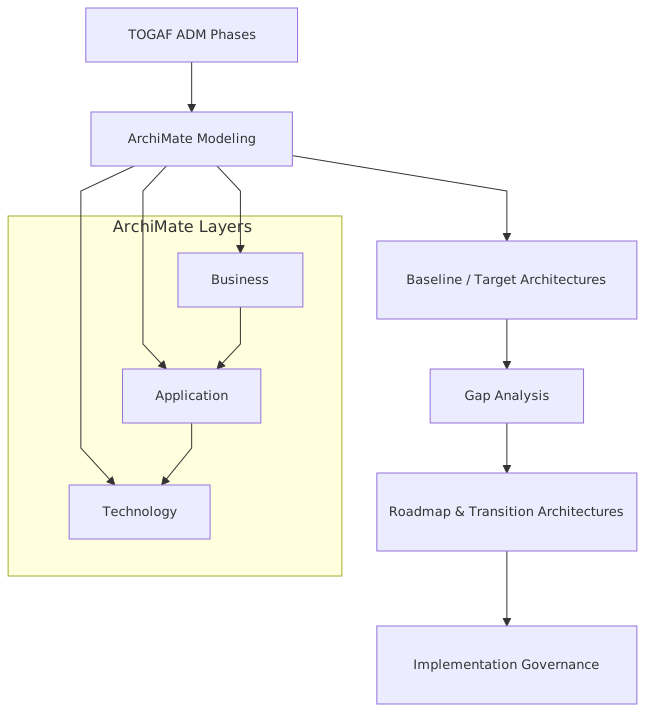
I’ll be blunt here. A lot of TOGAF work ends up as PowerPoint architecture. Nice phase outputs. Nice governance decks. Maybe even some capability maps and roadmaps. But the relationship between them is fuzzy. ArchiMate in TOGAF ADM
One slide says “improve customer onboarding.”
Another says “introduce event-driven integration.”
Another says “modernize IAM.”
Another says “adopt cloud-native services.”
Good luck understanding whether those are connected, what depends on what, and what breaks if one initiative slips by six months.
ArchiMate, used properly, gives TOGAF projects a backbone. It lets you show:
- which business capabilities need improvement
- which processes support those capabilities
- which application services enable those processes
- which data objects and events flow between systems
- which technology services and cloud components host the solution
- which work packages deliver the change
That end-to-end chain is where architecture becomes credible.
Where ArchiMate fits across TOGAF ADM phases
You do not need ArchiMate in the same depth in every ADM phase. That is one of the first practical lessons. ArchiMate modeling guide
Some architects treat every phase like a full modeling exercise. That is a mistake. The right use is selective and purposeful.
Here is a practical view.
Notice what is not in that table: “model everything.” Because that is how teams lose the room.
The best use of ArchiMate in TOGAF: decision views, not encyclopedias
This is probably my strongest opinion on the topic.
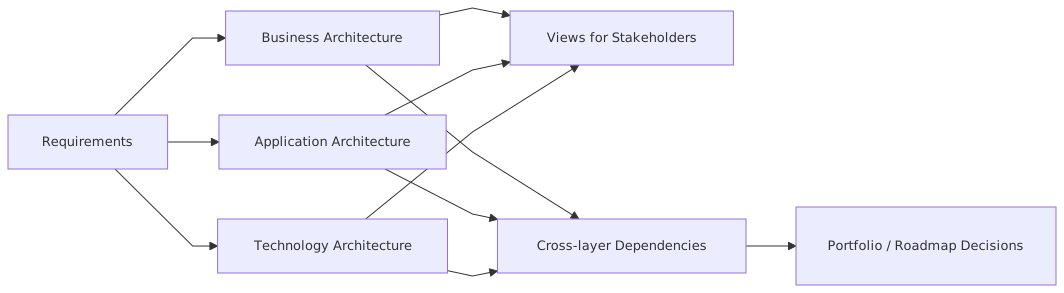
The best ArchiMate models are not giant repositories. They are curated views built to support specific architectural decisions.
An architect should be able to answer questions like:
- If we centralize IAM, what banking channels are affected?
- If Kafka becomes the integration backbone, which legacy point-to-point interfaces can be retired?
- If customer identity moves to cloud-hosted identity services, what regulatory controls change?
- If anti-money-laundering screening is event-driven, where do we guarantee delivery and auditability?
- If we decompose the loan origination platform, what business processes become operationally fragile?
Those are architecture questions. ArchiMate can help answer them because it supports relationships across layers. But the trick is to create views around those questions. ArchiMate tutorial
Not one giant “enterprise map.”
Not a wallpaper diagram.
A decision view.
That distinction separates useful architecture from decorative architecture.
A simple example before we go deeper
Imagine a bank wants to modernize customer onboarding.
Current state:
- branch and digital onboarding use different identity checks
- IAM is fragmented across channels
- the core banking platform is integrated through batch interfaces
- compliance checks happen late in the process
- cloud adoption is underway, but uneven
- Kafka is being proposed as the event backbone
Target state:
- one onboarding process across branch, mobile, and web
- centralized IAM for authentication, authorization, and consent
- Kafka for event distribution between onboarding, KYC, AML, CRM, and core banking
- selected services deployed in cloud
- clear controls for audit, identity lifecycle, and data access
TOGAF gives the method to develop baseline, target, gap analysis, transition architectures, and roadmap.
ArchiMate gives you the language to model:
- the business process “Customer Onboarding”
- the business service “Account Opening”
- the application services exposed by IAM, KYC, AML, CRM, and core banking
- event flows over Kafka
- data objects such as customer profile, consent, verification status
- cloud nodes and technology services
- work packages to implement the migration
That is the practical combination.
How this applies in real architecture work
This is where many articles go soft. They explain the notation and framework but skip the reality of enterprise delivery. Real architecture work is messy. Teams are siloed. Program managers want milestones. Security wants controls. Product teams want autonomy. Engineers want clarity. Executives want outcomes. Nobody wakes up wanting “better metamodel consistency.”
So how do you actually use ArchiMate in a TOGAF project?
1. Use it to align business and technology early
In Phase A and Phase B, ArchiMate helps avoid a classic failure mode: business architecture and technology architecture progressing as separate conversations.
Say the business says, “We want frictionless onboarding.”
Fine. That sounds nice. But what does it mean structurally?
You can model:
- the value stream from prospect to active customer
- business roles involved in onboarding
- business capabilities like Identity Verification, Consent Management, Risk Assessment
- the business processes that realize those capabilities
Then, before the project drifts into slogans, you connect those capabilities to application services and data.
Now the phrase “frictionless onboarding” is linked to actual changes in IAM, eventing, screening, customer master, and cloud deployment. Suddenly the architecture conversation becomes testable.
2. Use it to expose integration reality
Integration diagrams in enterprises are often lies by omission. They show arrows, but not semantics.
With ArchiMate, you can model whether:
- an application serves another through synchronous APIs
- business events are published through Kafka
- data objects are replicated or merely referenced
- a service depends on IAM at runtime
- cloud-hosted services consume technology services from a landing zone
This matters because migration risk lives in these details.
For example, if onboarding publishes a CustomerVerified event to Kafka, and AML screening, CRM, and account provisioning consume it, that is not just a line on a diagram. It has implications for:
- event schema governance
- replay strategy
- idempotency
- access control
- observability
- audit evidence
Architecture is not the same as software design, but enterprise architecture absolutely needs to represent the structures that create enterprise-level risk and dependency.
3. Use it to support transition architectures
A lot of TOGAF projects are weak on transition states. They define a current state and a beautiful target state, then pretend the migration is obvious.
It isn’t.
ArchiMate is especially useful here because it lets you model plateaus, gaps, and work packages. That means you can show:
- baseline onboarding with fragmented IAM and batch integration
- transition state with central IAM but partial Kafka adoption
- later transition with cloud-native onboarding services
- final target with event-driven orchestration and full audit traceability
This helps delivery teams understand what is intentionally temporary and what is foundational.
That alone can save a program.
Common mistakes architects make with ArchiMate in TOGAF projects
Let’s talk about the mistakes. These are common, and frankly, predictable.
Mistake 1: Modeling the metamodel instead of the enterprise
This is the classic one. Architects become obsessed with correctness of notation and lose sight of usefulness.
Yes, semantic precision matters. No, it is not the point.
If your audience cannot understand the architecture implications of replacing a legacy IAM platform because you are lost in notation purity, you have failed. Better a slightly simplified but decision-useful view than a perfectly modeled diagram nobody can interpret.
Mistake 2: Trying to model everything
You do not need every application component, every interface, every data object, every server, every actor, every role. That path leads to stale models and exhausted teams.
Model only what is needed to answer the architectural question at hand.
This is a hard discipline. Architects often confuse completeness with value. They are not the same.
Mistake 3: Mixing baseline, target, and aspiration into one view
This happens constantly. One diagram includes current systems, target services, planned cloud platforms, and some strategic principles floating in the corner. It becomes impossible to tell what exists, what is approved, and what is speculative.
Separate your views. Be explicit about state and time. TOGAF is about managed change, not fantasy landscapes.
Mistake 4: Ignoring stakeholders and producing architect-only diagrams
An ArchiMate view for a security architect should not look the same as one for a COO or a domain lead. Yet many teams produce one canonical diagram and expect everyone to decode it.
Bad idea.
Create stakeholder-specific views:
- executive view focused on capabilities, outcomes, and work packages
- delivery view focused on applications, interfaces, and dependencies
- security view focused on IAM, trust boundaries, and control points
- operations view focused on runtime services, cloud dependencies, and resilience
The model can be one repository. The views should not be one-size-fits-all.
Mistake 5: Treating ArchiMate as a replacement for thinking
A model does not make an architecture coherent. It only reveals whether it is.
This is worth repeating. ArchiMate is not a substitute for judgment. It does not tell you whether Kafka is actually the right integration choice, whether cloud is appropriate for a regulated workload, or whether your IAM centralization creates a dangerous concentration of failure. Those are architecture decisions. The model helps you analyze them. It does not make them for you.
Mistake 6: No tie back to implementation governance
Some architecture teams model beautifully during design, then disappear once delivery starts. That is a TOGAF anti-pattern.
If the ArchiMate model is not used during implementation governance, solution reviews, exception handling, and change control, then it becomes shelfware. The point is to maintain traceability through execution, especially when teams deviate from target designs under schedule pressure.
And they will.
A real enterprise example: retail banking onboarding modernization
Let’s make this concrete.
A mid-sized retail bank had three onboarding journeys:
- branch-assisted
- mobile app
- broker-assisted for small business accounts
Each channel had different identity proofing, different entitlement logic, and different integration paths into core banking. IAM was split across an old access management stack, channel-specific user stores, and a newer cloud identity service used only for digital channels. Compliance checks were stitched together. CRM was updated asynchronously through overnight jobs. There was no reliable event backbone.
The executive ambition was familiar:
- reduce onboarding time
- improve compliance consistency
- support omnichannel onboarding
- prepare for cloud migration
- enable better reuse across product lines
What the TOGAF project did right
The architecture team used TOGAF ADM in a practical way:
- Phase A: defined the problem, stakeholders, and architecture vision
- Phase B: mapped capabilities and onboarding business processes
- Phase C: modeled the fragmented application landscape and data handoffs
- Phase D: described the target cloud and integration platforms
- Later phases: defined transition architectures and a migration roadmap
This part was fairly standard.
Where ArchiMate made the difference
The team created a small set of purposeful views.
View 1: Capability to process to application traceability
This showed that “Customer Onboarding” depended on:
- Identity Verification
- Consent Management
- AML Screening
- Product Eligibility
- Account Provisioning
And those capabilities were realized by a mess of applications, some duplicated across channels.
That immediately exposed a governance problem: every channel had its own interpretation of identity and consent.
View 2: Event-driven target integration
This model showed Kafka as the event backbone connecting:
- onboarding orchestration
- IAM services
- KYC/AML engines
- CRM
- customer master
- core banking account creation
The key value was not that it looked modern. The value was that the team could reason about event ownership, sequencing, and audit requirements. They identified that IdentityValidated, ConsentCaptured, ScreeningCompleted, and AccountOpened were enterprise-significant events, not just technical messages.
That changed the design conversation.
View 3: IAM dependency and trust view
This one was critical. The bank planned to centralize authentication and authorization into a modern IAM platform, partly cloud-hosted. The ArchiMate view connected:
- customer-facing channels
- IAM services
- policy decision points
- customer identity store
- privileged admin flows
- audit services
- regulatory control requirements
This exposed two risks:
- a hidden dependency between broker-assisted onboarding and an old LDAP directory that nobody had included in the roadmap
- a potential single point of failure in token validation during peak onboarding periods
Without the model, those issues would likely have appeared late, during testing or cutover planning.
View 4: transition architecture roadmap
The bank did not move to the target in one step.
Transition 1:
- central IAM for digital channels
- Kafka introduced for onboarding events only
- branch process still integrated through existing middleware
Transition 2:
- branch and broker channels onboarded to common IAM
- CRM and customer master consume Kafka events
- consent service centralized
Transition 3:
- account opening and compliance orchestration moved to cloud-hosted services
- old point-to-point interfaces retired
- policy controls standardized
That sequence mattered. It respected operational reality.
What went wrong anyway
Let’s not romanticize it.
The project still hit issues:
- business teams underestimated process harmonization effort
- Kafka governance was weak at the start, with inconsistent topic ownership
- the IAM team initially designed for authentication only, not lifecycle and authorization complexity
- cloud landing zone constraints were discovered late by one delivery team
But because the architecture models connected business capabilities, application services, events, and technology dependencies, those issues were easier to isolate and resolve. The models became negotiation tools, not just documentation.
That is what good architecture artifacts do.
Banking, Kafka, IAM, and cloud: what architects often miss
These examples show up in many enterprise programs now, but they are often modeled superficially.
Kafka is not “just integration”
Architects love to draw Kafka in the middle of everything, as if event streaming magically fixes enterprise coupling. It does not. It changes the coupling.
You still need to model:
- who owns the event
- what business fact it represents
- which consumers depend on it
- what ordering guarantees matter
- where replay is allowed
- which controls apply to sensitive payloads
- how IAM governs producer and consumer access
In ArchiMate terms, don’t just model Kafka as a technology node and call it a day. Represent the application cooperation and business significance around the events. Otherwise you are drawing infrastructure, not architecture.
IAM is not a security box on the edge
This is another common sin. IAM gets placed on a diagram like a gatekeeper at the perimeter. In reality, IAM is deeply entangled with business process, compliance, customer experience, operational resilience, and data governance.
In a TOGAF project, ArchiMate should help you show IAM as:
- an enabler of business services
- a runtime dependency for application services
- a source of policy enforcement
- a control mechanism tied to audit and compliance
- a transformation domain with migration implications
If you treat IAM as a technical sidecar, you will get nasty surprises during implementation.
Cloud is not the target architecture
Cloud is a hosting and operating model choice, not a business architecture.
Strange that this still needs saying, but many roadmaps effectively say “move to cloud” as if that is a target state by itself. It isn’t. Your target architecture should describe improved capabilities, better operating models, reduced risk, or faster product change. Cloud may enable those outcomes. It is not the outcome.
ArchiMate helps here because it can force separation between:
- business architecture changes
- application architecture changes
- technology deployment changes
That separation is healthy. It stops cloud enthusiasm from masquerading as strategy.
A practical modeling approach that actually works
If I were advising a TOGAF project team starting tomorrow, I would suggest this approach.
Keep one repository, publish a few views
Maintain a coherent model in a repository, but only publish the views needed for decisions and governance. Usually 8–15 views are enough for a major initiative.
Start with business capability and value flow
Before going deep into applications, model the capabilities and business flows that matter. Otherwise the architecture becomes a technical inventory exercise.
Add only the application and data elements needed for traceability
You need enough detail to connect capability to implementation, not enough to replace a CMDB or engineering catalog.
Model integration semantics explicitly
For Kafka, APIs, batches, and files, be clear about interaction style and dependency. “Connected” is not specific enough.
Use transition architectures seriously
Most enterprise pain sits in transition states. Model them with discipline.
Review models with delivery teams
If engineers, security leads, and product owners cannot validate the architecture views, they are probably wrong or too abstract.
Tie every major work package to an architectural outcome
Do not let implementation planning drift into generic platform work detached from business value.
Contrarian thought: sometimes ArchiMate is too much
Here’s the part some architecture people won’t like.
Sometimes ArchiMate is overkill.
If you are dealing with a narrow solution scope, a mature engineering organization, and a small stakeholder set, simpler diagrams may be enough. Not every project needs full ArchiMate formality. And not every team has the modeling skill to use it well.
There, I said it.
The answer is not to force ArchiMate everywhere. The answer is to use it where cross-domain traceability matters, where change is enterprise-wide, where governance needs rigor, and where stakeholders need a common language.
TOGAF projects, especially large ones, usually meet that threshold. But architects should resist the temptation to impose notation because they can. Method should serve architecture, not the other way around.
That is a mature stance, not a compromise.
What good looks like
A good use of ArchiMate in a TOGAF project has a few visible characteristics:
- stakeholders can understand the views relevant to them
- baseline, target, and transition states are clearly separated
- business capabilities link to applications, data, and technology in a traceable way
- major risks and dependencies become easier to discuss
- implementation governance uses the models, not just the design phase
- the architecture repository stays lean enough to maintain
- the notation supports decisions instead of dominating them
If you achieve that, ArchiMate becomes a serious asset. If not, it becomes another architecture burden.
And enterprises already have enough of those.
Final thought
The real value of ArchiMate in TOGAF projects is not visual consistency. It is disciplined clarity. It helps architects connect strategy to execution without hand-waving. It reveals dependency, exposes ambiguity, and supports migration planning in a way ad hoc diagrams usually cannot.
But let’s be honest about the trade-off. It also demands restraint, judgment, and a willingness to model only what matters.
That is why some teams fail with it. They treat it as a notation exercise. The better teams use it as a thinking tool.
In banking transformations, cloud migrations, IAM modernization, and Kafka-based integration programs, that difference is enormous. One approach produces architecture documents. The other produces architecture decisions.
And if you have been in enough enterprise programs, you know which one survives contact with reality.
FAQ
1. Is ArchiMate required to run a TOGAF project properly?
No. TOGAF does not require ArchiMate. But for complex enterprise change, ArchiMate is often the best practical way to make TOGAF outputs coherent and traceable across business, application, data, and technology domains.
2. How detailed should ArchiMate models be in a TOGAF engagement?
Detailed enough to support decisions, not detailed enough to model the whole universe. Start with capabilities, processes, applications, integrations, and key technology dependencies. Add depth only where risk, cost, or complexity justify it.
3. How does ArchiMate help with Kafka-based architectures?
It helps model more than the platform itself. You can show which business events matter, which applications publish and consume them, how processes depend on them, and what transition states exist as point-to-point integrations are retired.
4. How should IAM be represented in ArchiMate for enterprise architecture?
As more than a security component. Model IAM as a set of services and dependencies that support business processes, enforce policy, control access, and influence migration sequencing. In regulated sectors like banking, this is essential.
5. What is the most common failure when combining TOGAF and ArchiMate?
Using ArchiMate to create static documentation instead of actionable views. If the models do not help with roadmap decisions, governance reviews, dependency analysis, or stakeholder alignment, they are probably too abstract or too bloated.
Frequently Asked Questions
What is TOGAF used for?
TOGAF (The Open Group Architecture Framework) provides a structured approach to developing, governing, and managing enterprise architecture. Its Architecture Development Method (ADM) guides architects through phases from architecture vision through business, information systems, and technology architecture to migration planning and governance.
What is the difference between TOGAF and ArchiMate?
TOGAF is a process framework — it defines how to develop, govern, and manage enterprise architecture. ArchiMate is a modeling language — it defines how to represent and communicate architecture content. They are designed to work together: TOGAF provides the method, ArchiMate provides the notation for producing TOGAF deliverables.
Is TOGAF certification worth it?
TOGAF certification (Foundation and Practitioner) is widely recognised by employers and is particularly valued in consulting, financial services, government, and large enterprise environments. Foundation validates understanding of TOGAF concepts; Practitioner validates the ability to apply them. Combined with ArchiMate and tool skills (Sparx EA), it significantly strengthens an enterprise architect's profile.