⏱ 21 min read
ArchiMate Business Architecture Diagram Example | Business Layer Modeling Guide
Explore an ArchiMate business architecture diagram example and learn how to model business actors, roles, processes, services, and value streams for clearer enterprise architecture communication. ArchiMate tutorial for enterprise architects
ArchiMate business architecture diagram example, ArchiMate business layer, business architecture diagram, ArchiMate example, enterprise architecture modeling, ArchiMate business process, business actors and roles, ArchiMate business services, ArchiMate value stream, TOGAF ArchiMate, enterprise architecture diagram, business architecture modeling ArchiMate layers explained
Introduction
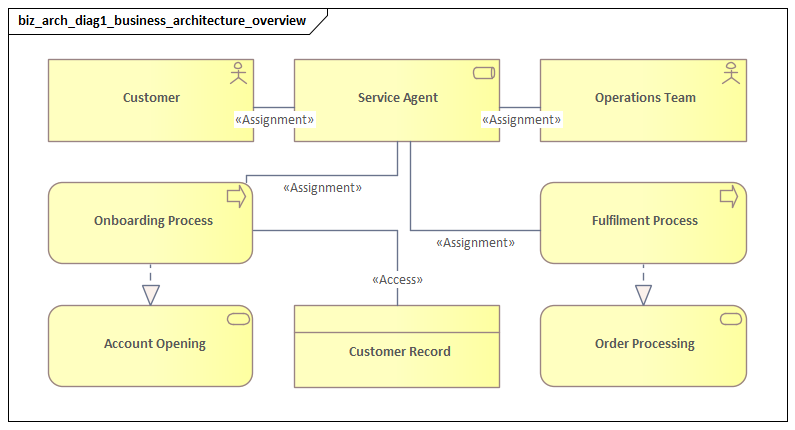
An ArchiMate business architecture diagram shows how an organization delivers value, assigns responsibility, and exposes services to customers and internal stakeholders. Its strength lies in combining structure, behavior, and service exposure in one coherent view. Rather than treating departments, workflows, and information as separate artifacts, it connects them in a way that supports analysis, communication, and change. ArchiMate relationship types
At the business layer, ArchiMate provides a compact set of concepts: actors, roles, collaborations, processes, functions, services, interfaces, products, events, and business objects. Each serves a distinct purpose. Some identify who is involved. Others describe what work is performed, what is visible to a consumer, or what information is created and used. Because those distinctions are explicit, architects can trace how a service is realized, where accountability sits, and which dependencies shape delivery. ArchiMate modeling best practices
That is what sets ArchiMate apart from many standalone business artifacts. A process map can show sequence, but usually says little about ownership or service exposure. An organization chart shows reporting lines, not how value is delivered. A capability map identifies what the enterprise must be able to do, but often stops short of showing how those abilities operate in practice. ArchiMate connects those perspectives. It can show, for example, how a customer onboarding service is realized by several business processes, performed by specific roles, and supported by business objects such as applications, agreements, and verification records.
The practical benefit is shared understanding. Executives can see service ownership, operating dependencies, and opportunities for standardization. Operational leaders can clarify handoffs, controls, and accountability. Architects and delivery teams can use the same model to understand where applications, automation, and integration support the business design. In transformation work, that common language is often more valuable than the notation itself.
A good business architecture diagram is selective. It should capture the essential design of the business at the right level of abstraction, not every workflow step or organizational nuance. The sections that follow define the core concepts in an ArchiMate business view, apply them in a customer onboarding example, and show how the same model supports value-stream mapping, stakeholder communication, and architectural decision-making.
Understanding ArchiMate in Business Architecture
ArchiMate is an enterprise architecture modeling language developed by The Open Group. In business architecture, its value comes from consistency and traceability. It gives architects a standard way to model business structure and behavior, while still allowing those models to connect to strategy, applications, and technology when needed.
That matters because business change rarely stays within one domain. A new customer service may require process redesign, role reassignment, policy updates, application changes, and additional controls. Without a common modeling language, those changes tend to be documented in separate artifacts maintained by different teams. ArchiMate gives the enterprise a way to hold those relationships together.
It is also important to be clear about what ArchiMate is not. It is not just a process notation, and it is not simply an organization model. Traditional process models are useful for workflow detail, but they often blur the distinction between internal activity and externally visible service. Organization charts show reporting structures, but not value delivery. ArchiMate fills that gap by distinguishing:
- actors from roles
- processes from services
- internal execution from external value
- business objects from the behaviors that create or use them
Those distinctions improve analysis. If a company wants to outsource part of its operation, the key question is not only which process changes, but which role is reassigned and whether the service definition stays stable. If the enterprise wants to digitize a customer journey, the issue is not just which tasks can be automated, but which interfaces expose the service and which business objects require validation.
A realistic example is IAM modernization. An architecture board reviewing a new access governance platform may need to decide whether identity proofing, access approval, and entitlement review remain separate business responsibilities or move into a shared governance service. The technology decision matters, but the business design comes first. ArchiMate makes that visible.
Another advantage is viewpoint flexibility. The same underlying model can support different audiences without producing contradictory diagrams. A business sponsor may need a service-centric view. An operations manager may need a role-and-handoff view. A solution architect may need to see which applications support the business service. Because the concepts remain consistent, those views can stay aligned with one another.
The purpose of an ArchiMate business diagram is not documentation for its own sake. It should help answer practical questions such as:
- What service does the business provide?
- Which roles are responsible for delivering it?
- Which processes realize it?
- Which business objects are created, used, or exchanged?
- Where are the dependencies, bottlenecks, or opportunities for redesign?
When the model helps answer those questions, it becomes architecture rather than illustration.
Core Elements of an ArchiMate Business Architecture Diagram
The business layer of ArchiMate uses a manageable set of elements. A good model does not use every available concept. It uses the right concept for the question at hand.
1. Structural elements
Structural elements describe who is involved and how responsibility is organized.
- Business Actor: an organizational entity capable of behavior, such as a branch office, operations center, supplier, or partner
- Business Role: a responsibility carried out by an actor, such as Customer Advisor, Claims Assessor, or Account Manager
- Business Collaboration: two or more roles or actors working together to deliver a shared outcome
The distinction between actor and role is especially important. Roles often remain stable when the organization changes. A role can be centralized, reassigned, or outsourced without changing the business design itself. That is why role-based modeling is more durable than simply drawing departments.
2. Behavioral elements
Behavioral elements describe what work is performed.
- Business Process: a sequence of activities that produces a defined result
- Business Function: behavior grouped by expertise or specialization rather than sequence
- Business Interaction: behavior carried out jointly by multiple roles or actors
- Business Event: something that triggers or influences business behavior, such as an application submission or payment failure
In practice, processes are useful when flow and outcome matter, while functions are useful when stable areas of responsibility matter more than sequence. Events are often underused, even though they add essential context by showing why work starts, changes, or branches.
A simple micro-example comes from claims operations. A Claim Submitted event may trigger intake, triage, and fraud screening. The business architecture should capture the meaning of that event and the business response, while leaving the implementation detail of event brokers or orchestration tools to lower layers.
3. Service and value elements
These elements describe what the business exposes to customers or internal consumers.
- Business Service: the externally or internally visible behavior offered by the business
- Business Interface: the access point through which a service is exposed, such as a portal, branch desk, or service center
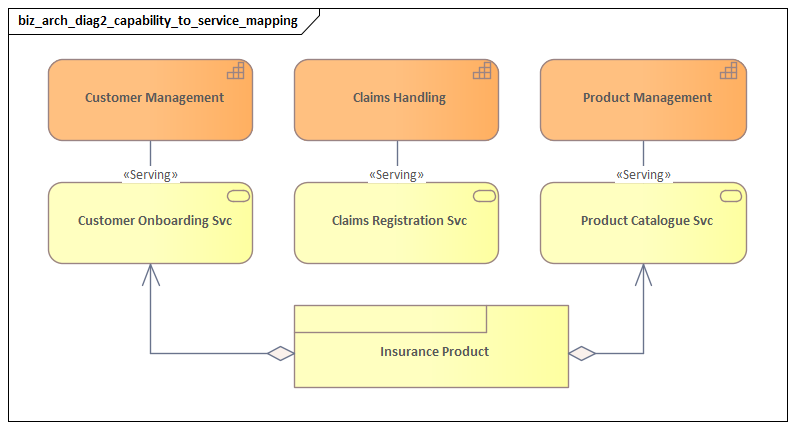
- Product: a packaged offering that combines one or more services with commercial or contractual meaning
One of the most important distinctions in ArchiMate is the difference between a process and a service. A process describes how work is performed internally. A service describes what is made available to a consumer. The service may remain stable even if the process is redesigned.
4. Information-related elements
These elements describe the business information or artifacts involved in the work.
- Business Object: a meaningful business thing, such as an application, invoice, claim, or customer profile
- Representation: a human-readable or consumable form of a business object, such as a statement or confirmation email
- Contract: a formal agreement that defines obligations or service conditions
Business objects often reveal where operational problems really sit. Delays that appear to be process issues may turn out to be incomplete documentation, duplicate reviews, or unclear ownership of records.
5. Relationships that matter most
Even a simple business architecture view becomes more useful when the relationships are explicit. Typical relationships include:
- an actor is assigned to a role
- a role performs a process
- a process realizes a service
- a service is exposed through an interface
- a process creates or uses a business object
- an event triggers a process
- a product bundles one or more services
These relationships provide the structure for the example that follows.
Step-by-Step Example: Customer Onboarding in a Retail Bank
To make the notation concrete, consider a simplified customer onboarding scenario for a retail bank. The example starts with the externally visible service and then works inward to roles, processes, events, and business objects.
Step 1: Define the business service
Begin with the customer-facing outcome: Customer Onboarding Service.
This service expresses what the bank provides to a prospective customer: the ability to apply, be verified, and become an active customer. Starting with the service keeps the model anchored in value rather than internal activity.
Step 2: Identify the interfaces
Next, show how the service is accessed:
- Online Banking Portal
- Branch Service Desk
These are business interfaces. Separating interfaces from the service is useful because channels can change without changing the service itself. A bank may add mobile onboarding or partner-assisted onboarding while keeping the same business service.
Step 3: Define the roles and actors
Now identify the responsibilities involved:
- Customer Advisor
- Compliance Officer
- Account Setup Specialist
These are business roles. They may be assigned to actors such as:
- Retail Banking Division
- Shared Operations Center
This distinction matters when the operating model changes. If onboarding is centralized, the actors may change while the roles remain stable.
Step 4: Model the processes that realize the service
A high-level onboarding flow might include:
- Capture Application
- Perform Identity Verification
- Assess Compliance Risk
- Activate Customer Account
These are business processes. They realize the onboarding service. At this level, the aim is not workflow detail but architectural clarity: what major behaviors are required, and which roles perform them?
A simple mapping might be:
- Customer Advisor performs Capture Application
- Compliance Officer performs Assess Compliance Risk
- Account Setup Specialist performs Activate Customer Account
Step 5: Add the business objects
The key business objects could include:
- Customer Application
- Identity Evidence
- Risk Assessment Record
- Account Agreement
These objects show what information is created, reviewed, and handed off. They often reveal where delays and controls really sit. Identity verification, for example, may stall not because the process is unclear, but because identity evidence is incomplete or inconsistent.
Step 6: Introduce events
To show triggers and decision points, add events such as:
- Application Submitted
- Verification Failed
- Compliance Review Required
- Account Activated
These business events show why processes begin and where exceptions occur. In regulated environments, exception handling often shapes the operating model more than the happy path does.
A realistic extension is event-driven downstream processing. Once Account Activated occurs, the bank may publish a business event that triggers card issuance, welcome communications, and fraud monitoring. The business architecture should capture the event and its meaning; the Kafka topics and technical consumers belong in the application and technology layers.
Step 7: Review the diagram against a real decision
An ArchiMate diagram should help answer a decision-making question. In this case, the bank might ask:
- Which onboarding steps can be digitized?
- Which roles remain manual?
- Which business objects require compliance validation?
- Which channels use different variants of the same process?
- What changes if identity verification is outsourced?
Because the model separates services, interfaces, roles, processes, and objects, those questions can be answered without rebuilding the view from scratch.
Example narrative of the full model
Taken together, the model says this:
The bank offers a Customer Onboarding Service through the Online Banking Portal and Branch Service Desk. The service is realized by the processes Capture Application, Perform Identity Verification, Assess Compliance Risk, and Activate Customer Account. These processes are performed by the roles Customer Advisor, Compliance Officer, and Account Setup Specialist, assigned to the Retail Banking Division and Shared Operations Center. The processes create and use the business objects Customer Application, Identity Evidence, Risk Assessment Record, and Account Agreement. The overall flow is triggered by Application Submitted and may branch on events such as Verification Failed or Compliance Review Required.
That is a compact but meaningful business architecture view. It shows service delivery, accountability, and information flow without collapsing everything into a process map.
Mapping Processes, Roles, Services, and Value Streams
The onboarding example becomes more useful when linked to value creation. ArchiMate distinguishes internal execution from externally perceived value, which makes it a good companion to value-stream thinking.
A value stream describes how value progresses from a stakeholder’s perspective. In the onboarding scenario, stages might be:
- Prospect Engaged
- Application Received
- Identity Confirmed
- Risk Approved
- Account Activated
These stages are not the same as processes. They show value progression, not internal procedure. Several processes may support one stage, and one process may contribute to more than one stage.
Mapping the onboarding example to value stream stages
Using the earlier model:
- Prospect Engaged may involve the onboarding service being exposed through the portal or branch interface
- Application Received is supported by Capture Application and the creation of the Customer Application object
- Identity Confirmed is supported by Perform Identity Verification using Identity Evidence
- Risk Approved is supported by Assess Compliance Risk and the Risk Assessment Record
- Account Activated is supported by Activate Customer Account and the completion of the Account Agreement
This mapping connects business architecture to customer value. It also helps reveal where internal complexity slows visible progress.
Why this mapping matters
When processes, roles, services, and value stages are shown together, several kinds of analysis become possible.
1. Redundant process variants
Different channels may use different internal processes to achieve the same value stage. Branch onboarding and digital onboarding may both support Application Received but use separate validation steps. That often points to unnecessary duplication.
2. Role bottlenecks
A single specialist role may sit across multiple value stages. In this example, the Compliance Officer may become a bottleneck if all exceptions route through that role.
3. Service rationalization
The bank may discover that what different teams call separate services are really parts of one broader onboarding service. It may also identify a reusable sub-service, such as identity verification, that should be managed more explicitly.
4. Stronger linkage to application architecture
Applications can be mapped not only to processes, but also to the services and value stages they support. That creates a better basis for prioritizing technology change.
A practical transformation use case
Suppose leadership wants to improve onboarding speed. A process-only view might suggest automating form entry. A value-stream-aware business architecture view may show that the real delay sits between Identity Confirmed and Risk Approved, where incomplete evidence leads to repeated review. In that case, the better intervention may be stronger document validation at the interface, not simply faster process execution.
A similar pattern appears in healthcare scheduling. A hospital may initially focus on accelerating referral intake, only to find that the real bottleneck sits in insurance authorization. The value stream makes the delay visible; the business architecture shows which service, role, and business objects are involved.
Common Modeling Patterns, Pitfalls, and Best Practices
Once the core concepts are clear, the next challenge is applying them consistently. Weak business architecture diagrams usually fail for familiar reasons: concepts are mixed, the abstraction level shifts from one area to another, or the model has no clear purpose.
Effective modeling patterns
1. Service realization pattern
This is the pattern used in the onboarding example. Start with a business service, then trace back to the processes, roles, and objects that realize it. It keeps the model anchored in outcomes.
2. Role-responsibility pattern
Separate actors from roles and show assignment clearly. This is particularly useful for restructuring, outsourcing, and shared services because the business design remains stable even if the organization changes.
A practical example is finance operations. A global company may move the Invoice Resolution Specialist role from regional business units into a shared service center. The actor changes; the role, process, and service definition do not.
3. Collaboration and handoff pattern
Instead of modeling one large departmental process, show where multiple roles collaborate and which business objects pass between them. This often reveals hidden dependencies and delays.
4. Event-driven pattern
Use business events to show triggers, exceptions, and control points. This is especially useful in regulated environments or high-volume operations. The implementation may later use event brokers such as Kafka, but the business architecture should first make clear which events matter and why.
Common pitfalls
1. Overloading the process concept
A common mistake is to use processes to represent everything: outcomes, services, capabilities, and responsibilities. If everything becomes a process, ownership and service impact are harder to analyze.
2. Modeling the organization chart
A business architecture diagram should show how value is delivered, not just who reports to whom. Departments may appear as actors, but the model should not collapse into a reporting structure.
3. Mixing abstraction levels
A high-level service should not sit beside detailed task logic and work instructions in the same view. If the audience needs operational detail, use a complementary process model. Keep the ArchiMate view focused.
4. Ignoring business objects
Many diagrams show actors and processes but omit the objects being created or exchanged. That removes a major source of analytical value, especially when diagnosing controls, delays, or duplication.
5. Creating one diagram per audience with no common baseline
Different stakeholders need different views, but those views should come from the same underlying model. Otherwise, teams end up with conflicting representations of the same business area.
Best practices
Model to answer a stakeholder question
Every diagram should support a decision. Typical questions include:
- How can this service be digitized?
- Which roles can be centralized?
- Where do handoffs create delay?
- Which services are duplicated across business units?
Use disciplined naming
- Services should be named as offerings or outcomes
- Processes should use action-oriented names
- Roles should describe responsibilities, not department titles
Clear naming improves model quality and makes review easier.
Keep the view small and purposeful
A readable diagram with a clear point is more useful than a comprehensive but crowded one. Include only the elements needed to answer the architecture question.
Reuse concepts across views
If Customer Onboarding Service exists in one view, it should be the same service in another. Reuse improves consistency and governance.
Validate with business stakeholders
A technically correct model that business leaders do not recognize is of limited value. Review the diagram with the people who own or perform the work.
In practice, governance matters here as much as notation. One insurer, for example, used architecture review checkpoints to prevent three business units from modeling slightly different versions of the same claims intake service. The review did not slow delivery; it stopped service fragmentation before it became embedded in systems and reporting.
Using the Diagram for Stakeholder Communication and Strategic Alignment
The same qualities that make an ArchiMate diagram analytically useful also make it effective for communication. Because the model separates services, roles, processes, and objects, different stakeholders can discuss the same business design from different angles without talking past one another.
A shared picture for different audiences
- Executives care about services, ownership, cost, risk, and strategic change
- Operational leaders care about responsibilities, controls, throughput, and handoffs
- Technology teams care about dependencies, integration points, and change impacts
A well-structured business architecture diagram gives each group a relevant view of the same underlying model.
Translating strategy into operating design
Strategies often remain abstract until they are translated into concrete business changes. For example:
- a strategy to expand digital channels may require new business interfaces
- a strategy to improve responsiveness may require redesigned processes and clearer role ownership
- a strategy to standardize operations may require consolidation of duplicate services or reassignment of actors to stable roles
Because these concepts are distinct, the diagram supports a more disciplined discussion about what strategy execution actually means.
Supporting planning and delivery
In practice, the business architecture diagram should function as a decision support model. That means:
- portfolio managers can identify which business services merit investment
- business leaders can test whether proposed changes preserve accountability and value
- delivery teams can see where process redesign, policy updates, or application changes are required
- architecture review boards can evaluate whether a solution aligns with the intended business design
A realistic example is technology lifecycle governance. Consider a legacy identity platform nearing end of support. A system inventory may show one application dependency; a business architecture view may show something much broader: access request services, approval roles, audit controls, and compliance reporting all depend on that platform. The replacement decision is no longer just technical debt management. It becomes an operating model decision with business risk implications.
Another example is event architecture in customer operations. An architecture board may approve a Kafka-based approach for onboarding notifications because it supports timely downstream action without changing the business service definition. The same board may reject a proposal that introduces a second customer activation service with overlapping ownership. The issue is not the technology pattern alone. It is whether the business design stays coherent.
Tailoring views without losing consistency
Different audiences should not be given unrelated diagrams. Instead, derive audience-specific views from the same model:
- an executive view emphasizing services, products, and ownership
- an operations view emphasizing roles, collaborations, and handoffs
- a transformation view highlighting pain points, duplication, or automation candidates
- a solution view linking business services to applications and data
This approach preserves consistency while making the model easier to use.
Making trade-offs explicit
One of the most valuable uses of the diagram is its ability to make trade-offs visible. For example:
- centralization may improve efficiency but concentrate expertise in one role
- a new digital interface may improve customer access but require stronger validation of business objects
- standardizing a service may reduce cost but limit local process flexibility
- extending the life of a legacy platform may reduce short-term spend but increase operational risk and constrain future change
When those relationships are visible, decisions become better informed. Stakeholders can debate the design itself rather than isolated process steps or system features.
In that sense, the ArchiMate business architecture diagram is not just documentation. It is a working instrument for aligning strategy, operations, and change.
Conclusion
An ArchiMate business architecture diagram is most useful when it makes business design explicit: what services the enterprise provides, which roles are responsible, which processes realize those services, which business objects are involved, and where events, handoffs, and dependencies shape outcomes.
The central discipline is simple. Keep the concepts distinct so the model remains useful. A service is not a process. A role is not an actor. A value stream stage is not the same as an internal activity. A business object is not background detail. Those distinctions are what allow the diagram to support analysis, communication, and change.
The customer onboarding example showed how that works in practice. Starting from the service and then linking interfaces, roles, processes, events, and objects creates a model that is compact yet decision-ready. Extending that model into value-stream mapping makes it more effective for transformation planning, service rationalization, and stakeholder alignment.
The goal is not to produce the most detailed diagram. It is to produce the most useful one. A clear ArchiMate business architecture view helps an organization understand how value is delivered today and how it can be redesigned tomorrow with greater confidence and control.
Frequently Asked Questions
What is enterprise architecture?
Enterprise architecture is a discipline that aligns an organisation's strategy, business operations, information systems, and technology infrastructure. It provides a structured framework for understanding how an enterprise works today, where it needs to go, and how to manage the transition.
How is ArchiMate used in enterprise architecture practice?
ArchiMate is used as the standard modeling language in enterprise architecture practice. It enables architects to create consistent, layered models covering business capabilities, application services, data flows, and technology infrastructure — all traceable from strategic goals to implementation.
What tools are used for enterprise architecture modeling?
Common enterprise architecture modeling tools include Sparx Enterprise Architect (Sparx EA), Archi, BiZZdesign Enterprise Studio, LeanIX, and Orbus iServer. Sparx EA is widely used for its ArchiMate, UML, BPMN and SysML support combined with powerful automation and scripting capabilities.