⏱ 19 min read
Most enterprise architecture teams did not kill UML because UML was useless. They killed it because they used it badly. UML modeling best practices
That’s the uncomfortable truth.
In a lot of companies, UML became the visual language of delay. Endless diagrams. Review cycles with twelve people. Models no engineer trusted. Architecture decks that looked polished and said almost nothing about what would actually break in production. Then Agile arrived, then DevOps, and UML got pushed into the same mental bucket as heavyweight governance and PMO theater. UML for microservices
I think that was a mistake.
The real problem was never UML itself. The problem was treating UML as a deliverable instead of a working tool. If you use UML as static documentation produced before delivery, yes, it becomes dead weight. If you use it as a lightweight modeling language inside Agile and DevOps workflows, it becomes one of the most practical tools an architect has. Especially in enterprise environments where systems are distributed, regulated, event-driven, and full of identity, integration, and cloud complexity.
And let’s be honest: if you are designing banking platforms with Kafka, IAM dependencies, cloud-native services, multiple risk controls, and audit obligations, “just talk to the team” is not enough. People need shared visual thinking. They need a way to reason about structure, behavior, trust boundaries, and operational consequences. UML still does that very well, if you stop trying to turn it into a museum piece.
The simple version
Here’s the short explanation up front.
Integrating UML with Agile and DevOps means using small, useful diagrams to support fast delivery, not to slow it down.
That usually means:
- using UML diagrams to clarify architecture decisions during backlog refinement, design spikes, and sprint planning
- keeping diagrams close to code, pipelines, and runbooks
- updating only diagrams that help teams build, secure, and operate systems
- treating diagrams as living assets tied to change, not one-time project artifacts
In practice, UML fits Agile and DevOps when it helps teams answer questions like:
- What are the main services and dependencies?
- Where does identity and authorization happen?
- What events flow through Kafka, and what happens when consumers fail?
- Which cloud components are runtime-critical?
- What sequence of steps creates customer risk, fraud risk, or operational risk?
- What changed, and what do we need to test and deploy safely?
That’s it. No religion required.
Why this matters more now than ten years ago
A lot of people assume Agile and DevOps reduced the need for architecture modeling. The opposite is true.
Modern enterprise systems are harder to reason about than the old monoliths everyone likes to mock. Today we have:
- dozens or hundreds of microservices
- asynchronous event backbones like Kafka
- IAM layers with OAuth2, OIDC, SAML, service identities, and policy enforcement
- cloud-native infrastructure with ephemeral workloads
- data residency and compliance constraints
- platform teams and product teams moving at different speeds
- CI/CD pipelines deploying partial system changes continuously
This creates a nasty problem: local change is easy, systemic understanding is hard.
Developers can ship one service quickly. But who sees the cross-domain effect? Who notices that a new claims event on Kafka changes fraud scoring behavior downstream? Who spots that a token exchange pattern introduces a hidden dependency on an IAM availability zone? Who understands that a cloud failover breaks a sequence assumption in a payment authorization flow?
That is architecture work. And architecture work needs representations. Not giant repositories of abstract models. Useful representations.
UML, used properly, gives you a disciplined way to express things many teams otherwise leave fuzzy.
The part people get wrong: UML is not the architecture
This is where architects often embarrass themselves.

They act as if producing UML diagrams means they have “done architecture.” No. A diagram is evidence of thinking, not the thinking itself. Worse, some architects hide weak reasoning behind diagram density. If your sequence diagram has 47 steps but nobody can explain the failure modes, you are not being rigorous. You are decorating uncertainty.
The right posture is simpler:
- architecture decisions come first
- UML helps communicate and test those decisions
- diagrams should support delivery and operations
- if a diagram is not used, kill it
That last point is important. Enterprise architecture has a hoarding problem. Repositories fill up with component diagrams, deployment views, and process models no one has opened in eighteen months. Teams are then told “the architecture is documented,” which is one of the most dangerous lies in IT.
Which UML diagrams actually work in Agile and DevOps
Let me be blunt: you do not need the full UML catalog.
In most enterprise environments, four or five diagram types do most of the useful work.
If I had to choose only three for real-world architecture work, I would pick:
- Component diagrams
- Sequence diagrams
- Deployment diagrams
Those three cover a surprising amount of enterprise reality.
How UML fits into Agile without becoming heavyweight
A lot of Agile teams resist diagrams because they associate them with upfront design and phase gates. Fair concern. But that’s not an argument against modeling. It’s an argument against bad timing and bad governance. ArchiMate for governance
Here’s where UML genuinely fits in Agile:
1. During discovery and backlog shaping
Before a story becomes a sprint commitment, there is usually uncertainty around integration, ownership, security, or data flow. A quick component or sequence diagram can expose hidden dependencies early.
For example, a user story might sound simple:
> “As a customer, I want to update my contact details in mobile banking.”
But in a bank, that can involve:
- mobile app
- API gateway
- customer profile service
- IAM token validation
- customer master data service
- Kafka event publication
- fraud monitoring consumer
- notification service
- audit trail service
Without a diagram, teams underestimate impact. They code the API and forget downstream event semantics, audit obligations, or IAM scopes. Then the surprises hit in integration testing or production.
A ten-minute sequence sketch often saves weeks.
2. During design spikes
Agile teams do spikes when uncertainty is high. That is exactly the right place for lightweight UML.
A spike should not end with only a paragraph in Confluence saying “approach validated.” It should often produce one or two diagrams that explain:
- candidate interactions
- trust boundaries
- failure handling
- technology assumptions
- operational implications
This is especially useful when introducing Kafka topics, IAM patterns, or cloud-native deployment changes.
3. During sprint planning and team alignment
Some stories are implementation tasks. Others change the architecture shape. If the latter, diagrams help align developers, testers, platform engineers, and security teams.
This matters in DevOps because “you build it, you run it” only works if the team understands the whole path, not just their code repository.
4. During architecture decision records
I strongly recommend pairing UML with ADRs. The ADR states the decision and rationale. The UML diagram shows the structural or behavioral consequence.
That combination is much better than either alone.
- ADR without diagram: too textual, easy to misread
- diagram without ADR: easy to misinterpret, lacks reasoning
5. During retrospectives after incidents
This one is underrated.
When a production incident happens, architects should revisit sequence and deployment diagrams. Not for blame. For learning. Many incident patterns expose architecture assumptions that were never explicit.
If Kafka consumers lagged because a downstream IAM token introspection endpoint throttled requests, that should show up in the architecture model. If your active-active cloud design was actually active-confused, update the deployment view.
Architecture should absorb operational truth.
How UML fits into DevOps, which is where the argument usually gets serious
DevOps people often say, “Working software over documentation.” True. But they sometimes quietly mutate that into “no modeling, no diagrams, just code and dashboards.” That’s too narrow for enterprise systems.
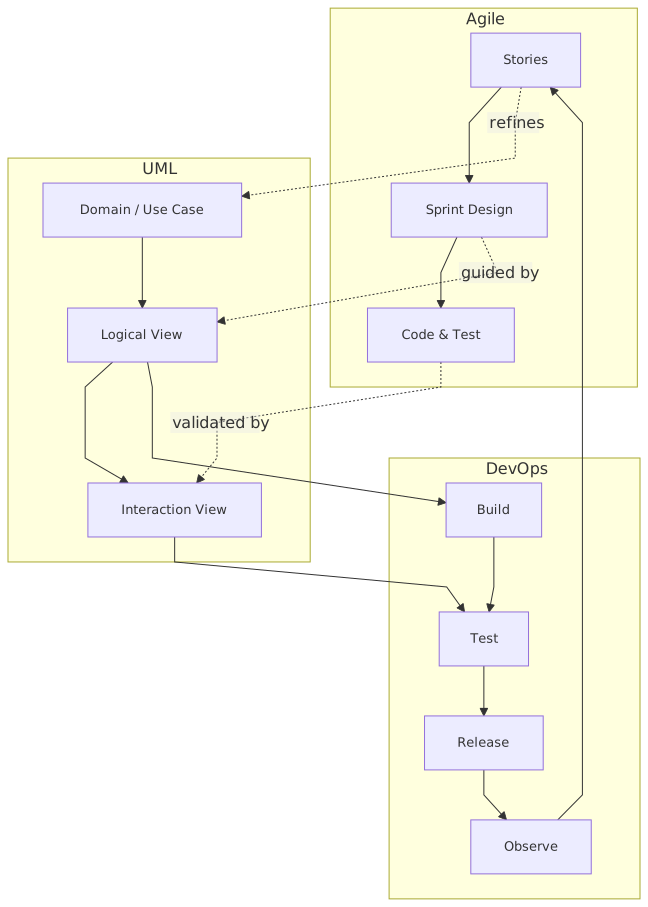
DevOps is about fast, reliable change in production. UML supports that when tied to delivery and operations.
UML in CI/CD context
You don’t need a “diagram stage” in the pipeline like some bizarre compliance ritual. But you do need architecture visibility around change. Good teams use UML in these ways: architecture decision record template
- diagrams stored with source or near source
- diagrams updated as part of pull requests when architecture-impacting changes occur
- links from ADRs to diagrams
- diagrams referenced in release notes for major integration changes
- deployment diagrams aligned with infrastructure-as-code patterns
- sequence diagrams used in operational readiness reviews
This is practical, not ceremonial.
UML and infrastructure-as-code
Some people argue deployment diagrams are obsolete because Terraform or CloudFormation already defines runtime infrastructure. I disagree.
IaC is executable truth for provisioning. It is not always the best communication medium for humans trying to understand system topology, resilience assumptions, or trust boundaries. Reading Terraform to understand an enterprise payment path is like reading assembly to understand business capability.
Use both.
The IaC provisions reality. The deployment diagram explains reality.
UML and observability
A good sequence diagram becomes much more valuable when paired with telemetry.
For example, if you model this runtime path:
- customer submits payment
- payments API validates token with IAM
- payment command stored
- event published to Kafka
- fraud service consumes event
- core banking adapter posts transaction
- notification service emits confirmation
Then your observability strategy should map to it:
- trace IDs across steps
- metrics for Kafka publish/consume latency
- IAM token validation latency
- fraud decision timing
- dead-letter queue behavior
- user-visible response thresholds
This is where architecture stops being conceptual and starts helping operations.
A real enterprise example: retail banking payments modernization
Let’s make this concrete.
A large retail bank is modernizing its payments platform. The old world is a core banking monolith with batch-heavy integration. The new target state includes:
- mobile and web channels
- API gateway
- centralized IAM using OAuth2/OIDC
- payment orchestration microservices
- Kafka as event backbone
- fraud detection services
- cloud-based customer notification services
- hybrid connectivity to on-prem core banking systems
The bank says it is Agile. It also says it is doing DevOps. Both are partly true. Product teams work in sprints. Releases happen through CI/CD for many services. But because this is banking, there are still risk reviews, architecture checkpoints, and audit requirements.
This is exactly the kind of environment where UML either becomes useful or becomes theater.
What good looks like
The lead architect does not create a 150-page UML package. Instead, they maintain a small set of living diagrams.
1. Component diagram
This shows:
- channels
- API gateway
- IAM platform
- payment initiation service
- payment validation service
- fraud scoring service
- Kafka topics
- core banking adapter
- notification service
- audit service
It also marks ownership boundaries, external dependencies, and sensitive trust zones.
This diagram is used in:
- onboarding new teams
- dependency mapping
- impact analysis for changes
- architecture review of new payment features
2. Sequence diagram for payment initiation
This captures a key runtime flow:
- user authenticates and receives token
- channel calls payment API
- gateway validates token and scopes
- payment initiation service checks account permissions
- service emits payment-created event to Kafka
- fraud service consumes event and returns decision
- orchestration service updates payment state
- core banking adapter posts transaction
- confirmation event triggers notification
Critically, the architect also models unhappy paths:
- IAM timeout
- Kafka publish retry
- fraud service delay
- duplicate event handling
- core banking rejection
That is real architecture work. Not just the happy path.
3. Deployment diagram
This shows:
- cloud regions
- Kubernetes clusters
- managed Kafka topology
- IAM endpoints
- private links to on-prem data center
- security zones
- DR assumptions
- observability stack
This is used in platform reviews, resilience testing, and operational readiness.
How this supports Agile
During backlog refinement, a new story proposes “instant payment confirmation.” The sequence diagram reveals something the product owner missed: confirmation cannot be immediate if fraud scoring is asynchronous for high-risk transactions. That leads to a split design:
- low-risk payments get near-real-time confirmation
- high-risk payments get pending status with later notification
Without the diagram, the team might have overpromised.
How this supports DevOps
A deployment change moves the fraud service to a different cloud zone for scaling reasons. The deployment diagram shows the additional network path and IAM dependency. The team updates latency budgets and alert thresholds before rollout. During canary deployment, they watch the exact path shown in the sequence diagram.
That is UML helping delivery speed and production safety at the same time.
Common mistakes architects make
This is where I have less patience, because most UML pain is self-inflicted.
1. Modeling too much, too early
Architects often respond to uncertainty by creating more diagrams. Wrong instinct. In Agile environments, create the minimum model needed to make a decision or unblock delivery.
If a team needs to understand one Kafka interaction, don’t hand them a full enterprise integration landscape. Give them the specific component and sequence views that matter.
2. Drawing static pictures of dynamic systems
Enterprise systems are event-driven, asynchronous, identity-aware, and operationally volatile. Yet many architecture diagrams still look like neat boxes with straight arrows, as if every interaction were synchronous and reliable.
That is fantasy.
If you use Kafka, model events, retries, ordering assumptions, dead-letter handling, and consumer groups where relevant. If IAM matters, show token issuance, validation, propagation, and policy checks. If cloud networking matters, show boundaries and runtime placement.
3. Ignoring failure paths
This is the biggest one.
Architects love happy-path sequence diagrams because they are clean. Production does not care about your clean diagram. Production cares about:
- timeout behavior
- retries
- idempotency
- fallback
- eventual consistency
- duplicate events
- stale tokens
- unavailable dependencies
If your architecture models don’t include failure modes, they are decorative.
4. Letting diagrams drift away from reality
A stale diagram is worse than no diagram because it creates false confidence.
To avoid this:
- attach diagrams to change processes
- update them when architecture-significant changes happen
- assign ownership
- review them during incidents and major releases
Not every code change needs a diagram update. But every meaningful architecture change probably does.
5. Treating UML as an architect-only language
Another bad habit. Architects create diagrams in specialized tools, then present them as finished artifacts to engineering teams. That kills engagement immediately.
Use tools teams can access. Keep notation disciplined but readable. Invite engineers, security leads, SREs, and product people into the conversation. UML should support shared understanding, not status hierarchy.
6. Confusing UML precision with business value
A perfectly notated diagram that does not help a delivery decision is still waste.
I have seen architects spend hours debating notation purity while nobody could answer whether an IAM policy decision should happen at the gateway, service, or both. That is the wrong battle. Clarity beats purity.
Contrarian thought: not every Agile team should use UML heavily
Let me say something that architecture people don’t always like hearing.
Not every team needs much UML.
A small product team building an internal tool with limited integration complexity may be better served by a few whiteboard sketches and one context diagram. Forcing formal UML there is just bureaucracy with a technical accent.
The need for UML rises with:
- system criticality
- team count
- integration depth
- regulatory exposure
- asynchronous complexity
- operational risk
- cross-domain dependency
So yes, in a startup feature team, UML may be marginal. In a bank with Kafka-heavy eventing, IAM sprawl, cloud complexity, and audit obligations, it becomes much more valuable.
Context matters. Architects should stop pretending one method fits every environment.
Practical ways to implement this in real architecture work
If you want UML to work in Agile and DevOps, don’t launch a modeling program. That phrase alone should worry you. Instead, change a few habits.
Keep a small architecture diagram set
For each major product or platform, maintain:
- one component diagram
- two to five key sequence diagrams
- one deployment diagram
- optional state machine for critical lifecycle logic
That’s usually enough.
Tie diagrams to decisions and epics
Every major epic, integration change, or platform shift should identify whether an existing diagram needs update or whether a new one is needed.
Store diagrams where teams work
Not in a hidden EA repository no developer can find.
Put them:
- in the engineering wiki near service docs
- in the repo as diagram-as-code where practical
- linked from ADRs, runbooks, and onboarding pages
Review diagrams in architecture and ops forums
Use them in:
- design reviews
- threat modeling
- release readiness
- incident analysis
- resilience testing
If a diagram never appears in a real conversation, it probably should not exist.
Model trust and runtime, not just application boxes
In enterprise systems, the hard problems are often:
- identity propagation
- authorization boundaries
- event semantics
- cloud network realities
- failover behavior
Model those. They matter more than tidy package structures.
A simple operating model for architects
Here’s a practical model I’ve seen work.
This is what integration looks like in practice. UML is not a separate phase. It is woven into the work.
Banking, Kafka, IAM, cloud: where UML earns its keep
A few specific observations from enterprise environments.
In banking
Banks have long-lived systems, layered controls, and audit pressure. Architecture mistakes are expensive and public. UML helps because it creates traceable, communicable views of interactions that matter for risk and compliance.
But the trick is not to let governance consume the value. Use just enough formalism to support design, assurance, and change. EA governance checklist
With Kafka
Kafka introduces a false sense of decoupling. Teams think publishing an event removes dependency. It does not. It transforms dependency.
Now you must reason about:
- schemas
- topic ownership
- ordering
- replay
- consumer lag
- duplicate handling
- eventual consistency
Sequence and state diagrams are especially useful here. They help teams understand event consequences over time, not just service connections.
With IAM
IAM is where many architecture diagrams become dangerously vague. They show a box labeled “Auth” and move on. That is not good enough.
In real systems, you need to understand:
- who authenticates whom
- where tokens are issued
- where scopes are checked
- how service-to-service identity works
- where policy decisions are enforced
- what happens when IAM is degraded
Sequence diagrams are excellent for this. In regulated enterprises, they are often the difference between assumed security and actual security.
In cloud environments
Cloud changes topology fast. Services scale dynamically. Managed components hide implementation details. This makes some architects throw up their hands and stop modeling runtime altogether.
Again, mistake.
You do not need to model every pod. You do need to model:
- regions
- availability zones
- network boundaries
- managed service dependencies
- private/public exposure
- resilience patterns
- data flow across trust zones
That is enough to support architecture and operations.
Final thought
The debate about UML in Agile and DevOps is often framed in childish terms: old versus new, heavyweight versus lightweight, architects versus engineers. Real enterprise work is not that simple.
UML is neither salvation nor legacy baggage by default. It becomes useful or useless based on how you use it.
Used badly, it creates delay, false precision, and stale documentation. Used well, it sharpens decisions, exposes risk, improves cross-team understanding, and supports safer delivery. In complex environments like banking, especially with Kafka, IAM, and cloud-native platforms, that is not academic. That is operationally important.
My strong opinion is this: enterprise architects should stop apologizing for modeling, and stop overproducing it at the same time.
Use UML like a working architect.
Not like a compliance machine.
Not like a diagram artist.
And definitely not like someone trying to replace engineering with boxes and arrows.
A few living diagrams, tied to decisions and production reality, will do more for architecture than a hundred polished artifacts nobody trusts.
FAQ
1. Is UML still relevant in Agile teams?
Yes, if used lightly and tied to delivery decisions. No, if used as upfront documentation for its own sake. Agile does not remove the need for shared system understanding.
2. Which UML diagrams are most useful for DevOps environments?
Usually component, sequence, and deployment diagrams. They help teams understand service dependencies, runtime behavior, and operational topology.
3. How often should architecture diagrams be updated?
When architecture-significant changes happen: new integrations, IAM changes, Kafka event flow changes, major deployment shifts, resilience design updates. Not every code change needs a diagram update.
4. Can UML work alongside infrastructure-as-code and ADRs?
Absolutely. IaC provisions environments. ADRs capture decisions. UML explains structure and behavior. Together they provide a much stronger architecture record than any one of them alone.
5. What is the biggest mistake architects make with UML?
Treating diagrams as final deliverables instead of living tools. The second biggest is modeling only the happy path and ignoring failure, security, and runtime realities.
Frequently Asked Questions
How is ArchiMate used for cloud transformation?
ArchiMate models cloud transformation by comparing baseline and target architectures across all layers. Cloud platforms appear as Technology Services, workloads as Application Components assigned to Technology Nodes. The Implementation and Migration layer models transition plateaus, work packages, and migration events — producing a traceable cloud roadmap.
How does ArchiMate align with DevOps practices?
ArchiMate supports DevOps by modeling the CI/CD pipeline as Application Behavior elements, infrastructure as code as Technology Artifacts, and deployment topology as Technology Nodes. Traceability from requirements through design to deployed infrastructure helps DevOps teams understand architectural constraints and governance requirements.
What cloud architecture patterns can be modeled in ArchiMate?
ArchiMate can model cloud-native patterns including: multi-region active-active deployments, event-driven integration via messaging platforms, API-led integration architectures, zero-trust network topology, container orchestration (Kubernetes), and hybrid cloud connectivity. Each pattern maps to specific Technology and Application layer elements.