⏱ 19 min read
Most people learn ArchiMate the wrong way.
They start with the notation. They memorize symbols. They argue about whether something is an application service or an application function. They download a template, produce a pretty diagram, and somehow still fail to explain how the bank’s IAM mess is blocking cloud migration.
That’s the problem.
ArchiMate is not hard because the language is complex. It’s hard because too many architects treat it like a drawing standard instead of a thinking tool. And if you learn it that way, you’ll be slow, academic, and mostly ignored by delivery teams.
So here’s the blunt version: if you want to learn ArchiMate quickly, stop trying to “master the framework” first. Learn how to use a small subset of the language to explain real enterprise problems. That is what makes it stick. That is what gets you useful fast. ArchiMate modeling guide
What ArchiMate actually is
Simple explanation first.
ArchiMate is a visual modeling language for enterprise architecture. It helps you describe how business, applications, technology, data, and change relate to each other.
That’s the SEO-friendly answer. It’s also true.
In practice, ArchiMate gives you a way to answer questions like:
- What business capability depends on this application?
- Which applications publish events into Kafka?
- Which IAM services control access to cloud workloads?
- What breaks if we retire this legacy core banking platform?
- What changes are part of this transformation, and who is impacted?
It is not just boxes and lines. It is a shared language for dependency mapping.
And yes, there are many elements and relationship types. Too many, frankly, for beginners. But the good news is you do not need all of them to become productive.
The fastest way to learn ArchiMate
Here’s my opinion, and I’ll stand by it: you can become useful in ArchiMate in a week if you ignore 70% of the notation at the beginning.
Not “certified expert.” Not “debate every semantic nuance.” Useful.
The fastest path looks like this:
- Learn the core layers.
- Learn the handful of element types you will use constantly.
- Learn the 5–6 relationships that do most of the work.
- Model one real problem from your environment.
- Get challenged by engineers, security, and operations.
- Refine from there.
That’s how architects actually learn. Not by reading the spec cover to cover like it’s scripture.
Start with the three layers that matter most
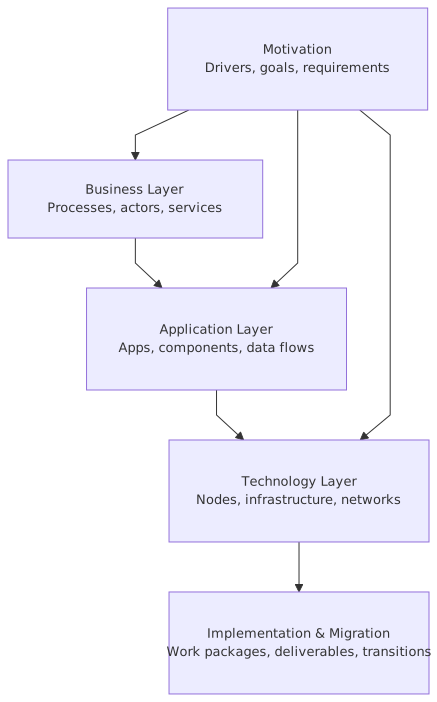
If you’re new, think in these layers first:

- Business layer: what the enterprise does
- Application layer: software behavior and systems
- Technology layer: infrastructure and platforms
You can add strategy, implementation/migration, physical, and motivation later. Those are useful. But if you can’t connect business process to application service to technology node, you don’t need more layers. You need more clarity.
Here’s the mental model I use with teams:
- Business = why and what the enterprise does
- Application = how software supports it
- Technology = where it runs
Simple. Not perfect. Good enough to start.
The small ArchiMate subset you should learn first
This is the subset I tell junior architects to use before anything else.
If you stay inside this set for your first month, you’ll move quickly.
Notice what I did not say: I did not tell you to start with every behavior element, every structural variation, every relationship nuance, every motivation concept. That path is slow and demoralizing.
The relationships you need to know immediately
This is where people get tangled up.
You do not need every ArchiMate relationship to create useful models. Start with these: ArchiMate tutorial
- Serving: one thing provides value or support to another
- Assignment: a role or actor performs behavior
- Realization: one thing implements a more abstract thing
- Composition: strong part-of relationship
- Aggregation: looser grouping
- Access: behavior uses or updates data
- Triggering: one process or event starts another
- Flow: something moves between behaviors or active structures
If you can use these well, you can model most enterprise situations that matter.
And here’s a contrarian view: many architects obsess over exact relationship purity when the real issue is they haven’t framed the problem. A semantically imperfect diagram that makes a decision possible is worth more than a pristine model that nobody understands.
Purists hate hearing that. Delivery teams know it’s true.
Learn ArchiMate by modeling one real enterprise problem
This is the key.
Do not start with a generic “order to cash” example from a training course unless your company actually cares about order to cash. Start with a problem your stakeholders are already fighting about.
Good examples:
- Why cloud migration is stalling because IAM is fragmented
- Why event-driven integration over Kafka created more complexity instead of less
- Why a banking channel change takes six months because of hidden dependencies
- Why three identity stores are creating audit findings
- Why customer onboarding still depends on a legacy mainframe batch process
If the problem is politically real, your learning accelerates. People will challenge your model. That is good. ArchiMate becomes practical when the model has to survive contact with reality.
A real enterprise example: retail bank modernization
Let’s make this concrete.
Imagine a retail bank. Very normal situation:
- Mobile banking app and online banking portal
- Legacy core banking platform
- CRM platform in the cloud
- Kafka used as the enterprise event backbone
- IAM split across Active Directory, Azure AD / Entra ID, and an old custom entitlement service
- Mix of on-prem and cloud workloads
- Pressure to improve customer onboarding and fraud monitoring
The business complaint sounds simple: “Why does onboarding a new retail customer still take too long, and why is every change risky?”
The wrong architecture response is a 70-page deck.
The right response is a set of connected ArchiMate views.
Step 1: model the business side
Start with:
- Business Process: Customer Onboarding
- Business Service: Retail Account Opening
- Business Role: Branch Agent, Customer, Compliance Analyst
- Capability: Customer Management, Identity Verification, Fraud Detection
Already this helps. You are showing that onboarding is not “just an app flow.” It is a business process supported by capabilities and services.
Step 2: map the application support
Then add:
- Application Component: Mobile Banking App
- Application Component: Onboarding API
- Application Component: CRM SaaS
- Application Component: Core Banking System
- Application Component: Fraud Engine
- Application Component: IAM Platform
- Application Service: Customer Profile Management
- Application Service: Authentication and Authorization
- Application Service: Event Publishing
- Data Object: Customer Profile
- Data Object: KYC Result
- Data Object: Account Application
Now you can show which systems support onboarding, which services they expose, and what data matters.
Step 3: map the integration and platform reality
Then add technology and platform elements:
- Node: Kubernetes Cluster
- Node: On-Prem VM Cluster
- System Software: Kafka Platform
- Technology Service: Container Hosting
- Technology Service: Event Streaming
- Technology Service: Identity Federation
- Location: Primary Data Center, AWS Region, Azure Region
Now the model starts to explain why things are slow and risky.
For example:
- The Onboarding API runs in Kubernetes in AWS.
- The Core Banking System remains on-prem.
- Kafka bridges application events between cloud and on-prem.
- IAM relies on federation to multiple identity stores.
- Fraud Engine consumes onboarding events from Kafka.
- CRM SaaS updates lag because entitlement mapping is inconsistent.
That is architecture. Not just system inventory. Not just process mapping. The dependency chain is visible.
What ArchiMate reveals in real work
When used properly, ArchiMate exposes the parts of the enterprise people usually hand-wave.
In the banking example, the model often reveals things like:
- The real bottleneck is not onboarding UI design
It’s the dependency on a legacy entitlement check inside the custom IAM service.
- Kafka is not simplifying everything
It is decoupling some integrations, yes. But it is also creating event ownership ambiguity and duplicate customer state.
- Cloud migration is not blocked by infrastructure
It is blocked by unresolved identity boundaries, trust relationships, and audit controls.
- Business capabilities are split across too many systems
Customer profile is mastered in CRM, partially duplicated in core banking, and reinterpreted in downstream event consumers.
These are the kinds of insights architecture teams are supposed to produce. ArchiMate helps because it forces you to connect layers instead of talking in silos.
How this applies in real architecture work
This is where many articles get too abstract, so let’s be direct.
In real architecture work, ArchiMate is useful for five things.
1. Scoping change properly
When a product team says, “We just need to add MFA to the banking app,” the architect should immediately ask:
- Which user populations?
- Which identity provider?
- Which application services depend on authentication?
- Which channels use the same IAM path?
- Which customer journeys are affected?
- Which operational teams own the failure modes?
An ArchiMate model helps you show that MFA is not just a front-end feature. It touches IAM services, customer support processes, fraud workflows, cloud identity federation, and possibly branch operations.
2. Explaining dependencies to non-architects
Good architecture is translation.
Engineers think in services and runtime. Business leaders think in products and risk. Security thinks in controls and trust boundaries. Operations thinks in supportability. ArchiMate gives you a way to create views for each audience without inventing a new notation every time.
That matters. A lot.
3. Rationalizing application portfolios
In almost every enterprise, there are too many systems doing vaguely similar things.
ArchiMate helps you show:
- overlap in capabilities
- duplicate application services
- fragmented data ownership
- technology sprawl
- migration candidates
If your bank has four customer identity-related platforms, ArchiMate can make that duplication painfully obvious. Painfully obvious is good. That’s when action starts.
4. Designing target states without fantasy
A target architecture that ignores migration reality is just architecture theater.
ArchiMate’s implementation and migration concepts—like work packages, plateaus, and gaps—help you describe a transition that delivery teams can actually execute.
For example:
- Plateau 1: legacy IAM with cloud federation
- Plateau 2: centralized authorization service for digital channels
- Plateau 3: unified policy decision and entitlement model across channels
That is far better than drawing one giant “future state” cloud blob and pretending the hard bits will sort themselves out.
5. Making governance less painful
Architecture governance often fails because standards are detached from actual system context.
If you can attach standards decisions to models—for example, where Kafka is the strategic event backbone, where synchronous APIs are required, where IAM federation is mandatory—you move from generic policy to contextual governance. ArchiMate for governance
People resist architecture less when it is specific.
Common mistakes architects make with ArchiMate
There are many. Here are the big ones.
Mistake 1: trying to model everything
This is the classic beginner mistake.
They discover the language and think the goal is exhaustive representation. So every process, every application, every interface, every server, every data object, every requirement goes into one mega-diagram.
Result: unreadable nonsense.
A model is useful because it is selective. If everything is shown, nothing is emphasized.
Mistake 2: using ArchiMate like Visio with fancy symbols
I see this all the time.
Boxes are technically ArchiMate elements, but the relationships are vague, inconsistent, or missing. The diagram looks formal but says almost nothing. It is architecture cosplay.
If the model does not express dependency, service, realization, ownership, or impact, it is not doing much work.
Mistake 3: arguing notation before agreeing meaning
This one is surprisingly common in architecture teams.
People debate:
- Is this an application function or an application service?
- Is this composition or aggregation?
- Should this be a business object or data object?
Fine, but first answer the real question: what decision are we trying to support?
I’m not against precision. I’m against premature precision.
Mistake 4: modeling the org chart, not the enterprise
Some architects model what is politically visible rather than what is operationally true.
So the architecture mirrors departments, funding lines, or vendor contracts, instead of how value is delivered and how systems interact. That creates a very tidy but deeply misleading picture.
Real enterprise architecture often cuts across the org chart. If your model doesn’t, be suspicious.
Mistake 5: skipping the business layer
Technical architects especially do this.
They jump straight into applications, APIs, Kafka topics, Kubernetes, IAM federation, and cloud landing zones. Useful details, yes. But without business services, processes, or capabilities, the model cannot explain why any of it matters.
Then leadership says architecture is too technical. They’re not entirely wrong.
Mistake 6: skipping the technology layer
Business architects make the opposite mistake.
They build elegant capability maps and process flows but avoid runtime reality. Then migration plans become fiction because nobody represented hosting constraints, platform dependencies, or network/security boundaries. ArchiMate capability map
Cloud architecture without technology-layer modeling is usually wishful thinking.
Mistake 7: producing one diagram for everyone
A board member, a product owner, a platform engineer, and an IAM lead do not need the same view.
ArchiMate supports viewpoints for a reason. Use them.
One core model, multiple views. That’s the move.
A practical learning plan for 30 days
If you want to learn ArchiMate quickly, follow a disciplined but realistic plan.
Week 1: learn the basics, but only the useful basics
Focus on:
- layers
- core element types
- key relationships
- 2–3 viewpoint examples
Do not drown in the full specification. Learn enough to read and create simple models.
Your output for week 1:
- one business/application diagram
- one application/technology diagram
Week 2: model a current-state problem
Pick one real issue. Good candidates:
- IAM fragmentation for digital channels
- Kafka event sprawl and unclear ownership
- banking onboarding delays due to legacy dependencies
- cloud migration blocked by shared services
Interview people. Validate what actually exists. You will learn faster from one uncomfortable stakeholder conversation than from ten pages of notation rules.
Your output for week 2:
- current-state model
- top 5 pain points shown visually
Week 3: model a target state and transition
Now use:
- work packages
- plateaus
- gaps
Show what changes first, what stays, what risk is reduced, and what dependencies remain.
Your output for week 3:
- target-state view
- transition roadmap view
Week 4: review with real stakeholders
This is essential.
Take the model to:
- solution architects
- security/IAM leads
- platform/cloud engineers
- product or business owners
Ask:
- what is wrong?
- what is missing?
- what is oversimplified?
- what decision does this help us make?
That feedback loop is where ArchiMate becomes a working skill rather than a certification memory exercise.
How to think about Kafka in ArchiMate
Kafka is a good test of whether someone really understands architecture or just likes platform buzzwords.
In ArchiMate, I usually model Kafka like this:
- Application layer: event-producing and event-consuming application components, plus application services around publishing/subscribing if needed
- Technology layer: Kafka platform as system software or technology service depending on viewpoint
- Data: event payloads as data objects when relevant
- Flow/serving/access relationships: to show event movement and usage
Why this matters: teams often model Kafka as if it magically solves integration. It does not. It changes the integration style.
In real work, your model should expose:
- who owns each event
- which systems are producers vs consumers
- where customer data is duplicated
- where eventual consistency creates business risk
- where operational monitoring sits
- where cloud/network boundaries affect event flow
In a bank, for example, customer onboarding events may be published by an onboarding API, consumed by fraud, CRM sync, and analytics systems. Great. But if the core banking platform remains system-of-record and updates asynchronously, your architecture has to represent delayed state propagation. Otherwise stakeholders assume consistency that does not exist.
That misunderstanding causes real incidents.
How to think about IAM in ArchiMate
IAM is another area where ArchiMate earns its keep.
IAM is rarely one system. In enterprises, especially banks, it is a mess of:
- identity stores
- authentication services
- authorization services
- federation services
- privileged access controls
- provisioning workflows
- audit/reporting
- application-specific entitlements
In ArchiMate, model:
- Business services like secure customer access or workforce access governance
- Application services like authentication, authorization, identity lifecycle management
- Application components like IAM platform, directory service, federation gateway, policy engine
- Technology services where cloud identity integration matters
- Business roles and actors to show who uses what
This is where many cloud programs get stuck. They think they are migrating applications, but they are actually renegotiating identity trust, policy enforcement, and operational accountability.
Your ArchiMate model should make visible:
- which apps rely on which identity source
- where authorization decisions are made
- where federation bridges on-prem and cloud
- where customer IAM differs from workforce IAM
- where audit evidence is generated
That is not just documentation. That is control architecture.
Strong opinion: certification is overrated unless you model live problems
I’ll say something mildly unpopular.
ArchiMate certification is fine. I’m not against it. But plenty of certified architects still produce sterile models that nobody uses. And some non-certified architects create excellent models because they understand systems, delivery, and business pressure.
If your goal is to learn quickly, optimize for applied competence, not badge collection.
Read enough. Practice more. Get corrected by reality.
What “good” looks like
A good ArchiMate model does at least three things:
- It answers a question
Not vaguely. Clearly.
- It shows relationships that matter
Dependencies, service boundaries, ownership, impact, transition.
- It is readable by the intended audience
Not “simple” in a childish way. Focused.
For our banking example, a good model might answer:
- Why customer onboarding changes are risky
- Which IAM dependencies block cloud-native channel expansion
- How Kafka supports fraud and analytics without becoming unmanaged event sprawl
- Which transition steps reduce operational and compliance risk first
That is what executives, delivery leads, and risk teams can use.
A simple cheat sheet for beginners
If you are staring at a blank canvas, use this sequence:
- What business process or capability are we talking about?
- Which business service is being delivered?
- Which application components support it?
- Which application services do they provide?
- What data objects matter?
- Where do these systems run?
- Which technology services are involved?
- What is changing?
- What breaks, improves, or gets retired?
That sequence works surprisingly well.
Final thought
The fastest way to learn ArchiMate is to stop treating it as a notation problem.
It is a reasoning discipline. A communication discipline. A dependency discipline.
Learn a small subset. Use it on a real problem. Prefer clarity over completeness. Let engineers challenge it. Let business stakeholders react to it. Revise it until the model helps make a decision.
And remember: the value of enterprise architecture is not that it can describe everything. The value is that it can describe the things that matter, in a way that makes change safer and smarter.
ArchiMate helps with that. When used properly, it is one of the best tools we have.
When used badly, it is just expensive diagramming.
Choose wisely.
FAQ
1. How long does it take to learn ArchiMate well enough to use at work?
If you focus on the core layers, common elements, and a small set of relationships, you can become useful in a few days and reasonably competent in 3–4 weeks. Mastery takes longer, mostly because real enterprise modeling is messy, political, and iterative.
2. Do I need ArchiMate certification to use it professionally?
No. Certification can help with structure and common vocabulary, but it does not guarantee practical modeling skill. In most enterprises, stakeholders care far more about whether your models help decisions than whether you passed an exam.
3. What is the biggest mistake beginners make with ArchiMate?
Trying to model too much at once. The second biggest mistake is focusing on notation purity before clarifying the problem being modeled. Start with one real question and one focused view.
4. Is ArchiMate useful for cloud, Kafka, and IAM architecture?
Yes, very much. It is especially useful when these topics cut across business, application, and technology layers. Cloud migration, event-driven integration, and IAM modernization all involve dependencies that are hard to explain without a structured modeling language.
5. Should I use ArchiMate for detailed solution design?
Usually not as the primary tool. ArchiMate is strongest at enterprise and cross-domain architecture: capabilities, services, dependencies, platforms, transitions, and impact. For low-level solution detail, pair it with other techniques like sequence diagrams, C4, BPMN, or infrastructure-as-code views.
Frequently Asked Questions
What is enterprise architecture?
Enterprise architecture is a discipline that aligns an organisation's strategy, business processes, information systems, and technology. Using frameworks like TOGAF and modeling languages like ArchiMate, it provides a structured view of how the enterprise operates and how it needs to change.
How does ArchiMate support enterprise architecture practice?
ArchiMate provides a standard modeling language that connects strategy, business operations, applications, data, and technology in one coherent model. It enables traceability from strategic goals through business capabilities and application services to the technology platforms that support them.
What tools are used for enterprise architecture modeling?
The main tools are Sparx Enterprise Architect (ArchiMate, UML, BPMN, SysML), Archi (free, ArchiMate-only), and BiZZdesign Enterprise Studio. Sparx EA is the most feature-rich option, supporting concurrent repositories, automation, scripting, and integration with delivery tools like Jira and Azure DevOps.