⏱ 20 min read
Most architecture decks fail for one stupid reason: they try to show everything to everyone on one page.
That’s usually where the mess starts. A few application boxes, some arrows, maybe a cloud icon, a security badge, and if the architect is feeling especially ambitious, a process swimlane squeezed into the bottom corner. The result? Nobody understands it. Business leaders glaze over. Engineers argue about notation. Security complains they’re missing identity flows. And the architect walks away saying, “Well, it’s all there.”
No. It isn’t. Not in any useful way.
That is exactly why ArchiMate viewpoints matter.
If you want the simple version early: an ArchiMate viewpoint is a way of showing only the architecture concerns relevant to a specific audience or problem. Same architecture, different lens. You do not create one giant truth-diagram and expect everyone to decode it. You create purposeful views.
That sounds obvious. But in real enterprise architecture work, this is where many teams still get it wrong.
ArchiMate itself is often treated like a notation problem. It’s not. The notation is the easy part. The hard part is deciding what to show, what to leave out, and who the view is actually for. Viewpoints are the discipline that stops architecture from becoming diagram wallpaper.
This article is a practical guide to ArchiMate viewpoints. Not a spec summary. Not a certification cram sheet. A real-world explanation of how to use them when you’re dealing with banking platforms, Kafka event streams, IAM sprawl, cloud migrations, and people who need answers faster than your repository can render a model.
What is an ArchiMate viewpoint?
Let’s make this plain.
An ArchiMate viewpoint is a predefined or intentionally designed way to represent a subset of an architecture model for a particular purpose and stakeholder.
That’s the clean definition.
In practice, a viewpoint answers three questions:
- Who is this for?
- What decision or concern does it support?
- What parts of the architecture should be visible in this view?
That last part is critical. A viewpoint is not “everything in the model, but zoomed out.” It is selective by design.
For example:
- A CIO may need a strategy or capability view
- A domain architect may need an application cooperation view
- A security architect may need a layered view of IAM services, policies, and interfaces
- A platform engineer may need an infrastructure or deployment-focused view
- A transformation lead may need a project and migration view
Same enterprise. Different concerns. Different viewpoints.
And yes, ArchiMate defines a number of standard viewpoints. But don’t get too religious about the catalog. In real work, the point is not to say, “This is exactly viewpoint 23 from the standard.” The point is to create a view that is useful, consistent, and traceable to the model.
That’s a contrarian thought for some architecture purists, but it matters. A technically correct viewpoint that nobody can use is still a bad architecture artifact.
Why viewpoints matter more than most architects admit
Architecture is communication under constraint.
You have limited attention. Limited time. Limited appetite from stakeholders. And usually limited quality in the underlying data. So if your diagrams are trying to answer every question at once, they answer none of them well.
Viewpoints matter because they help you control three things:
- Complexity
- Audience relevance
- Decision support
Without viewpoints, architecture becomes a dumping ground. Every object in the repository ends up on the canvas because someone is afraid of leaving something out. That creates diagrams that are technically dense and practically useless.
I’ve seen this in banking transformation programs over and over. A team wants to explain how customer onboarding works across channels, IAM, fraud controls, and core banking integration. Instead of creating separate views for business process, application interaction, identity trust boundaries, and integration events, they produce one mega-diagram. It becomes a political artifact, not an analytical one. Everyone points at their box. Nobody sees the architecture.
A good viewpoint does the opposite. It narrows the conversation.
That’s why ArchiMate viewpoints are not optional decoration. They are one of the few mechanisms that make enterprise architecture consumable.
The simple mental model: one architecture, many lenses
Here’s the easiest way to think about viewpoints.
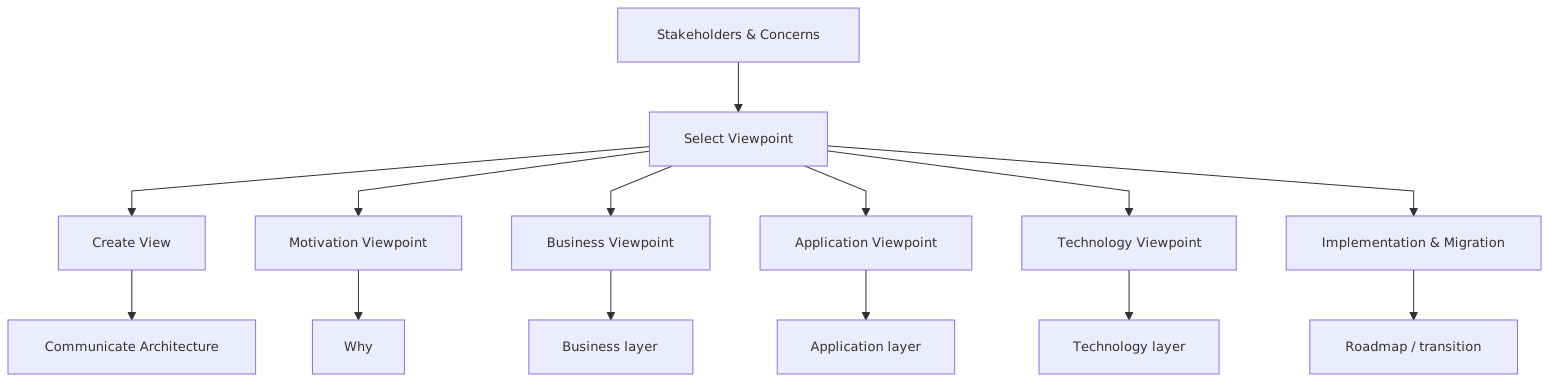
Imagine the enterprise architecture as a city.
- The business layer is what the city does: services, processes, actors
- The application layer is the systems enabling it
- The technology layer is the roads, power grid, and physical infrastructure
- The strategy and motivation elements explain why the city changes
- The implementation and migration elements show how change gets delivered
Now ask five different people to understand the city:
- A mayor wants growth areas and public services
- A transport planner wants traffic and routes
- A utility operator wants grid dependencies
- A property developer wants zoning and constraints
- Emergency services want incident response paths
Same city. Different lens.
That’s a viewpoint.
It’s not a different architecture. It’s a purposeful slice.
This is where architects sometimes drift into confusion. They assume if different views show different things, they are somehow inconsistent. Not true. In fact, if every view shows the same things, you probably don’t have viewpoints at all. You just have repeated clutter.
Common ArchiMate viewpoints you’ll actually use
You can go deep into the standard, but most enterprise teams repeatedly rely on a manageable set of viewpoint types. Not because the others are useless, but because these tend to map directly to real governance, design, and transformation conversations.
Here’s a practical summary.
If you are new to ArchiMate, start there. Don’t begin with every possible viewpoint in the standard. Begin with the ones your enterprise genuinely needs. ArchiMate modeling guide
The deeper truth: viewpoints are about concern management
The formal language around viewpoints often sounds dry: stakeholders, concerns, model kinds, abstraction, representation. Useful, but abstract.
The practical truth is sharper: viewpoints are how architects manage competing concerns without collapsing into chaos.
In real enterprise work, concerns collide all the time:
- Business wants speed
- Security wants control
- Platform teams want standardization
- Product teams want autonomy
- Operations wants resilience
- Finance wants lower run cost
- Regulators want traceability
A viewpoint helps you frame one concern set clearly enough to be discussed without drowning in the others.
Take IAM in a bank.
If you’re trying to explain identity and access architecture for customer-facing and workforce systems, one viewpoint won’t do it.
You may need:
- A business process view for onboarding and access approval
- An application cooperation view for identity provider, HR system, directory, entitlements platform, and downstream apps
- A layered view linking business roles to application services and technology nodes
- A motivation view for regulatory drivers like segregation of duties and strong customer authentication
- An implementation roadmap view for moving from legacy LDAP and custom SSO to modern IAM services in cloud
That is not overkill. That is basic competence.
The opposite approach — one giant “IAM architecture” page — is what weak architecture teams do when they confuse comprehensiveness with clarity.
How this applies in real architecture work
Let’s get practical, because this is where architecture articles usually go soft.
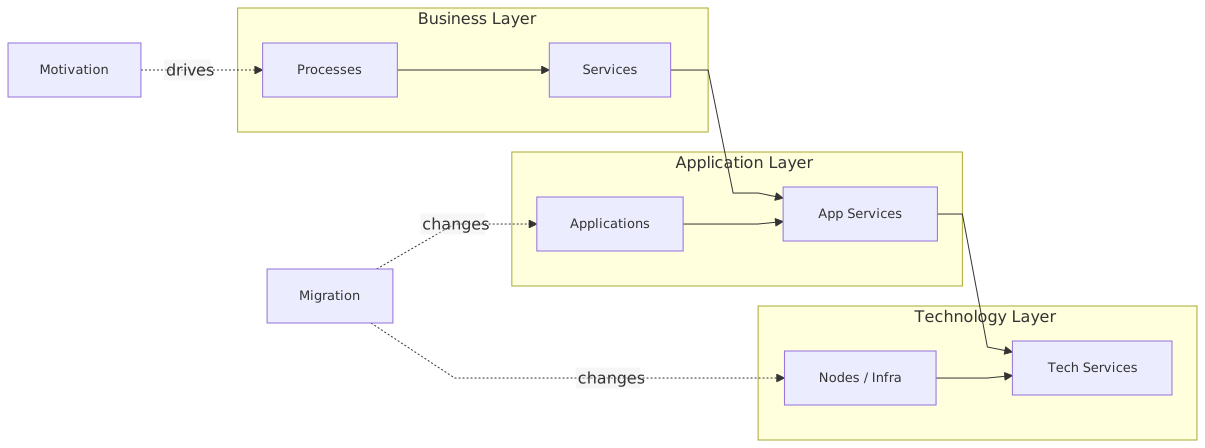
In real architecture work, viewpoints are useful in five places:
1. Stakeholder communication
You need different views for executives, engineers, security teams, and delivery leads.
A head of retail banking does not need a deployment diagram of your Kafka brokers. A platform engineer does not need a capability map with pastel colors and no interfaces. If you show the wrong view to the wrong audience, you lose credibility fast.
2. Impact analysis
When a change request lands — say, moving an event streaming platform from self-managed Kafka on-prem to a managed cloud service — you need to understand the impact across layers.
A layered viewpoint can show:
- Business services consuming events
- Applications publishing and subscribing
- Integration services and schemas
- IAM trust relationships
- Technology nodes and cloud landing zones
That is architecture work. Not drawing for drawing’s sake. Understanding consequences.
3. Governance and design assurance
Architecture review boards often ask broad questions badly:
- Is it aligned to target state?
- Is it secure?
- Does it duplicate capability?
- Is it cloud compliant?
You cannot answer those with one generic picture. You need targeted viewpoints to test specific concerns.
For example:
- A capability view for strategic alignment
- An application cooperation view for reuse and overlap
- A technology view for cloud policy compliance
- A security-focused layered view for IAM and trust boundaries
4. Roadmapping and transformation
Most transformation roadmaps are glorified milestone charts. They show dates, not architecture. TOGAF roadmap template
A proper implementation and migration viewpoint helps you show:
- Current plateau
- Transition architectures
- Work packages
- Dependencies
- Target plateau
This is especially useful in cloud migration, where the transition state matters. Many enterprises pretend they are moving neatly from legacy to target in one step. They are not. There will be hybrid states, temporary controls, duplicated integration paths, and ugly coexistence. Good viewpoints make that visible.
5. Repository discipline
A viewpoint forces the model to be structured well enough to generate useful views. That’s healthy pressure.
If you cannot create a coherent application cooperation view, your application services and interfaces are probably not modeled properly. If your layered view breaks because nothing connects business processes to applications, your traceability is weak. If your migration view is impossible, your target architecture is probably just a slogan.
That’s one of the hidden benefits of ArchiMate viewpoints: they expose modeling laziness. ArchiMate tutorial
A real enterprise example: digital onboarding in a bank
Let’s walk through a realistic example.
A retail bank wants to modernize customer onboarding for current accounts and savings products. Existing onboarding is fragmented:
- Web and mobile channels use different flows
- Customer identity verification is partly manual
- IAM is split between legacy workforce identity and newer customer identity services
- Core banking integration is synchronous and brittle
- Kafka is being introduced for event-driven orchestration
- Some services are moving to cloud, but core systems remain on-prem
This is exactly the kind of situation where viewpoints become essential.
View 1: Capability viewpoint
At the top level, the bank wants to discuss investment and target operating capability.
Capabilities might include:
- Customer onboarding
- Identity verification
- Consent management
- Account origination
- Fraud screening
- Customer communication
- Access management
This view is useful for leadership. It ties architecture work to business capability improvement. It also surfaces overlap. Maybe three teams think they own “identity verification.” That’s not unusual.
View 2: Business process viewpoint
Now we show the onboarding process:
- Customer starts application
- Identity is verified
- Risk/fraud checks run
- Product eligibility is assessed
- Account is created
- Credentials are issued
- Customer receives confirmation
This helps business and operations understand the process design. It also shows where manual intervention still exists.
View 3: Application cooperation viewpoint
Now the real architecture discussion starts.
Applications involved may include:
- Mobile banking app
- Web onboarding portal
- CIAM platform
- Identity verification service
- Fraud engine
- Product rules service
- Account origination service
- Core banking adapter
- Kafka event platform
- Notification service
- CRM update service
This view shows who talks to whom, what services are exposed, and where event-driven interactions happen.
For example:
- The onboarding portal calls the CIAM platform for registration
- The identity verification service publishes a “verification completed” event to Kafka
- Fraud and eligibility services subscribe to onboarding events
- Account origination publishes “account opened”
- Notification and CRM systems consume downstream events
This is where many architects make a mess. They either draw Kafka as a magical central brain or they omit it entirely because “it complicates the picture.” Both are wrong. Kafka should be shown according to the concern. In an application interaction view, it matters as an integration mechanism and event backbone. In an executive capability view, it probably doesn’t.
View 4: IAM and trust-focused layered viewpoint
This one matters a lot in banking.
You need to show:
- Customer actor
- Identity and authentication services
- Consent and authorization policies
- CIAM platform
- Access token flows
- API gateway
- Application services
- Trust boundaries between cloud and on-prem
- Administrative IAM for workforce and privileged access
This is where security architecture becomes understandable. Not by listing standards in a spreadsheet, but by showing how identity services support business services and how access is enforced across systems.
A layered view can reveal uncomfortable truths:
- Customer and workforce identity are wrongly coupled
- Legacy applications still bypass central policy enforcement
- Cloud services rely on modern OIDC flows while core adapters still use static credentials
- Privileged access controls are inconsistent across environments
That’s real architecture value.
View 5: Implementation and migration viewpoint
Finally, the transformation roadmap: ArchiMate in TOGAF ADM
- Plateau 1: Current onboarding with fragmented channels
- Plateau 2: Unified onboarding front-end, CIAM integrated, Kafka introduced for selected events
- Plateau 3: Full event-driven orchestration, cloud-hosted onboarding services, IAM policy centralization
- Plateau 4: Legacy onboarding retired, full target-state controls in place
Work packages may include:
- CIAM rollout
- Kafka platform onboarding
- Fraud service event integration
- Core adapter modernization
- Consent service implementation
- IAM policy harmonization
- Legacy decommissioning
This is what roadmap conversations should look like. Not just “Q3 go-live.”
Common mistakes architects make with ArchiMate viewpoints
This is where I’ll be blunt.
Most problems with viewpoints are not caused by ArchiMate. They are caused by architects using it badly.
1. Treating viewpoints as templates instead of thinking tools
A viewpoint is not a checkbox. You don’t select “application cooperation viewpoint” and automatically get a useful artifact. You still need judgment.
What matters is:
- audience
- concern
- level of abstraction
- decision context
The standard gives guidance. It does not replace architectural thinking.
2. Showing too much
This is the classic failure mode.
Architects often think completeness equals quality. So they include every application, every interface, every node, every relation. The result is unreadable.
A view is allowed to omit. In fact, it must.
If your viewpoint does not simplify the conversation, it is failing.
3. Mixing abstraction levels carelessly
One of the ugliest anti-patterns is combining strategic capabilities, detailed APIs, physical nodes, and implementation milestones in the same view with no narrative discipline.
Can you do cross-layer views? Yes.
Should every cross-layer view contain all levels at once? Absolutely not.
A layered viewpoint should still have a clear question it answers.
4. Ignoring stakeholder concerns
Some architects build views for themselves, not for their stakeholders. That is self-indulgence dressed up as rigor.
If your CISO cannot understand the IAM trust model from your security view, the problem is not the CISO. It’s your view.
5. Confusing notation purity with usefulness
This one annoys me a bit.
There is a class of architect who will spend twenty minutes arguing whether an element should be modeled as an application function or an application service, while the delivery teams still don’t know which systems own customer consent. That is not rigor. That is avoidance.
Yes, semantics matter. But usefulness matters more.
6. Failing to connect views back to one model
The opposite problem also happens. Teams create nice-looking slides that resemble ArchiMate but are disconnected from any coherent repository.
That means:
- no traceability
- no impact analysis
- no consistency checks
- no controlled evolution
A viewpoint should be a view onto a model, not just a standalone drawing.
7. Using one “master diagram” for everything
This is the cardinal sin.
If your architecture team has a single giant landscape diagram that gets copied into every deck, you are not using viewpoints. You are broadcasting clutter.
Contrarian view: not every stakeholder needs “pure ArchiMate”
This needs saying.
A lot of enterprise architects secretly know this, but some are afraid to admit it: not every consumer of architecture artifacts needs to see strict ArchiMate notation.
There, I said it.
The underlying model should be disciplined. The relationships should be consistent. The semantics should hold. But the rendered view for a steering committee may need simplification, annotations, color coding, or selective visual adaptation.
Why? Because architecture exists to drive understanding and decisions.
Now, this is not permission to descend into random PowerPoint art. That path leads to chaos. But if your standard viewpoint needs light adaptation so a banking operations leader can quickly understand the onboarding risk controls, do it. Carefully. Deliberately. Traceably.
Some architecture communities act as if notation purity is the highest virtue. It isn’t. Decision usefulness is.
How to choose the right viewpoint
A practical way to choose a viewpoint is to ask these questions in order:
1. What decision is being made?
Examples:
- Should we invest in a new CIAM platform?
- What breaks if Kafka moves to managed cloud?
- Which applications support customer onboarding?
- How do IAM controls map to regulatory requirements?
2. Who needs to understand it?
Examples:
- CIO
- domain architects
- security team
- cloud platform team
- program board
- audit or risk
3. What concerns matter most?
Examples:
- business alignment
- integration complexity
- ownership
- resilience
- security
- migration sequencing
4. What level of detail is useful?
Examples:
- capability level
- service interaction level
- deployment level
- roadmap level
5. What should be deliberately left out?
This is the question weak architects skip.
Leaving things out is not negligence. It is design.
A practical viewpoint set for modern enterprises
If you’re building an architecture practice and want a sensible baseline, I’d recommend a small set of recurring viewpoints rather than dozens of ad hoc diagrams.
Something like this:
That’s enough for most enterprises to become far more coherent than they are today.
You do not need fifty viewpoint types. You need a few that are well understood and repeatedly used.
Viewpoints and Kafka: a quick reality check
Kafka deserves a quick callout because it’s often modeled badly.
In enterprise diagrams, Kafka is usually shown in one of three terrible ways:
- As a black hole in the middle with every arrow pointing at it
- As a tiny icon hidden under “integration”
- As if it magically solves orchestration, data ownership, and resilience by existing
A proper viewpoint helps avoid that nonsense.
In an application cooperation view, Kafka should show:
- which producers publish events
- which consumers subscribe
- what logical event services exist
- whether interactions are asynchronous
In a technology view, you may show:
- Kafka clusters
- managed service boundaries
- network zones
- platform dependencies
- monitoring and resilience considerations
In a layered view, you may connect:
- business events
- application services
- event platform services
- infrastructure hosting
What you should not do is pretend Kafka is the architecture. It is part of the architecture.
Viewpoints and IAM: where architects often oversimplify
IAM is another area where viewpoints are essential because identity concerns cut across layers.
A useful IAM architecture conversation usually needs at least three lenses:
- Business lens: who needs access to what, under which policies
- Application lens: which systems authenticate, authorize, and provision identities
- Technology lens: where trust boundaries, directories, secrets, and runtime controls exist
In a bank, this gets even more important because customer identity, workforce identity, and privileged access are often separate but interacting domains.
A weak architecture view will draw “IAM” as one box.
A good architecture view will show:
- CIAM for customer authentication
- workforce IdP for employees
- PAM controls for privileged administrators
- application services consuming identity assertions
- policy enforcement points
- trust relationships across cloud and on-prem environments
That difference is not cosmetic. It changes how risks are understood.
Final thought: viewpoints are a discipline, not a feature
If you remember one thing, remember this:
ArchiMate viewpoints are not just diagram types. They are a discipline for making architecture understandable and actionable.
That means:
- modeling with purpose
- speaking to stakeholder concerns
- controlling complexity
- supporting decisions
- preserving traceability
And frankly, this is where real architects separate themselves from diagram producers.
A real architect knows when to zoom in, when to abstract, when to cut detail, when to show cross-layer traceability, and when to create separate views because forcing everything into one picture will only make everyone dumber.
Use ArchiMate viewpoints well, and your architecture starts to work as a communication and decision tool.
Use them badly, and you just get more boxes.
FAQ
1. What is the simplest definition of an ArchiMate viewpoint?
An ArchiMate viewpoint is a tailored view of the architecture created for a specific audience, concern, or decision. It shows only the relevant parts of the model, not everything.
2. How many ArchiMate viewpoints should an architecture team use?
Usually fewer than people think. A small, repeatable set is better than dozens of inconsistent views. Many teams can cover most needs with capability, business process, application cooperation, layered, technology, and implementation/migration viewpoints.
3. Can I adapt ArchiMate views for executives or non-technical stakeholders?
Yes, and you probably should. Keep the underlying model disciplined, but simplify the rendered view where needed. Just don’t drift into random slide art with no traceability back to the architecture model.
4. Which viewpoint is best for showing Kafka or event-driven architecture?
Typically an application cooperation viewpoint for producer/consumer relationships and event interactions, plus a technology viewpoint if you need to show cluster placement, cloud hosting, resilience, or platform boundaries.
5. Which viewpoint is best for IAM architecture?
Usually a layered viewpoint works best because IAM spans business roles, application services, trust relationships, and infrastructure. You may also pair it with a motivation view for regulatory requirements and an implementation view for modernization roadmaps.
ArchiMate Viewpoints Explained
Frequently Asked Questions
What is enterprise architecture?
Enterprise architecture is a discipline that aligns an organisation's strategy, business processes, information systems, and technology. Using frameworks like TOGAF and modeling languages like ArchiMate, it provides a structured view of how the enterprise operates and how it needs to change.
How does ArchiMate support enterprise architecture practice?
ArchiMate provides a standard modeling language that connects strategy, business operations, applications, data, and technology in one coherent model. It enables traceability from strategic goals through business capabilities and application services to the technology platforms that support them.
What tools are used for enterprise architecture modeling?
The main tools are Sparx Enterprise Architect (ArchiMate, UML, BPMN, SysML), Archi (free, ArchiMate-only), and BiZZdesign Enterprise Studio. Sparx EA is the most feature-rich option, supporting concurrent repositories, automation, scripting, and integration with delivery tools like Jira and Azure DevOps.