⏱ 26 min read
ArchiMate Modeling Best Practices for Enterprise Architecture
Learn ArchiMate modeling best practices for enterprise architecture, including layer alignment, viewpoint selection, model consistency, traceability, and stakeholder communication. ArchiMate tutorial for enterprise architects
ArchiMate, ArchiMate modeling, ArchiMate best practices, enterprise architecture, EA modeling, architecture viewpoints, business architecture, application architecture, technology architecture, motivation layer, implementation and migration, model governance, architecture traceability, stakeholder communication, TOGAF, architecture repository ArchiMate layers explained
Introduction
ArchiMate is widely used in enterprise architecture because it offers a consistent way to model strategy, business operations, applications, information, and technology in one language. Standard notation matters, but that is not the main reason teams adopt it. Its real value is practical: it helps different stakeholders understand the same enterprise from different angles without losing the connections between those views. Executives, portfolio managers, architects, process owners, and engineers all need different representations of change, but those representations still have to align. ArchiMate gives architecture teams a workable structure for doing that. ArchiMate relationship types
In most enterprises, the problem is not a shortage of diagrams. It is that many diagrams are too technical, too abstract, too inconsistent, or too detached from actual decisions. Good ArchiMate modeling closes that gap by favoring usefulness over volume. A strong model should help answer questions such as: which capabilities support a strategic objective, which applications enable a business process, where dependencies create operational risk, and what technology constraints shape a transformation roadmap. An architecture board, for example, may need a simple view showing why a customer identity platform must be standardized before funding a new digital channel. In that context, model quality is measured not only by completeness, but by how well the model supports planning, governance, and change. ArchiMate viewpoints
ArchiMate is especially effective because it sits between conceptual thinking and implementation detail. It is expressive enough to trace relationships across business, application, and technology domains, yet abstract enough to avoid becoming a low-level design notation. That balance matters in large organizations. If models stay too high level, they become generic and difficult to act on. If they become too detailed, they are hard to maintain and inaccessible to non-technical stakeholders. The better approach is to choose the level of abstraction that matches the decision being made.
This article explains how to use ArchiMate in ways that improve clarity, consistency, and architectural value. It begins with why ArchiMate matters in modern enterprise architecture, then reviews the concepts, layers, and relationships that make the language effective. From there, it turns to scope, viewpoints, and stakeholder concerns, followed by modeling practices that keep views clear and useful. The final sections examine how ArchiMate fits alongside standards such as TOGAF, BPMN, and UML, and why governance and repository management are essential if models are to remain useful over time.
Taken together, these practices position ArchiMate as more than a notation standard. Used well, it becomes part of an enterprise knowledge base that supports impact analysis, roadmap planning, investment prioritization, and communication across teams. The aim is not merely to produce compliant diagrams, but to create architecture assets that help the organization make better decisions about change.
1. Why ArchiMate Matters in Modern Enterprise Architecture
Enterprise architecture now operates in a setting of continuous change. Organizations are modernizing legacy platforms, adopting cloud services, integrating SaaS products, responding to regulation, improving customer experience, and enabling new digital business models at the same time. In that environment, architecture teams need more than isolated process maps, application inventories, or infrastructure diagrams. They need a way to connect strategic intent with operational and technical reality. That is where ArchiMate proves its value.
One of its strongest contributions is traceability. Most enterprises already hold large amounts of architecture-related information, but it is scattered across spreadsheets, project documents, CMDBs, process tools, and solution diagrams. The issue is rarely missing information. More often, it is the lack of a coherent model showing how those pieces fit together. ArchiMate addresses this by allowing architects to represent motivation, capabilities, business behavior, applications, information objects, and technology dependencies within one modeling approach. That makes it easier to answer the questions leadership actually cares about: which capabilities depend on a legacy platform, which transformation initiatives affect a regulated process, or where a technology risk could disrupt customer-facing operations.
This becomes even more important when change crosses organizational boundaries. A transformation program may involve business leaders defining target capabilities, product teams changing applications, security teams introducing controls, and infrastructure teams redesigning hosting patterns. Without a common language, each group describes the same change differently and at a different level of detail. ArchiMate does not remove disagreement, but it does provide a shared frame for discussing what is changing, why it matters, and which dependencies need attention. In an IAM modernization, for instance, that shared frame can show how identity proofing, access policies, customer channels, directory services, and legacy applications all sit within the same decision space.
Its value is not simply that it can describe many things. The more important point is that it can connect them at the right level of abstraction. That makes ArchiMate particularly useful for impact analysis and change planning. Enterprise architects are often asked urgent questions: if an application is retired, what processes and users are affected; if a capability is outsourced, what systems and interfaces need review; if a new compliance requirement appears, where do controls need to be introduced? A well-structured ArchiMate model makes those assessments faster and more reliable because it captures relationships across layers instead of relying on tribal knowledge.
A realistic example is payment modernization in a retail bank. The strategic goal may be faster settlement and lower operating cost. The business layer includes payment initiation, fraud review, and dispute handling. The application layer includes the core payments engine, fraud scoring service, customer channels, and settlement adapters. The technology layer includes managed cloud messaging, API gateways, and mainframe connectivity. Without a connected model, each team optimizes its own area. With ArchiMate, the bank can see that replacing a settlement adapter affects not only technology components, but also fraud workflows, reconciliation processes, and customer notification services.
ArchiMate is also increasingly relevant because architecture work has become more portfolio-oriented. Leaders want visibility into investment overlap, technical debt concentration, platform standardization opportunities, and roadmap dependencies. The language supports this by allowing baseline, target, and transition states to be modeled in a connected way. A capability gap can be linked to the applications that need enhancement, the technology constraints that limit change, and the work packages required to deliver improvement. That degree of linkage allows architecture to contribute directly to prioritization and governance.
There is also a communication advantage. Different audiences need different views, but those views should not be built on conflicting definitions. Executives may want a capability-and-initiative view, domain architects may need an application cooperation view, and operations teams may need a technology dependency view. ArchiMate supports this through viewpoint-based communication built on a consistent underlying model. Section 3 returns to this in more detail, because viewpoint discipline is often the difference between useful models and unreadable ones.
Ultimately, ArchiMate matters because it helps enterprise architecture move from disconnected documentation to decision support. It gives architects a disciplined way to represent the enterprise as an interconnected system rather than a collection of unrelated diagrams. That is what makes it valuable in modern practice.
2. Core ArchiMate Concepts, Layers, and Relationships
To use ArchiMate well, architects need a clear grasp of its underlying structure. It is not just a library of symbols. It is a metamodel that defines how different parts of the enterprise can be represented and related in a disciplined way. Later choices around scope, viewpoint, and governance depend on how consistently these core concepts are used.
At a high level, ArchiMate organizes the enterprise into layers. Strategy and motivation elements describe why change is needed, what outcomes are being pursued, and which capabilities or resources matter. The business layer represents how the organization operates through actors, roles, processes, functions, services, and business objects. The application layer captures software behavior and structure through application components, application services, and data-related elements. The technology layer models the infrastructure foundation through nodes, devices, system software, networks, and technology services. Physical elements and implementation and migration elements extend the language so architects can also represent deployment realities and planned change.
These layers are most useful when treated as connected levels of abstraction rather than separate silos. Business processes use application services. Application components run on technology nodes. Strategic capabilities are realized through coordinated changes across business, application, and technology domains. This cross-layer linkage is one of the main reasons ArchiMate is so valuable in enterprise architecture: it shows how change in one layer affects another.
Consider an event-driven architecture initiative. At the business layer, order capture and fulfillment processes need near-real-time coordination. At the application layer, order management, inventory, and notification services publish and consume events. At the technology layer, a managed Kafka platform and container clusters provide the runtime foundation. If the platform team changes the event retention policy or cluster topology, the impact is not confined to infrastructure. Downstream applications, business SLAs, and operational monitoring may all be affected. ArchiMate is useful precisely because it can represent those connections without dropping into implementation-level sequence design.
ArchiMate also distinguishes between aspects such as active structure, behavior, and passive structure. Active structure elements are the entities that perform behavior, such as a business actor, application component, or node. Behavior elements describe what those entities do, such as a business process, application function, or service. Passive structure elements represent what is used or produced, such as business objects and data objects. This distinction matters because many modeling errors come from blending those semantics. An application component is not the same as an application service. A business role is not a business process. Preserving those distinctions makes models easier to read and more dependable for analysis.
Relationships matter just as much. ArchiMate provides many relationship types, but in practice a smaller subset covers most enterprise use cases. Composition and aggregation show structural grouping, with composition implying a stronger whole-part dependency. Assignment links active structure to behavior, such as a role assigned to a process. Realization shows that one element implements or fulfills another, which is useful when connecting logical and physical concepts or linking business and application concepts. Serving is one of the most important relationships because it expresses support across layers. Access shows the use of passive structure, while triggering and flow help describe dynamic interaction.
In practice, the harder task is not memorizing every relationship definition. It is choosing the simplest correct relationship for the purpose of the model. Over-modeling creates confusion quickly. If every line needs explanation, the diagram is already too complex for most stakeholders. A useful rule is to model only the relationships that answer a real architecture question: support, dependency, ownership, realization, information usage, or change impact.
Another essential practice is to treat ArchiMate concepts as reusable building blocks rather than diagram-specific shapes. An application service should mean the same thing whether it appears in a capability view, an application cooperation view, or a roadmap. That consistency is what allows the repository discussed in Section 6 to function as a coherent architecture knowledge base rather than a collection of disconnected drawings.
These core concepts provide the foundation for everything that follows. Without semantic discipline at the element and relationship level, viewpoint design becomes inconsistent, integration with other standards turns ambiguous, and repository governance becomes difficult. With that discipline in place, ArchiMate becomes a reliable structure for understanding how the enterprise works and how it can change.
3. Defining Modeling Scope, Viewpoints, and Stakeholder Concerns
Once the core concepts are in place, the next discipline is scope. Many ArchiMate models fail not because the notation is wrong, but because the model tries to answer too many questions at once. A useful model has a clear purpose, a defined audience, and explicit boundaries. Without those constraints, diagrams tend to mix strategy, operational detail, and implementation planning in ways that overwhelm stakeholders and reduce analytical value.
Scoping starts with the decision the model is meant to support. As argued earlier, enterprise architecture models should serve decision-making rather than exist as documentation for its own sake. A model may be needed to assess change impact, communicate a target state, expose dependencies, clarify ownership, support investment decisions, or guide governance. The scope should therefore be framed in business terms. Examples include understanding which applications support a customer onboarding capability, identifying technology dependencies for a regulatory process, or showing how a transformation initiative affects multiple business units. Once the question is clear, the architect can decide which concepts are relevant and which are not.
A practical way to define scope is across four dimensions: breadth, depth, time, and organizational coverage. Breadth determines which domains are included, such as business and application only or end-to-end across strategy, business, application, and technology. Depth determines the level of detail, from capability maps to component-level dependencies. Time distinguishes whether the model describes the current state, target state, or a transition stage. Organizational coverage clarifies whether the model applies to one business unit, one product line, a shared platform, or the whole enterprise. These boundaries are simple, but they prevent uncontrolled expansion and make maintenance easier.
Viewpoints turn that scoped content into stakeholder-relevant communication. This is one of ArchiMate’s strongest capabilities, but it is often underused. Different stakeholders care about different concerns, and a single all-purpose diagram usually serves none of them well. Executives often want capabilities, outcomes, risks, and initiatives. Domain architects may need application interactions, service dependencies, and integration patterns. Operations teams may focus on infrastructure resilience and deployment dependencies. Risk and compliance stakeholders may need traceability from controls or requirements to affected processes and systems.
A viewpoint, then, should be more than a filtered diagram. It should be a deliberate response to a stakeholder question. That means choosing the right level of abstraction, limiting element types, and emphasizing the relationships that matter most to the audience. If leadership is reviewing investment priorities, detailed node and interface information will distract from the decision. If a platform team is assessing migration risk, a capability-only view will be too abstract. An architecture board deciding whether to fund IAM consolidation, for example, usually needs a view of duplicated identity services, affected channels, and major risk reduction, not protocol-level detail.
A short modeling brief can help. Before building a view, capture five points: who is the audience, what decision is being supported, what questions the model must answer, what level of detail is acceptable, and what is explicitly out of scope. This simple step reduces rework and discourages the creation of ad hoc diagrams with no lasting purpose. It also aligns modeling effort with governance processes such as portfolio review, solution approval, risk assessment, or transformation planning.
Scope and viewpoint also shape maintainability. A narrow, well-designed view is easier to update and easier to trust than a broad diagram that tries to contain everything. Repository quality depends heavily on whether models are created with clear purpose and ownership from the start. Models that lack defined scope usually become obsolete first, because no one can tell what they are supposed to represent or when they need revision.
A healthcare example makes the point. Suppose an enterprise architect is asked to support a decision on consolidating patient scheduling platforms after an acquisition. The executive view may show duplicated scheduling capabilities, affected clinics, and investment options. The application view may show the scheduling systems, integration services, patient portal dependencies, and master patient index usage. The technology view may focus on hosting, resilience, and data residency constraints. All three views draw from the same underlying model, but each is scoped differently because each serves a different decision.
The best ArchiMate models are not the most comprehensive. They are the most intentional. They are scoped to a real problem, shaped around stakeholder concerns, and expressed through viewpoints that make complexity understandable. That sets the stage for the modeling practices in the next section.
4. Best Practices for Creating Clear, Consistent, and Actionable ArchiMate Models
Once scope and viewpoint are established, the next challenge is model quality. Clear ArchiMate models do not come from notation knowledge alone. They come from disciplined habits that make diagrams understandable, comparable, and useful over time. In enterprise settings, the real issue is rarely whether a team can produce a model. It is whether that model stays coherent across architects, domains, and governance cycles.
A foundational practice is to establish modeling conventions and apply them consistently. ArchiMate is flexible, but unchecked flexibility quickly turns into inconsistency. Teams should define standards for element naming, diagram titles, color usage, layering, labeling, and preferred relationship patterns. Application services, for example, may be named as externally meaningful services, while application components are named as manageable systems or products. Business capabilities may follow either a verb-noun or noun-based taxonomy, but whichever approach is chosen should be used consistently. These conventions reduce interpretation effort and make the repository easier to trust.
Another strong practice is to model one idea per view. A view should answer a specific stakeholder question. Many weak diagrams try to show process flow, application support, ownership, roadmap intent, and infrastructure dependency all at once. Even when technically correct, such diagrams are hard to read and rarely persuasive. A better approach is to separate concerns into focused views that still trace back to the same underlying model. One view may show how a capability is enabled by business and application services. Another may show the technology dependencies of the applications involved. The connected model remains intact, but each diagram stays readable.
Abstraction also needs to be managed deliberately. Actionable models usually sit one level above implementation detail and one level below vague conceptual statements. Architects should resist the urge to include every interface, server, team, or data entity unless those details are necessary for the question being addressed. At the same time, they should avoid models so abstract that they hide critical dependencies. A useful test is whether the intended stakeholder can understand what would change, who would be affected, and where further analysis is needed. If not, the abstraction level is probably wrong.
Relationship discipline is another core practice. Every relationship shown in a view should add analytical value by clarifying support, dependency, realization, information use, or impact. Unnecessary lines create visual noise and imply significance where none exists. This matters especially for non-architect stakeholders, who may assume every visible connection carries equal weight.
Consistency over time requires a clear separation between the conceptual model and the presentation layer. The repository should contain reusable elements with stable definitions, while diagrams should be curated views for specific purposes. This avoids duplication and conflicting representations of the same application, capability, or service. It also reduces maintenance effort. When the enterprise changes, architects can update the core model and regenerate views rather than redraw everything manually.
Actionability improves when models include just enough management context. Depending on the use case, this may include ownership, lifecycle state, criticality, standards alignment, or links to initiatives. These additions help move a model from descriptive to operational. A dependency view, for example, becomes far more useful for governance if it also shows which applications are end-of-life, which platforms are strategic, or which work packages are already funded.
Take a cloud migration example. A technically accurate view may show an ERP integration hub, file transfer service, API gateway, and several downstream finance applications. That is useful, but incomplete for decision-making. Add lifecycle state, business criticality, and migration wave, and the same view becomes actionable. The board can now see that one integration component is business-critical, hosted on unsupported middleware, and scheduled in a later migration wave than the applications that depend on it. That changes the decision.
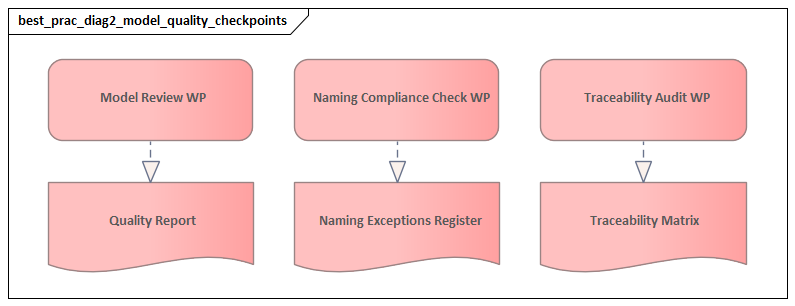
Peer review is another underrated practice. A diagram that looks neat may still be semantically inconsistent. Teams should review models for both notation quality and architectural usefulness. Useful questions include: does the model answer the intended stakeholder question, are the relationships semantically correct, is the abstraction level appropriate, and does the view show only what is necessary? Shared review patterns improve consistency across architects and build confidence in the repository.
Finally, clarity should outweigh completeness in individual views. Completeness belongs in the repository; clarity belongs in the diagram. That distinction resolves a common tension in enterprise modeling. Architects often feel pressure to include everything they know, but stakeholder-facing views work best when they show only what is needed for the decision at hand. Combined with the scope and viewpoint discipline described earlier, this approach produces models that are both understandable and actionable.
5. Integrating ArchiMate with TOGAF, BPMN, UML, and Other EA Standards
ArchiMate delivers the most value when it is used as part of a broader architecture ecosystem rather than as a standalone language. In most organizations, architects work across methods, process notations, solution design artifacts, governance frameworks, and operational data sources. The goal is not to force ArchiMate to replace them all, but to position it clearly alongside them.
The relationship with TOGAF is especially important. TOGAF provides a method, governance structure, and process for developing architecture. ArchiMate provides a formal language for expressing architecture content. In practical terms, TOGAF helps answer how architecture work is organized and governed, while ArchiMate helps represent the resulting knowledge consistently. A mature practice uses TOGAF to structure engagement and decision-making, then uses ArchiMate to model baseline architectures, target states, transition architectures, and implementation implications.
Integration with BPMN requires the same kind of clarity. BPMN is optimized for detailed workflow design, where sequencing, gateways, events, exceptions, and automation logic matter. ArchiMate is better suited to showing enterprise context and dependencies: which capability a process supports, which applications enable it, what information it uses, and what technology it depends on. A practical rule of thumb is that BPMN explains process execution, while ArchiMate explains process context. A claims-handling process, for example, may be modeled in BPMN for operational optimization, while ArchiMate shows how that process fits into the wider architecture landscape.
The same principle applies to UML. UML remains valuable for software-oriented analysis and design, including component models, classes, sequences, and detailed deployment views. ArchiMate should not be stretched into low-level solution design where UML is more precise. Instead, ArchiMate should provide the enterprise frame around the solution: which application components exist, what services they expose, how they support business behavior, and where they fit in the wider landscape. UML can then elaborate the internal design of a specific solution. Keeping that boundary clear prevents enterprise models from becoming overloaded with engineering detail.
Successful integration depends on explicit content mapping. Teams should define how concepts align across standards. A TOGAF architecture building block may map to one or more ArchiMate elements. A BPMN process may map to a business process or value stream stage. A UML component may correspond to an application component. Without these mapping rules, repositories drift into ambiguity and traceability breaks down. This is where semantic discipline becomes essential: if ArchiMate elements are used inconsistently, integration with other standards becomes unreliable.
Integration also needs governance rules. Organizations should decide which artifact is authoritative, when synchronization is required, and who owns semantic consistency. ArchiMate should not duplicate every detail from external tools. Instead, it should connect to authoritative sources where appropriate. CMDBs may remain the source for infrastructure inventory. BPM tools may remain the source for executable workflows. Portfolio tools may remain the source for project and investment status. ArchiMate then serves as a navigational layer that links those domains into a coherent architecture view.
A common enterprise pattern is to use ArchiMate as the bridge between portfolio planning and delivery design. For example, a telecom operator may use TOGAF-based governance to manage target architecture decisions, BPMN to refine order activation workflows, UML to detail service orchestration components, and ArchiMate to connect all of that back to customer onboarding capability, OSS/BSS applications, and network platform dependencies. The standards are different, but the architecture narrative remains coherent because the boundaries are clear.
Other standards and frameworks matter as well. Service management structures can inform operational service models. Risk and control frameworks can support compliance traceability. Capability taxonomies and portfolio structures can strengthen strategic planning. The goal in each case is the same: use ArchiMate as an integrative language that connects specialized viewpoints without replacing the tools and methods that are better suited to detailed analysis in their own domains.
When integration is designed deliberately, ArchiMate becomes more than a modeling notation. It becomes the language that links method, model, and execution across the architecture practice.
6. Governance, Repository Management, and Continuous Improvement
ArchiMate modeling becomes sustainable only when it is supported by governance and repository discipline. Many organizations begin with enthusiasm, create useful views, and then lose confidence as diagrams diverge, ownership becomes unclear, and updates stop reflecting reality. The problem is usually not the language itself. It is the absence of a managed practice around the models.
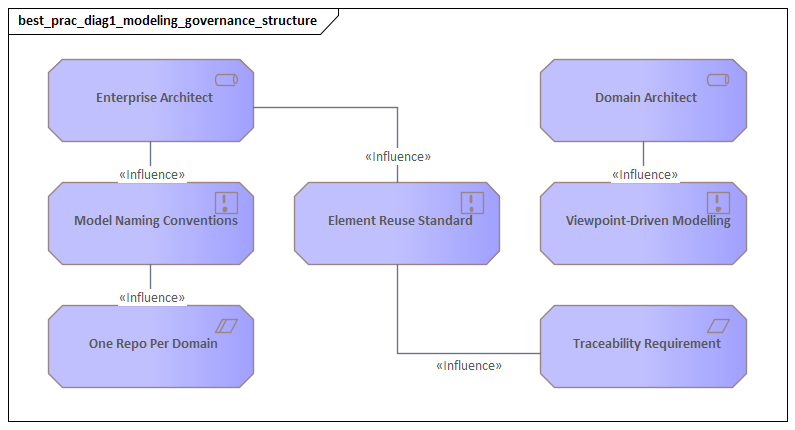
A strong governance approach starts with accountability. Every major domain in the repository should have clear ownership, whether in business architecture, application architecture, data architecture, technology architecture, or platform teams. Ownership does not mean one person updates everything manually. It means there is a responsible role for semantic quality, lifecycle accuracy, and approval of significant changes. Without that, repositories accumulate duplicate elements, contradictory relationships, and obsolete target-state views.
Governance should also define model lifecycle states. Some views are exploratory, some are approved baseline descriptions, some represent target architecture, and others describe transition states tied to active initiatives. Marking these states explicitly helps stakeholders understand what they can rely on for governance decisions and what is still being developed. It also prevents early conceptual diagrams from being mistaken for approved commitments.
Repository management should be built around reusable architecture objects, not just diagrams. As emphasized earlier, the conceptual model must be separated from the presentation layer. Elements should have stable identifiers, standard names, concise definitions, ownership metadata, and links to related artifacts where useful. Folder structures, taxonomies, and tags should support navigation by domain, lifecycle, business unit, and initiative. If architects cannot quickly find the authoritative representation of a capability, application component, or technology service, they will bypass the repository and return to local documents.
From a practical perspective, repository quality improves only when it is tied to governance processes. Architecture review boards, project initiation, solution design checkpoints, technology lifecycle reviews, and investment planning should all create demand for current models. If governance requires traceability through repository content, teams have a reason to maintain it. If models are never used in real decision forums, they decay regardless of tooling quality. A common example is technology lifecycle governance: when a database platform moves to contain or retire, the repository should make it easy to identify affected applications, business services, and funded remediation work.
Continuous improvement depends on quality controls and feedback loops. Useful practices include periodic model reviews, duplicate detection, relationship validation, naming standard checks, and retirement of stale views. Metrics can help, but they should measure trustworthiness and usefulness rather than sheer volume. Counting diagrams says very little. Better indicators include the percentage of critical applications with assigned owners, the proportion of target-state elements linked to initiatives, the number of obsolete views archived, or the coverage of key business capabilities across layers.
Incremental evolution is equally important. Enterprises often lose momentum by trying to model everything before establishing working governance. A better approach is to prioritize high-value domains, apply minimum metadata standards, and expand iteratively. This aligns with the decision-focused approach described throughout the article: model where the business need is strongest, then grow the repository as usefulness becomes visible.
A practical micro-example is end-of-life platform remediation. Suppose a global manufacturer decides to retire an aging on-premises integration broker. If the repository is well governed, architects can identify which plants, warehouse processes, MES applications, and B2B interfaces depend on that broker, which transition architectures are already approved, and which owners are accountable for remediation. If the repository is poorly governed, the same exercise turns into weeks of interviews and spreadsheet reconciliation.
Ultimately, governance and repository management are what turn ArchiMate from a notation into an enterprise capability. Well-governed models remain relevant because they are owned, curated, reviewed, and tied to real change processes. Without that discipline, even technically correct models lose value quickly. With it, ArchiMate becomes a durable part of the enterprise knowledge base.
Conclusion
ArchiMate is most effective when treated as a disciplined enterprise practice rather than a diagramming exercise. Its value comes from connecting strategy, operations, applications, and technology in a form that supports decision-making. That is what allows enterprise architecture to move from disconnected documentation to meaningful traceability. The middle sections of this article showed that the value depends on semantic discipline, clear scope, stakeholder-focused viewpoints, and modeling habits that prioritize clarity over volume.
The later sections make an equally important point: good modeling does not stand alone. ArchiMate works best when positioned alongside standards such as TOGAF, BPMN, and UML, with each used for the purpose it serves best. Long-term value also depends on governance, repository management, and continuous improvement. Without those operating disciplines, even strong diagrams quickly become stale.
A useful test is simple. Does the model help leaders and delivery teams understand dependencies, assess impact, prioritize change, and manage risk? If it does, it is doing its job. If it merely demonstrates notation knowledge, it is not.
In that sense, ArchiMate is more than a modeling standard. Applied well, it becomes a practical foundation for making enterprise complexity manageable and for guiding change with greater confidence.
Frequently Asked Questions
What is enterprise architecture?
Enterprise architecture is a discipline that aligns an organisation's strategy, business operations, information systems, and technology infrastructure. It provides a structured framework for understanding how an enterprise works today, where it needs to go, and how to manage the transition.
How is ArchiMate used in enterprise architecture practice?
ArchiMate is used as the standard modeling language in enterprise architecture practice. It enables architects to create consistent, layered models covering business capabilities, application services, data flows, and technology infrastructure — all traceable from strategic goals to implementation.
What tools are used for enterprise architecture modeling?
Common enterprise architecture modeling tools include Sparx Enterprise Architect (Sparx EA), Archi, BiZZdesign Enterprise Studio, LeanIX, and Orbus iServer. Sparx EA is widely used for its ArchiMate, UML, BPMN and SysML support combined with powerful automation and scripting capabilities.