⏱ 7 min read
ArchiMate has become one of the most widely adopted languages for Enterprise Architecture modeling. Maintained by The Open Group, it provides a standardized way to describe organizations, applications, and infrastructure across multiple architecture layers. Tools such as Archi, Sparx Enterprise Architect, and others have made ArchiMate accessible to a broad community of architects.
However, practitioners who work with modern distributed systems frequently encounter a recurring limitation: ArchiMate does not include a native equivalent of the UML sequence diagram. For many architects this absence is not immediately obvious, but it becomes increasingly problematic when modeling microservice interactions, API orchestration, identity and security flows, event-driven systems, and distributed transaction patterns. These architectures depend heavily on runtime interaction sequences, and explaining them without a sequence diagram can become awkward or confusing. ArchiMate tutorial for enterprise architects
Why sequence diagrams matter in architecture
A sequence diagram represents how different actors or systems interact over time. Unlike static architecture diagrams, sequence diagrams answer dynamic questions: what system initiates a process, which services are called and in what order, which calls are synchronous or asynchronous, where failures or retries occur, and what the orchestration logic is.
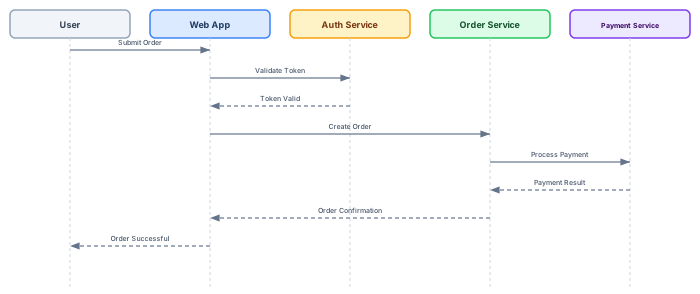
This sequence diagram communicates the entire order flow in a single view: the user submits an order, the web app validates the token with the auth service, then creates the order, which triggers payment processing. The dashed return arrows clearly distinguish responses from requests. Sequence diagrams are extremely effective for communicating architecture behavior across technical teams.
Why ArchiMate does not include sequence diagrams
ArchiMate was designed with a different goal than UML. While UML focuses heavily on software design and behavior modeling, ArchiMate focuses on enterprise-level structure and relationships. The language intentionally emphasizes structural elements, service exposure, capabilities, and relationships between layers. ArchiMate behavioral elements include Business Process, Application Process, Application Function, Interaction, Event, and Service — but these elements describe what happens, not necessarily the chronological order of interactions.
This design keeps ArchiMate technology-neutral, implementation-independent, and focused on architecture rather than design. The trade-off is that architects who need to document how systems interact at runtime must look beyond ArchiMate's notation. ArchiMate layers explained
Why this becomes a problem in modern architectures
Modern architectures rely heavily on distributed systems — microservices, API gateways, event streaming platforms, identity federation, and zero-trust architectures. In these systems, the interaction flow itself becomes architecture. Consider an authentication flow:
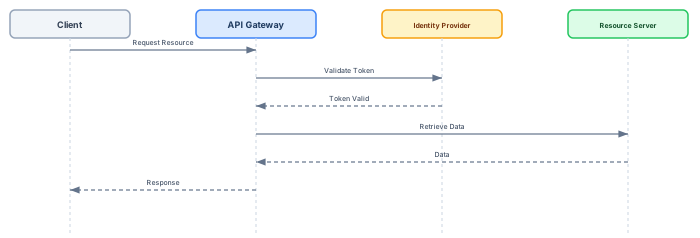
Without sequence diagrams, explaining this flow requires either lengthy text descriptions or diagrams that show connections but not ordering — both inferior communication tools.
Attempting sequence modeling using pure ArchiMate
A common workaround is to model interactions using Application Components and Flow relationships:

This diagram shows relationships but not the ordering of calls. The reader cannot determine whether the Auth Service is called before or after the Order Service, or whether the Payment Service call is synchronous or asynchronous.
Using Application Processes as orchestration
Another workaround is modeling the interaction logic as an Application Process chain:

This works when a central orchestrator exists and the flow is strictly sequential. However, it fails in distributed choreography scenarios where multiple services react independently to events — there is no single orchestrator to model as a process chain.
Event-driven architecture: where the gap is most visible
Event-driven systems illustrate the modeling gap most clearly:
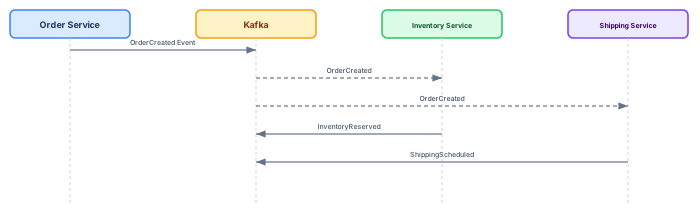
In this pattern, the Order Service publishes an event to Kafka, and multiple downstream services consume it independently. The Inventory Service and Shipping Service react in parallel — there is no sequential chain. ArchiMate can model the components and their relationships, but cannot express the temporal pattern: publish first, then parallel consumption, then independent responses. The sequence diagram makes this interaction pattern immediately clear. ArchiMate relationship types
Practical solutions: hybrid modeling with UML and Mermaid
Because ArchiMate lacks sequence diagrams, architects typically adopt hybrid modeling strategies. The most practical approach maps notation to purpose: ArchiMate for enterprise landscape, application structure, and infrastructure; UML sequence diagrams for runtime interactions and behavioral flows. Tools like Sparx Enterprise Architect support both notations in the same repository, enabling architects to link ArchiMate Application Components to UML sequence diagrams that detail their runtime behavior. ArchiMate modeling best practices
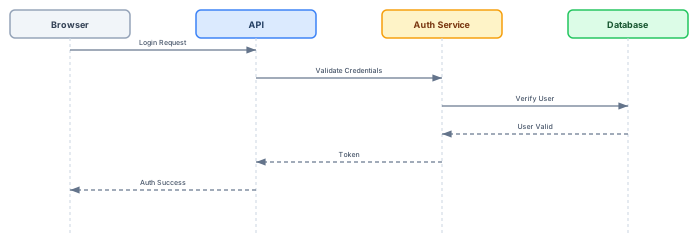
Mermaid diagrams are increasingly popular for lightweight architecture documentation. They are text-based (Git-friendly), easy to embed in Markdown, and simple to version control. For teams that document architecture in wikis, ADRs, or technical specifications, Mermaid provides a pragmatic alternative to heavyweight modeling tools.
ArchiMate interaction views: what they can and cannot do

ArchiMate interaction views show which components communicate with which other components. This is valuable for understanding the communication topology — who talks to whom. However, interaction views deliberately omit sequencing semantics: they do not show the order of calls, the distinction between synchronous and asynchronous communication, or the branching logic when errors occur. For structural communication views, ArchiMate is excellent. For runtime behavior, it is insufficient.
Recommended modeling strategy

A practical architecture modeling approach uses three complementary layers. First, ArchiMate for structural architecture: the enterprise landscape, application portfolio, technology infrastructure, and capability maps. Second, ArchiMate interaction views for communication topology: which components serve which other components. Third, sequence diagrams (UML or Mermaid) for runtime behavior: the temporal ordering of calls, synchronous vs asynchronous patterns, error handling, and retry logic.
Combined in architecture documentation, these three layers provide complete coverage — from strategic enterprise views down to detailed runtime interactions. Architecture modeling is not about strict adherence to a single notation. It is about clear communication of complex systems. The best architects use the right notation for each communication challenge, and for runtime interactions in distributed systems, that notation is the sequence diagram.
Frequently Asked Questions
What is enterprise architecture?
Enterprise architecture is a discipline that aligns an organisation's strategy, business operations, information systems, and technology infrastructure. It provides a structured framework for understanding how an enterprise works today, where it needs to go, and how to manage the transition.
How is ArchiMate used in enterprise architecture practice?
ArchiMate is used as the standard modeling language in enterprise architecture practice. It enables architects to create consistent, layered models covering business capabilities, application services, data flows, and technology infrastructure — all traceable from strategic goals to implementation.
What tools are used for enterprise architecture modeling?
Common enterprise architecture modeling tools include Sparx Enterprise Architect (Sparx EA), Archi, BiZZdesign Enterprise Studio, LeanIX, and Orbus iServer. Sparx EA is widely used for its ArchiMate, UML, BPMN and SysML support combined with powerful automation and scripting capabilities.