⏱ 5 min read
Set up the ArchiMate tooling correctly
Enterprise Architect includes ArchiMate among the technologies integrated with the installer, and it is also delivered through an MDG technology approach (model-driven extensions). turn21view0
Recommended Reading
The vendor documentation describes ArchiMate support as enabling rapid development of ArchiMate diagrams to describe, analyze, and visualize relationships among business domains, supporting stakeholder impact analysis and communication. turn21view2 ArchiMate tutorial for enterprise architects
Use built-in viewpoints and patterns to model faster
A practical workflow is to start from viewpoint patterns rather than blank canvases. The Enterprise Architect ArchiMate guide includes viewpoint patterns across strategy, motivation, implementation/migration, and core layers, with descriptions of what each viewpoint is intended to show. turn8view0turn21view2 ArchiMate layers explained

This matters because it operationalizes a core ArchiMate principle: a model is too complex to consume directly, so you produce targeted views aligned to stakeholder concerns. turn13view0turn8view0 ArchiMate relationship types
Maintain semantic correctness with metamodel-driven constraints
Enterprise Architect tooling guidance illustrates that relationship choices can be restricted based on permissible relationships defined by the metamodel, which helps maintain coherence and reduce invalid modeling. turn8view0turn13view0
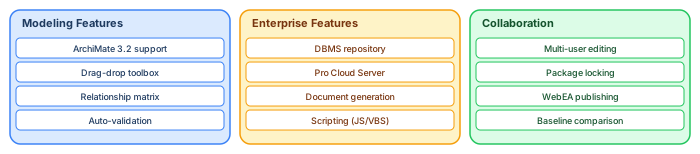
In practice, this transforms modeling quality: instead of “drawing lines,” architects are nudged toward semantically correct relationships.
Create custom viewpoints for your enterprise standards
Large organizations often require “enterprise-specific” viewpoints (for example: “Cloud Landing Zone View” or “Customer Data Product View”). Enterprise Architect provides documented steps for defining and deploying custom ArchiMate viewpoints, including wrapping profiles into MDG technologies so they can be reused across models and teams. turn21view1 ArchiMate modeling best practices
This is the scalable way to enforce modeling standards without relying on individual memory or ad-hoc templates.
Collaborate at scale with a shared repository
For team-based enterprise architecture, repository architecture matters. Enterprise Architect documentation describes extensive support for team-based modeling, including scalability, concurrent access, and security controls, and it highlights cloud-server-based deployment for distributed teams in a single living repository. turn20view1turn20view0
The Pro Cloud Server documentation describes cloud repositories as hosted by Pro Cloud Server, enabling connection via a single URL and supporting enterprise deployment while keeping control of configuration and repository data in the organization’s infrastructure. turn20view0
Use reporting to turn models into stakeholder-ready deliverables
A common enterprise pattern is: the model is the system of record; diagrams are the stakeholder views; generated documents and dashboards are the consumable artifacts for governance forums.
This aligns with the underlying premise that architecture description should mix visuals and text for effectiveness and stakeholder reach. turn13view0turn21view2
Frequently asked questions
Can Enterprise Architect support both TOGAF and ArchiMate workflows?
Yes. Documentation states that ArchiMate can be used alongside methods that guide the architecture process (such as TOGAF), and it also describes separate TOGAF MDG technology support that targets ADM phases and the four architecture domains. turn21view2turn10view0
Applying these patterns in practice
The value of ArchiMate modeling is realized not through comprehensive coverage of every element type, but through disciplined application of a few core patterns that answer recurring stakeholder questions. Three patterns account for the majority of architecture communication needs.
The Layered View pattern shows how business processes depend on applications, and how applications depend on infrastructure. Build this view by placing Business Processes at the top, Application Components in the middle, and Technology Nodes at the bottom. Connect them with Serving and Realization relationships. This single view demonstrates cross-layer traceability — when a server is decommissioned, trace upward to see which applications and business processes are affected.
The Cooperation View pattern shows how application components interact through interfaces and data flows. Place the core application in the center and its integration partners around it, connected by Flow relationships labeled with the data exchanged. This view reveals integration dependencies that are otherwise buried in technical documentation.
The Motivation View pattern connects strategic goals to architecture decisions. Stakeholder concerns drive Goals, Goals are realized by Outcomes, Outcomes are enabled by Capabilities, and Capabilities are realized by Application Components. This chain answers the question executives always ask: "Why are we building this?"
If you’d like hands-on training tailored to your team — Sparx Enterprise Architect, BPMN, SysML, Apache Kafka or the Archi tool — or modelling coaching in ArchiMate and TOGAF-aligned governance, you can reach us via our contact page.
Frequently Asked Questions
What is Sparx Enterprise Architect used for?
Sparx Enterprise Architect (Sparx EA) is a comprehensive UML, ArchiMate, BPMN, and SysML modeling tool used for enterprise architecture, software design, requirements management, and system modeling. It supports the full architecture lifecycle from strategy through implementation.
How does Sparx EA support ArchiMate modeling?
Sparx EA natively supports ArchiMate 3.x notation through built-in MDG Technology. Architects can model all three ArchiMate layers, create viewpoints, add tagged values, trace relationships across elements, and publish HTML reports — making it one of the most popular tools for enterprise ArchiMate modeling.
What are the benefits of a centralised Sparx EA repository?
A centralised SQL Server or PostgreSQL repository enables concurrent multi-user access, package-level security, version baselines, and governance controls. It transforms Sparx EA from an individual diagramming tool into an organisation-wide architecture knowledge base.