⏱ 20 min read
Most workflow systems look tidy on the whiteboard and treacherous in production.
The first version is always innocent. A few states, a few transitions, maybe a timeout, maybe an approval step. Then the business changes its mind—which is to say, the business behaves like a business. Compliance inserts a review. Operations wants retries. Legal needs a second signature for specific jurisdictions. Finance insists that anything above a threshold must route differently. Suddenly the workflow isn’t a flowchart anymore. It’s a living contract between software, people, and policy.
That is where workflow versioning stops being a technical nicety and becomes architectural plumbing. If you don’t treat versions as first-class citizens, your workflow engine will eventually behave like a museum where old visitors are forced to use the newest map. They get lost, and they blame you.
A workflow architecture that cannot honor historical process definitions while evolving toward new ones is not resilient. It is merely optimistic.
This article looks at workflow versioning as an architectural concern, not just a feature toggle in a BPM product. We’ll talk about domain semantics, long-running processes, migration reasoning, Kafka and microservices, reconciliation, enterprise tradeoffs, and the failure modes people usually discover at 2 a.m. We’ll also be opinionated: many teams over-engineer versioning in the wrong place, and many others pretend they don’t need it until an audit or a production incident proves otherwise. event-driven architecture patterns
Context
Workflow architecture sits at an awkward intersection.
It is partly domain model, partly orchestration layer, partly operational control plane. In a modern enterprise, workflows coordinate order fulfillment, claims handling, loan underwriting, employee onboarding, procurement approvals, and incident management. They bind together systems that were never designed to cooperate gracefully: ERP, CRM, document platforms, rules engines, event streams, email systems, human task queues, and half a dozen microservices written by teams with very different ideas of “done.” microservices architecture diagrams
The difficulty is not merely that processes change. The difficulty is that running instances do not all change at the same time.
A loan application started under last month’s policy may still be in review when the risk policy changes. A claims workflow initiated before a regulatory update may legally need to complete under the old rule set. A customer return process created yesterday might need to adopt a new fraud screening step today. Some instances can move forward under the new model. Some must remain on the old one. Some need human adjudication. That’s not a bug in workflow architecture. That’s the real world intruding.
Domain-driven design helps here because it forces us to ask a more useful question than “How do we update the process definition?” The better question is: what are the business semantics of a workflow version?
Is a version a technical revision of step order? A new policy regime? A new contract with downstream systems? A change in legal meaning? Those are not the same thing. If you collapse them into one integer field called version, you create ambiguity at the exact point where your architecture most needs precision.
Good workflow versioning starts by acknowledging bounded contexts. The Order Management context might define versions around fulfillment policy. The Risk context may define versions around decision logic. The Customer Service context may not care about internal workflow versions at all; it cares about externally visible statuses and SLAs. One workflow can span multiple contexts, but version semantics rarely belong to all of them equally. This matters because migration decisions should follow domain boundaries, not implementation convenience.
Problem
Without explicit versioning, workflow systems fail in remarkably predictable ways.
A team updates the workflow definition in place. New requests work fine. Existing in-flight instances, however, now point to states or transitions that no longer exist. Tasks become orphaned. Timers fire against invalid nodes. Compensation logic expects outputs from a step that older instances never executed. Reporting mixes definitions together and can no longer answer a simple question from audit: “Why did application A require two approvals while application B required one?”
Even worse, microservices participating in the workflow often evolve independently. The workflow engine believes “ApprovePayment” means one thing; the payment service has already shipped a new command contract that means something else. Kafka topics contain events whose meaning drifts over time. Schemas may remain backward compatible syntactically while breaking the business meaning semantically. This is the nastiest class of versioning bug: the system still runs, but it lies.
Long-running workflows make all of this harder. A batch import may finish in seconds. A mortgage application can live for weeks. A procurement workflow can stretch across quarters. Once a process outlives a deployment cycle, versioning is no longer optional. It is part of the business record.
And there’s another problem that people underestimate: workflow migration is not only about moving a process instance from model V1 to V2. It’s about reconciling state, intent, and side effects. If the old version already sent notifications, booked inventory, or created external tasks, the new version cannot simply “resume from equivalent step.” There may be no exact equivalence. Architecture gets serious when semantics stop lining up neatly.
Forces
Several forces pull against each other in workflow versioning.
Business change is constant
Policy, pricing, regulation, organizational structure, and customer expectations all change. Workflow models need to evolve quickly, often under pressure.
In-flight work must remain valid
An enterprise cannot casually invalidate active claims, orders, cases, or approvals because a diagram changed. Historical continuity matters legally and operationally.
Human tasks create time gaps
People disappear for weekends, vacations, sick leave, and queue delays. Human-in-the-loop workflows make version drift inevitable.
Distributed systems amplify semantic mismatch
A workflow may call services synchronously, publish to Kafka asynchronously, wait on external events, and invoke SaaS APIs. Each dependency has its own change cadence. Versioning in one place alone is not enough.
Auditability matters
In regulated industries, you must explain not just what happened, but under which rule set it happened. “We deployed a fix” is not an audit trail.
Product teams want autonomy
Microservice teams want to evolve independently. Centralized workflow control can become a bottleneck. But complete independence creates semantic fragmentation.
Migration has a cost
Supporting multiple workflow versions increases operational complexity, testing scope, dashboarding needs, and support burden. Keeping every old version alive forever is architectural hoarding.
These forces rarely resolve cleanly. Architecture is choosing which pain you prefer and making that choice legible.
Solution
The core solution is simple to say and harder to do well:
Treat workflow definition versions, workflow instance state, and integration contracts as separate but related versioned artifacts.
That separation is the difference between architecture and wishful thinking.
A mature workflow versioning approach usually includes these principles:
- Immutable workflow definitions
Once published, a workflow definition version does not change. Fixes create a new version. Existing instances retain a pointer to the definition they started with unless explicitly migrated.
- Explicit version selection policy
New instances must choose a workflow version according to domain rules: effective date, jurisdiction, product type, customer segment, or feature policy. “Always latest” is acceptable only in trivial domains.
- Instance-to-definition binding
Each workflow instance records which definition version governs it, plus related policy/rules versions where relevant.
- Controlled migration paths
Migration from one version to another is explicit, rule-based, and often partial. Some instances are migratable; some are not; some require reconciliation.
- Stable domain events
Events emitted to Kafka or other brokers should prefer durable business semantics over leaking internal workflow step names. Internal orchestration changes should not unnecessarily force enterprise-wide contract changes.
- Reconciliation capability
The system must compare expected state against actual side effects across services and external systems. Migration without reconciliation is theatre.
- Operational observability by version
Metrics, logs, traces, and dashboards must reveal behavior by workflow version, not just aggregate process name.
This leads to an architecture where workflow versions are not hidden inside a modeling tool. They become part of the platform contract.
A conceptual model
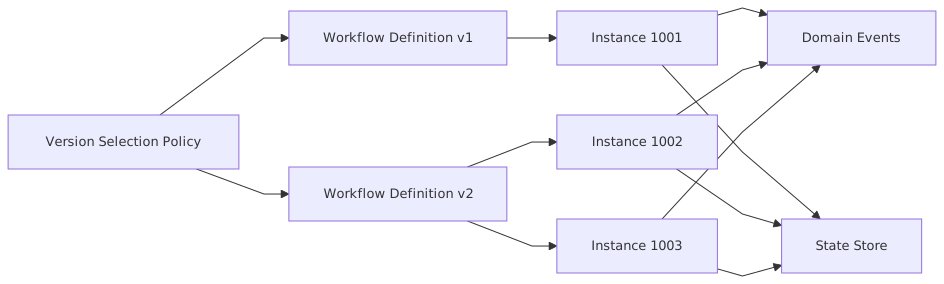
The important part is not the arrows. It is the discipline behind them. Definitions are immutable. Instances bind to them. Events represent business facts. Policy chooses the version.
Architecture
Let’s get concrete.
A robust workflow versioning architecture in the enterprise typically has five layers:
1. Process definition layer
This stores immutable workflow definitions and metadata:
- workflow name
- definition version
- effective dates
- applicable products/regions/channels
- compatible migration sources
- state model
- task definitions
- timeout/retry policies
- compensation and exception handling rules
This is where people often make a bad decision: embedding too much domain logic directly in the workflow graph. A workflow should coordinate decisions and actions, not become a swamp of hidden business rules. Rich domain semantics belong in domain services or a rules capability aligned to the bounded context. The workflow should invoke them, not impersonate them.
If a definition version changes because the underlying domain policy changed, record that relationship explicitly. Don’t bury policy evolution inside opaque JSON.
2. Workflow runtime layer
This executes instances, persists state transitions, schedules timers, manages tasks, and emits events.
The runtime must store:
- instance ID
- workflow definition version
- current state
- correlation IDs
- business key
- participant context
- side-effect ledger or execution log
- migration eligibility flag
- reconciliation status
Long-running workflows need durable state transitions, idempotent execution, and recovery semantics. If your runtime cannot replay safely or resume deterministically after failure, versioning problems will become data integrity problems.
3. Integration layer
In a microservices and Kafka landscape, the workflow runtime should not create a brittle web of direct synchronous dependencies unless latency or consistency truly demands it.
A healthier pattern is:
- commands to specific services when orchestration needs directed action
- domain events to Kafka when business facts should propagate
- anti-corruption layers where legacy services expose awkward contracts
- schema governance for event compatibility
- semantic versioning of payloads where unavoidable, but with strong preference for additive evolution
A common trap is publishing low-level workflow step events like WorkflowStepCompleted. Useful internally, useless across the enterprise. Better to publish business events like ClaimSubmitted, RiskReviewRequested, PaymentAuthorized, or OrderReleased. These survive process reshaping far better.
4. Version policy and migration layer
This component decides:
- which version new instances should use
- whether an existing instance can migrate
- what mapping exists from old states to new states
- whether compensation or remediation is required first
- whether reconciliation passed
Think of it as the traffic cop between process evolution and live business work.
5. Observability and governance layer
You need version-aware monitoring, audit history, and governance workflows. Not glamorous, but essential. EA governance checklist
This includes:
- dashboards by workflow version
- alerts on stalled versions
- migration success/failure rates
- event lag by version
- audit reports showing rule set and process path
- retirement policy for obsolete versions
Version-aware event-driven architecture
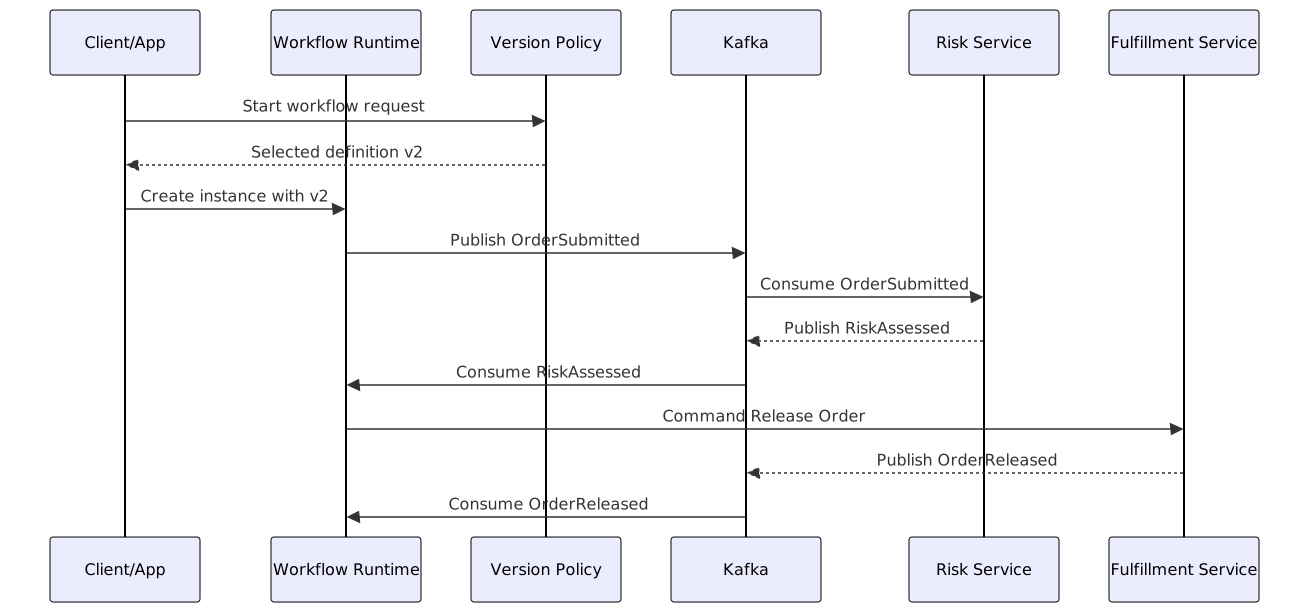
Notice what is not happening. The workflow version itself is not sprayed all over the ecosystem unless needed. The runtime knows the version. Other services consume stable business events and apply their own bounded-context rules. That limits coupling.
Migration Strategy
Migration is where architecture earns its keep.
The worst migration strategy is “switch everything on Friday night.” The second worst is “never migrate anything; just let versions accumulate forever.” One causes outages. The other creates a software landfill.
The practical answer is usually a progressive strangler approach.
Progressive strangler for workflow versioning
Instead of replacing workflow behavior wholesale, route new work to the new definition while old instances complete on the old path. Introduce migration only for clearly safe cohorts.
There are four common strategies:
- Run-off
Existing instances finish on the old version. New instances start on the new one. Lowest risk, highest temporary duplication.
- State mapping migration
Existing instances at selected states can move to a corresponding state in the new version. Useful when the graph changed modestly.
- Checkpoint migration
Migration allowed only at explicit checkpoints where side effects are reconciled and semantic equivalence is understood.
- Restart under new version with carry-forward data
For some case-style workflows, it is cleaner to terminate the old instance and start a new one with a migration record and imported context.
I strongly prefer checkpoint migration over broad freeform migration. It forces architects to confront reality: not all states are equivalent, and not all side effects are reversible.
A migration decision flow
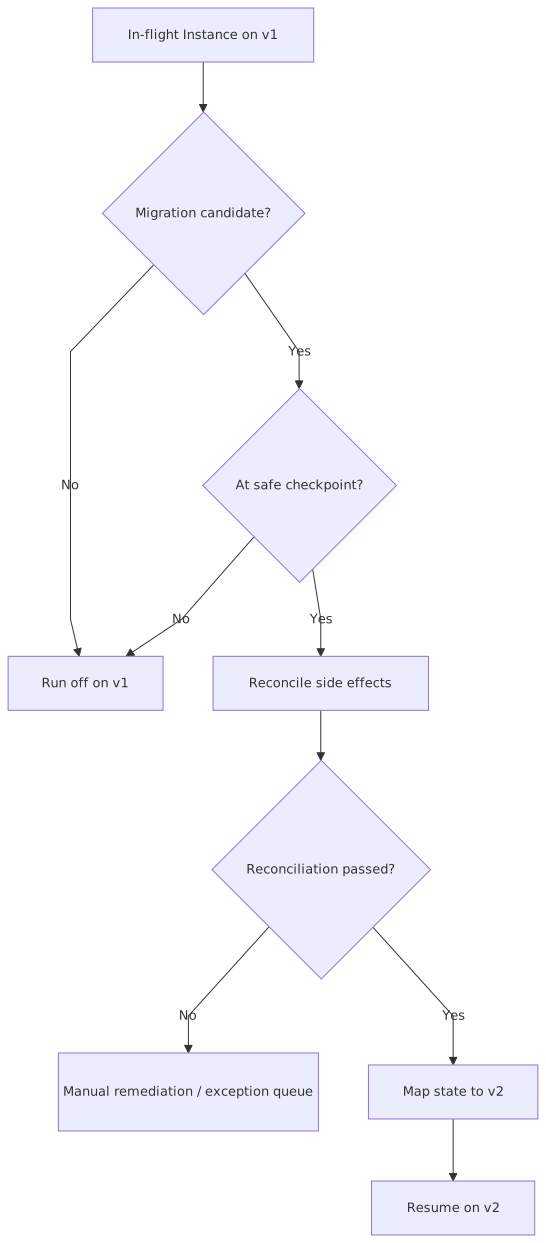
That reconciliation step is not optional in serious systems. If the old version already emitted events, opened tasks, or triggered external actions, you must verify what actually happened, not what the workflow engine assumes happened.
Reconciliation
Reconciliation is the missing chapter in many workflow migration stories.
A workflow runtime may believe an approval task is pending, while the task system shows it completed yesterday. Kafka may contain the event, but a downstream service may not have processed it. An external payment gateway may have authorized funds even though the local service crashed before persisting the response.
If you migrate without reconciling, you risk duplicate actions, skipped obligations, or contradictory business records.
A sound reconciliation capability typically compares:
- workflow instance state
- execution log / side-effect ledger
- downstream service states
- human task status
- event publication and consumption markers
- external system acknowledgments
This often requires a dedicated reconciliation service or at least a reconciler job aligned to major workflow domains. It is not glamorous software. It is the kind of software that keeps you out of the newspaper.
Migration in Kafka-based systems
Kafka helps and hurts.
It helps because event logs give you durable history and replay options. It hurts because replaying events into evolved consumers can trigger new semantics on old facts. That’s not inherently wrong, but it is dangerous if unmanaged.
A practical stance:
- treat event replay for workflow migration as a specialized operation, not a casual support trick
- pin critical consumers to compatible schemas and semantics
- use migration topics or headers when you need controlled transitional handling
- maintain idempotency keys for commands and side effects
- prefer emitting corrected business facts over mutating history
In other words, Kafka is a record of what happened, not a magic wand for fixing architecture debt.
Enterprise Example
Consider a global insurer modernizing claims processing.
The original claims workflow, version 1, handled:
- claim submission
- document collection
- adjuster review
- approval
- payment
Then regulations changed in two countries, requiring fraud screening before adjuster review for claims above a threshold. At the same time, the fraud team introduced a machine-assisted scoring service exposed through Kafka events, while the payment platform was being split into microservices.
This is where naive workflow design dies.
If the insurer simply edited the workflow in place, thousands of active claims would be stranded. Some claims legally had to continue under the old process because they were initiated before the regulatory effective date. Others could adopt the new screening step. Still others were already past the equivalent point and could not sensibly go backward.
The architecture team did three smart things.
First, they defined workflow versions in business terms, not just engine revisions. Claims workflow v2 was explicitly bound to:
- jurisdiction set A and B
- effective date
- fraud-screening policy version
- payment integration contract version
That made audit and routing intelligible.
Second, they used progressive strangler migration. New claims in affected jurisdictions started on v2. Existing v1 claims ran off unless they were at a checkpoint before adjuster review and had no payment side effects. Only then were they eligible for migration.
Third, they built a reconciliation service. Before migration, it checked:
- document collection status in the content platform
- open human tasks in the work management system
- fraud score event presence in Kafka
- claim reserve status in the core claims system
- payment holds in the finance platform
A small percentage failed reconciliation due to missing or duplicate task signals. Those claims went to an exception queue for operations review.
Was this more expensive than changing one BPMN file? Of course. But it allowed the insurer to continue processing claims during regulatory change without data corruption or audit exposure. That is what enterprise architecture is for. BPMN training
Operational Considerations
Versioning is easy in design documents and stubborn in operations.
Metrics by version
Track throughput, cycle time, abandonment, SLA breach, retry count, and failure rate by workflow version. Aggregate metrics hide important pathology. If v1 is healthy and v2 is stalling at fraud review, the average will politely conceal the fire.
Deployment discipline
Workflow definitions, rules versions, consumer schemas, and service contracts should be promoted through environments as a coherent release train where necessary. Independent deployment is a good servant and a bad religion. Some changes are semantically coupled whether teams like it or not.
Human task queues
Task systems must preserve enough context to understand which process version generated a task. Otherwise support teams will see “Approve Claim” with no clue why two seemingly identical claims have different instructions.
Timeout and retry policies
Version changes often alter wait states and retries. That can create weird edge behavior during migration. A task that was due in 24 hours under v1 may become 48 hours under v2. Make these semantics explicit.
Data retention and archival
Retain retired workflow definitions long enough to support audit, dispute handling, and historical replay analysis. Deleting old definitions because “nothing new uses them” is a rookie move.
Support tooling
Operations needs:
- instance inspection by version
- manual retry with idempotency safeguards
- migration status visibility
- reconciliation reports
- exception queue handling
If your versioning strategy requires shell access and SQL scripts, you haven’t designed a platform. You’ve created a hostage situation.
Tradeoffs
Workflow versioning is not free, and pretending otherwise is irresponsible.
Benefits
- safer process evolution
- auditability and compliance clarity
- reduced breakage for in-flight work
- better bounded-context decoupling
- controlled modernization across microservices
Costs
- more complex runtime and metadata management
- larger testing matrix
- additional operational tooling
- migration and reconciliation engineering effort
- temporary coexistence of multiple versions
The key tradeoff is between change agility and operational complexity. Ironically, investing in versioning increases long-term agility by making change survivable, but it imposes short-term discipline that teams often resist.
Another tradeoff is centralization versus autonomy. A central workflow platform can enforce versioning rigor. But if it becomes the single place where all domain behavior is encoded, it turns into an enterprise bottleneck. The answer is not “put everything in the workflow engine.” The answer is a clean split: workflows orchestrate; domain services own domain logic.
Failure Modes
Here are the failure modes I see repeatedly.
1. In-place mutation of workflow definitions
The team edits version 1 and calls it version 1. Existing instances break in subtle ways. Audit becomes impossible. This is the cardinal sin.
2. Workflow step names leak as enterprise contracts
Consumers subscribe to Step7Completed or ManagerApprovalFinished. Then a perfectly reasonable workflow refactor becomes an enterprise-wide breaking change. Publish business events, not internal choreography trivia.
3. Semantic drift under schema compatibility
Payloads remain backward compatible at JSON level while meaning changes underneath. The system compiles and still betrays the business.
4. Migration without reconciliation
The architecture assumes side effects are where they “should be.” Production politely demonstrates otherwise.
5. Unlimited version accumulation
Every old workflow version remains active forever because no one defines retirement policy. Support burden grows. Reporting becomes nonsense. Teams fear touching anything.
6. Overusing synchronous orchestration
The workflow engine calls every service directly. Latency increases, coupling hardens, outages cascade, and version rollout becomes all-or-nothing.
7. Overusing event choreography
The opposite sin. Nobody owns end-to-end process state. Version semantics scatter across services. Incident analysis turns into archaeology.
Good architecture lives in the middle. It knows when to orchestrate and when to publish facts.
When Not To Use
Not every process needs sophisticated workflow versioning.
If you have a short-lived, purely technical workflow that completes in seconds, has no human tasks, no audit requirement, and no meaningful business policy semantics, heavyweight version governance is overkill. A simple deploy-with-backward-compatibility approach may be enough.
Likewise, if the “workflow” is really just CRUD with a status field and minimal branching, don’t introduce an industrial workflow platform because it looks grown-up. Plenty of enterprise mess begins with using a BPM hammer on a thumbtack.
Also avoid workflow-centered versioning when the real problem is domain model confusion. If teams cannot agree on what “approved” means, no versioning strategy will save you. Fix the ubiquitous language first.
And if your organization cannot support reconciliation, audit metadata, and operations tooling, be honest about the risk. A workflow engine with fancy version numbers but no supporting operating model is decoration.
Related Patterns
Workflow versioning does not stand alone. It works well with several adjacent patterns.
Saga pattern
Useful for long-running distributed transactions with compensating actions. But saga orchestration still needs version semantics if the process model evolves.
Strangler fig pattern
Ideal for progressive workflow modernization. Route new cohorts to the new process while shrinking the legacy footprint over time.
Outbox pattern
Important when workflow state changes and event publication must remain consistent. Especially relevant with Kafka.
Anti-corruption layer
Essential when legacy systems cannot understand new workflow semantics or when old contracts should not infect the new domain model.
Event sourcing
Can help with historical traceability and replay, but it does not eliminate semantic versioning problems. Replaying old events into new meanings is still risky.
Policy/version registry
A lightweight but powerful companion pattern. Keep explicit records of rules, decision models, and workflow definitions as related versioned artifacts.
Summary
Workflow versioning is not about adding a version column to a process definition table. It is about respecting time as a first-class force in enterprise systems.
Businesses change. Processes evolve. Work stays in flight. Regulations shift midstream. Microservices move at different speeds. Humans take days to do things computers expect in milliseconds. That is the landscape. Any workflow architecture that ignores it is borrowing reliability from the future.
The right design is usually straightforward in principle:
- immutable workflow definitions
- explicit business semantics for versions
- instance binding to a definition and related policy set
- stable domain events over Kafka where appropriate
- progressive strangler migration
- checkpoint-based migration over blanket rewrites
- serious reconciliation before movement
- version-aware observability and retirement discipline
And just as important, know when not to use it. Workflow versioning is valuable where process meaning matters over time. It is needless weight where process logic is short-lived and technically narrow.
The architectural lesson is a familiar one from domain-driven design: model what the business actually cares about. If the business cares which policy governed a claim, which approval path governed a loan, or which rule set governed a payment release, then versioning is part of the domain—not a technical afterthought.
A workflow diagram shows movement. A workflow versioning architecture shows memory.
In enterprise systems, memory is what keeps movement honest.
Frequently Asked Questions
What is enterprise architecture?
Enterprise architecture aligns strategy, business processes, applications, and technology in a coherent model. It enables impact analysis, portfolio rationalisation, governance, and transformation planning across the organisation.
How does ArchiMate support architecture practice?
ArchiMate provides a standard language connecting strategy, business operations, applications, and technology. It enables traceability from strategic goals through capabilities and services to infrastructure — making architecture decisions explicit and reviewable.
What tools support enterprise architecture modeling?
The main tools are Sparx Enterprise Architect (ArchiMate, UML, BPMN, SysML), Archi (free, ArchiMate-only), and BiZZdesign. Sparx EA is the most feature-rich, supporting concurrent repositories, automation, scripting, and Jira integration.