⏱ 5 min read
Recommended Reading
Executive summary
An Architecture Review Board (ARB) becomes effective when it is a fast feedback system that reduces rework and risk rather than a bureaucratic gate. AWS describes an ARB as a multi-disciplinary team responsible for reviewing solution architectures to help ensure compliance with enterprise guidelines, best practices, and supportability—explicitly noting that broad stakeholder representation reduces project “recycle.” enterprise cloud architecture patterns
Sparx EA can operationalize this by storing review inputs as structured “review packs” (packages containing required diagrams, decisions, and traceability), running formal review cycles using EA’s Model Reviews capability, and capturing approvals as baselines and audit log evidence. Model Reviews are designed to support formal assessment of model content, including elements and diagrams, and Review elements support discussion capture. Sparx EA training
A mature ARB workflow also ties to TOGAF governance practices such as architecture compliance reviews and architecture boards, but it is implemented in EA as repeatable checklists, decision records, and publishable stakeholder views (often via WebEA). ArchiMate in TOGAF ADM
- Workflow design: intake, triage, fast-path vs exception-path
- Implementation in EA: review packs, model reviews, baselines, auditing
- Stakeholder enablement: WebEA + role-based access
- Checklists: quality gates, architecture principles, compliance items
- Pitfalls and metrics (cycle time, rework reduced, decision latency)
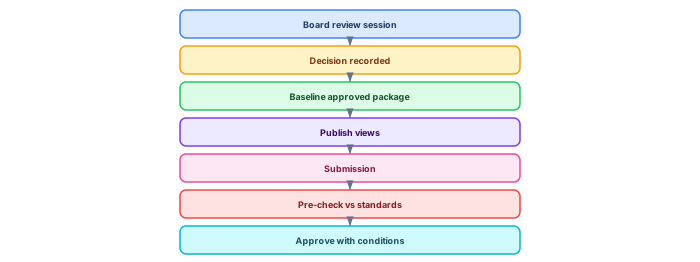
Mermaid to include (ARB flow):

- ARB definition and stakeholder breadth (AWS).
- EA Model Reviews capability.
- Review elements and discussion capture.
- Baselines definition and reversion.
- Auditing records model change trail.
- WebEA installation/config (stakeholder access).
- TOGAF compliance review process concept.
- Architecture Board description (TOGAF).
The complete ARB workflow in Sparx EA

The Architecture Review Board (ARB) is where architecture governance becomes real — where proposed changes are evaluated, approved, deferred, or rejected based on model-based evidence. When the ARB workflow runs through Sparx EA, decisions become traceable, impact analysis becomes automated, and the review process becomes repeatable. Sparx EA best practices
Step 1: Architect submits request. The requesting architect creates an Architecture Change Request element in a designated "ARB Inbox" package. The request includes: a description of the proposed change, the business driver motivating it, a tagged value for urgency (Standard / Expedited), and hyperlinks to the affected model elements.
Step 2: EA team runs impact analysis. Before the board meeting, the EA team uses Sparx EA's traceability features to identify impact. The Relationship Matrix shows which elements are connected to the proposed change. The Traceability view shows the full dependency chain from the affected component up to business capabilities and down to technology services. This analysis takes hours instead of weeks when the model is well-connected.
Step 3: Board reviews with model evidence. During the board meeting, the EA team presents the impact analysis using ArchiMate views published via WebEA or exported as PDF. Board members see the change in context — not a PowerPoint approximation, but the actual model showing real dependencies.
Step 4: Board votes. The decision (Approved / Deferred / Rejected) is recorded as a tagged value on the Change Request element. If approved, conditions and constraints are documented. If deferred, the required additional analysis is specified.
Step 5: Decision logged in repository. The Change Request element is moved to an "ARB Decisions" package, creating a permanent, searchable decision register in the EA repository.
Architecture Decision Register in the repository

Over time, the collection of ARB decisions becomes a valuable knowledge base. Each decision record contains: the original context (why the change was proposed), the options considered (with trade-off analysis), the selected option (with rationale), the model impact (which elements changed), and governance metadata (who approved, when, and the next review date). ARB governance with Sparx EA
This decision register is searchable and queryable. When a future architect proposes a similar change, the board can reference prior decisions. When an auditor asks why a particular architecture choice was made, the evidence is in the model — not in someone's email archive.
-- SQL: Query the Architecture Decision Register
SELECT o.Name AS Decision,
       p1.Value AS Status,
       p2.Value AS DecisionDate,
       p3.Value AS ReviewDate,
       o.Note AS Rationale
FROM t_object o
LEFT JOIN t_objectproperties p1 ON o.Object_ID = p1.Object_ID AND p1.Property = 'Decision_Status'
LEFT JOIN t_objectproperties p2 ON o.Object_ID = p2.Object_ID AND p2.Property = 'Decision_Date'
LEFT JOIN t_objectproperties p3 ON o.Object_ID = p3.Object_ID AND p3.Property = 'Review_Date'
WHERE o.Stereotype = 'ArchitectureDecision'
ORDER BY p2.Value DESC;
If you’d like hands-on training tailored to your team — Sparx Enterprise Architect, BPMN, SysML, Apache Kafka or the Archi tool — or modelling coaching in ArchiMate and TOGAF-aligned governance, you can reach us via our contact page.
Frequently Asked Questions
What is Sparx Enterprise Architect used for?
Sparx Enterprise Architect (Sparx EA) is a comprehensive UML, ArchiMate, BPMN, and SysML modeling tool used for enterprise architecture, software design, requirements management, and system modeling. It supports the full architecture lifecycle from strategy through implementation.
How does Sparx EA support ArchiMate modeling?
Sparx EA natively supports ArchiMate 3.x notation through built-in MDG Technology. Architects can model all three ArchiMate layers, create viewpoints, add tagged values, trace relationships across elements, and publish HTML reports — making it one of the most popular tools for enterprise ArchiMate modeling.
What are the benefits of a centralised Sparx EA repository?
A centralised SQL Server or PostgreSQL repository enables concurrent multi-user access, package-level security, version baselines, and governance controls. It transforms Sparx EA from an individual diagramming tool into an organisation-wide architecture knowledge base.