⏱ 10 min read
Introduction: why automation is essential for enterprise EA
Manual modeling does not scale. When an architecture repository contains 50,000+ elements, 800+ diagrams, and serves 30+ architects, manual operations — creating elements from spreadsheets, enforcing naming conventions, generating reports, validating property completeness — become bottlenecks. Sparx Enterprise Architect provides the most comprehensive automation capabilities of any EA tool: internal scripting (JavaScript, VBScript), the COM/Automation API for external integration, and SQL-level access to the repository database. Sparx EA training
Recommended Reading
Automation maturity model

Most organizations progress through four maturity levels. Level 1 (Manual): Elements created by hand, no validation, copy-paste from spreadsheets. Level 2 (Script-Assisted): Basic validation scripts, CSV import/export, naming convention checks. Level 3 (API-Driven): COM API integration with external tools, CI/CD pipeline validation, automated report generation. Level 4 (Fully Automated): Bidirectional CMDB synchronization, architecture-as-code practices, self-healing repository with automated cleanup.
Most enterprises operate at Level 1–2. The goal is to reach Level 3, where automation handles the repetitive work and architects focus on design decisions.
Automation architecture
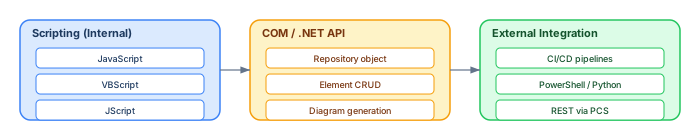
Internal scripting
EA's built-in script editor supports JavaScript, VBScript, and JScript. Scripts run inside EA and have full access to the Repository object model. Use cases: batch element creation, property updates, validation checks, diagram generation, and data export.
// JavaScript: Validate that all Application Components have an Owner tag
var elements = Repository.GetElementsByQuery("Simple", "Object_Type='Component'");
for (var i = 0; i < elements.Count; i++) {
    var el = elements.GetAt(i);
    var owner = el.TaggedValues.GetByName("Owner");
    if (!owner || owner.Value == "") {
        Session.Output("MISSING OWNER: " + el.Name);
    }
}
COM / .NET API
The EA COM API (also accessible via .NET interop) enables external applications to read and write the repository. This is the foundation for CI/CD integration, CMDB synchronization, and custom tooling. The API exposes: Repository (open/close models, execute SQL), Element (create, modify, delete elements), Diagram (create views, add elements to diagrams), and Package (navigate the repository tree). integration architecture diagram
# Python: Export all ArchiMate components to JSON via COM API
import win32com.client, json

ea = win32com.client.Dispatch("EA.Repository")
ea.OpenFile(r"C:\models\enterprise.eapx")

sql = "SELECT Object_ID, Name, Stereotype FROM t_object WHERE Object_Type='Component'"
result = ea.SQLQuery(sql)
# Parse XML result and convert to JSON
print(json.dumps(components, indent=2))
ea.CloseFile()
External integration via CI/CD
Integrate EA validation into your CI/CD pipeline. When an architect commits changes (via XMI export or controlled packages), the pipeline opens the repository via COM API, runs validation scripts, and gates the deployment on validation results. This ensures that no invalid content reaches the shared repository. modeling integration architecture with ArchiMate
# PowerShell: CI/CD validation gate
$ea = New-Object -ComObject EA.Repository
$ea.OpenFile("$env:MODEL_PATH")

$errors = 0
$sql = "SELECT Name FROM t_object WHERE Object_Type='Component' AND Object_ID NOT IN (SELECT Object_ID FROM t_objectproperties WHERE Property='Owner')"
$result = $ea.SQLQuery($sql)
# Count elements without Owner
if ($missing.Count -gt 0) { $errors += $missing.Count }

$ea.CloseFile()
if ($errors -gt 0) { Write-Error "Validation failed: $errors errors"; exit 1 }
Common automation patterns
CSV Import: Read a CSV file (application inventory, capability list, technology catalog) and create elements with properties in EA. This is the single highest-value automation for new EA deployments.
Validation Suite: A collection of scripts that check naming conventions, required properties, orphan elements, relationship consistency, and diagram completeness. Run before every baseline or release.
Report Generation: Export model content to HTML, CSV, or JSON for stakeholders who do not have EA licenses. Generate architecture catalogs, traceability matrices, and compliance reports automatically.
CMDB Synchronization: Pull application and infrastructure data from ServiceNow, BMC, or other CMDBs into EA. Push architecture metadata (owner, lifecycle, capability mapping) back to the CMDB. This keeps both systems in sync without manual data entry.
Diagram Generation: Automatically create views from model content — e.g., generate an application landscape diagram showing all Application Components grouped by business domain.
Building a script library
As automation matures, organize scripts into a reusable library. Store scripts in a Git repository with the following structure:
ea-scripts/
├── validation/
│   ├── check-naming-conventions.js
│   ├── check-required-properties.js
│   └── pre-release-validation-suite.js
├── import/
│   ├── import-csv-applications.js
│   ├── import-csv-capabilities.js
│   └── sync-from-cmdb.py
├── export/
│   ├── export-catalog-csv.js
│   ├── export-landscape-html.js
│   └── generate-traceability-matrix.js
├── maintenance/
│   ├── find-orphan-elements.js
│   ├── cleanup-stale-tags.js
│   └── rebuild-indexes.sql
└── README.md
Each script should include: a header comment with description, author, prerequisites, and usage instructions; error handling (try/catch blocks for COM API calls); logging (write to Session.Output for visibility); and a dry-run mode (report what would change without making changes).
Performance considerations for large-scale automation
When automating operations on repositories with 50,000+ elements, performance matters. Key optimization techniques:
Use SQL queries instead of API iteration. Repository.SQLQuery() is dramatically faster than iterating through the Element collection via COM API. For read operations, always prefer SQL.
Batch writes. When creating or updating many elements, batch operations using Repository.Execute() for direct SQL updates (read-only tables excepted) or minimize COM API round-trips by caching frequently accessed objects.
Disable diagram auto-refresh. When scripts modify many elements, diagram auto-refresh creates significant overhead. Call Repository.EnableUIUpdates = false before bulk operations and re-enable after.
Use connection pooling. For external scripts that open and close the repository repeatedly (e.g., CI/CD pipelines), keep the COM connection open for the duration of the script rather than opening/closing per operation.
Real-world automation examples
Example: CMDB synchronization with ServiceNow
One of the highest-value automation patterns is bidirectional synchronization between Sparx EA and ServiceNow. The architecture: a Python script runs nightly, queries ServiceNow's REST API for the application inventory (CIs of type "Application"), compares with EA's Application Components (via SQL query on t_object), creates new elements in EA for applications that exist in ServiceNow but not in EA, updates tagged values (Owner, Lifecycle Status, Support Group) for existing elements, and flags elements in EA that no longer exist in ServiceNow as "Decommissioned." Sparx EA best practices
The reverse direction pushes architecture metadata from EA to ServiceNow: business capability mapping, technology classification, and architecture compliance status. This ensures that both the CMDB (operational truth) and the architecture repository (design truth) stay aligned.
Example: Automated architecture review report
Before each Architecture Review Board meeting, a script generates a comprehensive HTML report containing: new elements created since the last review (with author and creation date), modified elements (with change summary), validation results (naming violations, missing properties, orphan elements), diagram statistics (largest diagrams, most recently modified), and a summary dashboard with quality metrics (ownership coverage, documentation completeness, staleness ratio).
The report is generated via COM API, exported as HTML, and published to the team's SharePoint site automatically. The Architecture Board reviews the report before the meeting, making the review process data-driven rather than opinion-based.
CI/CD integration: model validation in the pipeline
The highest-value automation pattern is integrating EA model validation into your CI/CD pipeline. When architecture models are stored in a DBMS repository, a CI job can connect to the repository, run validation scripts, and fail the pipeline if the model does not meet quality standards.
# PowerShell: CI/CD model validation gate
$ea = New-Object -ComObject EA.Repository
$ea.OpenFile("dbtype=1;Connect=DSN=EARepo;")

# Check 1: All Application Components have an Owner
$sql = "SELECT Name FROM t_object WHERE Object_Type = 'Component'
        AND Object_ID NOT IN (
            SELECT Object_ID FROM t_objectproperties WHERE Property = 'Owner'
        )"
$orphans = $ea.SQLQuery($sql)
if ($orphans -match "Name") {
    Write-Error "VALIDATION FAILED: Components without Owner"
    $ea.CloseFile(); exit 1
}

# Check 2: No diagrams exceed 50 elements
$sql = "SELECT d.Name, COUNT(*) AS Cnt FROM t_diagram d
        JOIN t_diagramobjects do ON d.Diagram_ID = do.Diagram_ID
        GROUP BY d.Name HAVING COUNT(*) > 50"
$big = $ea.SQLQuery($sql)
if ($big -match "Name") {
    Write-Warning "WARNING: Oversized diagrams detected"
}

$ea.CloseFile()
Write-Output "Model validation passed."
Script development lifecycle

Treat EA scripts as production code. The development lifecycle should follow the same discipline as application development:
Write and test on a sandbox model. Never test destructive scripts (delete, bulk update) on the production repository. Create a copy of the repository or a representative subset for testing. Validate that the script produces the expected output on known data before promoting it.
Peer review via Git. Store all scripts in a Git repository. Use pull requests for review before merging. The reviewer checks: does the script handle edge cases (empty results, null values, special characters)? Does it include error handling? Is it documented with comments explaining what it does and when to use it?
Deploy to shared library. Approved scripts are deployed to a shared network location or published via Pro Cloud Server. All architects use the same validated scripts — no local copies that may be outdated or modified.
Error handling best practices
// JavaScript: Robust EA script with error handling
function validateModel() {
    var errors = 0;
    var warnings = 0;

    try {
        var elements = Repository.SQLQuery(
            "SELECT Object_ID, Name, Object_Type FROM t_object " +
            "WHERE Object_Type IN ('Component', 'ArchiMate_ApplicationComponent')"
        );

        // Parse XML result from SQLQuery
        var xmlDoc = new ActiveXObject("MSXML2.DOMDocument");
        xmlDoc.loadXML(elements);
        var rows = xmlDoc.selectNodes("//Row");

        for (var i = 0; i < rows.length; i++) {
            var name = rows[i].selectSingleNode("Name").text;
            var objId = rows[i].selectSingleNode("Object_ID").text;

            // Check naming convention
            if (!/^[A-Z]/.test(name)) {
                Session.Output("ERROR: Naming violation — " + name);
                errors++;
            }
        }
    } catch (e) {
        Session.Output("SCRIPT ERROR: " + e.message);
        return -1;
    }

    Session.Output("Validation complete: " + errors + " errors, " + warnings + " warnings");
    return errors;
}
validateModel();
Conclusion
Automation is what transforms Sparx EA from a diagramming tool into an enterprise architecture management platform. Start at Level 2 (validation scripts and CSV import), progress to Level 3 (COM API integration and CI/CD validation), and aim for Level 4 (bidirectional synchronization and architecture-as-code). The investment in automation pays compound returns as the repository grows and more teams depend on it. free Sparx EA maturity assessment
If you’d like hands-on training tailored to your team — Sparx Enterprise Architect, BPMN, SysML or the Archi tool — or modelling coaching in ArchiMate and TOGAF-aligned governance, you can reach us via our contact page.
Frequently Asked Questions
What is Sparx Enterprise Architect used for?
Sparx Enterprise Architect (Sparx EA) is a comprehensive UML, ArchiMate, BPMN, and SysML modeling tool used for enterprise architecture, software design, requirements management, and system modeling. It supports the full architecture lifecycle from strategy through implementation.
How does Sparx EA support ArchiMate modeling?
Sparx EA natively supports ArchiMate 3.x notation through built-in MDG Technology. Architects can model all three ArchiMate layers, create viewpoints, add tagged values, trace relationships across elements, and publish HTML reports — making it one of the most popular tools for enterprise ArchiMate modeling.
What are the benefits of a centralised Sparx EA repository?
A centralised SQL Server or PostgreSQL repository enables concurrent multi-user access, package-level security, version baselines, and governance controls. It transforms Sparx EA from an individual diagramming tool into an organisation-wide architecture knowledge base.