⏱ 20 min read
Most architects take too long to learn ArchiMate because they start in the wrong place.
They start with the specification. They memorize symbols. They debate whether something is an application component or an application collaboration. They build immaculate diagrams nobody uses. Then they conclude one of two things: either ArchiMate is too academic, or the business is too immature for “proper architecture.” ArchiMate modeling guide
Honestly, both excuses are lazy.
ArchiMate is not hard in the way people think it is. What makes it feel hard is that many architects try to learn the notation before they learn the job ArchiMate is supposed to help them do. That’s backwards. ArchiMate is not the work. It’s a language for expressing architecture decisions, trade-offs, dependencies, and change. If you learn it as a drawing tool, you’ll be slow. If you learn it as a thinking tool, you’ll get fast very quickly. ArchiMate tutorial
So here’s the short version early, because this is the part people search for:
ArchiMate is a visual modeling language for enterprise architecture. It helps you describe business processes, applications, data, technology, relationships, and change in a consistent way. If UML is mostly for software design, ArchiMate is for the broader enterprise picture: how the business works, what systems support it, what infrastructure it runs on, and how change impacts everything.
That’s the clean explanation.
The practical explanation is this: ArchiMate helps architects answer questions that matter in real life:
- What business capability depends on this IAM platform?
- Which Kafka topics support customer onboarding?
- What breaks if we move a payments service to cloud?
- Which application services are consumed by which channels?
- Where do controls sit for regulatory requirements?
- What change initiatives hit the same systems and teams?
That’s why it matters.
And if you want to learn ArchiMate fast, you should stop trying to “cover the framework” and instead learn just enough notation to solve common architecture problems. Build from there.
This article is that roadmap.
The fastest way to learn ArchiMate: stop studying it like a certification topic
Here’s the contrarian view: you do not need to know all of ArchiMate to be useful with ArchiMate. Not even close.
In most enterprise environments, 80% of architecture communication can be done with a small subset of the language:
- Business Process
- Business Actor / Role
- Application Component
- Application Service
- Data Object
- Technology Node
- Interface
- Relationship types: serving, access, realization, assignment, flow, composition
- A few motivation and change elements: requirement, capability, work package, plateau
That’s enough to model real architecture work in banks, insurers, telcos, government, SaaS, whatever.
The mistake is trying to become “complete” before becoming effective.
Real architects don’t win by drawing the most semantically pure diagram. They win by making complexity understandable enough that people can make decisions. If your CIO, platform lead, security architect, and delivery manager can look at your view and align on what’s changing, what depends on what, and what the risks are, the model is doing its job.
So the roadmap I recommend is simple:
- Learn the core concepts in plain English.
- Use them immediately on one real enterprise problem.
- Create a few recurring view types.
- Only then expand into motivation, strategy, migration, implementation depth.
- Avoid notation obsession.
That’s how you learn fast.
What ArchiMate actually gives you in real architecture work
A lot of articles explain ArchiMate in abstract terms. Fine. But architecture work is not abstract. It’s usually messy, political, under-documented, and attached to a delivery deadline that was unrealistic before the kickoff deck was even finished.
In that environment, ArchiMate gives you four practical advantages.
1. A consistent way to connect business and technology
This is the big one.
Without a common notation, architects often produce fragmented artifacts:
- process maps in one tool
- application inventories in spreadsheets
- cloud diagrams in PowerPoint
- integration landscapes in Visio
- security models in someone’s head
ArchiMate lets you connect them.
You can trace:
- a business process
- supported by an application service
- realized by an application component
- accessing a data object
- deployed on a technology node
- affected by a work package
- constrained by a requirement
That chain matters. It’s the difference between “we are modernizing onboarding” and “we know exactly which IAM flows, Kafka streams, customer records, APIs, and cloud services are impacted.”
2. Better impact analysis
Real architecture is mostly impact analysis with nicer titles.
Someone wants to replace an IAM product. Someone wants to centralize event streaming on Kafka. Someone wants to move workloads to cloud. Someone promises faster customer onboarding in retail banking. None of that is a single-system change. Everything ripples.
ArchiMate helps make those ripples visible.
3. Better communication across different audiences
A good ArchiMate model supports multiple views for different stakeholders:
- executives need capability and change impact
- engineering leads need application and integration dependencies
- security teams need trust boundaries and control points
- operations need technology nodes and deployment implications
Same model, different view.
That’s much better than redrawing the enterprise from scratch every time someone asks a new question.
4. Better discipline in thinking
This one is underrated.
When you model in ArchiMate, you are forced to ask:
- Is this a process, a capability, or an application?
- Is this a service or a component?
- Is this business data or application data?
- Is this a requirement or a work package?
- Is this relationship dependency, realization, or flow?
You don’t need to be pedantic. But the discipline is useful. It sharpens architecture thinking.
The practical roadmap: how to learn ArchiMate fast
Let’s make this concrete.
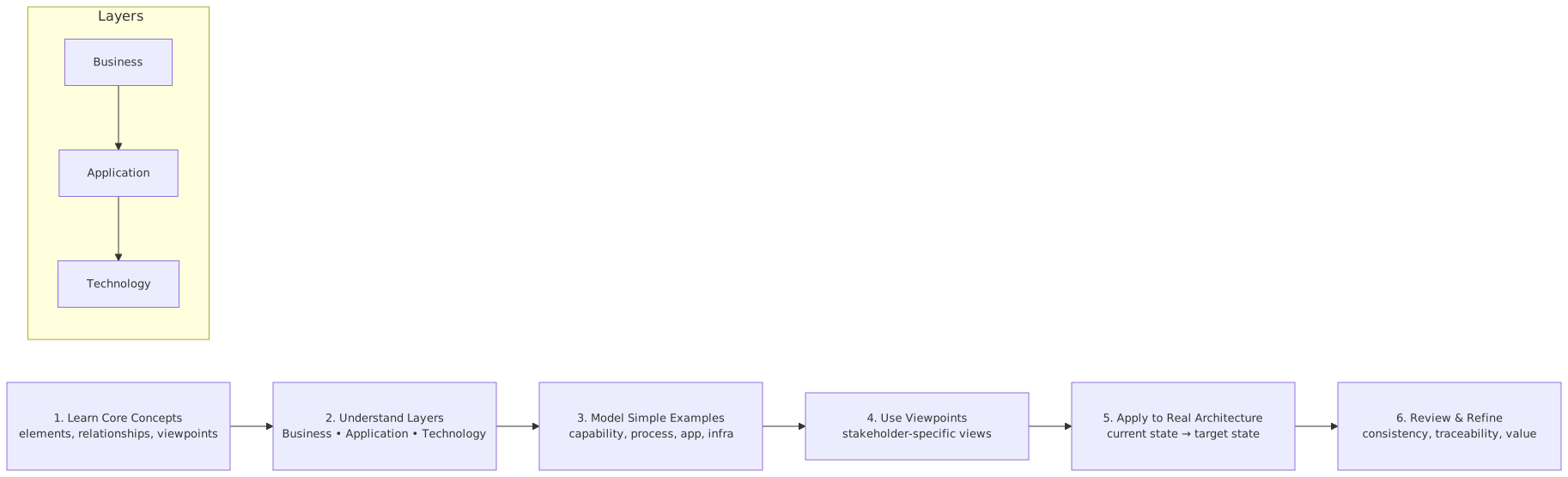
Phase 1: Learn the language in business terms, not notation terms
Do not start with symbols. Start with meaning.
Here’s the simplest mental model:
That’s enough for the first week.
I’d go further: for your first few models, ignore the less-used corners of the language. Don’t chase completeness. Learn the core layer stack first:
Business -> Application -> Technology
Then add:
Motivation -> Change
That sequence mirrors real work. First understand the operating model and systems. Then tie it to drivers and delivery.
Phase 2: Pick one real architecture scenario
This is where most people speed up or stall.
The fastest learners pick a live problem from their enterprise and model it. The slowest learners draw generic examples like “online bookstore” or “airport baggage system.” Those examples are clean, but they don’t teach the thing you actually need: dealing with ambiguity, overlap, and ugly enterprise boundaries.
Use a real scenario. For example:
- Retail bank customer onboarding modernization
- Enterprise IAM consolidation after acquisition
- Kafka event streaming platform rollout
- Cloud migration of payment and fraud services
- API-led integration for digital channels
If you’re an enterprise architect in a bank, this is perfect because banking gives you exactly the kind of cross-domain complexity ArchiMate handles well: channels, identity, compliance, events, core systems, cloud constraints, and operational risk.
Phase 3: Build just three diagrams first
You do not need twenty views. Start with three.
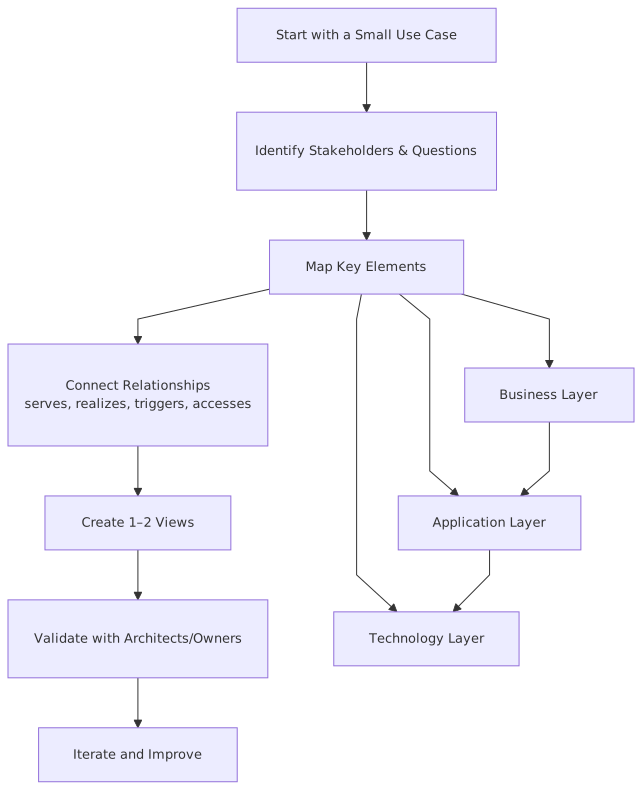
1. Context view
Show:
- business actors or roles
- key business processes
- major application components
- external systems
- major interfaces
This is your orientation map.
2. Support view
Show:
- which business processes are served by which application services
- which application components realize those services
- major data objects involved
This is where business and application come together.
3. Change impact view
Show:
- current-state pain point
- target components/services
- work packages
- impacted systems
- dependencies and risks
This is the view that gets used in planning meetings.
That’s enough to start being useful.
Phase 4: Learn relationships by usage, not by memorization
People get hung up on ArchiMate relationships. They shouldn’t.
Learn them in practical terms:
- Serving: one thing provides value/functionality to another
- Assignment: a role or structure is responsible for behavior
- Access: something reads/writes data
- Realization: one thing implements a more abstract thing
- Composition/Aggregation: whole-part structure
- Flow: transfer or sequence of something
- Association: use sparingly when relationship is real but not otherwise precise
Strong opinion: if most of your diagram is association lines, your model is weak. Association is often a sign the architect hasn’t thought the structure through.
Phase 5: Build repetition, not novelty
Fast learning comes from repeating the same modeling patterns until they become second nature.
For example:
- process -> application service -> application component
- application component -> data object -> integration flow
- application service -> interface -> consumer
- requirement -> work package -> target plateau
Do that again and again on real work. Within a month, ArchiMate stops feeling like a notation and starts feeling like shorthand.
A real enterprise example: banking onboarding with IAM, Kafka, and cloud
Let’s walk through a real-style scenario.
A retail bank wants to modernize customer onboarding. Today, onboarding spans branch, mobile app, contact center, and broker channels. Identity verification is inconsistent. Customer data is duplicated. Integration between onboarding, KYC, fraud, CRM, and core banking is point-to-point. The bank also wants more event-driven integration, using Kafka, and plans to move some onboarding services to cloud.
This is exactly the sort of thing where ArchiMate earns its keep.
The business problem
The business wants:
- faster onboarding
- fewer abandoned applications
- better identity assurance
- consistent omnichannel experience
- improved auditability
- lower integration cost
The architecture reality
The actual estate looks more like this:
- channel applications: mobile banking app, branch CRM, broker portal
- IAM stack: customer identity provider, MFA service, access policy engine
- onboarding services: document upload, identity verification, application capture
- integration: old ESB plus emerging Kafka platform
- data: customer profile, onboarding application, identity evidence, risk flags
- downstream systems: KYC platform, fraud engine, CRM, core banking customer master
- technology: some legacy on-prem, some cloud-native components, mixed API management
Now, how would ArchiMate help?
Step 1: model the business side
At business layer, you might model:
- Business Process: Customer Onboarding
- sub-processes: Identity Verification, Application Capture, Risk Screening, Account Opening
- Business Role: Customer, Branch Agent, Operations Analyst
- Business Service: Customer Onboarding Service
Already useful. It tells people what we are talking about.
Step 2: map application support
Now connect the business process to application services:
- Identity Verification Service
- Customer Profile Service
- Application Submission Service
- Risk Screening Service
- Account Provisioning Service
Then map the application components realizing them:
- IAM Platform
- Onboarding Portal
- Mobile Onboarding App
- KYC Engine
- Fraud Service
- CRM Platform
- Core Banking Customer System
This is where stakeholders usually start nodding, because now the model reflects reality.
Step 3: include Kafka where it matters
A lot of architects model event platforms badly. They either make Kafka the center of the universe or reduce it to a line between systems.
Both are wrong.
Kafka is not “the architecture.” It is a technology and integration mechanism supporting certain interaction patterns. In ArchiMate, model it where it adds clarity:
- Kafka Platform as a Technology Service or technology structure depending on your level
- relevant application components publishing/consuming events
- event-like information objects such as Customer Onboarding Event, Identity Verified Event, Risk Assessed Event
- flows between producers and consumers
This helps answer real questions:
- Which systems publish onboarding events?
- Who consumes identity verification outcomes?
- Which events are authoritative versus derived?
- What is the blast radius if the Kafka platform is unavailable?
Step 4: represent IAM correctly
IAM is another area where architects often get sloppy.
They either model IAM as one magic box, or they fragment it into so much detail that nobody can read it.
For this scenario, model IAM as a set of meaningful services:
- Authentication Service
- MFA Service
- Identity Proofing Service
- Authorization Policy Decision Service
- User Directory / Identity Store
Then connect those services to:
- customer channels
- onboarding application services
- compliance requirements
This matters because in real architecture work, IAM is almost never just a security detail. It affects customer experience, fraud controls, channel consistency, audit evidence, and platform dependency.
Step 5: show cloud deployment implications
Now the technology layer:
- cloud Kubernetes cluster or managed runtime
- API gateway
- Kafka infrastructure or managed streaming platform
- on-prem core banking node
- secure connectivity boundary
- identity provider runtime location
- data stores
This lets you ask the serious questions:
- Which onboarding services can move to cloud without violating data residency rules?
- Which integrations remain latency-sensitive to on-prem systems?
- Does IAM stay centralized or split across hybrid environments?
- Are Kafka consumers cloud-local or crossing the network to on-prem?
That’s architecture. Not just drawing, but exposing trade-offs.
What this looks like in real work
Here’s how a good architect actually uses ArchiMate on a program like this.
In discovery
You model the current state quickly:
- channels
- onboarding process
- IAM touchpoints
- integration paths
- major data objects
- key systems
Not perfect. Good enough.
In stakeholder workshops
You use the model to validate understanding:
- Is branch onboarding using the same identity proofing service as mobile?
- Does fraud screening happen before or after account creation?
- Which system is system of record for the onboarding application?
- Are Kafka events replacing ESB calls, or just supplementing them?
The model becomes a conversation tool.
In target-state design
You create a future-state view:
- unified onboarding service
- standardized IAM services across channels
- Kafka for event publication to CRM, analytics, and operations
- cloud-hosted onboarding components
- retained on-prem core banking dependency
Now people can reason about sequencing.
In planning
You add work packages:
- IAM consolidation
- onboarding API layer
- Kafka event contract rollout
- cloud landing zone onboarding deployment
- decommission point-to-point integrations
That’s where architecture becomes executable.
Common mistakes architects make when learning ArchiMate
This part matters, because most slow learners fall into the same traps.
Mistake 1: modeling everything at once
Classic mistake. They open the tool and try to represent the whole enterprise in one mega-diagram.
It becomes unreadable in an hour.
Good ArchiMate modeling is not about putting all facts in one picture. It’s about creating focused views from a coherent model. Learn to slice.
Mistake 2: confusing capabilities, processes, and services
This happens constantly.
- A capability is an ability the enterprise has.
- A process is how work gets done.
- A service is behavior exposed to a consumer.
If you mix these up, your model gets fuzzy fast.
For example:
- “Customer Onboarding” might be a business capability
- “Perform Customer Onboarding” is a business process
- “Customer Onboarding Service” is a business service
Those distinctions are not academic. They change how you plan transformation.
Mistake 3: over-modeling technology, under-modeling business support
A lot of technical architects learning ArchiMate draw beautiful cloud diagrams and weak business mappings.
That’s not enterprise architecture. That’s infrastructure illustration.
If you can’t show which business process or capability benefits from the cloud move, your model is incomplete.
Mistake 4: using ArchiMate like a compliance exercise
Some architecture teams use ArchiMate because “the standard says so.” They produce formally correct artifacts with zero decision value.
That is death by framework.
A model should help answer a live question:
- What should we invest in?
- What can we retire?
- What depends on this platform?
- What changes first?
- What risk are we carrying?
If it doesn’t answer anything, it’s decoration.
Mistake 5: being too pure about notation
This is a contrarian point, and I stand by it: slight imperfection in notation is better than perfect irrelevance.
Yes, learn the language properly. But if your team understands a view and it drives the right decision, don’t derail the meeting to litigate whether a concept should have been modeled as a function or service. Improve the model later.
Architecture is not a symbol policing profession.
Mistake 6: failing to model change
Many architects only model the current estate. Useful, but incomplete.
The real value often comes when you add:
- work packages
- plateaus
- gaps
- dependencies
- transition states
Because enterprises don’t live in static diagrams. They live in migration.
A 30-day roadmap to learn ArchiMate fast
If I had to coach a working architect with a full-time job, I’d use this plan.
Week 1: Learn the core vocabulary
Focus only on:
- business process
- business role
- application component
- application service
- data object
- technology node
- interface
- serving, realization, access, flow
Goal: explain these in plain English without looking them up.
Week 2: Model one current-state scenario
Pick one real problem:
- IAM modernization
- Kafka adoption
- cloud migration
- onboarding redesign
Create:
- one context view
- one support view
- one data/integration view
Goal: make the estate understandable to someone else.
Week 3: Add target state and change
Introduce:
- requirement
- capability
- work package
- plateau
Create:
- target-state view
- migration/dependency view
Goal: connect architecture to delivery.
Week 4: Review with stakeholders
Walk through the model with:
- engineering lead
- product owner
- security architect
- platform owner
Ask:
- what’s wrong?
- what’s missing?
- what’s unclear?
- what decision does this help us make?
Goal: learn where your model communicates well and where it doesn’t.
That last step is where real learning happens. Not in solo diagramming. In friction.
How ArchiMate changes the quality of architecture work
This is the part people miss.
Learning ArchiMate fast is good. But the bigger point is what it changes in your practice.
A decent architect without ArchiMate can still reason well. Of course. Plenty do. But a decent architect with a coherent modeling language usually becomes more effective in three ways.
1. They stop hand-waving dependencies
Instead of saying “IAM is kind of central here,” they can show:
- which channels consume authentication services
- which onboarding steps depend on identity proofing
- which policies affect authorization decisions
- which customer journeys fail when IAM is degraded
That precision matters.
2. They can separate structure from delivery noise
Programs often drown in project language. ArchiMate helps pull architecture back into focus:
- what exists now
- what should exist later
- what relationships matter
- what transition work is required
It cuts through PowerPoint theater.
3. They become better at saying no
A good model exposes nonsense quickly.
For example:
- “Let’s move everything to cloud in Q3” sounds bold until the model shows core banking dependencies, IAM trust constraints, and data residency issues.
- “Let’s use Kafka for all integration” sounds modern until the model shows synchronous authorization checks and transactional dependencies that don’t fit eventing well.
This is where contrarian architecture has value. A model doesn’t just support ideas. It tests them.
My recommended learning stack
If you want speed, use this order:
- Learn core ArchiMate concepts
- Model one real enterprise problem
- Review with stakeholders
- Refactor the model
- Only then read deeper into the standard
Not the other way around.
And one more opinion, maybe unpopular: tool choice matters less than model quality. Good architects can learn in Archi, Bizzdesign, LeanIX with modeling extensions, or even structured diagrams in another tool at first. A great repository is useful, yes. But a bad model in an expensive platform is still a bad model.
Start where you can move.
Final thoughts
If you want to learn ArchiMate fast, don’t treat it like a notation exam. Treat it like field equipment.
Use it on architecture problems that matter:
- banking onboarding
- IAM redesign
- Kafka integration strategy
- cloud migration planning
- application rationalization
Learn the smallest useful subset first. Build views that support decisions. Tie business, applications, data, technology, and change together. Repeat the same patterns until they feel natural.
And remember this: the goal is not to become a person who knows ArchiMate. The goal is to become a person who can make enterprise complexity understandable enough to move.
ArchiMate just happens to be one of the best tools for that job when used properly.
When used badly, it becomes architecture wallpaper.
Don’t make wallpaper.
FAQ
1. How long does it take to learn ArchiMate well enough for real work?
For practical use, usually a few weeks if you model a live scenario immediately. For deeper confidence across layers and change viewpoints, more like 2–3 months of regular use. You do not need mastery of the full language before you start adding value.
2. Is ArchiMate worth learning if my company already uses UML, BPMN, or C4?
Yes. They solve different problems. UML is stronger for software design, BPMN for process detail, C4 for software architecture communication. ArchiMate is stronger when you need business, application, technology, and change in one coherent enterprise picture. UML modeling best practices
3. What is the biggest mistake beginners make with ArchiMate?
Trying to model everything, and trying to model it perfectly. That combination kills momentum. Start small, focus on one decision or problem, and build a few stakeholder-friendly views.
4. How do I use ArchiMate for Kafka and event-driven architecture?
Model Kafka as part of the technology/integration landscape, not as the center of all meaning. Show producers, consumers, event/data objects, and where eventing supports business and application services. Keep the business context visible, otherwise you’re just drawing plumbing.
5. Can ArchiMate help with IAM and cloud architecture?
Absolutely. It is very good for showing how IAM services support channels and business processes, and how cloud deployment choices affect applications, security boundaries, and dependencies. It’s especially useful in hybrid environments where identity, data, and runtime are split across on-prem and cloud.
Frequently Asked Questions
What is enterprise architecture?
Enterprise architecture is a discipline that aligns an organisation's strategy, business processes, information systems, and technology. Using frameworks like TOGAF and modeling languages like ArchiMate, it provides a structured view of how the enterprise operates and how it needs to change.
How does ArchiMate support enterprise architecture practice?
ArchiMate provides a standard modeling language that connects strategy, business operations, applications, data, and technology in one coherent model. It enables traceability from strategic goals through business capabilities and application services to the technology platforms that support them.
What tools are used for enterprise architecture modeling?
The main tools are Sparx Enterprise Architect (ArchiMate, UML, BPMN, SysML), Archi (free, ArchiMate-only), and BiZZdesign Enterprise Studio. Sparx EA is the most feature-rich option, supporting concurrent repositories, automation, scripting, and integration with delivery tools like Jira and Azure DevOps.