⏱ 21 min read
- Introduction: The Power of EA Automation
Sparx Enterprise Architect is more than a modeling tool—it's an extensible platform with a comprehensive Automation Interface (API) that enables programmatic access to every aspect of the repository. With over 850,000 licenses deployed globally, organizations increasingly rely on automation to scale their architecture practice, integrate with DevOps pipelines, and enforce modeling standards
The Automation Interface exposes the entire EA object model, allowing you to:
Create and modify elements, diagrams, and relationships programmatically
Generate documentation and reports automatically
Validate models against organizational standards
Integrate with external systems (Jira, ServiceNow, Azure DevOps)
Extend EA functionality with custom Add-Ins and scripts
Here we provide definitive coverage of the Automation API, from basic scripting to advanced Add-In development, with production-ready code examples in C#, JavaScript, and VB.NET.
Part 1: Automation Architecture Overview
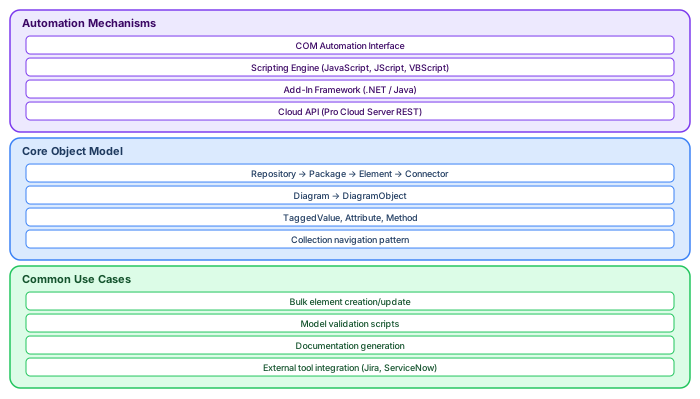
Interface Types and Capabilities

Enterprise Architect provides multiple automation mechanisms, each suited to different use cases Sparx EA best practices
- The Repository Object: Your Entry Point
Every automation interaction begins with the Repository object, the root of the EA object model
- Repository (EA.Repository)
- ├── Models (Collection of EA.Package)
- ├── Projects (EA.Project)
- ├── SQLQuery (Method for direct SQL)
- └── ... (130+ properties and methods)
Critical architectural insight: The Automation Interface is a functional interface, not a data interface. When you access a Repository, EA loads its UI components and establishes database connections. This creates noticeable latency but provides full access to EA's capabilities
Object Model Hierarchy
- Understanding the object hierarchy is essential for effective automation:
- Repository
- └── Models (Root packages)
- └── Package
- ├── Elements (Collection)
- │ └── Element
- │ ├── Attributes (Collection)
- │ ├── Methods (Collection)
- │ ├── TaggedValues (Collection)
- │ └── Connectors (Collection)
- ├── Diagrams (Collection)
- │ └── Diagram
- │ ├── DiagramObjects (Collection)
- │ └── DiagramLinks (Collection)
- ├── Packages (Collection - recursive)
- └── Element (Package is also an Element)
Part 2: Getting Started with Scripting
Scripting Environment Setup
Enterprise Architect's built-in scripting supports three languages free Sparx EA maturity assessment
Important: Microsoft removed the Script Debugger download in 2016, making JScript/VBScript debugging difficult. Sparx Systems now recommends JavaScript for all new scripts
- Your First Script: Hello Model
Access the Scripting window (View → Scripting) and create a new JavaScript:
JavaScript
!INC Local Scripts.EAConstants-JScript
/*
* HelloModel.js
* Iterates through all packages and prints their names
*/
Function main()
{
- // Get the Repository object (automatically available)
- var repository = Repository;
- // Get all root models var models = repository.Models;
- Session.Output("Starting model traversal...");
- // Iterate through root packages for (var i = 0; i < models.Count; i++)
{
- var model = models.GetAt(i);
- Session.Output("Model: " + model.Name);
- // Recursively process child packages processPackage(model, 1);
}
Session.Output("Model traversal complete.");
}
Function processPackage(package, level)
{
// Get child packages var childPackages = package.Packages; for (var i = 0; i < childPackages.Count; i++)
{
- var childPackage = childPackages.GetAt(i);
- // Indent based on hierarchy level var indent = ""; for (var j = 0; j < level; j++) {
- indent += " ";
}
- Session.Output(indent + "Package: " + childPackage.Name);
- // Process elements in this package processElements(childPackage, level + 1);
- // Recurse into sub-packages processPackage(childPackage, level + 1);
}
}
Function processElements(package, level)
{
Var elements = package.Elements; for (var i = 0; i < elements.Count; i++)
{
Var element = elements.GetAt(i); var indent = ""; for (var j = 0; j < level; j++) {
Indent += " ";
}
Session.Output(indent + "Element: " + element.Name +
" [" + element.Type + "]");
}
}
Main();
- Key concepts demonstrated:
The Repository object is automatically available in scripts
Collections use zero-based indexing
Session.Output() writes to the System Output window
Recursive traversal of the package hierarchy
Script Groups and Storage
Scripts are organized into groups that determine their availability
Sharing scripts: Export from Scripting window (right-click → Export), import into target model
Part 3: Core Automation Patterns
- Pattern 1: Element Creation and Modification
Creating architecture elements programmatically:
JavaScript
!INC Local Scripts.EAConstants-JScript
/**
* Creates a Business Actor with tagged values
*/
Function createBusinessActor(packageGUID, actorName, role, department)
{
Var repository = Repository;
// Get target package var package = repository.GetPackageByGuid(packageGUID); if (package == null) {
Session.Output("ERROR: Package not found: " + packageGUID); return null;
}
// Create element var elements = package.Elements; var element = elements.AddNew(actorName, "Actor");
// Set stereotype and properties element.Stereotype = "business actor"; element.Notes = "Auto-generated business actor"; element.Status = "Proposed";
Element.Author = repository.GetCurrentLoginUser(); element.Version = "1.0"; element.Phase = "1.0";
- // Save element (CRITICAL - required before adding tagged values)
- if (!element.Update()) {
- Session.Output("ERROR: Failed to create element: " +
- element.GetLastError()); return null;
}
// Refresh to get assigned ElementID element = repository.GetElementByGuid(element.ElementGUID);
// Add tagged values addTaggedValue(element, "Role", role); addTaggedValue(element, "Department", department); addTaggedValue(element, "CreatedDate", new Date().toISOString());
Session.Output("Created: " + actorName + " (ID: " + element.ElementID + ")"); return element;
}
Function addTaggedValue(element, tagName, tagValue)
{
Var taggedValues = element.TaggedValues; var tv = taggedValues.AddNew(tagName, ""); tv.Value = tagValue; tv.Update();
}
// Usage var packageGUID = "{00000000-0000-0000-0000-000000000000}"; createBusinessActor(packageGUID, "Chief Data Officer",
"Strategic", "Data Management");
Critical pattern: Always call Update() after creating objects before accessing their generated properties (like ElementID). Collections require explicit Refresh() in some contexts
- Pattern 2: Diagram Automation
Creating and populating diagrams programmatically:
JavaScript
/**
* Creates a requirements diagram with auto-layout
*/
Function createRequirementsDiagram(packageGUID, diagramName, requirementNames)
{
Var repository = Repository; var package = repository.GetPackageByGuid(packageGUID);
// Create diagram var diagrams = package.Diagrams; var diagram = diagrams.AddNew(diagramName, "Requirement"); diagram.Notes = "Auto-generated requirements diagram";
Diagram.Update();
// Add elements to diagram var diagramObjects = diagram.DiagramObjects; var xPos = 100; var yPos = 100;
For (var i = 0; i < requirementNames.length; i++)
{
// Create requirement element var reqElement = package.Elements.AddNew(
RequirementNames[i], "Requirement"); reqElement.Stereotype = "functional"; reqElement.Update();
// Add to diagram var diagramObj = diagramObjects.AddNew("", ""); diagramObj.ElementID = reqElement.ElementID; diagramObj.ObjectType = 4; // otElement
DiagramObj.left = xPos; diagramObj.right = xPos + 150; diagramObj.top = yPos; diagramObj.bottom = yPos + 60;
- diagramObj.Update();
- // Move position for next element (simple grid layout)
- xPos += 200; if (xPos > 800) {
- xPos = 100; yPos += 100;
}
}
- // Apply auto-layout (requires EA UI interaction)
- repository.SaveDiagram(diagram.DiagramID); repository.ReloadDiagram(diagram.DiagramID);
- Session.Output("Created diagram: " + diagramName +
- " with " + requirementNames.length + " requirements"); return diagram;
}
- Pattern 3: Connector and Relationship Management
Creating traceability relationships:
JavaScript
/**
* Creates a «trace» relationship between elements
*/
Function createTraceRelationship(sourceElementID, targetElementID, relationshipName)
{
Var repository = Repository;
// Get source element var source = repository.GetElementByID(sourceElementID); var target = repository.GetElementByID(targetElementID); if (source == null || target == null) {
Session.Output("ERROR: Source or target not found"); return null;
}
// Create connector var connectors = source.Connectors; var connector = connectors.AddNew(relationshipName, "Abstraction"); connector.Stereotype = "trace";
Connector.SupplierID = targetElementID; connector.ClientEnd.Role = "source"; connector.SupplierEnd.Role = "target"; connector.Notes = "Auto-generated trace relationship";
- if (!connector.Update()) {
- Session.Output("ERROR: Failed to create connector: " +
- connector.GetLastError()); return null;
}
// Refresh both ends source.Update(); target.Update();
Session.Output("Created trace: " + source.Name + " → " + target.Name); return connector;
}
/**
* Bulk create relationships from CSV-style data
*/
Function bulkCreateRelationships(relationshipData)
{
// relationshipData: array of {sourceName, targetName, type}
Var repository = Repository; var created = 0; var failed = 0; for (var i = 0; i < relationshipData.length; i++)
{
- var rel = relationshipData[i];
- // Find elements by name (simplified - use SQL for production)
- var sql = "SELECT Object_ID FROM t_object WHERE Name = '" +
Rel.sourceName.replace(/'/g, "''") + "'"; var sourceResult = repository.SQLQuery(sql); sql = "SELECT Object_ID FROM t_object WHERE Name = '" +
Rel.targetName.replace(/'/g, "''") + "'"; var targetResult = repository.SQLQuery(sql);
// Parse XML result (simplified)
Var sourceID = extractObjectID(sourceResult); var targetID = extractObjectID(targetResult); if (sourceID && targetID) {
- if (createTraceRelationship(sourceID, targetID, rel.type)) {
- created++;
- } else {
- failed++;
}
} else {
Session.Output("WARNING: Could not find elements for: " +
Rel.sourceName + " → " + rel.targetName); failed++;
}
}
Session.Output("Bulk complete: " + created + " created, " + failed + " failed");
}
- Pattern 4: SQL Query Integration
Direct database access for complex queries
JavaScript
/**
* Executes SQL and returns structured results
*/
Function executeArchitectureQuery(sqlQuery)
{
- var repository = Repository;
- // Execute SQL via API (READ-ONLY recommended)
- var xmlResult = repository.SQLQuery(sqlQuery);
// Parse XML result var xmlDoc = new ActiveXObject("MSXML2.DOMDocument"); xmlDoc.async = false; xmlDoc.loadXML(xmlResult);
Var results = []; var rows = xmlDoc.selectNodes("//Row"); for (var i = 0; i < rows.length; i++)
{
Var row = rows[i]; var rowData = {};
// Extract all columns var columns = row.childNodes; for (var j = 0; j < columns.length; j++) {
Var col = columns[j]; rowData[col.nodeName] = col.text;
}
Results.push(rowData);
}
Return results;
}
// Example: Find orphaned applications function findOrphanedApplications()
{
- var sql = `
- SELECT o.Object_ID, o.Name as ApplicationName, o.Status, p.Name as PackageName
- FROM t_object o
- JOIN t_package p ON o.Package_ID = p.Package_ID
- WHERE o.Object_Type = 'Component'
- AND o.Stereotype = 'application'
- AND o.Object_ID NOT IN (
- SELECT Start_Object_ID FROM t_connector
- WHERE Connector_Type IN ('Usage', 'Realization')
)
- ORDER BY p.Name, o.Name
- `; var orphans = executeArchitectureQuery(sql);
- Session.Output("=== Orphaned Applications ==="); for (var i = 0; i < orphans.length; i++) {
- var app = orphans[i];
- Session.Output(app.PackageName + " > " + app.ApplicationName +
- " [" + app.Status + "]");
}
Return orphans;
}
Golden rule: Read via SQL, write via API. Direct SQL updates bypass EA's business logic and can corrupt models
Part 4: C# Add-In Development
Add-In Architecture
- Add-Ins provide the deepest integration with EA, enabling:
- Custom menu entries in EA's main menu and context menus
- Event handling (element creation, modification, deletion)
- Custom windows and dialogs
- Shape scripts and code generation templates
Creating Your First C# Add-In
- Step 1: Project Setup
Create a new C# Class Library project (.NET Framework 4.6.1 or higher):
csharp
Using System; using System.Windows.Forms; using EA; namespace MyEAAddIn
{
Public class MainClass
{
// EA calls this when loading the Add-In public string EA_Connect(EA.Repository repository)
{
// Return nothing - Add-In loaded successfully return "";
}
// EA calls this to build the Add-In menu public object EA_GetMenuItems(EA.Repository repository, string location, string menuName)
{
Switch (location)
{
Case "MainMenu":
// Top-level menu return "-&My AddIn"; // "-" prefix creates separator case "&My AddIn":
- // Sub-menu items return new string[] {
- "&Validate Model",
- "&Generate Report",
- "&About"
};
}
Return null;
}
// EA calls this when menu item is clicked public void EA_MenuClick(EA.Repository repository, string location, string menuName, string itemName)
{
Switch (itemName)
{
- case "&Validate Model":
- ValidateModel(repository); break; case "&Generate Report":
- GenerateReport(repository); break; case "&About":
- MessageBox.Show("My EA Add-In v1.0", "About"); break;
}
}
Private void ValidateModel(EA.Repository repository)
{
// Implementation here
MessageBox.Show("Model validation complete!", "Validation");
}
Private void GenerateReport(EA.Repository repository)
{
// Implementation here
}
// EA calls this when disconnecting public void EA_Disconnect()
{
GC.Collect();
GC.WaitForPendingFinalizers();
}
}
}
- Step 2: COM Registration
Add-In must be registered as COM visible:
csharp
- // AssemblyInfo.cs using System.Runtime.InteropServices;
- [assembly: ComVisible(true)]
- [assembly: Guid("YOUR-GUID-HERE-1234-567890ABCDEF")]
- Register with regasm:
cmd
Regasm /codebase MyEAAddIn.dll
Or use EA's Add-In manager for registration.
- Advanced Add-In: Model Validation
Production-ready validation Add-In with comprehensive checks:
csharp
Using System; using System.Collections.Generic; using System.Linq; using System.Windows.Forms; using EA; namespace EAValidator
{
Public class ValidationAddIn
{
Private EA.Repository _repository; private List<ValidationIssue> _issues; public string EA_Connect(EA.Repository repository)
{
_repository = repository;
_issues = new List<ValidationIssue>(); return "";
}
Public object EA_GetMenuItems(EA.Repository repository, string location, string menuName)
{
- if (location == "MainMenu")
- return "-&Architecture Validator"; if (menuName == "&Architecture Validator")
- return new string[] {
- "&Run Full Validation",
- "&Check Naming Conventions",
- "&Verify Traceability",
- "&Show Validation Report"
- }; return null;
}
Public void EA_MenuClick(EA.Repository repository, string location, string menuName, string itemName)
{
Switch (itemName)
{
- case "&Run Full Validation":
- RunFullValidation(repository); break; case "&Check Naming Conventions":
- CheckNamingConventions(repository); break; case "&Verify Traceability":
- VerifyTraceability(repository); break; case "&Show Validation Report":
- ShowValidationReport(); break;
}
}
Private void RunFullValidation(EA.Repository repository)
{
- _issues.Clear();
- CheckNamingConventions(repository);
- VerifyTraceability(repository);
- CheckDiagramConsistency(repository);
- ValidateStereotypes(repository);
- MessageBox.Show(
- $"Validation complete.\nFound {_issues.Count} issues.",
- "Validation Results",
- MessageBoxButtons.OK,
- _issues.Count > 0 ? MessageBoxIcon.Warning : MessageBoxIcon.Information);
}
Private void CheckNamingConventions(EA.Repository repository)
{
- // Query all elements string sql = @"
- SELECT Object_ID, Name, Object_Type, Stereotype
- FROM t_object
WHERE Object_Type IN ('Class', 'Component', 'Actor', 'UseCase')"; string result = repository.SQLQuery(sql);
Var xmlDoc = new System.Xml.XmlDocument(); xmlDoc.LoadXml(result); var rows = xmlDoc.SelectNodes("//Row"); foreach (System.Xml.XmlNode row in rows)
{
String name = row.SelectSingleNode("Name")?.InnerText ?? ""; string type = row.SelectSingleNode("Object_Type")?.InnerText ?? "";
String stereotype = row.SelectSingleNode("Stereotype")?.InnerText ?? ""; string objectId = row.SelectSingleNode("Object_ID")?.InnerText ?? "";
// Validation rules if (string.IsNullOrWhiteSpace(name))
{
_issues.Add(new ValidationIssue
{
- ElementID = objectId,
- IssueType = "Missing Name",
- Severity = "Error",
- Description = $"{type} has no name",
- Recommendation = "Provide a descriptive name"
});
}
Else if (name.Contains(" ") && !name.Contains("_"))
{
// Check camelCase vs snake_case consistency
_issues.Add(new ValidationIssue
{
- ElementID = objectId,
- IssueType = "Naming Convention",
- Severity = "Warning",
- Description = $"Name '{name}' contains spaces",
- Recommendation = "Use CamelCase or snake_case consistently"
});
}
}
}
Private void VerifyTraceability(EA.Repository repository)
{
- // Find requirements without realization string sql = @"
- SELECT o.Object_ID, o.Name
- FROM t_object o
- WHERE o.Object_Type = 'Requirement'
- AND o.Object_ID NOT IN (
- SELECT Start_Object_ID FROM t_connector
- WHERE Connector_Type = 'Realization'
)"; string result = repository.SQLQuery(sql); var xmlDoc = new System.Xml.XmlDocument(); xmlDoc.LoadXml(result);
Var rows = xmlDoc.SelectNodes("//Row"); foreach (System.Xml.XmlNode row in rows)
{
_issues.Add(new ValidationIssue
{
- ElementID = row.SelectSingleNode("Object_ID").InnerText,
- IssueType = "Missing Traceability",
- Severity = "Warning",
- Description = $"Requirement '{row.SelectSingleNode("Name").InnerText}' has no realization",
- Recommendation = "Create realization relationship to implementing element"
});
}
}
Private void CheckDiagramConsistency(EA.Repository repository)
{
// Implementation for diagram validation
}
Private void ValidateStereotypes(EA.Repository repository)
{
// Implementation for stereotype validation
}
Private void ShowValidationReport()
{
Var reportForm = new ValidationReportForm(_issues); reportForm.ShowDialog();
}
Public void EA_Disconnect()
{
- _repository = null;
- _issues = null;
- GC.Collect();
- GC.WaitForPendingFinalizers();
}
}
Public class ValidationIssue
{
- public string ElementID { get; set; }
- public string IssueType { get; set; }
- public string Severity { get; set; }
- public string Description { get; set; }
- public string Recommendation { get; set; }
}
}
Event Handling in Add-Ins
Responding to EA events for real-time automation:
csharp
Public class EventHandlerAddIn
{
// Called when element is created public bool EA_OnPostNewElement(EA.Repository repository,
EventProperties info)
{
Var elementGUID = info.Get(0).Value; var element = repository.GetElementByGuid(elementGUID);
// Auto-populate standard tagged values if (element.Type == "Requirement")
{
AddStandardRequirementTags(element);
}
Return true; // Allow the creation
}
// Called before element deletion public bool EA_OnPreDeleteElement(EA.Repository repository,
EventProperties info)
{
Var elementGUID = info.Get(0).Value;
// Check if element has dependencies if (HasDependencies(elementGUID))
{
- var result = MessageBox.Show(
- "This element has dependencies. Delete anyway?",
- "Confirm Delete",
- MessageBoxButtons.YesNo,
- MessageBoxIcon.Warning); return result == DialogResult.Yes; // true = allow delete
}
Return true;
}
// Called when diagram is opened public void EA_OnPostOpenDiagram(EA.Repository repository, int diagramID)
{
- var diagram = repository.GetDiagramByID(diagramID);
- // Log diagram access for analytics
- LogDiagramAccess(diagram);
- // Auto-apply layout for specific diagram types if (diagram.Type == "Sequence")
{
AutoLayoutSequenceDiagram(repository, diagram);
}
}
Private void AddStandardRequirementTags(EA.Element element)
{
Var tvs = element.TaggedValues; var priority = tvs.AddNew("Priority", ""); priority.Value = "Medium"; priority.Update();
Var source = tvs.AddNew("Source", ""); source.Value = "Stakeholder"; source.Update();
}
}
Part 5: External Automation and Integration
Standalone C# Applications
Automating EA from external programs (no EA UI required):
csharp
Using System; using EA; namespace EAExternalAutomation
{
Class Program
{
Static void Main(string[] args)
{
// Create EA instance var eaApp = new EA.App(); var repository = eaApp.Repository; try
{
// Open repository bool opened = repository.OpenFile(
@"C:\Models\MyModel.qea"); if (!opened)
{
Console.WriteLine("Failed to open repository"); return;
}
- // Perform automation tasks
- GenerateDocumentation(repository);
- ExportToExcel(repository);
- RunModelChecks(repository);
- // Save and close repository.Exit();
}
Catch (Exception ex)
{
Console.WriteLine($"Error: {ex.Message}"); repository.Exit();
}
}
Static void GenerateDocumentation(EA.Repository repository)
{
Var project = repository.GetProjectInterface();
// Generate HTML report for package string packageGUID = "{00000000-0000-0000-0000-000000000000}"; string outputPath = @"C:\Reports\Architecture.html"; project.RunHTMLReport(packageGUID, outputPath,
"HTML",
- "<default>",
- "My Report");
- Console.WriteLine($"Report generated: {outputPath}");
}
Static void ExportToExcel(EA.Repository repository)
{
- // Query all applications string sql = @"
- SELECT o.Name as Application, p.Name as Domain, tv.Value as Owner
- FROM t_object o
- JOIN t_package p ON o.Package_ID = p.Package_ID
- LEFT JOIN t_objectproperties tv ON o.Object_ID = tv.Object_ID
- AND tv.Property = 'Owner'
- WHERE o.Object_Type = 'Component'
- AND o.Stereotype = 'application'"; string result = repository.SQLQuery(sql);
- // Parse and export to Excel using EPPlus or similar
// ...
}
Static void RunModelChecks(EA.Repository repository)
{
// Custom validation logic
// ...
}
}
}
Integration with DevOps Pipelines
Azure DevOps pipeline integration for CI/CD: enterprise cloud architecture patterns
csharp
// Azure DevOps custom task for EA validation public class EAValidationTask : Task hybrid cloud architecture
{
- [Required]
- public string ModelPath { get; set; }
- public string ValidationRules { get; set; }
- public override bool Execute()
{
Try
{
Var eaApp = new EA.App(); var repository = eaApp.Repository; if (!repository.OpenFile(ModelPath))
{
Log.LogError($"Failed to open EA model: {ModelPath}"); return false;
}
Var validator = new ModelValidator(repository); var results = validator.Validate(ValidationRules); foreach (var issue in results)
{
- if (issue.Severity == "Error")
- Log.LogError(issue.Description); else
- Log.LogWarning(issue.Description);
}
Repository.Exit(); return !results.Any(r => r.Severity == "Error");
}
Catch (Exception ex)
{
Log.LogError($"EA validation failed: {ex.Message}"); return false;
}
}
}
Part 6: Advanced Patterns and Best Practices
Performance Optimization
Critical patterns for large model automation:
JavaScript
- // BAD: Loading elements one by one in loop for (var i = 0; i < 1000; i++) {
- var element = repository.GetElementByID(i); // 1000 database calls!
- processElement(element);
}
// GOOD: Bulk query with SQL var sql = "SELECT Object_ID, Name, Object_Type FROM t_object WHERE ..."; var xmlResult = repository.SQLQuery(sql);
// Process XML result - single database call
- Collection handling:
JavaScript
// BAD: Modifying collection while iterating var elements = package.Elements; for (var i = 0; i < elements.Count; i++) {
If (shouldDelete(elements.GetAt(i))) {
Elements.Delete(i); // Invalidates iterator!
}
}
// GOOD: Build delete list first, then batch delete var toDelete = []; for (var i = 0; i < elements.Count; i++) {
Var elem = elements.GetAt(i); if (shouldDelete(elem)) {
ToDelete.push(elem.ElementID);
}
}
// Delete in reverse index order to maintain validity for (var i = toDelete.length - 1; i >= 0; i--) {
Var idx = findElementIndex(elements, toDelete[i]); if (idx >= 0) elements.DeleteAt(idx, false);
}
Error Handling and Logging
Robust automation requires comprehensive error handling:
JavaScript
/**
* Executes automation with full error handling
*/
Function safeExecute(operation, context)
{
Try
{
Session.Output("Starting: " + context); var result = operation();
Session.Output("Completed: " + context); return { success: true, result: result };
}
Catch (e)
{
- var errorMsg = "ERROR in " + context + ": " + e.message;
- Session.Output(errorMsg);
- // Log to file if available if (typeof logToFile !== 'undefined') {
- logToFile(errorMsg);
}
Return { success: false, error: e.message };
}
}
- // Usage safeExecute(function() {
- return createBusinessActor(packageGUID, "CIO", "Executive", "IT");
- }, "Create Business Actor");
Transaction Management
For complex multi-step operations:
csharp
// C#: Using EA's transaction support public void BulkCreateElements(EA.Repository repository,
List<ElementData> elements)
{
Try
{
// EA doesn't have explicit transactions, but we can simulate var createdElements = new List<EA.Element>();
Foreach (var data in elements)
{
Var element = CreateElement(repository, data); createdElements.Add(element);
}
// If we get here, all succeeded
MessageBox.Show($"Created {createdElements.Count} elements");
}
Catch (Exception ex)
{
// Manual rollback - delete created elements foreach (var element in createdElements)
{
Try
{
Var parent = repository.GetPackageByID(element.PackageID); parent.Elements.DeleteByID(element.ElementID, 0);
}
Catch { /* Best effort cleanup */ }
}
Throw; // Re-throw original exception
}
}
Part 7: Real-World Automation Scenarios
- Scenario 1: Requirements Import from Jira
JavaScript
/**
* Synchronizes Jira issues to EA requirements
*/
Function importFromJira(jiraProjectKey, eaPackageGUID)
{
// Call Jira REST API (via COM or external service)
Var jiraIssues = callJiraAPI("/rest/api/2/search?jql=project=" +
JiraProjectKey); var package = Repository.GetPackageByGuid(eaPackageGUID); var requirements = package.Elements; for (var i = 0; i < jiraIssues.length; i++)
{
Var issue = jiraIssues[i];
// Check if requirement already exists var existing = findRequirementByJiraID(issue.key); if (existing)
{
// Update existing existing.Name = issue.fields.summary; existing.Notes = issue.fields.description; existing.Status = mapJiraStatus(issue.fields.status.name);
Existing.Update();
}
Else
{
// Create new var req = requirements.AddNew(issue.fields.summary,
"Requirement"); req.Stereotype = "functional"; req.Notes = issue.fields.description; req.Status = "Proposed";
// Add Jira ID as tagged value var tv = req.TaggedValues.AddNew("JiraID", ""); tv.Value = issue.key; tv.Update();
Req.Update();
}
}
}
- Scenario 2: Automated Documentation Generation
csharp
// C#: Generate Word document from model public void GenerateArchitectureDocument(EA.Repository repository,
String outputPath)
{
Var wordApp = new Microsoft.Office.Interop.Word.Application(); var doc = wordApp.Documents.Add(); try
{
// Title var para = doc.Content.Paragraphs.Add(); para.Range.Text = "Architecture Documentation"; para.Range.Font.Size = 24;
Para.Range.Font.Bold = 1; para.Format.SpaceAfter = 24;
// Table of Contents placeholder doc.Content.Paragraphs.Add();
// Iterate architecture domains var models = repository.Models; foreach (EA.Package model in models)
{
AddDomainSection(doc, model);
}
- // Update TOC doc.TablesOfContents[1].Update();
- // Save doc.SaveAs2(outputPath); doc.Close();
- MessageBox.Show("Document generated: " + outputPath);
}
Finally
{
WordApp.Quit();
}
}
Private void AddDomainSection(Document doc, EA.Package domain)
{
// Add domain heading var heading = doc.Content.Paragraphs.Add(); heading.Range.Text = domain.Name; heading.Range.Font.Size = 16;
Heading.Range.Font.Bold = 1; heading.Format.SpaceAfter = 12;
// Add elements table var table = doc.Tables.Add(
Doc.Content.Paragraphs.Add().Range, domain.Elements.Count + 1, 4); table.Cell(1, 1).Range.Text = "Name"; table.Cell(1, 2).Range.Text = "Type";
Table.Cell(1, 3).Range.Text = "Status"; table.Cell(1, 4).Range.Text = "Description"; int row = 2; foreach (EA.Element element in domain.Elements)
{
Table.Cell(row, 1).Range.Text = element.Name; table.Cell(row, 2).Range.Text = element.Type; table.Cell(row, 3).Range.Text = element.Status; table.Cell(row, 4).Range.Text = element.Notes;
Row++;
}
}
- Scenario 3: Model Quality Gates
JavaScript
/**
* Pre-commit validation for model quality
*/
Function runQualityGates()
{
- var gates = [
- { name: "Naming Conventions", check: checkNaming },
- { name: "Traceability", check: checkTraceability },
- { name: "Documentation", check: checkDocumentation },
- { name: "Stereotype Usage", check: checkStereotypes }
- ]; var results = []; var allPassed = true; for (var i = 0; i < gates.length; i++)
{
- var gate = gates[i];
- Session.Output("Running gate: " + gate.name); var result = gate.check(); results.push({
- gate: gate.name, passed: result.passed, issues: result.issues
- }); if (!result.passed) allPassed = false;
}
// Generate report generateQualityReport(results); return allPassed;
}
Function checkNaming()
{
- var issues = [];
- // Query for naming violations var sql = `
- SELECT Object_ID, Name, Object_Type
- FROM t_object
- WHERE Name LIKE '% %'
- AND Object_Type IN ('Class', 'Component')
- `; var result = Repository.SQLQuery(sql);
- // Parse and populate issues...
Return {
Passed: issues.length === 0, issues: issues
};
}
Part 8: Debugging and Troubleshooting
Script Debugging
JavaScript debugging in EA
Enable Script Debugging: Tools → Options → Source Code Engineering → Scripting → Enable debugging
Set Breakpoints: Click in script editor gutter
Run Script: Execution pauses at breakpoint
Inspect Variables: Use Script Debugger window
- Common issues:
"Object required": Null reference - check if element exists before accessing
"Permission denied": Security restriction - run EA as administrator
"Type mismatch": Wrong data type - ensure proper casting
Add-In Debugging
C# Add-In debugging in Visual Studio:
- Project Properties → Debug:
- Start external program: C:\Program Files\Sparx Systems\EA\EA.exe
- Command line arguments: (none)
- Working directory: C:\Program Files\Sparx Systems\EA
Set breakpoints in Add-In code
F5 to debug - EA launches with debugger attached
Trigger Add-In from EA menus
- Troubleshooting registration:
cmd
# Unregister regasm /u MyAddIn.dll
# Re-register regasm /codebase MyAddIn.dll
Performance Profiling
Identify slow operations:
JavaScript
Function profileOperation(name, operation)
{
Var start = new Date().getTime(); var result = operation(); var elapsed = new Date().getTime() - start;
Session.Output(name + ": " + elapsed + "ms"); return result;
}
// Usage profileOperation("Load all elements", function() {
Return Repository.SQLQuery("SELECT * FROM t_object");
});
- Conclusion: The Automation Mindset
Mastering the Enterprise Architect Automation API transforms architecture from a manual, document-centric discipline into a programmable, integrated engineering practice. The patterns and examples in this guide provide the foundation for:
Scalable architecture governance through automated validation
DevOps integration via CI/CD pipeline automation
Enterprise integration connecting EA to CRM, ERP, and ALM systems
Productivity multiplication eliminating repetitive manual tasks
- Key success factors:
Start small - Automate one repetitive task before tackling complex workflows
Read via SQL, write via API - Respect EA's business logic
Handle errors gracefully - Never leave models in inconsistent states
Document your automation - Scripts are architecture assets too
Version control - Treat code as seriously as models
The Automation Interface is Sparx EA's hidden superpower. Organizations that leverage it effectively achieve architecture velocity impossible through manual methods alone. Sparx EA training
Frequently Asked Questions
What is enterprise architecture?
Enterprise architecture is a discipline that aligns an organisation's strategy, business operations, information systems, and technology infrastructure. It provides a structured framework for understanding how an enterprise works today, where it needs to go, and how to manage the transition.
How is ArchiMate used in enterprise architecture practice?
ArchiMate is used as the standard modeling language in enterprise architecture practice. It enables architects to create consistent, layered models covering business capabilities, application services, data flows, and technology infrastructure — all traceable from strategic goals to implementation.
What tools are used for enterprise architecture modeling?
Common enterprise architecture modeling tools include Sparx Enterprise Architect (Sparx EA), Archi, BiZZdesign Enterprise Studio, LeanIX, and Orbus iServer. Sparx EA is widely used for its ArchiMate, UML, BPMN and SysML support combined with powerful automation and scripting capabilities.