⏱ 11 min read
Introduction: why ArchiMate works in real enterprises
ArchiMate is frequently explained as a common language for enterprise architecture, optimized for coherent architecture descriptions that can be understood across stakeholder groups. That orientation matters in real enterprises because the hardest part of architecture is usually shared understanding — especially across strategy, business operations, application portfolios, and infrastructure teams. ArchiMate is strongest in the "coherence" phase of architecture, where you need just enough shared structure to reason about change and trade-offs, without diving into domain-specific design notation.
Recommended Reading
This tutorial walks through ArchiMate using realistic enterprise scenarios: digital customer onboarding (full cross-layer model), application rationalization after mergers (capability-anchored analysis), platform modernization with migration roadmaps (plateaus and gaps), and the anti-patterns that make enterprise models fail. ArchiMate tutorial for enterprise architects
ArchiMate building blocks you will use in every scenario
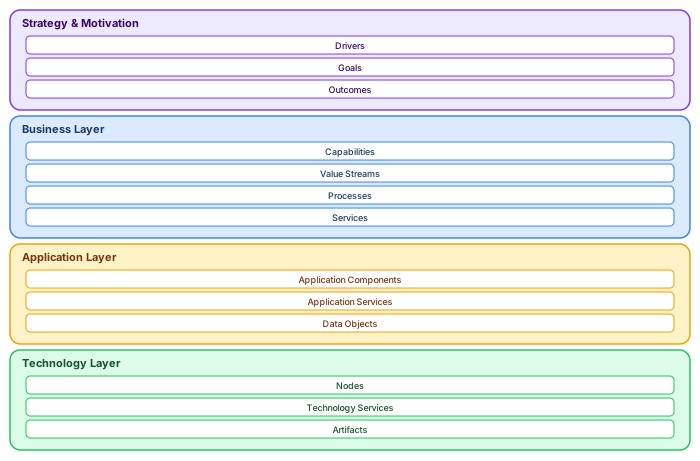
Before jumping into examples, internalize the two recurring constructs that organize every ArchiMate model. ArchiMate layers explained
Layers: ArchiMate organizes architecture into layers that correspond to organizational concerns. The Strategy and Motivation layer captures why the organization acts (drivers, goals, outcomes, principles). The Business layer captures what the organization does (capabilities, value streams, processes, services). The Application layer captures how software supports the business (components, services, interfaces, data objects). The Technology layer captures what infrastructure enables the applications (nodes, platform services, artifacts, devices). Cross-layer relationships connect the layers into a coherent whole.
Viewpoints as intentional slices: A viewpoint is a set of conventions used to produce a view that addresses a known concern for specific stakeholders. You never model "the architecture" — you model a view that answers a specific question. The Application Cooperation viewpoint answers "how do our applications interact?" The Migration viewpoint answers "how do we get from here to there?" Viewpoint discipline prevents the "model of everything" anti-pattern that kills most enterprise modeling initiatives.
The viewpoint-driven modeling workflow

Every ArchiMate modeling effort should follow this four-step workflow: ArchiMate relationship types
Step 1: Define the stakeholder concern. What question does someone need answered? "Which applications support customer onboarding?" is a concern. "Model the architecture" is not. The concern must be specific enough that you can evaluate whether the view answers it.
Step 2: Select the viewpoint. ArchiMate's standard viewpoint catalog maps concerns to predefined element and relationship combinations. For the onboarding question, the Application Usage viewpoint (showing business processes and the application services that support them) is the right choice.
Step 3: Model only what the viewpoint requires. Resist the urge to add "useful" elements that do not address the concern. If the concern is about application support for a process, you do not need technology infrastructure details in this view.
Step 4: Validate with stakeholders. Show the view to the person who raised the concern. Does it answer their question? Is it understandable without explanation? If they need a 30-minute walkthrough to read the view, it is too complex or poorly structured.
Scenario 1: Digital customer onboarding — full cross-layer model
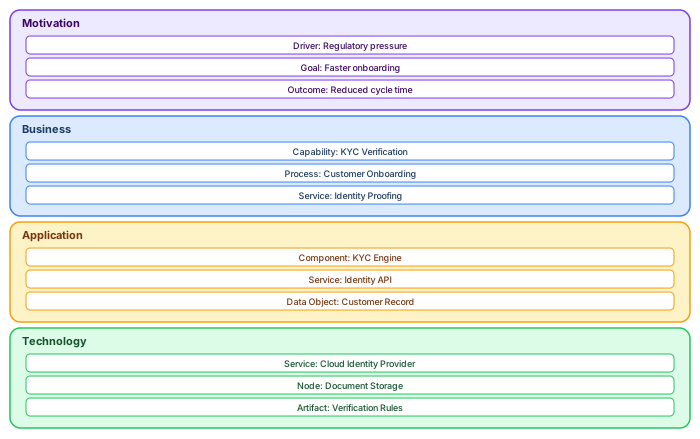
Imagine a retail bank modernizing customer onboarding across branch, mobile, and web channels. The stakeholder concern: "How do we reduce onboarding time from 5 days to 30 minutes while improving KYC compliance?"
Model with a viewpoint mindset, building separate views per layer that reference shared elements:
Motivation layer: The Driver is regulatory pressure (KYC/AML requirements tightening) combined with competitive pressure (fintechs offer instant onboarding). The Goal is faster onboarding (from 5 days to 30 minutes) with fewer compliance defects (from 8% error rate to under 1%). The Outcome is reduced customer drop-off and lower compliance remediation cost. Model these explicitly — they justify every technology investment in the subsequent layers.
Business layer: The core Capability is "KYC Verification." The Business Process "Customer Onboarding" decomposes into sub-processes: Identity Verification, Document Collection, Risk Assessment, Account Activation. The Business Service "Identity Proofing" is exposed to all channels. Each sub-process is owned by a Business Role (KYC Analyst, Compliance Officer, Branch Manager).
Application layer: The KYC Engine (Application Component) realizes an Identity Verification API (Application Service) that serves the onboarding process. It accesses the Customer Record (Data Object) with PII sensitivity tagging. A separate Document Management Component handles document collection, exposing a Document Upload Service to the mobile and web channels.
Technology layer: The KYC Engine runs on a Kubernetes cluster (Technology Node) in AWS EU-WEST-1 (Location). It depends on a Cloud Identity Provider (Technology Service) for biometric verification and an S3 bucket (Node) for document storage. The Verification Rules (Artifact) are deployed as configuration, enabling business-side updates without code changes.
The result is not one diagram — it is a set of aligned views that stakeholders read at their level. The CTO sees the technology modernization. The compliance officer sees regulatory traceability. The product owner sees the customer journey improvement. Each view uses the same model elements, ensuring consistency.
Scenario 2: Application rationalization after mergers

Post-merger application rationalization is one of the highest-value ArchiMate use cases. Two organizations merge, bringing overlapping application portfolios: two CRM systems, three payment gateways, four identity management solutions. The question: "Which applications can we retire without breaking core capabilities?" ArchiMate modeling best practices
Stage 1: Build the capability map. Business capabilities are stable abstractions that exist regardless of which applications support them. "Payment Processing," "Customer Management," "Risk Assessment," and "Regulatory Reporting" are capabilities both organizations share. Model these as Business Functions arranged in a capability map. This becomes the stable anchor — executives understand capabilities even when they cannot read application architecture.
Stage 2: Map the application portfolio. For each capability, identify which Application Components from each organization support it. Tag every application with: Source (Company A / Company B), Technology Stack (Java/.NET/COBOL), Annual Cost, User Count, Business Criticality (Critical/High/Medium/Low), and Lifecycle Status. Build an Application Cooperation view showing how applications interact — this reveals hidden integration dependencies that constrain retirement decisions.
Stage 3: Make traceable decisions. With the capability-to-application mapping visible, each overlap gets an explicit decision: Keep (the more modern system), Retire (the duplicate being decommissioned), Migrate (data and users moving), or Replace (both retired for a new solution). Each decision traces back to the capability analysis — the CFO can see why PaySys is being retired (it is the less modern duplicate for the Payment Processing capability) and why CRM-One data must be migrated (it serves a capability not covered by Company B's system).
Scenario 3: Platform modernization and migration roadmaps

When modernizing — decomposing a monolith, migrating to cloud, replacing a core banking system — executives need a roadmap they can govern. ArchiMate's Implementation and Migration extension provides the constructs: Plateaus (stable architectural states), Gaps (differences between plateaus), and Work Packages (initiatives that close the gaps).
The modeling flow: First, build a Baseline Architecture view showing the current state — the monolithic ERP, on-premise data center, manual reporting processes. Second, build a Target Architecture view showing the desired end state — fully decomposed microservices, cloud-native on AWS, fully automated reporting. Third, identify the Gaps — missing components, components to retire, relationships that change. Fourth, define Work Packages that address each gap. Fifth, define intermediate Plateaus — stable states the architecture passes through during the transition.
Each plateau must be a viable, operational architecture. You cannot migrate through a state where the payment system is offline — the intermediate plateau must show which components are live, which are in parallel run, and which have been decommissioned. This is the discipline that separates a governable roadmap from a wishful timeline.
// ArchiMate Migration View structure
//
// Plateau: "Baseline (Q1 2026)"
//   - Monolithic ERP (Application Component, Status: Active)
//   - On-premise data center (Node, Status: Active)
//   - Manual reporting (Business Process, Automation: Manual)
//
// Gap: "Decompose ERP, migrate to cloud"
// Work Package: "ERP Modernization Phase 1" (Q1-Q3 2026)
//
// Plateau: "Intermediate (Q3 2026)"
//   - Monolith + 3 extracted microservices (parallel run)
//   - Hybrid cloud (on-prem + AWS)
//   - Partial reporting automation
//
// Gap: "Complete extraction, decommission monolith"
// Work Package: "ERP Modernization Phase 2" (Q4 2026-Q1 2027)
//
// Plateau: "Target (Q1 2027)"
//   - Fully decomposed microservices
//   - Cloud-native on AWS
//   - Fully automated reporting
Anti-patterns to avoid in enterprise ArchiMate models
The "model of everything" anti-pattern. A single model with 5,000+ elements, no viewpoint structure, and no defined audience. Technically impressive and practically useless — nobody can navigate it, nobody trusts it, and nobody maintains it. Fix: start with viewpoints. Each view answers one question for one audience.
The "Visio replacement" anti-pattern. Using ArchiMate notation without leveraging the metamodel, relationships, or properties. The diagrams look like ArchiMate but have no semantic content — relationships are not validated, properties are empty, and the model cannot be queried. Fix: use a proper ArchiMate tool (Archi or Sparx EA) that enforces the metamodel.
The "stale model" anti-pattern. A model accurate 12 months ago that has not been updated since. Stakeholders learn the model does not reflect reality and stop using it. Fix: assign element ownership, establish quarterly review cycles, make model updates a contractual deliverable.
The "tool-first" anti-pattern. Spending months configuring templates and automation before modeling a single element. The tool becomes the project. Fix: model first, automate later. Get a small, useful view into stakeholders' hands within the first two weeks.
Value stream modeling: connecting strategy to operations

Value streams are one of ArchiMate's most powerful strategy-level constructs. A value stream represents the end-to-end sequence of stages through which the organization creates and delivers value to a stakeholder. Unlike processes (which model operational steps), value streams model strategic stages that directly connect to business outcomes.
In the customer onboarding example, the value stream "Customer Acquisition to Growth" has five stages: Discover & Engage (marketing and lead generation), Apply & Verify (application submission and KYC), Approve & Provision (account creation and product setup), Activate & Onboard (first use and training), and Manage & Grow (ongoing relationship and upselling). Each stage maps to one or more capabilities, which in turn map to application and technology components.
Value streams are particularly effective in executive communication because they speak the language of business outcomes rather than technical implementation. A CTO who may not understand application cooperation diagrams will immediately grasp a value stream that shows where the customer lifecycle is slow, broken, or dependent on legacy systems.
Cross-layer traceability: the architecture superpower
The deepest value of ArchiMate is cross-layer traceability — the ability to trace from a business driver through goals, requirements, capabilities, applications, and technology to understand the full impact of any change. When a regulator introduces a new KYC requirement, traceability answers: which goals does this affect? Which capabilities need updating? Which applications must change? Which technology services are impacted? Which projects are needed?
Without traceability, impact analysis is manual, slow, and error-prone — architects interview stakeholders, search documents, and hope they have not missed a dependency. With traceability, impact analysis is a model query that returns results in seconds and includes every connected element across all layers.
Building traceability requires discipline from day one: every Business Service must be linked to an Application Service via a Realization relationship, every Application Component must be assigned to a Technology Node, and every Requirement must trace to a Goal. Missing links break the traceability chain. Validation scripts should check for broken chains and flag them in quality reports.
If you’d like hands-on training tailored to your team — Sparx Enterprise Architect, BPMN, SysML, Apache Kafka or the Archi tool — or modelling coaching in ArchiMate and TOGAF-aligned governance, you can reach us via our contact page.
Frequently Asked Questions
What is ArchiMate used for?
ArchiMate is used to describe, analyse, and communicate enterprise architectures. It provides a standard visual notation for modeling business processes, applications, data, and technology infrastructure in a single connected model that different stakeholders can understand.
How does ArchiMate support enterprise architecture?
ArchiMate supports enterprise architecture by providing a common language that connects strategy, business operations, application systems, and technology infrastructure. It enables architects to trace how strategic goals are realised through business capabilities, applications, and technical platforms.
What is the difference between ArchiMate and UML?
ArchiMate focuses on enterprise architecture — showing how strategy, business, applications, and technology connect across domains. UML focuses on software design — modelling classes, components, sequences, and state machines. ArchiMate is used by enterprise architects; UML is used by software architects and developers.