⏱ 16 min read
ArchiMate is the most widely adopted open standard for Enterprise Architecture modeling. Developed and maintained by The Open Group, it provides a unified language for describing how business strategy, organizational structure, business processes, information flows, applications, and technology infrastructure relate to one another. When combined with Sparx Enterprise Architect — the most capable commercial modeling platform for ArchiMate — the result is a governance-grade architecture repository that supports traceability, impact analysis, and transformation planning at enterprise scale.
This guide distills practical experience from large-scale ArchiMate implementations across financial services, government, pharma, and telecom. It covers the modeling decisions that determine whether an ArchiMate repository becomes a trusted strategic asset or an abandoned documentation exercise. ArchiMate tutorial for enterprise architects
The ArchiMate framework: layers, aspects, and elements
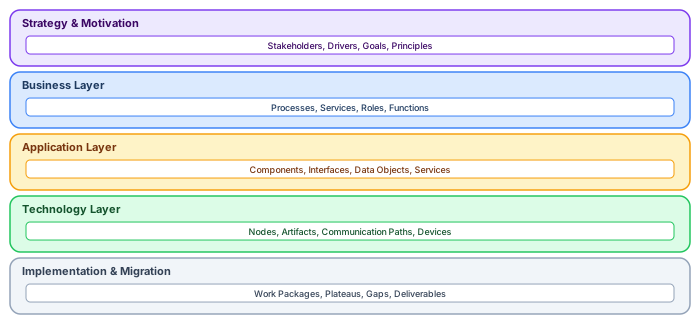
ArchiMate organizes architecture into five layers, each addressing a different level of abstraction. The Strategy and Motivation layer captures why the architecture exists — stakeholders, drivers, goals, outcomes, principles, and requirements. The Business Layer describes what the organization does — processes, services, functions, roles, and business objects. The Application Layer describes how IT supports the business — application components, interfaces, data objects, and application services. The Technology Layer describes the infrastructure — nodes, devices, system software, communication paths, and artifacts. The Implementation and Migration layer describes how the architecture changes over time — work packages, plateaus, gaps, and deliverables.
Each layer is further organized by three aspects: active structure (who or what performs behavior — actors, components, nodes), behavior (what is done — processes, functions, services), and passive structure (what is acted upon — objects, data, artifacts). Understanding this grid is essential because it determines which element types are valid in which contexts and which relationships are permitted between them.
Setting up Sparx EA for ArchiMate modeling
Sparx Enterprise Architect supports ArchiMate through its built-in MDG Technology. Before creating the first diagram, configure the environment correctly. ArchiMate layers explained
Enable the ArchiMate MDG. In Sparx EA, navigate to Specialize → Technologies → Manage Technologies and ensure "ArchiMate 3" is enabled. This activates the ArchiMate toolbox, element types, relationship rules, and diagram types. Disable MDG technologies you do not use — they clutter the toolbox and confuse modelers.
Configure tagged value sets. Add custom tagged values to ArchiMate elements for governance metadata: Status (Draft / Approved / Deprecated), Owner (responsible team or person), Domain (business domain), Last_Reviewed (date), and Lifecycle_Phase (Current / Target / Transitional). These tags enable filtering, reporting, and compliance checking that the standard ArchiMate properties do not support.
Set up model validation rules. Sparx EA's built-in validation checks ArchiMate relationship rules (for example, preventing a Composition relationship between elements in different layers). Add custom validation scripts that enforce your organization's standards — naming conventions, required tagged values, and maximum elements per diagram.
// Sparx EA JavaScript: Validate ArchiMate naming convention
// Elements must start with a domain prefix: FIN_, CRM_, HR_, etc.
var validPrefixes = ["FIN_", "CRM_", "HR_", "OPS_", "IT_", "SEC_"];
var elements = Repository.GetElementSet(
    "SELECT Object_ID, Name, Stereotype FROM t_object " +
    "WHERE Stereotype LIKE 'ArchiMate%'", 2);

var violations = 0;
for (var i = 0; i < elements.Count; i++) {
    var el = elements.GetAt(i);
    var hasPrefix = false;
    for (var j = 0; j < validPrefixes.length; j++) {
        if (el.Name.indexOf(validPrefixes[j]) === 0) {
            hasPrefix = true; break;
        }
    }
    if (!hasPrefix) {
        Session.Output("NAMING: " + el.Name + " [" + el.Stereotype +
            "] missing domain prefix");
        violations++;
    }
}
Session.Output("Total naming violations: " + violations);
Choosing the right ArchiMate viewpoints

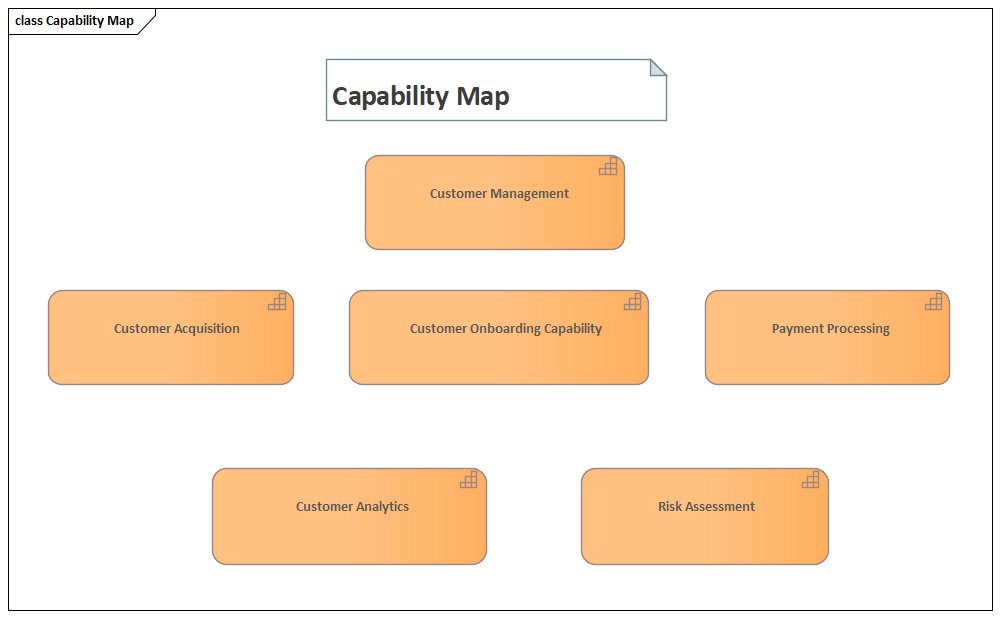
A viewpoint defines which element types and relationship types are visible in a diagram. Viewpoints are the single most important modeling decision because they determine whether a diagram communicates clearly or confuses its audience.
Organization Viewpoint shows the structure of the enterprise in terms of business actors, roles, and their relationships. Use it for organizational analysis and responsibility mapping. Business Process Cooperation shows how processes interact through services and events — essential for understanding cross-functional workflows. Application Cooperation shows how applications interact through interfaces and services — the most commonly used viewpoint for integration architecture. Technology Usage shows how applications are deployed on infrastructure — critical for operations and capacity planning. Layered Viewpoint shows the full stack from business through application to technology — the signature ArchiMate view that demonstrates cross-layer traceability.
The rule: every diagram must declare its viewpoint. A diagram without a viewpoint is a diagram without a purpose. In Sparx EA, set the viewpoint in diagram properties — this restricts the toolbox to valid element types and prevents modeling errors.
Repository structure for scalable ArchiMate models
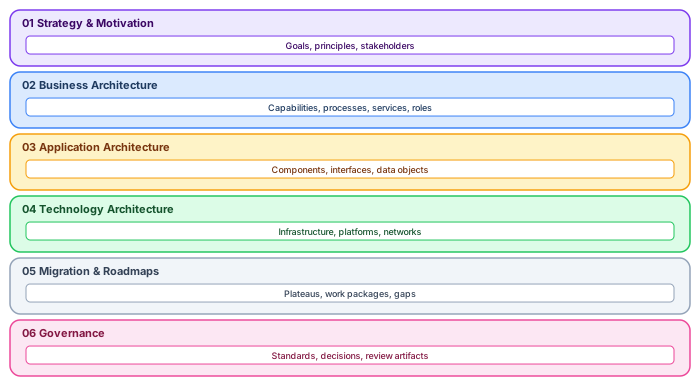
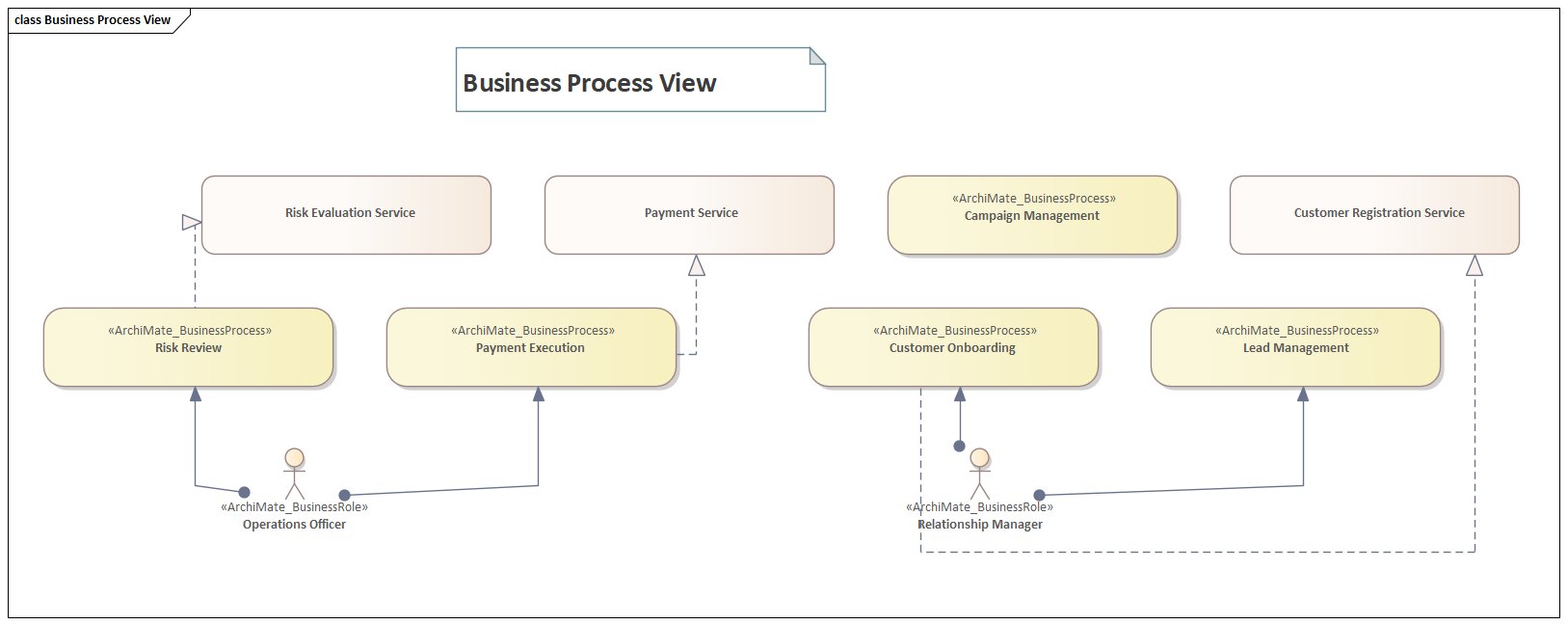
Repository structure determines whether the model scales to 10,000+ elements or collapses under its own weight. Use a consistent package hierarchy that mirrors the ArchiMate layers. ArchiMate relationship types
Enterprise Architecture Repository
├── 01_Strategy_and_Motivation
│   ├── Stakeholders
│   ├── Drivers_and_Goals
│   └── Principles_and_Requirements
├── 02_Business_Architecture
│   ├── Capabilities
│   ├── Value_Streams
│   ├── Processes
│   ├── Services
│   └── Roles_and_Actors
├── 03_Application_Architecture
│   ├── Components
│   ├── Interfaces
│   ├── Services
│   └── Data_Objects
├── 04_Technology_Architecture
│   ├── Infrastructure
│   ├── Platforms
│   └── Networks
├── 05_Migration_and_Roadmaps
│   ├── Current_State (Baseline)
│   ├── Target_State
│   └── Transition_Architectures
├── 06_Governance
│   ├── Standards
│   ├── Decision_Records
│   └── Review_Artifacts
└── 07_Views (Diagrams organized by viewpoint)
Critical rule: elements live in layer packages; diagrams live in the Views package. An Application Component named "CRM System" lives in 03_Application_Architecture/Components, not inside a diagram package. Diagrams reference elements — they do not own them. This separation enables element reuse across multiple diagrams without duplication.
// Sparx EA JavaScript: Detect elements that exist in only one diagram
// These are candidates for either orphan cleanup or broader reuse
var sql = "SELECT o.Object_ID, o.Name, o.Stereotype, COUNT(d.DiagramID) as DiagCount " +
    "FROM t_object o LEFT JOIN t_diagramobjects d ON o.Object_ID = d.Object_ID " +
    "WHERE o.Stereotype LIKE 'ArchiMate%' " +
    "GROUP BY o.Object_ID, o.Name, o.Stereotype " +
    "HAVING COUNT(d.DiagramID) <= 1";
var elements = Repository.GetElementSet(sql, 2);
for (var i = 0; i < elements.Count; i++) {
    var el = elements.GetAt(i);
    Session.Output("SINGLE-USE: " + el.Name + " [" + el.Stereotype + "]");
}
Naming conventions that scale

Naming is the most underestimated governance mechanism. In a repository with 5,000+ elements, consistent naming is the difference between finding what you need in seconds and searching for minutes.
Elements: Use business-readable names, not technical identifiers. "Customer Relationship Management" not "CRM_APP_001". Include the domain prefix when the repository serves multiple domains: "FIN_Payment Processing", "CRM_Customer Onboarding". Never embed lifecycle status in the name ("CRM System (DEPRECATED)") — use tagged values instead.
Relationships: Label relationships when the type alone is insufficient. A Serving relationship from "Payment Gateway" to "Order Service" should be labeled with what is served: "Payment Authorization API". An Access relationship should indicate the mode: "reads Customer Profile" or "writes Transaction Record".
Diagrams: Name diagrams with purpose, layer, and audience: "App Cooperation — Payment Domain — Architecture Board Review". Never name a diagram "Diagram1" or "New ArchiMate Diagram" — these accumulate and become impossible to navigate.
Avoiding common ArchiMate modeling mistakes

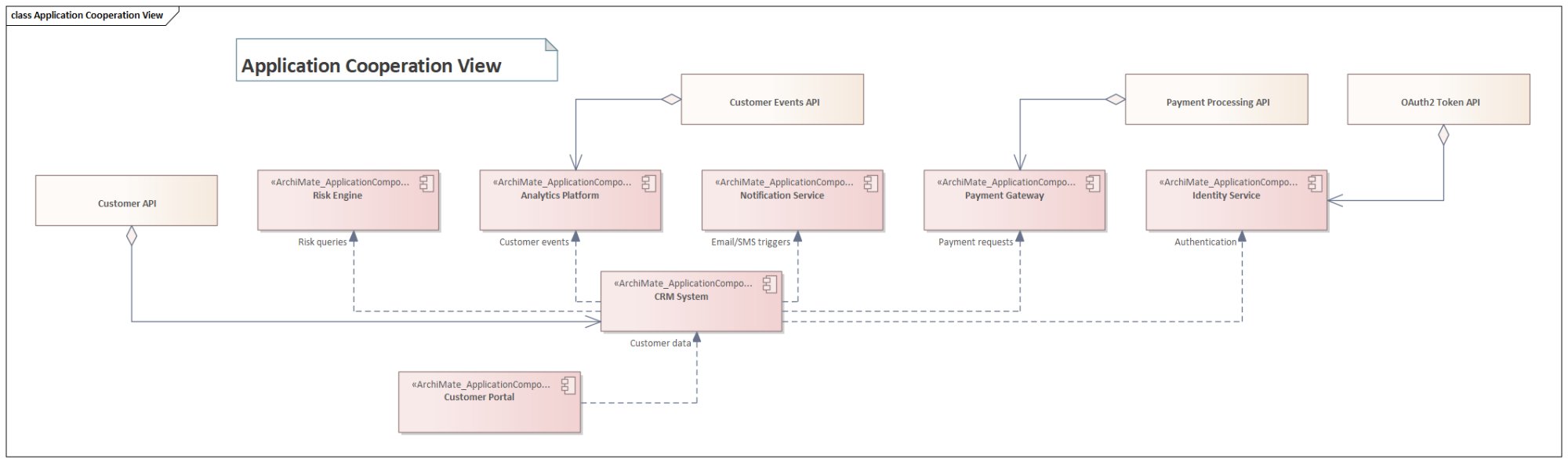
Five mistakes account for 80% of ArchiMate model quality problems. ArchiMate modeling best practices
Mistake 1: Too many elements per diagram. A diagram with 50+ elements communicates nothing. Target 15-20 elements maximum. If you need to show more, split into multiple viewpoint-specific diagrams linked by navigation. Sparx EA's hyperlinked diagrams support this drill-down pattern natively.
Mistake 2: Using Association for everything. Association is the weakest ArchiMate relationship — it says "these two things are related" without specifying how. Prefer typed relationships: Serving (provides service to), Realization (implements), Triggering (causes), Access (reads/writes), Composition (contains), Aggregation (groups). Each relationship type carries architectural meaning that Association discards.
Mistake 3: Mixing layer concerns. A single diagram should not show Business Actors alongside Technology Nodes unless it is explicitly a Layered Viewpoint. Mixing layers creates visual noise and obscures the architectural story.
Mistake 4: Orphan elements. Elements that exist in the repository but appear in zero diagrams are invisible to stakeholders. Run an orphan detection script monthly and either assign orphans to diagrams or archive them.
Mistake 5: Modeling implementations, not architecture. ArchiMate models architecture — what exists and how it relates. It does not model implementation details like class structures, database schemas, or API payloads. If you need implementation detail, use UML or BPMN and link to the ArchiMate elements via Realization relationships.
// Sparx EA JavaScript: Find orphan ArchiMate elements (in zero diagrams)
var sql = "SELECT o.Object_ID, o.Name, o.Stereotype FROM t_object o " +
    "LEFT JOIN t_diagramobjects d ON o.Object_ID = d.Object_ID " +
    "WHERE o.Stereotype LIKE 'ArchiMate%' AND d.DiagramID IS NULL";
var orphans = Repository.GetElementSet(sql, 2);
Session.Output("=== ORPHAN ARCHIMATE ELEMENTS ===");
for (var i = 0; i < orphans.Count; i++) {
    var el = orphans.GetAt(i);
    Session.Output("ORPHAN: " + el.Name + " [" + el.Stereotype + "]");
}
Session.Output("Total orphans: " + orphans.Count);
Capability-based planning with ArchiMate
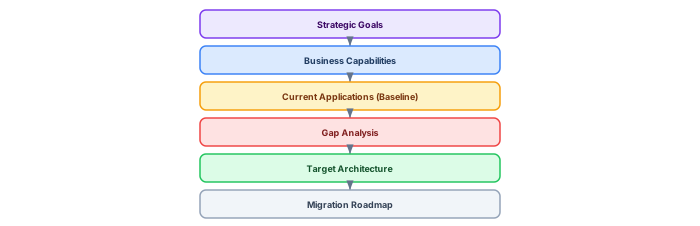
Capability-based planning is the most strategically valuable use of ArchiMate. It connects business strategy to technology implementation through a traceable chain: Strategic Goals → Business Capabilities → Current Applications (Baseline) → Gap Analysis → Target Architecture → Migration Roadmap.
Model capabilities as ArchiMate Capability elements (Strategy layer) or Resource elements. Each capability is realized by Application Components (Application layer) and supported by Technology Nodes (Technology layer). Tag each capability with maturity assessment: Current_Maturity (1-5), Target_Maturity (1-5), Investment_Priority (High/Medium/Low). Build a Capability Heatmap view that colors capabilities by the gap between current and target maturity — red gaps are investment priorities.
// Sparx EA JavaScript: Generate capability maturity report
var caps = Repository.GetElementSet(
    "SELECT Object_ID, Name FROM t_object " +
    "WHERE Stereotype = 'ArchiMate3::Capability'", 2);
Session.Output("Capability,Current,Target,Gap,Priority");
for (var i = 0; i < caps.Count; i++) {
    var cap = caps.GetAt(i);
    var current = cap.TaggedValues.GetByName("Current_Maturity");
    var target = cap.TaggedValues.GetByName("Target_Maturity");
    var priority = cap.TaggedValues.GetByName("Investment_Priority");
    var curVal = current ? current.Value : "?";
    var tgtVal = target ? target.Value : "?";
    var gap = (target && current) ? (parseInt(tgtVal) - parseInt(curVal)) : "?";
    var pri = priority ? priority.Value : "?";
    Session.Output(cap.Name + "," + curVal + "," + tgtVal + "," + gap + "," + pri);
}
Integrating ArchiMate with TOGAF ADM

ArchiMate was designed to work with TOGAF, and the integration is most effective when ADM phases map directly to repository packages and viewpoints. Phase A (Architecture Vision) produces Motivation and Strategy views. Phase B (Business Architecture) produces Business Process and Organization views. Phase C (Information Systems Architecture) produces Application Cooperation and Data views. Phase D (Technology Architecture) produces Infrastructure and Deployment views. Phases E-F (Opportunities and Migration Planning) produce Migration views with Plateaus, Gaps, and Work Packages.
Each ADM iteration produces a baseline and target architecture. In Sparx EA, use the Baseline Manager to snapshot the current state before each ADM cycle. Compare baselines to visualize what changed between iterations — elements added, modified, or removed. This provides auditable evidence of architecture evolution that TOGAF governance requires.
Multi-notation strategy: ArchiMate, UML, and BPMN

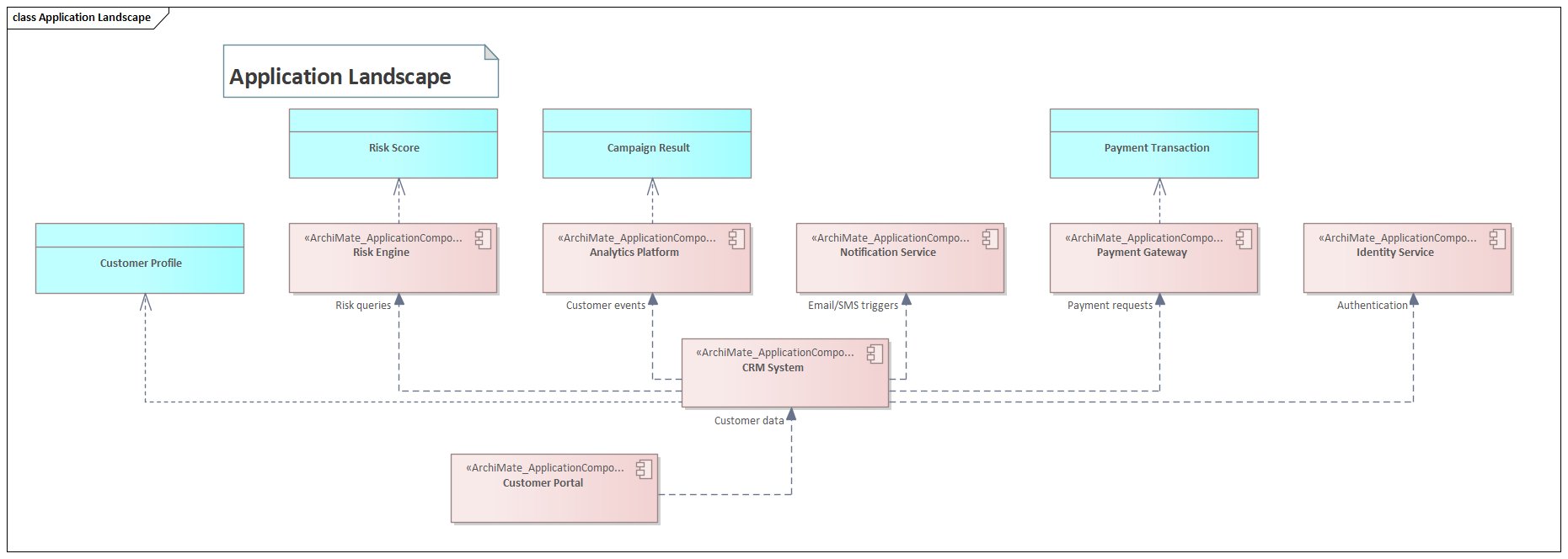
ArchiMate is not the only notation in the repository. Sparx EA supports ArchiMate, UML, BPMN, SysML, and custom profiles simultaneously. The key is defining clear ownership boundaries.
ArchiMate owns the enterprise landscape: cross-layer traceability, capability mapping, application portfolio, infrastructure topology, and motivation/strategy. UML owns detailed software design: class diagrams for data models, sequence diagrams for runtime interactions, component diagrams for module structure, and deployment diagrams for container-level detail. BPMN owns process detail: swimlane activities, gateway logic, event handling, and process orchestration that ArchiMate's Business Process element cannot express.
Link across notations using Realization relationships. An ArchiMate Application Component "Payment Service" is realized by a UML Component diagram showing its internal structure. An ArchiMate Business Process "Customer Onboarding" is realized by a BPMN process diagram showing the detailed flow.
Model quality assurance and validation

Model quality degrades without active governance. Implement a five-stage validation pipeline.
Stage 1: Naming validation. Automated script checks every element against naming conventions. Run nightly. Stage 2: Relationship validation. Sparx EA's built-in ArchiMate validation checks relationship rules. Run on every model change. Stage 3: Orphan detection. Script identifies elements not used in any diagram. Run weekly. Stage 4: Completeness check. Script verifies required tagged values (Owner, Status, Domain) are populated. Run before architecture reviews. Stage 5: Peer review. Human review of diagram clarity, viewpoint correctness, and architectural consistency. Run monthly at the Architecture Review Board.
// Sparx EA JavaScript: Completeness check — required tagged values
var required = ["Status", "Owner", "Domain"];
var elements = Repository.GetElementSet(
    "SELECT Object_ID, Name, Stereotype FROM t_object " +
    "WHERE Stereotype LIKE 'ArchiMate%'", 2);
var incomplete = 0;
for (var i = 0; i < elements.Count; i++) {
    var el = elements.GetAt(i);
    for (var r = 0; r < required.length; r++) {
        var tag = el.TaggedValues.GetByName(required[r]);
        if (!tag || tag.Value === "") {
            Session.Output("INCOMPLETE: " + el.Name + " missing " + required[r]);
            incomplete++;
        }
    }
}
Session.Output("Total missing tags: " + incomplete);
Impact analysis and change management

Impact analysis is where ArchiMate delivers its highest ROI. When a change is proposed — retiring an application, upgrading infrastructure, modifying a business process — the architecture model reveals every upstream and downstream dependency.
In Sparx EA, use the Traceability window to navigate relationships from any element. For a proposed application retirement, trace: which Business Processes are served by this application (Serving relationships), which other applications integrate with it (Flow relationships), which infrastructure hosts it (Realization), and which capabilities it supports (Realization from Capability). This trace produces the impact assessment in minutes rather than weeks of interviews.
// Sparx EA JavaScript: Impact analysis — find all dependencies for an element
var targetName = "CRM_Customer Management System";  // Change this
var el = Repository.GetElementsByQuery("Simple", targetName).GetAt(0);
Session.Output("=== IMPACT ANALYSIS: " + el.Name + " ===");

// Outgoing relationships (this element serves/realizes/triggers others)
var outgoing = el.Connectors;
for (var i = 0; i < outgoing.Count; i++) {
    var conn = outgoing.GetAt(i);
    var targetEl = Repository.GetElementByID(
        conn.ClientID === el.ElementID ? conn.SupplierID : conn.ClientID);
    var direction = conn.ClientID === el.ElementID ? "OUTGOING" : "INCOMING";
    Session.Output(direction + " [" + conn.Stereotype + "]: " + targetEl.Name);
}
Session.Output("Total connections: " + outgoing.Count);
Advanced techniques: automation and reporting
Mature ArchiMate practices automate repetitive tasks. Three high-value automation targets in Sparx EA:
Automated documentation generation. Use Sparx EA's Document Generator to produce architecture reports directly from the model. Configure templates that pull element properties, tagged values, relationships, and diagrams into formatted Word or PDF documents. When the model changes, regenerate the document — it is always synchronized with the repository.
Dashboard generation. Write scripts that query the repository and produce HTML dashboards: application portfolio by lifecycle status, capability maturity heatmaps, technology radar, and compliance status. Publish via WebEA for stakeholder self-service access.
Bulk operations. Scripts that update tagged values across hundreds of elements (for example, setting all elements owned by a reorganized team to a new owner), generate traceability matrices, or export element catalogs to Excel for offline review.
// Sparx EA JavaScript: Export ArchiMate Application Components to CSV
var apps = Repository.GetElementSet(
    "SELECT Object_ID, Name, Note FROM t_object " +
    "WHERE Stereotype = 'ArchiMate3::ApplicationComponent'", 2);
Session.Output("Name,Status,Owner,Domain,Description");
for (var i = 0; i < apps.Count; i++) {
    var el = apps.GetAt(i);
    var status = el.TaggedValues.GetByName("Status");
    var owner = el.TaggedValues.GetByName("Owner");
    var domain = el.TaggedValues.GetByName("Domain");
    Session.Output(el.Name + "," +
        (status ? status.Value : "") + "," +
        (owner ? owner.Value : "") + "," +
        (domain ? domain.Value : "") + "," +
        el.Notes.replace(/,/g, ";").substring(0, 100));
}
Cloud and microservices modeling in ArchiMate
Modern cloud-native architectures require specific ArchiMate modeling patterns. Model cloud services (AWS Lambda, Azure Functions, managed databases) as Technology Services, not Application Components — they are infrastructure provided by a cloud vendor, not applications built by the organization. Model API Gateways as Application Components that serve as intermediaries. Model Kubernetes clusters as Technology Nodes hosting containerized Application Components.
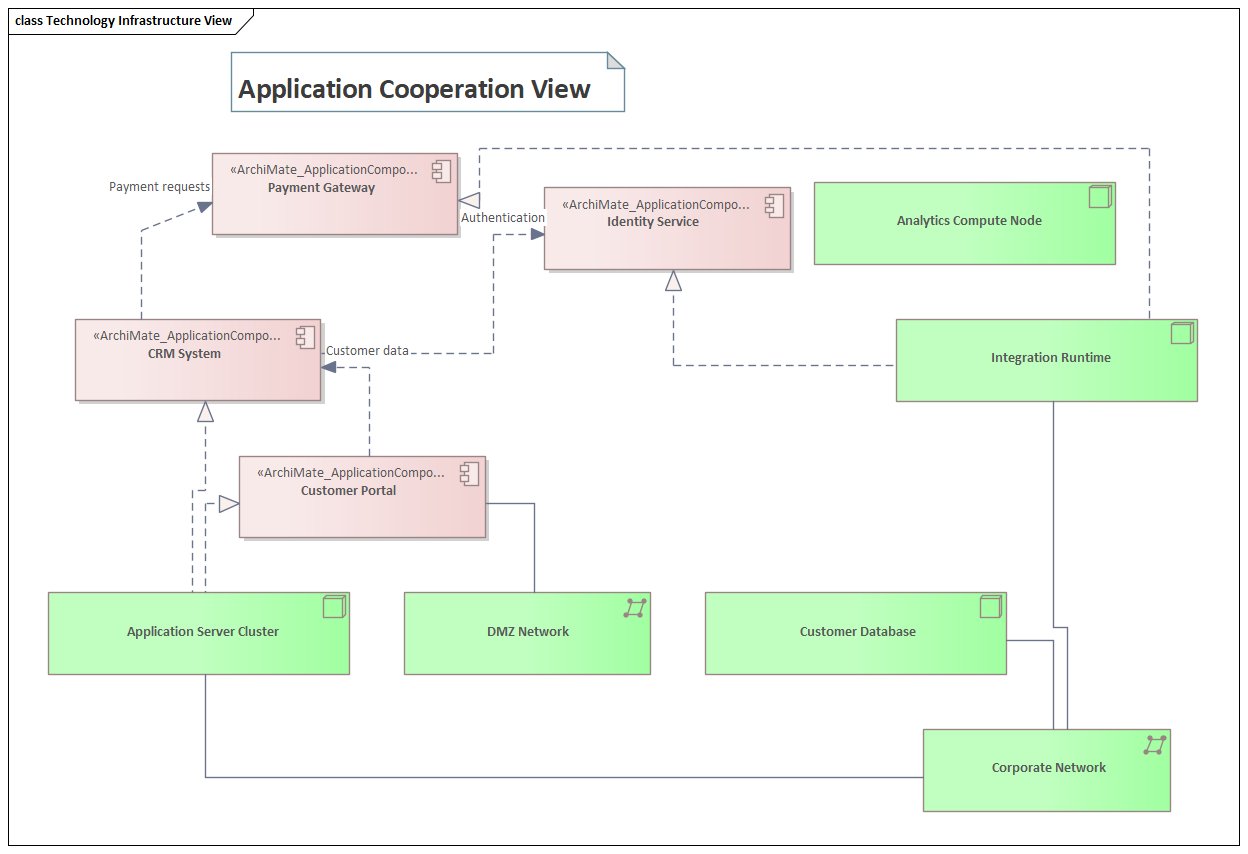
For microservices, each service is an Application Component that exposes Application Interfaces (APIs) and accesses Data Objects. Service-to-service communication flows through Application Collaboration elements or directly via Flow relationships. Event-driven communication via Kafka or similar platforms is modeled using Application Event elements triggering downstream Application Processes.
The critical modeling decision: where does the platform end and the application begin? Define this boundary explicitly in your modeling standards. Platform services (managed database, message broker, identity provider) belong in the Technology Layer. Domain services built on the platform (payment processing, customer management) belong in the Application Layer.
Frequently Asked Questions
What is Sparx Enterprise Architect used for?
Sparx Enterprise Architect (Sparx EA) is a comprehensive UML, ArchiMate, BPMN, and SysML modeling tool used for enterprise architecture, software design, requirements management, and system modeling. It supports the full architecture lifecycle from strategy through implementation.
How does Sparx EA support ArchiMate modeling?
Sparx EA natively supports ArchiMate 3.x notation through built-in MDG Technology. Architects can model all three ArchiMate layers, create viewpoints, add tagged values, trace relationships across elements, and publish HTML reports — making it one of the most popular tools for enterprise ArchiMate modeling.
What are the benefits of a centralised Sparx EA repository?
A centralised SQL Server or PostgreSQL repository enables concurrent multi-user access, package-level security, version baselines, and governance controls. It transforms Sparx EA from an individual diagramming tool into an organisation-wide architecture knowledge base.