⏱ 18 min read
Most enterprise architecture decks fail for one boring reason: they show the wrong picture to the wrong people.
Not because the architect is stupid. Usually the opposite. They know too much, so they dump everything into one diagram and call it “the target architecture.” Then the CIO sees a spaghetti map, the security team sees three missing controls, delivery teams ignore it, and the business sponsor goes back to PowerPoint because at least PowerPoint lies in a familiar way.
This is exactly why ArchiMate viewpoints matter.
Here’s the simple version up front: an ArchiMate viewpoint is a deliberately filtered view of the architecture for a specific audience and purpose. It is not “the architecture.” It is one way of showing it. Same landscape, different camera angle.
That sounds obvious. But in real architecture work, people still behave as if one master diagram should satisfy executives, engineers, risk teams, and operations all at once. It won’t. It never does. And honestly, if your diagram needs a ten-minute apology before people can read it, the problem is not the audience.
So let’s explain ArchiMate viewpoints simply, then properly, and then in the messy way they actually show up in banking, cloud, Kafka-based integration, and IAM programs.
ArchiMate viewpoints, simply explained
If you remember only one thing, remember this:
ArchiMate viewpoints are tailored diagrams that show only the architecture elements and relationships needed for a particular question.
That’s it.
A viewpoint helps answer questions like:
- What business capability is this program changing?
- Which applications support customer onboarding?
- Where does sensitive identity data flow?
- What infrastructure hosts this Kafka platform?
- Which systems depend on the IAM service?
- What changes between current state and target state?
A viewpoint is not mainly about notation purity. It is about communication with intent.
ArchiMate as a language gives you:
- elements like business processes, applications, data objects, technology nodes
- relationships like serving, access, realization, flow, assignment
- layers like business, application, technology
- viewpoints to shape those elements into something useful
Think of it this way:
- The model is the repository of truth.
- The viewpoint is the selected story you tell from that truth.
That distinction matters a lot. Good architects model broadly and present selectively. Bad architects do the reverse: they draw selectively and pretend it is the whole truth.
Why viewpoints exist at all
ArchiMate viewpoints exist because architecture has multiple stakeholders with incompatible needs.
A head of retail banking wants to know whether a new onboarding platform reduces abandonment and risk.
A solution architect wants to know which APIs and events are involved.
A security architect wants to know where authentication, authorization, and audit controls sit.
An operations lead wants to know blast radius and support boundaries.
A program manager wants to know what changes first and what depends on what.
These are not the same question. So they should not get the same diagram.
This is where I’ll be a bit blunt: many architecture teams still use diagrams as evidence that they worked hard, instead of as tools to help other people decide. That’s backward. A viewpoint is useful only if it helps someone make a better decision faster.
The basic idea behind ArchiMate viewpoints
ArchiMate defines many viewpoints, but don’t get trapped memorizing the catalog like it’s a driving theory test. The real idea is more practical:
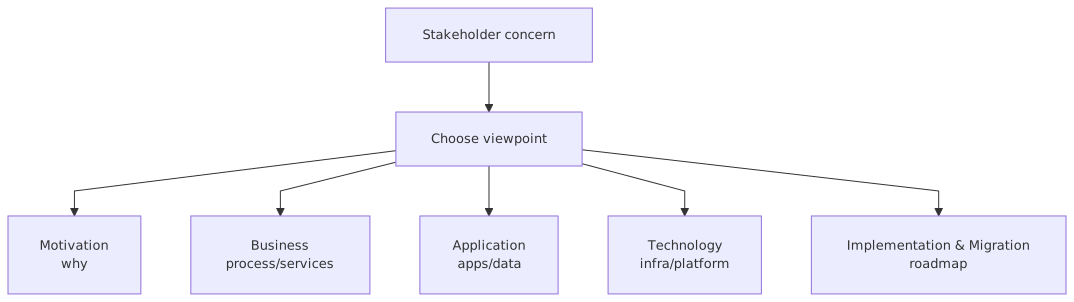
A viewpoint selects:
- Audience
- Concern
- Scope
- Level of detail
- Relevant elements and relationships
For example:
- Audience: security architects
- Concern: identity trust boundaries and access control
- Scope: customer-facing mobile onboarding journey
- Detail: medium
- Elements: business process, application services, IAM components, interfaces, data objects, technology nodes
That is already enough to know what should and should not be in the diagram.
A good viewpoint is opinionated. It excludes things. If you cannot say what your viewpoint intentionally leaves out, it is probably too broad.
The common categories, in plain English
You do not need a textbook recital here, but you do need a practical mental model. In real work, ArchiMate viewpoints tend to fall into a few useful buckets. ArchiMate modeling guide
1. Context viewpoints
These show the scope around a subject.
Use them when people ask:
- What is this thing connected to?
- What systems are in scope?
- Who uses it?
- What external parties matter?
Example: a Kafka event platform in a bank, showing producers, consumers, IAM integration, observability stack, and cloud hosting context.
2. Business viewpoints
These focus on capabilities, value streams, actors, products, and processes.
Use them when people ask:
- Why are we doing this?
- Which business capability changes?
- Which process step is impacted?
Example: mortgage onboarding process and the applications supporting KYC, credit checks, and account creation.
3. Application cooperation or usage viewpoints
These are the workhorses for many enterprise architects. They show how applications interact and what services they provide or consume.
Use them when people ask:
- Which system calls which?
- Where do events go?
- What application services are reused?
Example: mobile app, onboarding API, KYC service, IAM, Kafka topics, customer master, fraud engine.
4. Technology/infrastructure viewpoints
These show nodes, devices, system software, networks, cloud services, deployment patterns.
Use them when people ask:
- Where does this run?
- What cloud services are involved?
- What are the environment boundaries?
Example: Kafka clusters on managed cloud, IAM runtime, VPC segmentation, API gateway, container platform.
5. Information/data viewpoints
These focus on business objects, data objects, flows, ownership, access.
Use them when people ask:
- Where is customer identity data created?
- Which systems store PII?
- What data is published to Kafka and who reads it?
6. Change and migration viewpoints
These show plateaus, work packages, gaps, transition architectures.
Use them when people ask:
- How do we get from current to target?
- What sequence makes sense?
- What can be decommissioned when?
This one is chronically underused. Architects love target state diagrams because they are clean and flattering. Real programs need transition viewpoints because reality arrives in installments.
The mistake people make: treating viewpoints like templates
A lot of teams ask, “Which ArchiMate viewpoint should I use?” as if there is one officially correct answer. ArchiMate tutorial
Wrong question.
The better question is: What decision are we trying to support?
ArchiMate gives you standard viewpoints and a structure for defining your own. In practice, most useful enterprise diagrams are adapted viewpoints. Purists may twitch a bit at that. Fine. Purists do not usually carry delivery risk for a bank migration.
Use the standard viewpoints as a starting point, not a prison.
If your audience is the cloud platform team and they need to understand Kafka tenancy, IAM trust integration, and data residency constraints, then build the viewpoint for that. Don’t force a generic application cooperation view if it hides the actual risk.
A useful way to choose the right viewpoint
Here’s a practical table I wish more architecture teams used.
This is the point: viewpoint selection is stakeholder management, not notation trivia.
How this applies in real architecture work
Let’s get out of theory and into the real world, because this is where most ArchiMate discussions become weirdly ceremonial.
In real architecture work, viewpoints help you do five things better.
1. Get agreement without fake simplification
Different stakeholders can agree on one architecture if they can see the parts relevant to them. They do not need one universal diagram. In fact, trying to create one usually destroys agreement.
2. Expose hidden dependencies
A business process view may reveal that customer onboarding depends on a fraud decision step nobody budgeted for. An application cooperation view may reveal that the IAM token exchange is central to six systems. A migration view may reveal you cannot retire the legacy ESB before two Kafka consumers are rebuilt.
3. Keep architecture repositories useful
A repository without viewpoints is just a warehouse. A warehouse with no retrieval strategy is not architecture; it is hoarding.
4. Improve governance conversations
Architecture review boards often waste time because diagrams are either too technical for decision-makers or too vague for engineers. A viewpoint lets you pitch the same architecture at the right altitude.
5. Make change sequencing visible
This matters especially in banking, where compliance deadlines, audit controls, and service continuity all compete. The target state is easy to draw. The transition states are where programs actually fail. ArchiMate for governance
A real enterprise example: digital onboarding in a bank
Let’s take a realistic example.
A retail bank wants to modernize customer onboarding for current accounts and savings products. The goals are:
- faster digital onboarding
- stronger fraud checks
- centralized IAM
- event-driven integration using Kafka
- migration to cloud-hosted services where allowed
- reduced dependency on legacy branch-centric systems
Sounds familiar because every third bank has some version of this.
Now, one diagram will not cut it. Here’s how viewpoints help.
Viewpoint 1: Business viewpoint for executives
This view shows:
- Business capability: Customer Onboarding
- Related capabilities: Identity Verification, Fraud Assessment, Product Fulfillment, Customer Communication
- Actors: Customer, Operations Agent, Compliance Team
- Business process stages: Start application, verify identity, assess risk, create customer, open account, notify customer
What this tells the sponsor:
- where the investment lands
- which capabilities improve
- where risk and customer drop-off occur
What it should not show:
- Kafka topic names
- token exchange details
- Kubernetes clusters
If you put those in front of the COO, you are not being thorough. You are being annoying.
Viewpoint 2: Application cooperation view for solution teams
This view shows:
- Mobile banking app
- Web onboarding portal
- Onboarding orchestration service
- IAM platform
- KYC provider integration
- Fraud engine
- Customer master service
- Product/account opening service
- Notification service
- Kafka platform
And the interactions:
- Mobile app calls onboarding API
- Onboarding service uses IAM for customer auth/session handling
- Onboarding service invokes KYC and fraud checks
- Customer-created and onboarding-status events are published to Kafka
- Notification service consumes onboarding-status events
- Customer master publishes customer-profile-updated events
This is where the architecture starts becoming operationally useful.
Now the team can discuss:
- synchronous vs event-driven interactions
- coupling points
- retry patterns
- ownership boundaries
- where idempotency matters
This is the bread-and-butter viewpoint in modern enterprise architecture. If you cannot draw this clearly, your architecture is probably too hand-wavy.
Viewpoint 3: IAM-focused security viewpoint
This is one many teams skip, and then they act surprised when identity becomes the critical path.
This view shows:
- Customer identity provider
- Workforce identity provider for operations staff
- Token service / federation service
- API gateway
- Onboarding app and backend services
- Authorization decision points
- Audit logging
- Sensitive identity data objects
- Trust boundaries across internet, DMZ, internal services, cloud runtime
Questions it answers:
- Where does authentication happen?
- Where are tokens validated?
- Which services rely on IAM availability?
- Where is privileged access used?
- Which systems access PII and under what control?
In banking, IAM is not a side component. It is structural. If your architecture diagrams treat IAM like a tiny box labeled “SSO,” you are designing for an outage or an audit finding. Probably both.
Viewpoint 4: Technology/cloud viewpoint
This view shows:
- Cloud VPCs or landing zones
- Managed Kafka service or self-managed Kafka clusters
- Container platform
- API gateway
- IAM runtime components
- Network segmentation
- Logging and monitoring stack
- Legacy data center systems still in use
- Secure connectivity between cloud and on-prem
This helps platform teams answer:
- where workloads run
- what is shared vs dedicated
- where resilience and failover exist
- whether regulated data crosses boundaries
A common anti-pattern here is drawing “the cloud” as one giant blob. That is architecture by weather forecast. Useless. Cloud viewpoints need concrete boundaries, service responsibilities, and operational ownership.
Viewpoint 5: Migration viewpoint
Now we show the uncomfortable truth: the target state is not arriving next quarter.
A migration view might show:
Plateau 1: Legacy onboarding remains, new IAM integrated
Plateau 2: New onboarding orchestration introduced, fraud service modernized
Plateau 3: Kafka event backbone introduced for onboarding status and customer events
Plateau 4: Legacy account-opening integration retired, cloud-native fulfillment in place
Work packages:
- IAM federation rollout
- Kafka platform setup
- API abstraction over legacy customer master
- onboarding UI rebuild
- branch process alignment
- decommissioning of old middleware
This is where architecture becomes credible. Not because the diagram is pretty. Because it acknowledges dependencies and sequencing.
Where Kafka fits in viewpoint thinking
Kafka is a great example because architects often either overhype it or hide it.
The overhype version:
“Everything is event-driven now.”
No, it isn’t. In most enterprises, especially banks, some things are event-driven, some are synchronous, some are batch, and some are embarrassingly manual. Draw that honestly.
The hidden version:
Kafka is just “integration.”
Also wrong. Kafka changes ownership models, data publishing responsibilities, replay behavior, observability needs, and security controls. It deserves explicit representation in the right viewpoints.
In an application cooperation viewpoint, Kafka should show:
- producers
- consumers
- key event streams
- platform role, not every low-level topic unless needed
In a technology viewpoint, Kafka should show:
- cluster or managed service boundaries
- resilience zones
- security integration
- monitoring
- tenancy model
In an information viewpoint, Kafka should show:
- event payload ownership
- data classification
- retention concerns
- downstream consumers of customer data
A lot of architects draw Kafka as a magic middle box that somehow makes coupling disappear. It doesn’t. It changes the coupling. Sometimes for the better, sometimes just into a different shape.
Common mistakes architects make with ArchiMate viewpoints
Let’s be honest about the usual failures.
1. One diagram to rule them all
This is the classic sin. The architect wants one “master architecture diagram” for every purpose. Result: no one uses it.
2. Confusing model completeness with diagram completeness
Your repository can be comprehensive. Your diagram should not be.
3. Picking viewpoints by standard name, not by stakeholder need
A viewpoint is useful because it answers a question. Not because it matches a textbook label.
4. Mixing abstraction levels carelessly
Capability, API, Kafka topic, IAM token, and Kubernetes node all on one page. This is not “end-to-end.” It is just messy.
5. Ignoring transition states
Target state diagrams are cheap. Migration viewpoints are where architecture earns its keep.
6. Hiding security and IAM
Many architects still bolt security on after the “real architecture” is done. In banking especially, that is amateur hour.
7. Over-modeling relationships nobody cares about
Yes, ArchiMate can represent many relationship types. No, your audience does not need all of them on every diagram.
8. Under-modeling ownership
In modern platforms, ownership matters as much as connectivity. Who owns the Kafka topic? Who owns the IAM policy? Who supports the API at 2 a.m.? If the viewpoint can’t help answer that, it may be too abstract.
9. Treating viewpoints as static artifacts
Architecture views should evolve with the program. If your diagrams are six months behind delivery, they are decorative.
10. Making diagrams look like documentation, not decisions
This is subtle but important. A good viewpoint drives a conversation. A bad one just records one.
A slightly contrarian view: not every stakeholder needs ArchiMate-looking diagrams
Here’s the part some architecture purists won’t love.
Sometimes the best ArchiMate viewpoint does not need to look heavily “ArchiMate-ish” to the audience. The underlying model can still be ArchiMate. But the presentation may need simplification.
Executives do not care whether a relationship is serving or realization.
Delivery leads may care more about dependency sequencing than notation purity.
Security reviewers may need trust boundaries highlighted more strongly than standard shape semantics.
So yes, use ArchiMate properly. But do not worship the notation at the expense of comprehension.
The model should be rigorous. The view should be usable.
That is not a compromise. That is the job.
How I’d use viewpoints in a real banking architecture engagement
If I were leading architecture for the onboarding modernization described above, I would not start by drawing a giant target architecture.
I would produce a small set of viewpoints, each with a clear purpose:
- Capability impact view
For sponsor alignment and funding conversations.
- Current-state application interaction view
To expose the real mess, especially legacy dependencies.
- Target-state application cooperation view
To show future orchestration, IAM, Kafka, and service boundaries.
- IAM trust and access view
To force the identity conversation early.
- Cloud deployment view
To validate runtime assumptions and operational ownership.
- Data/event view
To show PII movement, event publication, and downstream consumers.
- Migration roadmap view
To sequence delivery and decommissioning.
That set is enough to run most serious conversations. Not forever, but for the core architecture work.
Notice what I did not include:
- fifty diagrams for completeness
- a giant metamodel poster
- every single interface detail
Architecture is partly reduction. If every view is equally detailed, then nothing is prioritized.
A practical checklist for creating a good viewpoint
Before drawing, ask:
- Who is this for?
- What decision should this support?
- What question should this answer in under two minutes?
- What is intentionally out of scope?
- What level of detail is appropriate?
- Which risks or dependencies must be visible?
- What action do I want after this diagram is reviewed?
Then after drawing, ask:
- Can a non-architect explain it back to me?
- Is there a clear focal point?
- Did I mix too many abstraction levels?
- Is security visible where it matters?
- Are ownership and dependencies obvious?
- Could this diagram survive contact with delivery reality?
If not, redraw it. Architects are often too precious about first drafts.
What good looks like
A good ArchiMate viewpoint has a few qualities:
- Purposeful: it answers one main question well
- Selective: it excludes distracting detail
- Traceable: it links back to a coherent model
- Honest: it reflects real dependencies, not just ideal ones
- Usable: stakeholders can act on it
- Maintainable: it can evolve as the architecture changes
And importantly, good viewpoints connect strategy to implementation without pretending those are the same thing.
That bridge is where enterprise architecture either proves its value or turns into wallpaper.
Final thought
ArchiMate viewpoints are not a bureaucratic extra. They are the difference between architecture that informs decisions and architecture that merely exists.
The simplest explanation is still the best one: a viewpoint is the right picture for the right audience and the right question.
In real enterprise work, especially in banks dealing with IAM complexity, Kafka-driven integration, cloud migration, and legacy constraints, this is not optional. It is how you stop architecture from collapsing into either abstract nonsense or technical clutter. cloud architecture guide
And yes, strong opinion: if your architecture practice does not use viewpoints deliberately, you probably do not have an architecture communication problem. You have an architecture thinking problem.
Because the inability to choose the right view usually means the architect has not decided what matters.
That is the uncomfortable truth.
FAQ
1. What is the difference between an ArchiMate model and an ArchiMate viewpoint?
The model is the full set of architecture elements and relationships you maintain. The viewpoint is a selected representation of part of that model for a specific audience and purpose. One model, many viewpoints.
2. How many viewpoints should an enterprise architect create for one initiative?
Usually fewer than people think. For a serious initiative, 5 to 8 well-chosen viewpoints often beat 20 generic ones. Start with stakeholder needs, not completeness anxiety.
3. Which ArchiMate viewpoint is best for Kafka-based integration?
Usually an application cooperation viewpoint for producer/consumer interactions, plus a technology viewpoint for platform deployment, and sometimes an information viewpoint for event/data ownership. Kafka often needs more than one view because it affects application, data, and platform concerns.
4. How do viewpoints help with IAM architecture?
They make identity dependencies visible. A dedicated IAM-focused viewpoint can show authentication flows, token validation points, trust boundaries, privileged access, audit controls, and which applications rely on IAM. In banking, this often reveals critical risks early.
5. Can I adapt ArchiMate viewpoints instead of using standard ones exactly?
Yes. You should. Use the standard viewpoints as guidance, but tailor them to the decision and audience. Just keep the underlying model disciplined. Rigidly following a standard viewpoint that nobody can use is not good architecture.
- Viewpoints are filtered ways to show the architecture for a specific audience or question.
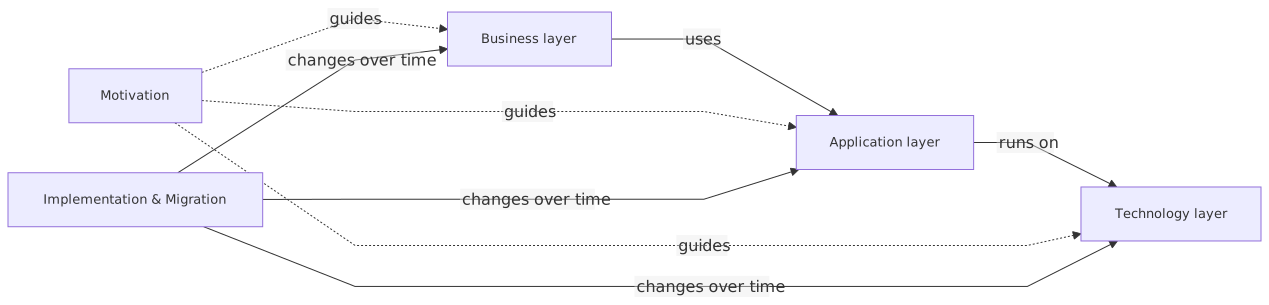
- Common use: connect stakeholder concerns to the right layers, relationships, and change roadmap.
- Simple rule: motivation explains why, business/application/technology show how it works, migration shows how it changes.
Frequently Asked Questions
What is enterprise architecture?
Enterprise architecture is a discipline that aligns an organisation's strategy, business processes, information systems, and technology. Using frameworks like TOGAF and modeling languages like ArchiMate, it provides a structured view of how the enterprise operates and how it needs to change.
How does ArchiMate support enterprise architecture practice?
ArchiMate provides a standard modeling language that connects strategy, business operations, applications, data, and technology in one coherent model. It enables traceability from strategic goals through business capabilities and application services to the technology platforms that support them.
What tools are used for enterprise architecture modeling?
The main tools are Sparx Enterprise Architect (ArchiMate, UML, BPMN, SysML), Archi (free, ArchiMate-only), and BiZZdesign Enterprise Studio. Sparx EA is the most feature-rich option, supporting concurrent repositories, automation, scripting, and integration with delivery tools like Jira and Azure DevOps.