⏱ 5 min read
Recommended Reading
Executive summary
Federated repositories succeed when they are federated by ownership but unified by standards. In Sparx EA, a federation-friendly design typically uses a shared DBMS repository (or multiple projects within a repository) with security enabled, so each domain team has clear update permissions within its own package boundaries, while enterprise reference packages remain controlled by a central standards function. EA’s security model assigns access permissions to user IDs and groups, controlling update capabilities while preserving broad visibility.
Federation also requires controlled change boundaries. Package-level mechanisms such as Controlled Packages (Native/XMI externalization) and package version control operations provide a way to define change units and integrate with external configuration management practices.
Finally, federated EA governance needs review and release rituals. EA’s Model Reviews enable formal assessment collaboration, baselines create approved snapshots and allow drift detection, and auditing provides accountability for changes over time. architecture decision records
- Repository structure: enterprise reference vs domain packages vs solution workspaces
- Ownership and permissions: groups, separation of duties
- Change control: controlled packages, baselines, package VC
- Review and release: model reviews, audit logs, publication via WebEA

- Security model and permissions overview.
- Controlled packages (externalization).
- Package VC operations.
- XMI VC capability.
- Model reviews collaboration.
- Baselines definition and revert.
- Auditing records who/when changes.
- DBMS repository support positioning.
Federation architecture: central governance with domain autonomy
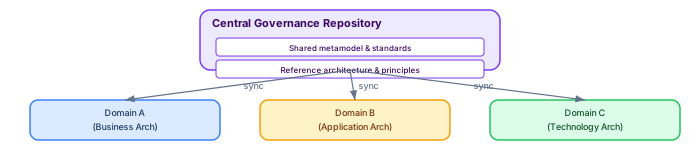
A federated EA repository balances two competing needs: central governance (the enterprise needs a coherent architecture view) and domain autonomy (each domain team needs to model at their own pace without blocking others). The architecture uses a central governance repository that defines the shared metamodel, reference architecture, and standards, with domain-specific repositories that hold the detailed models. Sparx EA best practices
Central governance repository: Contains the shared metamodel (MDG Technology), reference architecture elements (shared Business Capabilities, Technology Standards catalog, approved architecture patterns), naming conventions (enforced by validation scripts), and published enterprise views (the "single pane of glass" for leadership). This repository is read-only for domain teams — they consume the shared elements but do not modify them.
Domain repositories: Each domain (Business Architecture, Application Architecture, Technology Architecture, Security Architecture) has its own DBMS repository. Domain architects have full modeling rights within their repository. Domain-specific content (application components, process detail, deployment specifications) lives here. Shared reference elements from the central repository are imported as read-only copies.
Synchronization mechanism: Sparx EA's package-level version control or XMI export/import provides the synchronization mechanism. Domain teams export approved packages to XMI on a weekly cadence. The central repository imports these packages through a controlled pipeline that validates quality before acceptance. This approach ensures that the central view is always governance-compliant while domains retain modeling agility.
Conflict resolution in federated environments
Conflicts arise when two domain teams create or modify elements that overlap (e.g., both create an "API Gateway" Application Component). Resolution rules must be defined before federation begins: the central metamodel defines which element types are "shared" (owned by the central team) and which are "domain-local" (owned by domain teams). Shared elements can only be created and modified in the central repository. Domain teams reference shared elements but cannot modify them locally. integration architecture diagram
Getting more from your Sparx EA investment
Most organizations use less than 20% of Sparx Enterprise Architect's capabilities. Three underutilized features deliver disproportionate value when activated: model validation, document generation, and the automation API. Sparx EA training
Model validation checks every element and relationship against metamodel rules, catching errors that human reviewers miss. Enable ArchiMate validation under Specialize → Technologies to prevent invalid relationships (for example, a Composition between elements in different layers). Add custom validation scripts that enforce your organization's naming conventions, required tagged values, and maximum elements per diagram.
Document generation produces Word or PDF reports directly from the model. Configure templates that pull element properties, tagged values, relationships, and diagrams into formatted documents. When the model changes, regenerate the document — it is always synchronized. This eliminates the manual document maintenance that typically consumes 30-40% of architect time.
The automation API (JavaScript, VBScript, or .NET) enables bulk operations that would take hours manually: updating tagged values across hundreds of elements, generating traceability matrices, exporting element catalogs to Excel, or validating naming conventions. A single validation script that runs nightly catches more errors than a monthly manual review.
If you’d like hands-on training tailored to your team — Sparx Enterprise Architect, BPMN, SysML, Apache Kafka or the Archi tool — or modelling coaching in ArchiMate and TOGAF-aligned governance, you can reach us via our contact page.
Frequently Asked Questions
What is Sparx Enterprise Architect used for?
Sparx Enterprise Architect (Sparx EA) is a comprehensive UML, ArchiMate, BPMN, and SysML modeling tool used for enterprise architecture, software design, requirements management, and system modeling. It supports the full architecture lifecycle from strategy through implementation.
How does Sparx EA support ArchiMate modeling?
Sparx EA natively supports ArchiMate 3.x notation through built-in MDG Technology. Architects can model all three ArchiMate layers, create viewpoints, add tagged values, trace relationships across elements, and publish HTML reports — making it one of the most popular tools for enterprise ArchiMate modeling.
What are the benefits of a centralised Sparx EA repository?
A centralised SQL Server or PostgreSQL repository enables concurrent multi-user access, package-level security, version baselines, and governance controls. It transforms Sparx EA from an individual diagramming tool into an organisation-wide architecture knowledge base.