⏱ 9 min read
Introduction: why you need both ArchiMate and BPMN
ArchiMate and BPMN are complementary, not competing, modeling languages. ArchiMate provides the cross-layer architecture view — connecting business capabilities through application services to technology infrastructure. BPMN provides the process detail — pools, lanes, gateways, events, and task-level logic. Sparx Enterprise Architect is one of the few tools that supports both notations natively within the same repository, enabling seamless traceability from architecture to process detail.
Recommended Reading
Where each notation excels

ArchiMate excels at: Cross-layer visibility (how business capabilities depend on applications that run on infrastructure), stakeholder viewpoints (showing different perspectives of the same architecture), capability mapping and gap analysis, and strategy-to-execution traceability.
BPMN excels at: Detailed process logic with gateways (exclusive, parallel, inclusive), event-driven process flows (start/end events, intermediate events, boundary events), organizational modeling with pools and lanes, message flows between participants, and executable process definitions for process engines.
The key insight: ArchiMate models the "what" and "who"; BPMN models the "how." An ArchiMate Business Process element says "Order Processing exists and is performed by the Sales Department." A BPMN diagram shows the step-by-step flow: receive order → validate inventory → check credit → approve → ship.
The drill-down pattern: ArchiMate to BPMN

The most powerful pattern for combining ArchiMate and BPMN in Sparx EA is the drill-down: an ArchiMate Business Process element links to a BPMN diagram that provides the detailed process flow. In Sparx EA, this is implemented using a "Composite Diagram" — the ArchiMate element contains a child BPMN diagram that opens when you double-click it.
Implementation steps in Sparx EA
Step 1: Create the ArchiMate view showing Business Processes, the Business Roles that perform them, and the Application Services they use.
Step 2: For each Business Process that needs detailed process logic, right-click → Add → Composite Diagram → select BPMN 2.0.
Step 3: In the BPMN diagram, model the detailed flow with pools (participants), lanes (roles), tasks, gateways, and events.
Step 4: Connect BPMN tasks to ArchiMate Application Services using Realization relationships. This creates traceability from process steps to the applications that support them.
Modeling layer integration
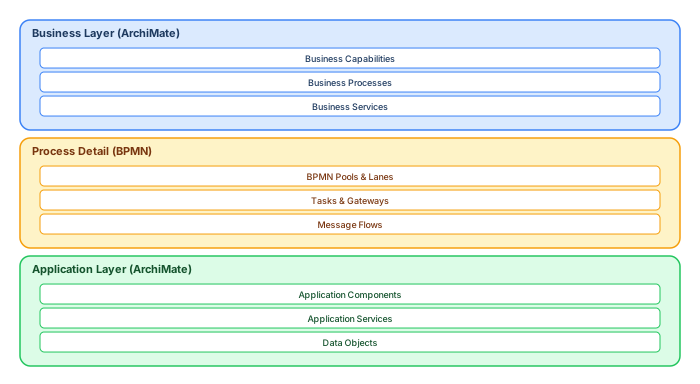
The full integration model has three layers. The Business Layer (ArchiMate) defines capabilities, processes, and services. The Process Detail Layer (BPMN) provides step-by-step process logic for selected business processes. The Application Layer (ArchiMate) shows the application components and services that support the process tasks.
Traceability flows vertically: Business Capability → Business Process (ArchiMate) → BPMN Process → BPMN Task → Application Service → Application Component. This chain enables impact analysis ("if we change this application, which business processes are affected?") and gap analysis ("which process steps lack application support?"). ArchiMate tutorial for enterprise architects
Practical example: customer onboarding
Consider a "Customer Onboarding" process. In ArchiMate, this appears as a Business Process performed by "Relationship Manager" (Business Role), using "CRM System" and "KYC Platform" (Application Services). The BPMN drill-down shows: Start Event → Collect Customer Data (User Task, Lane: Relationship Manager) → Verify Identity (Service Task, calling KYC Platform) → Exclusive Gateway (Pass/Fail) → If Pass: Open Account (Service Task, calling Core Banking) → Send Welcome Pack (Send Task) → End Event. If Fail: Request Additional Documents (User Task) → loop back to Verify Identity. ArchiMate layers explained
Best practices for combined modeling
Use ArchiMate for architecture governance, BPMN for process optimization. Not every ArchiMate process needs a BPMN drill-down. Reserve BPMN detail for processes that are complex, cross-organizational, or subject to process improvement initiatives.
Maintain naming consistency. The ArchiMate Business Process element and the BPMN process should have the same name. Application Services referenced in BPMN tasks should match the ArchiMate Application Service elements.
Use Sparx EA's traceability matrix to verify that all BPMN tasks are linked to application services. Generate reports showing gaps where process steps lack application support.
Advanced integration patterns
Pattern: BPMN service tasks linked to ArchiMate Application Services
In BPMN, a Service Task represents an automated activity performed by a system. In ArchiMate, an Application Service represents a service exposed by an application component. The integration pattern: create a Realization relationship from the ArchiMate Application Service to the BPMN Service Task. This creates a traceable link from the process step to the application capability that supports it. ArchiMate relationship types
This pattern enables powerful impact analysis: "If we decommission the KYC Application Service, which BPMN process tasks are affected?" EA's relationship matrix and traceability views answer this question automatically.
Pattern: BPMN message flows mapped to ArchiMate Flow relationships
BPMN message flows between pools represent inter-organizational or inter-system communication. Map these to ArchiMate Flow relationships between Application Interfaces or Application Services. This creates a complete picture: the BPMN diagram shows the message exchange protocol, while the ArchiMate view shows the architectural context (which components own the interfaces, which technology supports the integration). ArchiMate modeling best practices
Common mistakes when combining notations
Mixing notations on the same diagram: Do not place BPMN elements on ArchiMate diagrams or vice versa. Each diagram should use a single notation. Cross-notation traceability is achieved through relationships, not diagram co-location.
Duplicating processes: Do not model the same process as both an ArchiMate Business Process and a separate BPMN process without linking them. Use the composite diagram pattern to establish the drill-down link.
Over-detailing in ArchiMate: ArchiMate Business Processes should remain at the architecture level (5–15 processes per view). Process detail belongs in BPMN. If your ArchiMate diagram has 50+ process elements, you are modeling at the wrong level of abstraction.
Ignoring traceability: The value of combined modeling comes from the relationships between notations. If your BPMN tasks are not linked to ArchiMate services, you have two disconnected models rather than an integrated architecture.
Integration pattern: linking ArchiMate and BPMN
The most powerful pattern in multi-notation modeling is the drill-down: an ArchiMate Business Process element links to a detailed BPMN diagram that models the process flow step by step. The ArchiMate model provides the enterprise context (which capabilities, which services, which applications), while the BPMN diagram provides the operational detail (tasks, gateways, events, message flows).
In Sparx EA, this is implemented using composite diagrams: the ArchiMate Business Process element contains a child BPMN diagram. Double-clicking the process in the ArchiMate view opens the BPMN detail. This navigation pattern gives architects and process analysts a seamless experience across notations.
Traceability between notations
Use Realization relationships to trace from BPMN tasks to the ArchiMate Application Services that support them. This creates a traceability chain: ArchiMate Business Capability → ArchiMate Business Process → BPMN Tasks → ArchiMate Application Services → ArchiMate Application Components. When an application changes, you can trace the impact back through the chain to understand which business processes and capabilities are affected.
Step-by-step modeling workflow
Step 1: Define business capabilities in ArchiMate. Start at the top: model the business capabilities your organization provides (e.g., "Payment Processing," "Customer Onboarding," "Risk Assessment"). These are stable strategic constructs that change slowly.
Step 2: Model processes in BPMN. For each capability that requires operational detail, create a BPMN diagram showing the process flow. Model pools for organizational boundaries, lanes for roles, tasks for activities, gateways for decisions, and events for triggers and outcomes.
Step 3: Map to the application layer. Create Realization relationships from BPMN tasks to ArchiMate Application Services. This shows which software supports each process step. Add Serving relationships from Application Components to Application Services to complete the stack.
Step 4: Validate traceability. Run a traceability report (or script) that checks: every Business Process has at least one BPMN diagram, every BPMN task maps to an Application Service, and every Application Service is provided by an Application Component. Gaps in this chain indicate modeling debt.
BPMN modeling best practices in Sparx EA
Use pools for organizational boundaries. Each pool represents a participant (department, external partner, system). Message flows between pools show inter-organizational communication. Lanes within pools represent roles or sub-departments.
Keep processes at the right level of detail. A BPMN diagram with 50+ tasks is too detailed for architecture purposes. Aim for 10–20 tasks per diagram. Use sub-processes (collapsed activities) to hide detail that can be expanded when needed.
Name tasks with verb-noun pairs. "Validate Customer Identity," "Calculate Risk Score," "Send Notification" — not "Step 1," "Processing," or "Handle." Clear task names make the diagram self-documenting.
-- SQL: Find ArchiMate processes without BPMN detail diagrams
SELECT o.Name AS ProcessName, o.Object_Type
FROM t_object o
WHERE o.Object_Type = 'BusinessProcess'
AND o.Object_ID NOT IN (
    SELECT ParentID FROM t_diagram WHERE Diagram_Type = 'BPMN2.0'
)
ORDER BY o.Name;
Conclusion
ArchiMate and BPMN together provide a complete modeling framework: ArchiMate for the architecture view (what exists and how it connects across layers) and BPMN for the process view (how work flows step by step). Sparx EA's support for both notations in the same repository, with composite diagrams and traceability relationships, makes it uniquely suited for organizations that need both perspectives. Start with ArchiMate for the architecture landscape, then drill down into BPMN for the processes that matter most.
If you’d like hands-on training tailored to your team — Sparx Enterprise Architect, BPMN, SysML or the Archi tool — or modelling coaching in ArchiMate and TOGAF-aligned governance, you can reach us via our contact page.
Frequently Asked Questions
What is Sparx Enterprise Architect used for?
Sparx Enterprise Architect (Sparx EA) is a comprehensive UML, ArchiMate, BPMN, and SysML modeling tool used for enterprise architecture, software design, requirements management, and system modeling. It supports the full architecture lifecycle from strategy through implementation.
How does Sparx EA support ArchiMate modeling?
Sparx EA natively supports ArchiMate 3.x notation through built-in MDG Technology. Architects can model all three ArchiMate layers, create viewpoints, add tagged values, trace relationships across elements, and publish HTML reports — making it one of the most popular tools for enterprise ArchiMate modeling.
What are the benefits of a centralised Sparx EA repository?
A centralised SQL Server or PostgreSQL repository enables concurrent multi-user access, package-level security, version baselines, and governance controls. It transforms Sparx EA from an individual diagramming tool into an organisation-wide architecture knowledge base.