⏱ 24 min read
ArchiMate Meta-Model Explained for Practitioners | Enterprise Architecture Guide
Learn the ArchiMate meta-model in practical terms. Explore core concepts, relationships, layers, and viewpoints to model enterprise architecture clearly and consistently. ArchiMate tutorial for enterprise architects
ArchiMate meta-model, ArchiMate explained, ArchiMate for practitioners, enterprise architecture, ArchiMate relationships, ArchiMate layers, ArchiMate viewpoints, TOGAF, architecture modeling, business application technology layers ArchiMate layers explained
Introduction
ArchiMate is often described as a modeling language for enterprise architecture. That is true, but it understates the point. In practice, ArchiMate gives teams a common way to describe how the enterprise works, how its parts fit together, and how change moves from strategic intent to implementation. The meta-model is what makes that possible. It defines the element types architects can use, the relationships that connect them, and the rules that keep models coherent across domains and teams. ArchiMate relationship types
That matters because enterprise architecture rarely fails for lack of diagrams. It fails when stakeholders use the same terms differently, when models cannot be connected, or when architecture artifacts are too inconsistent to support decisions. One team maps capabilities, another documents processes, another models application services, and another focuses on platforms. Without a shared meta-model, those remain isolated views rather than part of a usable enterprise picture.
For practitioners, it is helpful to think of the meta-model as a modeling contract. It answers the questions that surface repeatedly: What is being delivered? Who or what performs the behavior? Which internal structures realize that behavior? What depends on what? Where should impacts be traced when something changes? Applied consistently, it improves repository quality, reduces ambiguity, and makes architecture content more reusable over time.
One of its clearest strengths is traceability across layers. ArchiMate lets architects connect strategic intent to operational and technical consequences. A goal can link to a capability, that capability to a business process or service, that process to application support, and that support to the underlying technology. That is why the language is useful in portfolio rationalization, target operating model work, cloud migration, regulatory change, and transformation planning.
The meta-model also imposes discipline on abstraction. Models usually fail in one of two ways: they are too conceptual to guide action, or too detailed to support decisions. ArchiMate addresses this by separating active structure, behavior, and passive structure, and by distinguishing internal realization from externally visible services. Once that pattern becomes familiar, it can be applied repeatedly across business, application, and technology domains. ArchiMate modeling best practices
This article explains the ArchiMate meta-model from a practitioner’s perspective. Rather than walking through notation mechanically, it focuses on how the meta-model supports analysis, governance, and decision-making in day-to-day architecture work.
1. Why the ArchiMate Meta-Model Matters in Practice
For practitioners, the ArchiMate meta-model matters because it turns architecture from a collection of diagrams into a structured decision asset. Many organizations produce architecture artifacts continuously, yet only a fraction of them influence investment choices, transformation sequencing, governance decisions, or risk discussions. The difference is rarely visual quality. More often, it comes down to semantic consistency. A meta-model gives architecture content a stable structure so models can be compared, queried, reused, and governed over time.
This becomes even more important in distributed enterprises, where architecture work is spread across business units, programs, and delivery teams. Without a common meta-model, each group creates descriptions that work locally but do not combine into an enterprise view. A process map from operations, an application inventory from IT, and a capability assessment from strategy may all be useful in isolation. They do not automatically support cross-domain reasoning. The meta-model provides the shared structure that allows those assets to connect.
One of the biggest practical benefits is traceability. Change initiatives almost never stay within one domain. Replacing a customer platform may affect business processes, data flows, support roles, interfaces, and infrastructure dependencies. If those concerns are modeled with inconsistent concepts, impact analysis becomes slow and heavily dependent on individual memory. When the meta-model is applied well, architects can trace relationships more reliably and identify which services are exposed to change, which actors are affected, and which components create concentration risk.
The meta-model also strengthens governance without forcing everyone to look at the same view. Executives need concise summaries tied to outcomes and value. Domain architects need structural dependency views. Solution teams need implementation-relevant detail. ArchiMate allows those views to differ while still drawing from the same semantic foundation. That separation—repository integrity on one side, viewpoint flexibility on the other—is one of the language’s most useful characteristics.
It also helps teams distinguish between what the enterprise does, how it does it, and what enables it. Those distinctions sound obvious, but they resolve many recurring modeling errors. Teams regularly confuse capabilities with processes, services with functions, or applications with the technology that hosts them. Those are not small mistakes. They can distort investment decisions by making a process problem look like a system problem, or a capability gap look like an infrastructure issue.
In transformation programs, that clarity improves planning. A roadmap is more credible when it is grounded in explicit architectural relationships rather than informal assumptions. If a target business service depends on several application services, and those services depend on legacy technology, sequencing constraints become visible early. Likewise, if a strategic initiative calls for a new capability but no supporting process, role, or application structure has been identified, the architecture reveals that gap before delivery begins.
A small example makes the point. Consider a bank introducing digital mortgage origination. Strategy frames the goal as reducing approval time. Business architecture identifies a capability gap in credit assessment. Process modeling shows manual handoffs between brokers, underwriters, and compliance teams. Application architecture reveals that three systems each maintain their own customer income data. Technology architecture then shows one of those systems runs on an unsupported platform. Without a meta-model, those findings sit in separate documents. With one, they form a traceable chain from business objective to technical constraint.
Over time, the meta-model also makes architecture work more durable. Enterprises change faster than most documents can keep up. Models built on a clear meta-model are easier to maintain, extend, and repurpose as priorities shift. In that sense, the meta-model is less about notation than about creating an operating asset for enterprise architecture.
2. Core Structure of the ArchiMate Meta-Model
At the center of the ArchiMate meta-model is a small set of structural patterns that repeat throughout the language. That repeatability is what makes it workable at scale. Once practitioners understand the underlying logic, they can apply it across business, application, and technology domains without learning a different conceptual scheme each time.
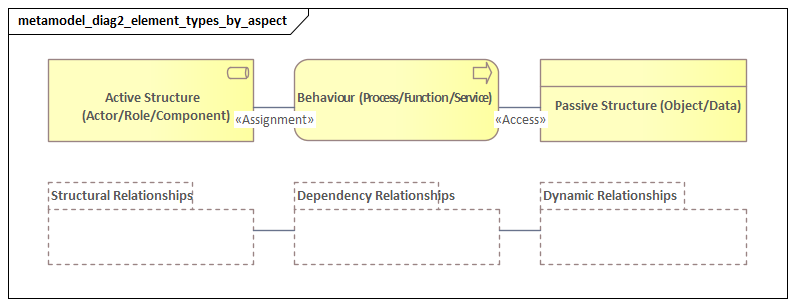
The first foundational pattern is the distinction between structure, behavior, and passive structure. Structure identifies the entities that perform, host, or enable something. Behavior captures what those entities do. Passive structure represents the objects that are created, used, or affected. In practical terms, this triad answers three recurring questions:
- Who or what acts?
- What action occurs?
- What is acted upon?
It is a simple pattern, but it is one of the strongest defenses against weak modeling. It prevents architects from mixing organizational units, activities, and information objects into one undifferentiated picture.
A second core idea is the distinction between internal realization and external exposure. ArchiMate separates the internal elements that perform behavior from the services that expose that behavior to consumers. A business process may realize a business service. An application component may realize an application service. A technology environment may expose a technology service while concealing its internal implementation. This distinction matters because it separates consumption from construction. Consumers should depend, where possible, on services rather than on the internal design choices behind them.
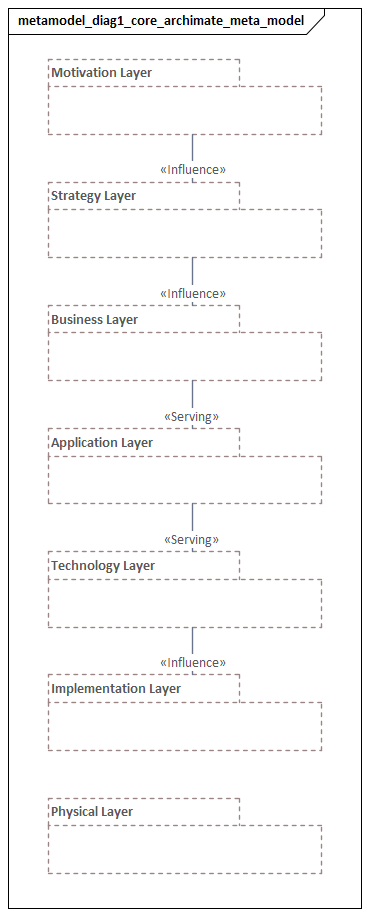
The third major pattern is the layered structure of the language. The best-known layers are business, application, and technology, but ArchiMate also includes strategy, motivation, implementation and migration, and physical concepts. These are not hard silos. They organize architectural concerns at different levels of the enterprise. Their value comes from the ability to connect them.
The meta-model also depends on a disciplined but flexible set of element types. ArchiMate does not create a unique construct for every enterprise concept. Instead, it provides a manageable vocabulary that can be used consistently across many situations. That is helpful in practice, but it also means local governance matters. Teams need conventions for representing concepts such as capability, platform, product, service, or shared data.
Relationships form the other half of the core structure. Choosing elements alone does not produce useful architecture. The explanatory power comes from how those elements are connected. ArchiMate distinguishes among structural relationships such as composition and aggregation, responsibility relationships such as assignment, dependency-oriented relationships such as serving and access, dynamic relationships such as triggering and flow, and implementation-oriented relationships such as realization. In practice, relationship discipline often matters more than finding the perfect element type.
A practical micro-example is retail order fulfillment. A business role such as Warehouse Associate performs a Picking Process. That process accesses an Order business object and realizes an Order Fulfillment business service. The process is supported by a Warehouse Management application service, which is realized by an application component. That component runs on nodes in the technology layer. The pattern repeats cleanly across layers: active structure performs behavior, behavior uses passive structure, and services expose behavior outward.
From a practitioner’s point of view, the core structure of the meta-model works like an analytic grammar. It gives teams a repeatable way to model operating models, service landscapes, application portfolios, and transformation roadmaps with enough rigor to support decisions. Once those patterns are internalized, ArchiMate becomes less about notation and more about disciplined enterprise reasoning.
3. Layers, Aspects, and Element Types
A practical way to understand the ArchiMate meta-model is to see it as a matrix. Layers show where in the enterprise a concept sits. Aspects show what kind of thing it is. Together, they provide a simple but powerful way to organize architecture content.
3.1 Layers
In day-to-day architecture work, the most common layers are:
- Business: how the enterprise operates and delivers value
- Application: the software behavior and structures that support the business
- Technology: the infrastructure that enables applications and digital operations
These are usually the first layers practitioners work with, but ArchiMate becomes much more useful when it is extended with:
- Strategy: capabilities, resources, courses of action
- Motivation: goals, outcomes, principles, requirements, constraints
- Implementation and Migration: work packages, deliverables, plateaus, gaps
Taken together, these layers allow architects to connect intent, design, and change over time. A strategic goal can drive a capability improvement, which in turn leads to changes in business services, application support, and implementation work packages.
3.2 Aspects
Across those layers, ArchiMate applies the same aspect pattern:
- Active structure: the entities that perform behavior
- Behavior: the activities, functions, processes, or interactions performed
- Passive structure: the objects or data used or produced
- Service: the externally visible behavior offered to consumers
This repeated pattern is one of the language’s real strengths. In the business layer, an actor or role performs a process that uses business objects and exposes a business service. In the application layer, an application component performs functions and exposes application services while accessing data objects. In the technology layer, nodes and system software host technology behavior and expose technology services.
3.3 Choosing element types based on the question
Practitioners often struggle not because the language is unclear, but because they try to model everything at once. A better approach is to choose element types based on the question being asked.
If the goal is operating model analysis, useful elements may include:
- capabilities
- business roles
- business processes
- business services
- value streams
If the goal is application rationalization, the focus may shift to:
- application components
- application services
- interfaces
- data objects
- technology dependencies
If the goal is cloud modernization, attention may center on:
- technology nodes
- system software
- artifacts
- deployment relationships
- platform services
The principle is straightforward: use only the concepts needed to answer a decision-oriented question. For example, in an IAM modernization initiative, the key question may be whether identity capabilities are delivered consistently across channels. In that case, model the capability, the business services that depend on authentication, the application services for identity and access, and the technology services such as directory, token, or federation platforms—without pulling in unrelated infrastructure detail.
Another example is hospital patient discharge. If the question is why discharge is delayed, the right model starts with business roles, processes, handoffs, and information objects such as discharge summaries and medication lists. If the question is platform consolidation, the model shifts toward application components, interfaces, and data stores. Same enterprise problem space, different architectural question, different element choices.
3.4 Layers are not ownership boundaries
A common misunderstanding is to treat ArchiMate layers as departmental boundaries. A business process is not meaningful only to the business, and an application service is not relevant only to IT. Layers indicate architectural perspective, not organizational ownership. This matters in cross-functional transformation, where products, journeys, platform teams, and shared services cut across traditional silos.
3.5 Stable versus transient concepts
Another useful discipline is to distinguish between stable architecture concepts and shorter-lived implementation detail. Capabilities, services, and key value streams often remain useful over longer planning horizons. Projects, temporary teams, and implementation artifacts tend to change much faster. In repository practice, this usually means stable concepts deserve stronger governance, while transient delivery detail can be managed more lightly.
Used well, layers, aspects, and element types help architects decide whether they are modeling enterprise intent, operational behavior, enabling systems, or transition work. That discipline makes models easier to govern and more useful for analysis.
4. Relationships: How the Meta-Model Creates Meaning
If elements are the vocabulary of ArchiMate, relationships are what make the language useful. Choosing the right element type matters, but architecture becomes valuable only when relationships express real dependencies, responsibilities, and implementation paths.
For practitioners, the first rule is to treat relationships as semantic assertions, not just visual connectors. Every line should answer a specific question. Is one element part of another? Does one perform behavior on behalf of another? Is a service consumed by a user or another system? Does an internal structure realize an externally visible service? Precision matters because different relationship types support different forms of analysis.
One practical way to think about relationships is through a small set of tests.
4.1 Structural relationships
These describe how elements are organized.
- Composition: strong whole-part containment
- Aggregation: weaker grouping relationship
Use these when the question is whether something is part of something else. They are especially useful for decomposition and scoping.
4.2 Responsibility and allocation
- Assignment: who or what performs behavior, owns responsibility, or is allocated to an activity
This matters in business and application modeling, where teams need to show which role performs a process or which component performs a function.
4.3 Realization and exposure
This builds directly on the internal-versus-external distinction introduced earlier.
- Realization: what internal element implements or makes possible a more abstract or externally visible element
- Serving: what service or behavior is provided to a consumer
These are often confused, but they answer different questions. Realization is about implementation. Serving is about consumption.
A simple example is event architecture using Kafka. The Kafka platform exposes an event streaming service to consuming applications, while the underlying brokers, topics, and cluster configuration realize that service. The consuming application is served by the event service; it does not depend directly on broker internals.
4.4 Access and information use
- Access: how behavior uses, creates, reads, or writes an object or data structure
This relationship becomes important when tracing information dependencies, regulatory impacts, or integration concerns. For instance, in an insurance claims process, a Claims Assessment process may read policy data, create an assessment record, and update a payment instruction. Modeling those access relationships makes data lineage and control points visible.
4.5 Dynamic relationships
- Triggering: temporal or causal sequencing
- Flow: transfer or movement between behaviors or structures
These help model operational sequence and interaction, especially in process-heavy or integration-heavy views.
4.6 Why relationship precision matters
Cross-layer traceability depends on relationship discipline. A business service may be realized by a business process, supported by an application service, implemented by an application component, and hosted on a technology node. That chain is useful only if each relationship is semantically accurate. Once everything is reduced to generic “supports” language, the model loses analytical value quickly.
That is why relationship quality often matters more than element quantity. A small model with precise relationships is usually more useful than a large one filled with vague or generic links. This is also where architecture board decisions benefit. Instead of debating whether a proposal “fits the target,” the board can inspect explicit relationships: what capability it improves, which existing services it reuses, and which new dependencies it introduces.
4.7 Avoiding over-connection
One common failure mode is relationship density. Once teams see the value of traceability, the temptation is to connect everything to everything. The result may be formally rich, but it becomes difficult to read and harder to maintain. Good architecture requires selective connection. Relationships should be modeled where they support a real decision, control point, or reusable analysis path. If a relationship is unlikely to inform impact analysis, governance, compliance, resilience, or roadmap sequencing, it may not need to be maintained in the core model.
4.8 Direct versus derived relationships
Some relationships can be inferred from others. This is useful in tooling and model navigation, but it should be handled carefully. Derived relationships can speed analysis, yet they can also create a false sense of certainty if treated as equivalent to explicitly modeled design intent. In governance contexts, it is often helpful to distinguish between relationships that are directly asserted and those that are analytically derived.
In practice, relationships are what allow ArchiMate to function as a reasoning framework rather than just a drawing standard. They connect strategy to execution, services to consumers, behavior to structure, and change initiatives to operational consequences.
5. Applying the Meta-Model in Real Enterprise Architecture Work
The real test of the ArchiMate meta-model is not whether a team can produce a technically correct diagram. It is whether the model improves decisions in live enterprise situations. The concepts introduced so far—traceability, layered structure, and relationship precision—matter only when they are embedded in recurring architecture work.
5.1 Scoping architecture problems
One of the most effective uses of the meta-model is in framing the problem before modeling begins. Different questions call for different starting points.
- If the issue is strategic differentiation, start with goals, capabilities, outcomes, and courses of action.
- If the issue is delivery failure or operating friction, focus on roles, processes, services, and handoffs.
- If the issue is technical debt or resilience, focus on components, interfaces, technology services, and infrastructure dependencies.
This discipline helps avoid a common failure mode: producing technically correct models that do not answer the stakeholder’s actual question.
5.2 Portfolio rationalization
Application rationalization often begins with system counts, cost figures, and ownership lists. That can be useful, but by itself it rarely leads to strong decisions. A more effective approach is to model applications in relation to the business services they support, the capabilities they enable, the data they manage, and the technology dependencies they introduce.
This allows architects to distinguish between systems that are merely redundant and systems that are architecturally critical. Two applications may appear duplicative, yet one may support a unique regulatory process, provide a stable integration service, or carry data dependencies that make replacement much harder than expected. The meta-model helps reveal those differences before rationalization decisions are made.
A realistic example is HR platform consolidation after a merger. On paper, both companies have onboarding systems. In the model, however, one system realizes onboarding services for permanent staff only, while the other also supports contractor vetting, badge provisioning, and payroll initiation across multiple countries. The overlap is partial, not complete. A simple application inventory would miss that; a meta-model-based view would not.
5.3 Target operating model and transformation design
The meta-model is equally valuable in target-state design. Architects often need to move from broad intent to a credible structure for change. ArchiMate supports this by connecting target capabilities, business services, roles, applications, and enabling technologies into a single design rather than treating them as separate workstreams.
That matters especially in large transformation programs, where business and technology planning often drift apart. A target operating model becomes more actionable when the architecture shows not only the desired business changes, but also the application services, integration patterns, and platform dependencies needed to make those changes real.
5.4 Solution governance
In solution governance, the meta-model helps teams assess whether a proposed design fits enterprise intent without forcing every review into low-level technical detail. A solution can be evaluated by asking:
- Does it realize the required services?
- Does it align to the intended capabilities?
- Does it reuse existing components where appropriate?
- Does it introduce dependencies consistent with platform strategy?
- Does it create new data or integration risks?
This creates a more structured review conversation than a generic compliance checklist and helps architects explain decisions in enterprise terms rather than as personal preference. For instance, an architecture board may approve a new workflow product only if it reuses the enterprise identity service, publishes domain events through the approved Kafka platform, and avoids introducing a new customer master.
5.5 Impact and risk analysis
Traceability becomes especially valuable in incident response, regulatory change, mergers, divestments, and major platform shifts. A well-governed model allows architects to trace which business services are exposed, which applications and interfaces are affected, where concentration risk exists, and which roadmap transitions may need to change.
This is particularly useful in decentralized delivery environments, where no single team holds the full dependency picture. It is also useful in technology lifecycle governance. When a database platform reaches end of support, architects can trace which application services depend on it, which business services are exposed, and which work packages must be prioritized to retire or upgrade it.
5.6 Making the meta-model operational
For practitioners, the key lesson is that the meta-model delivers most value when tied to repeatable architecture routines. It should shape how initiatives are scoped, how options are compared, how designs are governed, and how dependencies are traced over time.
In practice, that often means embedding ArchiMate into a few standard motions:
- initiative intake and scoping
- architecture review checkpoints
- portfolio assessment
- dependency and impact analysis
- roadmap planning
Used this way, the meta-model becomes less a language to learn and more an operational instrument for running enterprise architecture with speed and consistency.
6. Common Pitfalls and Best Practices
For most teams, the challenge with the ArchiMate meta-model is not understanding the notation in theory. The challenge is applying it consistently under delivery pressure. Because the language is flexible, different practitioners can model the same situation in different ways. That flexibility is useful, but without local conventions it quickly turns into ambiguity.
6.1 Common pitfalls
Modeling by organizational habit
Teams often choose elements based on ownership rather than meaning. A shared platform may be modeled as an application component by one team and as a technology service by another. Both choices may seem reasonable locally, but the inconsistency undermines comparability.
Mixing abstraction levels
Many weak models combine strategic concepts, operational design, and implementation detail in the same view. A capability, a project milestone, an API, and a server cluster may all be relevant to the same initiative, but they do not belong at the same level of discussion.
Over-modeling
Because ArchiMate offers many element and relationship types, teams sometimes try to capture the entire enterprise in exhaustive detail. In most cases, that creates maintenance burden rather than insight.
Weak relationship semantics
A model may contain the right elements and still be poor if its relationships are vague, generic, or inconsistent. Relationship quality is central to analytical usefulness.
Tool-driven inconsistency
Different tools allow broad freedom in specialization, relationship usage, and viewpoint construction. Without governance, that freedom produces content that may be technically valid but semantically uneven.
6.2 Best practices
Establish interpretation rules
Define a small set of enterprise-specific conventions:
- what counts as a capability
- when to model a service
- how products differ from services
- how platform constructs are represented
- which traceability paths are mandatory
Separate views by purpose
Keep strategic views sparse and stable. Keep operational views focused on execution logic. Keep implementation views aligned to delivery decisions. The same repository can support all three, but each view should answer a clear question.
Model for decision value
Model the minimum structure needed for recurring decisions. If an element or relationship has no expected use in governance, impact analysis, planning, or communication, it may not belong in the core repository.
Govern the meta-model as part of the architecture operating model
Good practice includes:
- approved usage patterns
- naming standards
- review checkpoints
- example models
- reference content libraries
Train for interpretation, not only notation
Practitioners need to understand not just what the symbols mean, but how to apply them consistently in real enterprise situations.
Prefer consistency over theoretical purity
Real enterprises contain hybrid platforms, informal processes, and evolving responsibilities that do not always fit neatly into a single modeling choice. In those cases, a clear convention applied consistently is usually better than prolonged debate over the perfect element type.
The most effective approach is to treat the meta-model as a managed discipline rather than a self-executing standard. When interpretation is governed well, ArchiMate becomes much easier to use productively.
Conclusion
For practitioners, the ArchiMate meta-model delivers its greatest value when it becomes part of the operating discipline of architecture rather than a reference framework consulted only during diagramming. Its real contribution is to provide enterprise architecture with a durable semantic backbone—one that supports continuity across strategy, domain design, solution governance, and change execution.
A useful way to think about the meta-model is as an architecture scaling mechanism. It allows multiple teams to contribute to a shared body of knowledge without collapsing into incompatible local models. That matters most in federated enterprises, product-centric operating models, and environments where architecture must guide decentralized delivery rather than centrally control it.
The strongest practical outcome is not modeling completeness, but reliable traceability. If an organization can consistently connect goals to capabilities, capabilities to services and processes, and those in turn to applications and technology dependencies, it gains a solid basis for prioritization, impact analysis, and roadmap credibility.
The long-term lesson is straightforward: ArchiMate should be used to improve decision quality. Teams that apply the meta-model selectively, govern it consistently, and tie it to real planning and delivery routines will gain far more value than teams that pursue formal completeness for its own sake. In that sense, the meta-model is not just a way to describe the enterprise more accurately. It is also a way to make enterprise change more intelligible, governable, and executable.
Frequently Asked Questions
What is enterprise architecture?
Enterprise architecture is a discipline that aligns an organisation's strategy, business operations, information systems, and technology infrastructure. It provides a structured framework for understanding how an enterprise works today, where it needs to go, and how to manage the transition.
How is ArchiMate used in enterprise architecture practice?
ArchiMate is used as the standard modeling language in enterprise architecture practice. It enables architects to create consistent, layered models covering business capabilities, application services, data flows, and technology infrastructure — all traceable from strategic goals to implementation.
What tools are used for enterprise architecture modeling?
Common enterprise architecture modeling tools include Sparx Enterprise Architect (Sparx EA), Archi, BiZZdesign Enterprise Studio, LeanIX, and Orbus iServer. Sparx EA is widely used for its ArchiMate, UML, BPMN and SysML support combined with powerful automation and scripting capabilities.