The documented way in
Enterprise Architect exposes an automation interface: EA.Repository and an object model beneath it covering packages, elements, connectors, diagrams and their contents. It is documented, stable across versions, and it is the correct way to read a repository programmatically.
The alternative — reading the underlying database directly — is faster and a bad idea. The schema is not a public contract, it changes, and a query that works against one repository format will not necessarily work against another. Use the API.
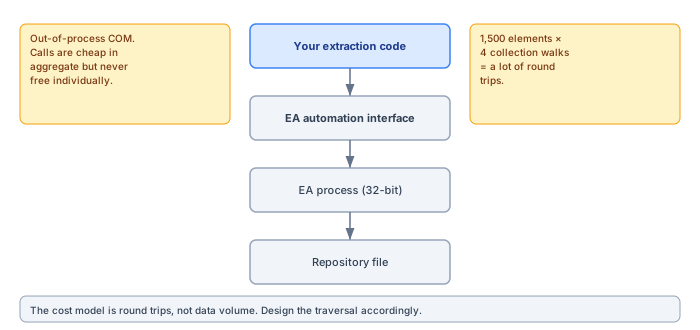
The cost model is round trips
EA runs as an out-of-process COM server. Every property access crosses a process boundary. Individually this is sub-millisecond and irrelevant; in aggregate it is the entire performance story.
Reading 1,500 elements, and for each one walking its tagged values, its connectors and its diagram appearances, is not 1,500 operations — it is tens of thousands. On a real repository the difference between a naive traversal and a considered one is the difference between six minutes and forty.
What helps
- Batch what the API will batch. A single query returning identifiers for every element beats walking the tree to discover them.
- Read each collection once. Re-entering
Element.TaggedValuesin a second pass costs the same as the first. - Cache identifier lookups. Resolving a GUID to an object repeatedly is a common accidental hot path.
- Do not open diagrams to read them. The contents are available without rendering; rendering is the expensive part.
Getting the identifiers in bulk
The advice to batch deserves its mechanics, because the API offers a middle path that the "never touch the database" rule does not forbid: Repository.SQLQuery. It is part of the automation interface, it is read-only, and it returns results in one round trip instead of thousands. Used carefully, it is the difference between a traversal that discovers the repository one collection at a time and an extraction that starts with a complete map.
Used carefully means: harvest identifiers and cheap scalars, nothing more. One query for every element identifier in scope with its type and package; one for the connector list; one for the diagram inventory. From there, the object model does the detailed reading, resolved by identifier rather than by tree-walking. The schema coupling this creates is real but shallow — a handful of table and column names that have been stable for a very long time — and it is confined to three queries you can find and fix in minutes if a future version moves something. That is a different risk category from reproducing business logic in SQL, which is where direct database access goes wrong: tagged-value inheritance, stereotype resolution and connector semantics belong to the API, which implements rules the tables only imply.
The shape that follows is a two-phase read. Phase one is three or four bulk queries producing an in-memory catalogue of what exists. Phase two walks that catalogue and reads each object's details through the object model, once, in a predictable order, with progress reporting that can finally say "element 900 of 1,480" instead of guessing. On the repositories we measure, this shape alone — before any other optimisation — cuts extraction time by more than half, because the expensive discovery work stopped being interleaved with everything else.
Bitness, and why it matters less than you think
EA is typically a 32-bit application, which leads people to assume their extraction code must also be 32-bit. It does not. Because the COM server is out-of-process, a 64-bit client can drive a 32-bit server without any special handling.
Where bitness does bite is in-process components — script hosts, database drivers, add-ins. A script host invoked to run something inside EA's own environment must match EA. Code that only talks to EA.Repository from outside does not.
Running it unattended
Extraction for a scheduled publication runs with no one watching, and several things behave differently in that context.
| Concern | What happens | What to do |
|---|---|---|
| GUI dependencies | Anything expecting a Browser selection fails | Resolve the root package explicitly |
| Dialogs | A prompt blocks forever | Suppress prompts; never rely on defaults |
| Orphaned processes | EA stays resident holding a file lock | Always CloseFile and Exit, including on error |
| Concurrent access | Extraction competes with a user session | Schedule outside working hours |
The orphaned-process failure is the one that wastes an afternoon. A run that exits without calling Exit() leaves EA holding the repository, and the next run fails with a lock error that points nowhere near the actual cause.
The machine it runs on
An extraction that drives EA over COM needs a Windows machine with EA installed and licensed, and that machine deserves more design attention than it usually gets, because it is the least cloud-shaped component in the whole pipeline.
The account matters first. Run under a dedicated service account, not under whoever built the script — the day that person's password expires is the day the Monday publication silently stops. The account needs a licence EA can claim non-interactively: a named licence assigned to it, or a floating licence with the keystore reachable from the machine, tested by actually running EA as that account rather than assuming. Licence dialogs are the classic unattended killer: EA waiting politely for someone to acknowledge a renewal prompt on a machine where no one will ever see it.
Then the session question. A scheduled task set to "run whether user is logged on or not" executes in a non-interactive session, and EA — a GUI application being driven headlessly — mostly tolerates this and occasionally does not, usually at the exact operation that tries to touch a window handle. The configurations that behave are worth cataloguing once and standardising: the task running interactively on a machine with an auto-logged, locked session is inelegant and dependable; full session-0 isolation is elegant and the place where the mysterious hangs live. Whichever you choose, choose it deliberately and write it down, because the failure symptom — a run that neither finishes nor errors — points nowhere near the cause.
Two habits complete the machine. A watchdog on the run: if extraction normally takes eight minutes, anything past thirty is hung, and the watchdog's job is to kill the EA process so the repository lock is released and the next run starts clean. And updates under control: EA point releases occasionally adjust automation behaviour, so the runner pins its EA version, and upgrades happen deliberately — run the extraction against a fixture repository after any upgrade, compare the snapshot to the previous one, and promote the new version only when the diff is empty. The pipeline's reliability is the machine's reliability; treating the runner as infrastructure rather than as somebody's old desktop is most of the battle.
What the API will not give you
Two things worth knowing before you design around them.
Rendering fidelity. You can read every shape's position, size, colour and z-order, but reproducing EA's own rendering — notation, decorations, label placement — is your problem. If you need pixel-identical output, export images through the API rather than redrawing.
Change notification. There is no event stream. Deciding whether anything changed since the last run means comparing state yourself, which for most publication purposes is not worth it — a full extraction on a schedule is simpler and more predictable than incremental logic that can be subtly wrong.
Exporting diagram images without opening windows
Most publications need the diagrams as images, and the API's answer is the EA.Project interface, whose diagram-image methods render straight to file without opening the diagram in the workspace. This is the path to use: it produces exactly what EA would draw — notation, stereotype decorations, the modeller's layout — while avoiding both the cost and the fragility of scripted window handling.
The decisions left to you are format and size. EA's file export is raster or metafile; there is no native SVG on this path, so a portal that wants crisp diagrams at every zoom level either exports PNG at double resolution and accepts the file sizes, or takes the geometry the API exposes and renders its own SVG from coordinates — a genuine fork in the road, with EA-perfect fidelity on one side and resolution independence on the other. For most portals, high-resolution PNG through Project is the right first answer: it is one method call per diagram, it never disagrees with what the architect saw, and image weight is a solvable problem where fidelity arguments are not.
Whichever way you render, capture the click map while you are there. Every diagram object's position and size is readable, which means every exported image can carry an overlay linking each shape to its element page. A diagram you can click is the difference between a picture of the architecture and a view into it, and the data needed costs one collection read per diagram — cheap at extraction time, unobtainable afterwards.
A working shape
The pattern that holds up: open once, resolve identifiers in bulk, walk the tree once collecting everything you need per object, close cleanly, then do all rendering and writing from the in-memory result. Keeping the extraction phase and the generation phase separate also means you can cache the extraction and re-render without touching the repository at all — which turns a six-minute iteration into a two-second one while you are working on templates.
Caching the extraction
The single highest-value thing you can do with an extraction is write it to disk and be able to render from it without touching the repository again.
The immediate benefit is iteration speed: template, branding and layout work goes from a six-minute cycle to a two-second one. The less obvious benefits are larger. Rendering becomes testable in CI on any platform, because it no longer needs a modelling tool. And a publication can be regenerated without repository access, which matters when the repository is locked, being upgraded, or simply busy.
The cache also becomes an artefact in its own right — a structured snapshot of the model at a point in time, which is useful for comparison and for reproducing a past publication exactly.
A minimal skeleton that gets the discipline right
The full extractor is a project; the skeleton that embodies the rules in this article fits on a page, and starting from the right skeleton is worth more than any later optimisation. In Python with the standard Windows COM bridge, the shape looks like this:
import win32com.client, json, sys

repo = win32com.client.Dispatch("EA.Repository")
try:
    if not repo.OpenFile(r"\\server\models\estate.qea"):
        sys.exit("could not open repository")

    # Phase 1: one bulk query for the element map
    raw = repo.SQLQuery(
        "SELECT Object_ID, ea_guid, Object_Type, Package_ID "
        "FROM t_object WHERE Object_Type <> 'Package'")
    catalogue = parse_ea_xml(raw)          # ids, types, packages

    # Phase 2: detail reads, once per element, by identifier
    snapshot = []
    for i, entry in enumerate(catalogue, 1):
        el = repo.GetElementByID(entry.object_id)
        snapshot.append({
            "guid": el.ElementGUID,
            "name": el.Name,
            "type": el.Type,
            "notes": el.Notes,
            "tags": [(t.Name, t.Value) for t in el.TaggedValues],
        })
        if i % 100 == 0:
            print(f"{i}/{len(catalogue)}")

    with open("snapshot.json", "w", encoding="utf-8") as f:
        json.dump(snapshot, f, ensure_ascii=False, indent=1)
finally:
    repo.CloseFile()
    repo.Exit()
Every rule from the preceding sections is visible in miniature. The bulk query builds the catalogue in one round trip. The detail loop reads each collection exactly once and never re-enters it. Progress is reported in terms a log reader can act on. The output is a snapshot on disk, not a portal — generation is somebody else's phase. And the finally block is not decoration: it is the difference between a failed run and a failed run that also leaves EA resident, holding the repository, for the next run to trip over.
On timing expectations, since the first question after the first run is always "is this normal": with the two-phase shape, repositories in the low thousands of elements extract in single-digit minutes on ordinary hardware, dominated by tagged-value and connector reads. If you are seeing half an hour, the round-trip discipline has leaked somewhere — the usual suspects are a per-element SQLQuery that crept into the loop, or diagram rendering happening inside extraction instead of in its own phase. Measure per-phase, not per-run; the phase timings point straight at the leak, where a single total only says "slow".
From this skeleton, the path to production is additive rather than structural: connectors and diagram inventories join phase one; the diagram image export joins as its own phase; the watchdog, the service account and the version pinning wrap the outside. What should survive every addition unchanged is the shape — open once, map cheaply, read once, write locally, close unconditionally. Extractors that keep that shape stay boring for years, and boring is the entire ambition for a component whose job is to run at three in the morning and be forgotten.
Failure modes worth handling explicitly
- The repository is open in a GUI session. Depending on the repository type this either blocks or produces inconsistent reads. Detect it and fail with a message that says so.
- An element type the extractor does not know. Skip it, count it, report it. Do not abort the run, and do not drop it silently.
- A diagram that fails to render. Same treatment. One bad diagram should not cost you the publication.
- The process is killed mid-run. Ensure the repository is closed and the tool exited, or the next run inherits a lock that points nowhere near the actual problem.
Stay read-only, even when it is tempting
A final discipline, learned the annoying way. Extraction code sees every defect in the repository — the empty names, the malformed tagged values, the connector with no target — and the API that reads them can also write them. The temptation to "just fix it while we're in here" is real, and it should be refused without exception. An extractor that writes is no longer a reporting tool; it is an unattended editor of the estate's system of record, running under a service account, with no reviewer and no undo, and the first time it "fixes" something an architect intended, trust in the whole pipeline goes with it.
The correct output for everything the extractor notices is the validation report — the one the publication gate already produces, routed to the human who owns the package. The repository changes through the front door, with a name attached. The extractor's privilege list should say so: read-only credentials where the platform can express them, so the discipline is enforced rather than promised.