What you are protecting
An architecture repository holds something that is expensive to recreate and, unlike most application data, cannot be reconstructed from anywhere else. If a transactional system loses a day, the events are usually recoverable from upstream. If an architecture repository loses six months, that is six months of modelling decisions that existed only there.
It is also, mercifully, small. A repository holding thousands of revisions of dozens of models is measured in gigabytes, which makes generous backup policies affordable in a way they are not elsewhere.
Back up the database, not the files
If the model is stored as records, the backup unit is the database. A PostgreSQL custom-format dump is the right primitive: it is consistent, compressed, and restorable selectively.
Backing up the filesystem underneath a running database is not equivalent, and copying individual model exports is not a backup of the repository — it loses revisions, baselines, permissions, audit and locks, which is most of what distinguishes a repository from a folder.
A backup you have not verified is a hope
Three checks turn a dump into something you can rely on:
- Integrity. A SHA-256 recorded at creation and verified on read. Silent corruption of a file nobody opens for two years is a real failure mode.
- Manifest. What this dump contains — schema version, repository, timestamp, counts. Restoring a dump into a platform whose schema has moved on needs to fail clearly rather than half-succeed.
- An actual restore. Periodically, into an isolated environment, with a check that the models open.
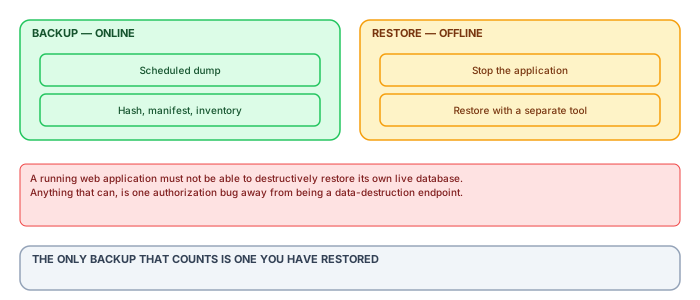
The restore drill is the one that gets skipped and the only one that proves anything. Put a date in the calendar, restore into an isolated environment, open a model in Archi against it, and write down how long it took. That number is your actual recovery time.
Why restore is deliberately offline
It is tempting to put a restore button in the administration portal. It is convenient, and it is a serious mistake.
A running application that can destructively restore its own live database is one authorization bug, one confused administrator or one session-fixation flaw away from being a data-destruction endpoint. The blast radius is the entire repository, and there is no undo.
Restore belongs in a separate tool, run deliberately, by someone with database access, against a stopped application. The inconvenience is the control. What the portal should offer is the inventory, the integrity status, and an authorized download — everything needed to prepare a restore, and nothing that performs one.
Retention and the three-generation habit
For a dataset this small, err generously: daily for a month, weekly for a year, and every backup taken immediately before a platform upgrade kept until the upgrade has been in production long enough to trust.
That last one prevents the specific bad afternoon where an upgrade migrates the schema, something is wrong, and the most recent backup is already in the new format.
What backups do not protect against
Worth stating plainly: backups protect against loss, not against mistakes. An architect who deletes half a model and publishes is not a backup problem — restoring the database to fix one model would discard everyone else's work since.
That case is handled by immutable revisions: publish the content of the prior revision as a new one, affecting nothing else. If your repository does not have that, you will end up using backups for something they are bad at, and the cost will be other people's work.
What to test in a restore drill
A restore drill that only confirms the database comes back has tested the easy half. Four checks make it meaningful:
- The dump restores into a clean instance of the same PostgreSQL version, without manual intervention.
- The application starts against it and reports the schema version it expects.
- A model opens in Archi through the plugin, and its diagrams look right. This is the check that catches subtle content problems.
- Time it. The elapsed time from decision to working system is your actual recovery objective, whatever the policy document says.
The fourth is the one that surprises people. Teams quoting a four-hour recovery objective frequently discover the drill takes seven, mostly in steps nobody counted — locating the backup, provisioning an instance, waiting for approval.
Backups and the upgrade path
A specific hazard worth planning around: a platform upgrade that migrates the database schema makes every prior backup restorable only into the prior version.
That is usually fine and occasionally catastrophic — the case being an upgrade that corrupts something subtly, discovered a fortnight later, by which point every backup is in the new format.
Two cheap mitigations: take and retain a backup immediately before every upgrade, labelled as such, and keep the previous application version deployable for as long as you retain backups from it. Neither costs anything until the day it saves you.
Recovery objectives, stated plainly
Backup discussions go in circles until two numbers are agreed, and the agreement is a business decision rather than a technical one: how much work may be lost, and how long may recovery take.
For an architecture repository the honest answers are usually generous. Losing a day of modelling is annoying and recoverable — the architect remembers what they did. Being unable to model for a day is not a business interruption. That points at nightly full backups with log shipping for a recovery point of a few hours, and a recovery time measured in hours rather than minutes.
Two things argue for tighter numbers. If the repository feeds a published register that other processes depend on, the recovery time is inherited from those processes. And if the audit trail is the system of record for a regulated activity, its recovery point should be tighter than the model's, because a lost audit event cannot be reconstructed from anyone's memory.
The restore nobody rehearsed
Backups are monitored, restores are assumed. The gap between them is where the genuinely bad outcomes live, and it is always the same three problems.
- The backup restores and the application will not start, because a configuration file, an encryption key or a licence lived outside the database and outside the backup.
- The restore takes far longer than anyone estimated, because nobody had timed it at production size and the estimate came from a test database a fraction of the size.
- Nobody present knows how. The procedure is written and has only ever been performed by one person, who is on holiday when it matters.
A rehearsal that actually tests these is not a database exercise. It is: take last night's backup, restore to a clean host, start the application, log in, open a model, and have someone who has never done it before drive. Twice a year. The first one will fail and that is the entire value.
Backing up what is not in the database
The database holds the models and that is where attention goes. Everything else that is needed to bring the service back tends to live somewhere nobody has enumerated.
- Application configuration, including the identity provider settings and the client secret, which is not recoverable from the provider.
- Any encryption key used at rest. A restored database that cannot be decrypted is an expensive collection of bytes.
- Licence files, and the knowledge of where they came from.
- The publication pipeline's own configuration — perspectives, exclusions, branding — which is often in a repository somewhere and occasionally on somebody's machine.
The test for this list is not whether it is backed up but whether the restore rehearsal needed anything that was not on it. That is why the rehearsal has to start from a clean host: restoring onto the still-configured original proves nothing about the items above.
Point-in-time recovery and the accidental deletion
The scenario backups are most often actually used for is not hardware failure. It is that somebody deleted a package on Tuesday and it was noticed on Friday, and the restore has to return that package without discarding three days of everyone else's work.
A full-database restore cannot do this. It returns the whole repository to Tuesday, which trades one data loss for a larger one, and the conversation about whose work is more important is not one anybody wants to have.
What makes this tractable is that a record store with immutable revisions already has the answer: the package still exists in every revision before the deletion, and restoring it is a content operation rather than a database one. This is one of the practical arguments for revisions that has nothing to do with governance — it converts the most common recovery scenario from a database restore into a few minutes of ordinary work.
Where revisions do not exist, the workable fallback is restoring the backup to a separate instance, exporting the deleted package, and importing it into production. Slower, and it does not put anybody in the position of choosing whose Tuesday to keep.
How long to keep backups, and why
Retention is usually inherited from a corporate standard written for transactional systems and applied without thought, which produces either far too much or an awkward conversation with an auditor.
The question that sets it is how long an error could go unnoticed. For a transactional system that is days. For an architecture repository it is longer — a package quietly corrupted in a bulk edit might not be spotted for a quarter, because nobody looks at every part of the estate every week.
That argues for a longer tail than the default: daily backups for a month, weekly for a quarter, monthly for a year. The volumes are small enough that this costs almost nothing, and it is the retention that matches the actual failure mode.
The counterweight is anything with a deletion obligation attached. A backup is a copy, and a copy that outlives a deletion request is a problem. In practice this is rarely acute for architecture content, but it should be a deliberate position rather than an oversight — and it is one of the few good reasons to keep the retention shorter than the failure mode would suggest.
Backups as an exit route
A backup is a vendor-specific artefact. It restores into the product that produced it and into nothing else, which means a backup strategy is not a data-portability strategy however complete it is.
This matters for the question that arrives during vendor risk assessment and again at renewal: what happens to our architecture if we stop using this product? A pile of database dumps is not an answer, and "we have full backups" said in response to that question is a misunderstanding of what was asked.
The answer is a periodic export in a standard exchange format, produced on the same schedule as the backups and kept alongside them. It is slower to produce, lossier than a database dump, and it is the only artefact that can be opened by something other than the product you bought. Running one monthly costs an hour of pipeline time and converts an uncomfortable question into a demonstration.
Who is allowed to restore
Restore is the most powerful operation the system has. It can return the estate to an earlier state, discard work, and — done to a separate instance — produce a complete copy of everything the repository holds, outside every permission the repository enforces.
That last property is the one usually missed. A person who can restore a backup can read the whole estate regardless of their scoped grants, which makes backup access an access control decision rather than an operational one. In most organisations the database administrators hold it, and they are not in the architecture permission model at all.
The workable position is not to remove that access, which would be impractical and would make recovery slower at the worst moment. It is to state it: name in the deployment documentation who can restore, acknowledge that this constitutes read access to the full estate, and log restores as prominently as exports. An auditor asking who can see everything expects the answer to include this group, and a documentation set that omits them reads as incomplete rather than clean.
The quarterly drill, as an agenda
Since the difference between a backup strategy and a backup hope is the drill, here is the one-hour agenda that has survived contact with real teams, ready to be put in four calendars a year.
Minute zero to ten: pick the scenario by drawing from a short list — full loss, single-model corruption discovered late, accidental deletion reported three days after the fact — and pick the operator by the same method, explicitly not always the person who wrote the runbook. Ten to forty: execute the restore to the standby environment, from the actual backup artefacts, following the written procedure and noting every place reality diverged from it. Forty to fifty: verify — not "the database came up" but the real checks: revision counts against the source, a spot-read of the restored models in the actual client, the audit trail intact through the restore point. Fifty to sixty: write down the three numbers and one list that are the drill's product — time to restore, data window lost, procedure divergences found, and the runbook edits they imply.
The agenda's quiet features are the point. Rotating the operator converts private knowledge into institutional knowledge one quarter at a time. Restoring from the real artefacts, not a convenient recent copy, is what once catches the encryption key that lives only on the server being simulated as lost. And the divergence list keeps the runbook alive — a runbook that has not changed in four drills is either perfect or unread, and the drill is how you find out which. An hour a quarter is the entire price; the practice that pays it gets to treat every section above as description rather than aspiration.
The whole discipline compresses to one sentence worth repeating at budget time: the repository is only as durable as the last restore someone actually performed. Everything else — schedules, retention, encryption — is supporting cast for that verified, rehearsed, boring recovery.