⏱ 18 min read
Introduction: why model validation is an architecture discipline, not a checkbox
Architecture models are only valuable when they are trustworthy. An ArchiMate or UML model that contains stale elements, broken relationships, unnamed components, or elements that exist in no view is worse than no model at all — it creates false confidence. Stakeholders make decisions based on what the model shows. If the model lies, the decisions fail. ArchiMate modeling best practices
Sparx Enterprise Architect (EA) ships with validation capabilities that range from simple metamodel compliance checks to scriptable, automatable validation pipelines. Most teams use only a fraction of these capabilities. This article covers the full validation spectrum: built-in rules, custom OCL constraints, JavaScript/JScript automation, profile-based governance, tagged-value enforcement, cross-notation traceability checks, and integration with CI/CD pipelines. We also include practical examples, working code, and mermaid diagrams that illustrate the validation architecture. Sparx EA training
The goal is not "zero validation errors." The goal is a model that stakeholders trust, architects maintain efficiently, and governance processes can audit objectively.
The validation pyramid: from syntax to semantics to governance
Not all validation is equal. Model validation operates at three levels, each catching different kinds of problems. Think of it as a pyramid — you need all three levels, but each level catches different defects at different costs.
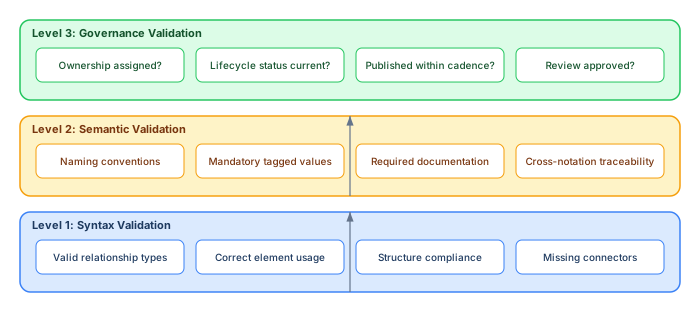
Level 1 — Syntax validation checks whether the model is structurally valid according to the metamodel. Does the ArchiMate Composition relationship connect two elements in the same layer? Is this UML association navigable? These are the checks that Sparx EA's built-in validator handles well out of the box.
Level 2 — Semantic validation checks whether the model is meaningful according to your organization's conventions. Do all Application Components have an "Owner" tagged value? Do all Business Services follow the naming pattern "Domain — Service Name"? These checks require custom rules — OCL constraints, validation scripts, or profile-based enforcement.
Level 3 — Governance validation checks whether the model is current, reviewed, and maintained. Has this capability map been updated in the last quarter? Does every element in the published view have an assigned owner? These checks often require automation scripts that query the repository and flag stale or uncurated content.
Level 1: Built-in validation — what Sparx EA checks automatically
Sparx EA's built-in validation engine checks models against the metamodel rules of the selected notation (UML, ArchiMate, BPMN, SysML, etc.). You can run validation by right-clicking a package or diagram and selecting Package → Validate Package. Results appear in the System Output window.
Relationship validity
The most critical Level 1 check: does this relationship type exist in the metamodel between these two element types? In ArchiMate, for example, Composition is only valid within the same layer. Serving flows upward (lower layers serve upper layers). Assignment connects active to behavioral elements. If your model contains an ArchiMate Composition from an Application Component to a Technology Node, built-in validation will flag it. ArchiMate best practices
Element usage
Each notation defines where and how element types can appear. In UML, an Actor should not be linked directly to a Class via Association. In BPMN, a Message Flow cannot connect two elements within the same pool. EA's validator catches these violations when the notation's metamodel defines the constraint.
Structure compliance
Structure rules cover containment, hierarchy, and diagram type constraints. Use cases should appear within system boundaries. BPMN activities belong in pools and lanes. Package nesting should follow organizational standards. EA checks these against the notation's structural rules.
Missing connectors
Elements that exist in a diagram but have no relationships may indicate incomplete modeling. While not always an error (some elements are legitimately standalone), a high count of unconnected elements is a quality signal. EA can flag elements with zero connectors.
Unimplemented requirements
If you use EA's requirements management features, the validator can check whether all requirements are traced to design or implementation elements. Requirements without realization relationships represent potential scope gaps. This is especially valuable in regulated environments where traceability is not optional.
Running built-in validation effectively
Built-in validation is most valuable when run routinely — not just before reviews. Establish a habit of validating after every significant modeling session. Resolve errors immediately; letting them accumulate creates validation fatigue where architects start ignoring warnings.
Level 2: Custom validation with OCL constraints
Built-in validation handles generic metamodel rules. But your organization has rules the metamodel does not know about. That is where OCL — the Object Constraint Language — becomes essential.
What OCL does in Sparx EA
OCL is a declarative, side-effect-free language that is part of the UML specification. In Sparx EA, you attach OCL constraints to elements, stereotypes, or profiles. During validation, EA evaluates each OCL expression against the model and reports violations. OCL constraints can express invariants (rules that must always hold), preconditions, postconditions, and queries. Sparx EA best practices
The power of OCL is precision: you can express rules like "every Application Component with stereotype «microservice» must have a tagged value 'API Contract URL' that is not empty" in a single declarative expression.
How to create OCL constraints in EA
There are two approaches to OCL in Sparx EA: free Sparx EA maturity assessment
Element-level constraints: Select an element, open Properties, navigate to the Constraints tab, and add an OCL constraint. This applies to that specific element.
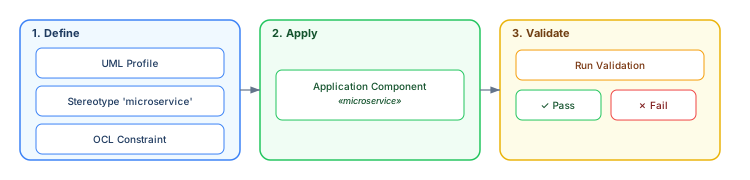
Profile-level constraints: Create a UML Profile with stereotypes that carry OCL constraints. When you apply the stereotype to any element, the constraint applies automatically. This is the scalable approach — define the rule once, enforce it everywhere the stereotype is used.
Practical OCL examples for enterprise architecture
Below are OCL constraints that solve real problems in enterprise architecture repositories. Each one targets a common quality issue that syntax validation cannot catch.
Every element must have documentation:
context Element inv hasDocumentation:
  self.documentation->notEmpty()
This catches the "documented in the architect's head but not in the model" problem. Elements without documentation are invisible to stakeholders who consume the model without the architect present.
Application Components must have an owner tagged value:
context Component inv hasOwner:
  self.taggedValue->select(name = 'Owner')->notEmpty()
Ownership is the foundation of model governance. If no one owns an element, no one maintains it, and it decays.
Business Services must follow naming convention "Domain — Service Name":
context Element inv namingConvention:
  self.name.indexOf(' — ') > 0
Consistent naming enables filtering, searching, and report generation. Without naming conventions, the same capability gets modeled as "Customer Mgmt", "CRM", "Customer Management", and "Cust Mgt" in four different views.
ArchiMate Business Processes must have at least one Triggering relationship:
context Element inv hasTriggering:
  self.supplierDependency->select(stereotype = 'ArchiMate_Triggering')->notEmpty() or
  self.clientDependency->select(stereotype = 'ArchiMate_Triggering')->notEmpty()
A Business Process that triggers nothing and is triggered by nothing is an island — likely an orphan from a past modeling session.
Every interface must have a direction (provider/consumer):
context Element inv interfaceDirection:
  self.taggedValue->select(name = 'Direction')->notEmpty() and
  Set{'Provider','Consumer','Both'}->includes(
    self.taggedValue->select(name = 'Direction')->first().value
  )
Integration views become unreliable when interface direction is ambiguous. Explicit provider/consumer tagging prevents the "we thought they called us, but actually we call them" problem.
OCL best practices
Keep OCL constraints modular and small. One constraint per rule. Test constraints on a small test package before applying them to the full repository. Use profile-based constraints for rules that apply to many elements. Combine OCL with built-in validation — they complement each other. And document each constraint with a plain-language description of what it checks and why.
Level 2 continued: Validation scripts in JavaScript
OCL is declarative and precise, but some validation rules require procedural logic: iterating over packages, comparing elements across diagrams, checking for orphans, or generating validation reports. Sparx EA's scripting engine (JavaScript, JScript, VBScript) gives you full access to the EA API for these cases.
Script: Find all elements not appearing in any diagram
Orphan elements — elements that exist in the repository but appear in no diagram — are a common quality problem. They accumulate over time as architects delete diagram references without deleting the underlying elements. This script finds them:
// Find orphan elements (exist in repository but appear in no diagram)
var sql = "SELECT o.Object_ID, o.Name, o.Object_Type " +
          "FROM t_object o " +
          "WHERE o.Object_ID NOT IN " +
          "(SELECT DISTINCT Object_ID FROM t_diagramobjects) " +
          "AND o.Object_Type NOT IN ('Package','Note','Text','Boundary') " +
          "ORDER BY o.Object_Type, o.Name";

var result = Repository.SQLQuery(sql);
// Parse XML result and output to System Output
Session.Output("=== Orphan Elements Report ===");
// ... parse and iterate XML results
Running this monthly reveals how much repository "debt" has accumulated. A high orphan count signals that model maintenance discipline needs improvement.
Script: Validate naming conventions across a package tree
// Validate naming convention: "Domain — ElementName"
function validateNaming(pkg) {
    var pattern = /^[A-Z][a-zA-Z0-9]+ — [A-Z]/;
    for (var i = 0; i < pkg.Elements.Count; i++) {
        var el = pkg.Elements.GetAt(i);
        if (el.Type == "Component" || el.Type == "Class") {
            if (!pattern.test(el.Name)) {
                Session.Output("NAMING VIOLATION: " + el.Type +
                    " '" + el.Name + "' (Package: " + pkg.Name + ")");
            }
        }
    }
    // Recurse into sub-packages
    for (var j = 0; j < pkg.Packages.Count; j++) {
        validateNaming(pkg.Packages.GetAt(j));
    }
}

var rootPkg = Repository.GetTreeSelectedPackage();
if (rootPkg != null) {
    Session.Output("=== Naming Convention Validation ===");
    validateNaming(rootPkg);
    Session.Output("=== Complete ===");
}
Script: Check tagged value completeness for a stereotype
// Ensure all «microservice» elements have required tagged values
function validateMicroserviceTags(pkg) {
    var required = ["Owner", "API Contract URL", "Lifecycle Status", "Team"];
    for (var i = 0; i < pkg.Elements.Count; i++) {
        var el = pkg.Elements.GetAt(i);
        if (el.Stereotype == "microservice") {
            var tags = {};
            for (var t = 0; t < el.TaggedValues.Count; t++) {
                var tv = el.TaggedValues.GetAt(t);
                if (tv.Value != "") tags[tv.Name] = tv.Value;
            }
            for (var r = 0; r < required.length; r++) {
                if (!(required[r] in tags)) {
                    Session.Output("MISSING TAG: " + el.Name +
                        " is missing '" + required[r] + "'");
                }
            }
        }
    }
    for (var j = 0; j < pkg.Packages.Count; j++) {
        validateMicroserviceTags(pkg.Packages.GetAt(j));
    }
}
These scripts are reusable building blocks. Combine them into a "validation suite" script that runs all checks in sequence and produces a consolidated report.
Level 3: Governance validation — freshness, ownership, and review status
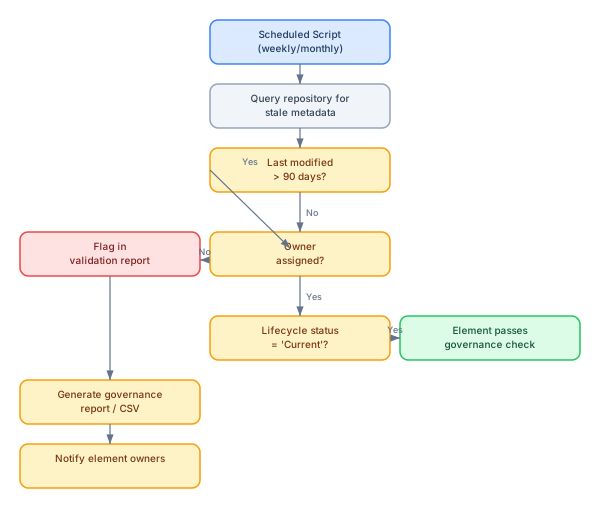
The hardest validation is not structural or semantic — it is temporal. Is this model current? When was this element last reviewed? Who approved this view for publication? These questions require governance validation that goes beyond what OCL or built-in rules can check.
Staleness detection
Use EA's SQL query capability to find elements that have not been modified within a defined period. For enterprise architecture, a 90-day staleness threshold is common for Application Components and Technology Nodes; a 180-day threshold for Business Capabilities and Services.
// Find elements not modified in over 90 days
var sql = "SELECT o.Name, o.Object_Type, o.ModifiedDate, o.Author " +
          "FROM t_object o " +
          "WHERE o.ModifiedDate < '" + ninetyDaysAgo + "' " +
          "AND o.Object_Type IN ('Component','Node','ArchiMate_ApplicationComponent') " +
          "ORDER BY o.ModifiedDate ASC";
Ownership completeness
Elements without owners decay fastest. A governance validation script checks that every element of a given type has a non-empty "Owner" tagged value. The script can distinguish between "no owner set" (high urgency) and "owner set but element is stale" (medium urgency).
Review status tracking
For formal governance, use a "Review Status" tagged value with allowed values: Draft, Under Review, Approved, Deprecated. A governance script can then check that no published view contains elements in "Draft" status — a common quality gap that undermines stakeholder confidence.
Building a validation suite: bringing all three levels together
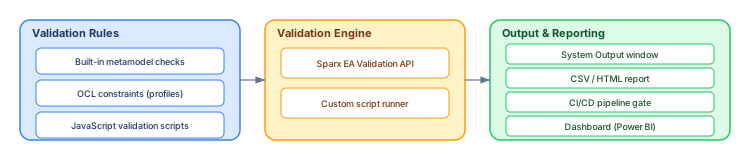
A mature Sparx EA practice combines all three levels into a single validation suite that runs on schedule and produces a consolidated report. The following diagram shows the recommended architecture for such a suite:
Master validation script
Create a master script that orchestrates all validation checks and produces a single report. The script should:
- Run built-in validation on the target package using
ProjectInterface.ValidatePackage() - Execute OCL constraint evaluation (these run as part of the built-in validation when profiles are applied)
- Execute custom JavaScript validation checks: orphan elements, naming conventions, tagged value completeness, staleness, ownership
- Aggregate all results into a structured CSV or HTML report
- Optionally post results to an external system (Jira ticket, Slack notification, email)
// Master validation script — orchestrates all checks
function runFullValidation(rootPackageGUID) {
    Session.Output("========================================");
    Session.Output("FULL MODEL VALIDATION REPORT");
    Session.Output("Date: " + new Date().toISOString());
    Session.Output("========================================\n");

    // Level 1: Built-in metamodel validation
    Session.Output("--- Level 1: Metamodel Validation ---");
    var pi = Repository.GetProjectInterface();
    var result = pi.ValidatePackage(rootPackageGUID);
    Session.Output(result != "" ? result : "No metamodel violations.\n");

    // Level 2: Naming conventions
    Session.Output("--- Level 2: Naming Conventions ---");
    var pkg = Repository.GetPackageByGuid(rootPackageGUID);
    validateNaming(pkg);

    // Level 2: Tagged value completeness
    Session.Output("\n--- Level 2: Tagged Value Completeness ---");
    validateMicroserviceTags(pkg);

    // Level 2: Orphan elements
    Session.Output("\n--- Level 2: Orphan Elements ---");
    findOrphanElements();

    // Level 3: Governance (staleness, ownership)
    Session.Output("\n--- Level 3: Governance Checks ---");
    checkStaleness(90);
    checkOwnership(pkg);

    Session.Output("\n========================================");
    Session.Output("VALIDATION COMPLETE");
    Session.Output("========================================");
}
Integrating validation into CI/CD pipelines
For organizations that treat architecture models as code, validation belongs in the CI/CD pipeline. Every model commit triggers validation, and failed validation blocks publication. This ensures that only clean, validated models reach stakeholders.

Headless EA execution
Sparx EA can be automated via its COM API without a visible UI. On a CI server (typically Windows), the pipeline script opens the repository, runs the validation suite, captures the output, and returns a pass/fail exit code. Tools like Jenkins, Azure DevOps, or GitLab CI can invoke EA automation through PowerShell or batch scripts that instantiate the EA COM object.
Practical pipeline configuration
A minimal pipeline step looks like this (PowerShell example for Azure DevOps):
# PowerShell: Run EA validation in CI pipeline
$ea = New-Object -ComObject EA.Repository
$ea.OpenFile("C:\models\enterprise-architecture.eapx")

$pi = $ea.GetProjectInterface()
$result = $pi.ValidatePackage("{root-package-GUID}")

if ($result -ne "") {
    Write-Error "Model validation failed:`n$result"
    $ea.CloseFile()
    exit 1
} else {
    Write-Host "Model validation passed"
    $ea.CloseFile()
    exit 0
}
This integrates model quality into the same workflow developers use for code quality. Architecture becomes a first-class engineering artifact with automated quality gates.
Common validation anti-patterns
Validation itself can go wrong. These are the anti-patterns we see most often in Sparx EA validation practices:
Validation fatigue: Too many rules, too many false positives. Architects start ignoring validation output because the signal-to-noise ratio is too low. Fix this by starting with a small set of high-value rules and expanding gradually. Every rule should have a clear "why" that architects accept.
Validation theater: Running validation before reviews but never acting on results. If validation errors persist across multiple reviews, the validation process has become a ritual without teeth. Fix this by defining a "validation budget" — a maximum number of acceptable violations per package, trending downward over time.
Over-constraining the model: So many OCL constraints that architects spend more time satisfying the validator than modeling architecture. Fix this by separating mandatory rules (errors that block publication) from advisory rules (warnings that inform but do not block).
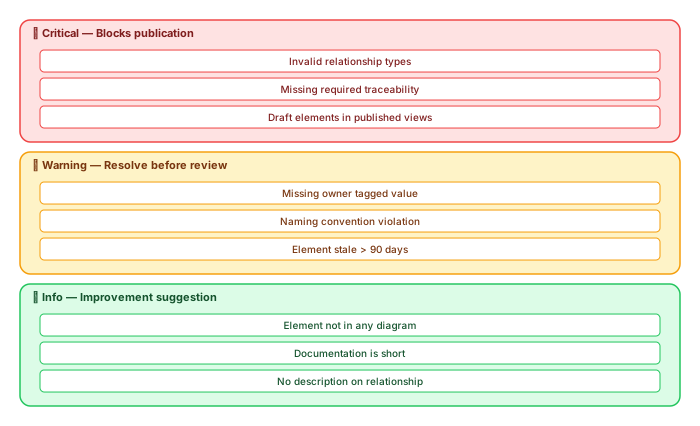
No error categorization: Treating all validation results equally. A missing owner tagged value is not the same severity as an invalid cross-layer relationship. Fix this by categorizing errors into Critical (blocks publication), Warning (should be resolved before next review), and Info (improvement suggestions).
Profile-based validation: scaling rules across the enterprise
For enterprise-scale models, individual OCL constraints and scripts are not enough. You need a systematic approach to defining and distributing validation rules. Sparx EA's UML Profile mechanism provides this.
Creating a validation profile
A UML Profile in EA defines stereotypes with associated tagged values, constraints, and visual properties. For validation purposes, the key capabilities are:
- Mandatory tagged values: Define tagged values on stereotypes that must be populated. When the stereotype is applied to an element, the element inherits the requirement.
- OCL constraints on stereotypes: Attach OCL constraints to stereotype definitions. Every element carrying the stereotype is automatically validated against these constraints.
- Allowed relationships: Define which relationship types are permitted between stereotyped elements.
For example, a «business_capability» stereotype might require tagged values for Level (L1/L2/L3), Owner, and Domain, plus an OCL constraint that the capability must have at least one Realization relationship from an Application Component.
Distributing profiles across teams
Profiles can be exported as XML files and imported into other repositories. This enables a central architecture team to define validation rules once and distribute them to all modeling teams. When rules change, update the profile and redistribute. This is the enterprise equivalent of a "linting configuration" in software development.
Measuring validation health over time
Validation is not a one-time activity — it is a practice that improves over time. To track improvement, measure these metrics:
- Total violation count by severity — tracked monthly. Should trend downward for Critical and Warning categories.
- Orphan element ratio — number of elements not in any diagram divided by total elements. Should be below 10% in a well-maintained model.
- Ownership coverage — percentage of elements with a non-empty Owner tagged value. Target: 95%+ for core element types.
- Staleness ratio — percentage of elements not modified within their expected refresh period. Should be below 15%.
- Time to resolve — average time between validation error detection and resolution. Shorter is better; trending upward signals validation fatigue.
Export these metrics weekly from your validation scripts and visualize them in a dashboard. When stakeholders see that model quality is measured and improving, their trust in the model increases — which is the ultimate goal.
A practical rollout plan for validation
Do not implement all three levels at once. Validation discipline, like any practice, must be adopted incrementally:
Month 1 — Level 1 only: Enable built-in validation and resolve all metamodel violations. This is non-negotiable and should be the minimum standard from day one. Train all architects on running validation and reading output.
Month 2–3 — Level 2 basics: Introduce naming conventions and mandatory tagged values (Owner and Lifecycle Status). Create OCL constraints or validation scripts for these two rules. Run them weekly. Socialize the results.
Month 4–6 — Level 2 extended: Add documentation requirements, orphan detection, and cross-notation traceability checks. Create a master validation script. Establish a "validation budget" per package.
Month 6+ — Level 3: Introduce governance checks (staleness, review status, publication cadence). Optionally integrate validation into CI/CD. Build a dashboard. Report metrics to architecture governance boards.
Conclusion
Advanced model validation in Sparx EA is not about achieving zero errors. It is about building trust. When architects trust the model, they use it. When stakeholders trust the model, they make decisions based on it. When governance trusts the model, they invest in it.
The validation pyramid — syntax, semantics, governance — provides a structured path from basic metamodel compliance to enterprise-grade model quality management. Start with Level 1, add Level 2 rules gradually based on real quality problems, and introduce Level 3 governance checks when your practice matures.
The tools are already in Sparx EA: built-in validation, OCL constraints, JavaScript scripting, UML Profiles, SQL queries, and COM automation. The challenge is not technology — it is discipline. Treat validation as a first-class practice, invest in it incrementally, and measure the results. The payoff is an architecture repository that people actually trust.
If you’d like hands-on training tailored to your team — Sparx Enterprise Architect, BPMN, SysML or the Archi tool — or modelling coaching in ArchiMate and TOGAF-aligned governance, you can reach us via our contact page.
Frequently Asked Questions
What is Sparx Enterprise Architect used for?
Sparx Enterprise Architect (Sparx EA) is a comprehensive UML, ArchiMate, BPMN, and SysML modeling tool used for enterprise architecture, software design, requirements management, and system modeling. It supports the full architecture lifecycle from strategy through implementation.
How does Sparx EA support ArchiMate modeling?
Sparx EA natively supports ArchiMate 3.x notation through built-in MDG Technology. Architects can model all three ArchiMate layers, create viewpoints, add tagged values, trace relationships across elements, and publish HTML reports — making it one of the most popular tools for enterprise ArchiMate modeling.
What are the benefits of a centralised Sparx EA repository?
A centralised SQL Server or PostgreSQL repository enables concurrent multi-user access, package-level security, version baselines, and governance controls. It transforms Sparx EA from an individual diagramming tool into an organisation-wide architecture knowledge base.