⏱ 7 min read
What Is Mermaid?
Mermaid is an open-source JavaScript library that generates diagrams and charts from plain text. Instead of dragging boxes around a canvas, you write a short description — five to twenty lines for most diagrams — and Mermaid renders it instantly into a clean, shareable vector graphic.
Created by Knut Sveidqvist in 2014 and released under the MIT License, Mermaid has become the default diagramming syntax for GitHub, GitLab, Notion, Confluence, Obsidian, and dozens of other platforms. It won the 2019 JavaScript Open Source Award for "Most Exciting Use of Technology." The library renders entirely in the browser — your diagram code never leaves your machine.
If you want to jump straight in, our free Mermaid diagram editor gives you a live preview, nine built-in templates, and PNG/SVG export in one click — no account required.
Why Text-Based Diagrams Win in 2026
Traditional diagramming tools — Visio, draw.io, Lucidchart — store diagrams as binary or XML files. They are hard to version-control, slow to update, and invisible to search engines. Mermaid flips this model entirely.
Version control: A Mermaid diagram is a text file. A git diff on a sequence diagram shows exactly which message was added, renamed, or removed. Code reviewers can review diagram changes the same way they review code changes.
Speed: Renaming a component that appears in fifteen boxes takes thirty seconds in a text editor. In a GUI tool it can take fifteen minutes. For architects who maintain living documentation, this difference is decisive.
Documentation that stays current: Mermaid diagrams can live alongside code in the same repository. When a developer changes an API endpoint, they update the sequence diagram in the same commit. The diagram never drifts from reality.
Portability: Export as SVG for documentation, PNG for presentations, or embed the raw code in a README. Any platform that renders Markdown with Mermaid support — GitHub, GitLab, most wikis — will display the diagram automatically.
Diagram Types You Can Create
Mermaid supports ten core diagram types, all from the same editor:
- Flowchart (
graph TD/graph LR) — processes, decision trees, pipelines - Sequence diagram — message flows between actors and systems
- Class diagram — object-oriented structures, domain models
- ER diagram — database schemas, entity relationships
- Gantt chart — project timelines, sprint planning
- State diagram — state machines, workflow states
- Git graph — branching strategies, merge flows
- Pie chart — distributions, breakdowns
- Mind map — topic hierarchies, brainstorming
- Timeline — event sequences over time
Each type uses its own lightweight syntax. Once you know the pattern for one diagram type, the others take minutes to learn. Sparx EA guide
Flowchart: CI/CD Pipeline Example
The flowchart is Mermaid's most-used diagram type. Nodes are declared with bracket styles that convey meaning: [square] for processes, {curly} for decisions, ([rounded]) for start/end states, and (parentheses) for sub-processes.
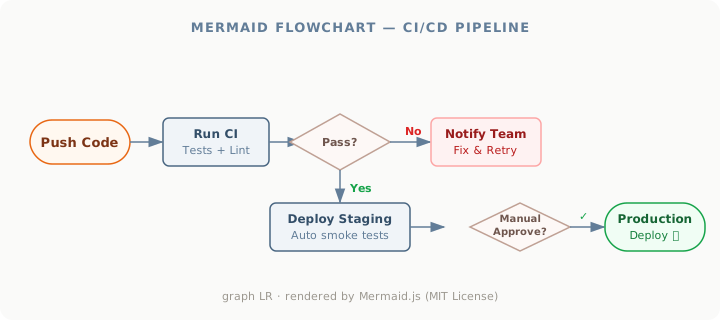
The Mermaid code behind this diagram is fewer than fifteen lines:
graph LR
    A([Push Code]) --> B[Run CI: Tests + Lint]
    B --> C{Pass?}
    C -->|Yes| D[Deploy Staging]
    C -->|No| E[Notify Team]
    D --> F{Manual Approve?}
    F -->|Yes| G([Production 🚀])
    E --> B
Direction modifiers — TD (top-down), LR (left-right), BT, RL — control the layout axis. For pipelines and processes, left-right layouts read more naturally. For hierarchies and trees, top-down is usually clearer.
Sequence Diagram: API Authentication Flow
Sequence diagrams model the temporal flow of messages between actors. They are essential for documenting API contracts, OAuth flows, microservice interactions, and any scenario where order of operations matters. integration architecture diagram
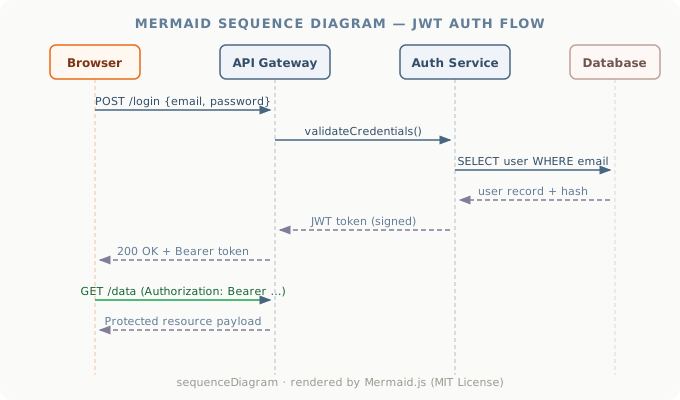
Mermaid uses ->> for synchronous messages and -->> for responses. Add autonumber at the top to number every message automatically — invaluable when a diagram has more than five steps and you need to reference specific messages in written documentation.
sequenceDiagram
    autonumber
    participant B as Browser
    participant G as API Gateway
    participant A as Auth Service
    participant D as Database
    B->>G: POST /login
    G->>A: validateCredentials()
    A->>D: SELECT user WHERE email
    D-->>A: user record + hash
    A-->>G: JWT token (signed)
    G-->>B: 200 OK + Bearer token
ER Diagram: SaaS Data Model
Entity-relationship diagrams in Mermaid follow the crow's foot notation used by database designers. The syntax reads naturally: USER ||--o{ INVOICE : places means "one user places zero or more invoices." Cardinality markers on both ends define the relationship type precisely.

ER diagrams in Mermaid also support attribute-level detail: you can declare the data type, constraints, and whether a field is a primary or foreign key. This makes the diagram useful both for high-level discussion and as a reference for developers implementing the schema.
Essential Mermaid Syntax Guide
Node shapes in flowcharts:
[Text]— rectangle (process)(Text)— rounded rectangle (sub-process)([Text])— stadium / pill (start or end){Text}— diamond (decision)((Text))— circle (event)>Text]— asymmetric / flag
Edge types:
-->— arrow with line---— line without arrow-->|Label|— labelled arrow-.->— dotted arrow==>— thick arrow
Styling: Apply CSS classes with classDef and assign them with class NodeId className. You can change fill colour, stroke, font weight, and border radius per node or per group.
Subgraphs: Group nodes into labelled containers with subgraph Title ... end. Subgraphs can be nested for multi-layer architectures.
Tips for Better Mermaid Diagrams
Keep diagrams focused. A diagram that tries to show everything shows nothing. If a flowchart has more than twelve nodes, split it. Create one diagram per concern: one for the happy path, one for error handling, one for the data model.
Use meaningful node IDs. IDs like A, B, C make the code unreadable after two weeks. Use loginForm, apiGateway, authService instead.
Label your edges. An unlabelled arrow between two decision nodes is ambiguous. Add |Yes| and |No| labels on every decision branch.
Export as SVG for documentation. SVG scales perfectly at any size, supports text search, and has a smaller file size than PNG for most diagrams. Use PNG only when the target environment does not support SVG.
Commit diagram source alongside code. Store the .mmd or Markdown-fenced Mermaid source in your repository, not just the exported image. This makes future edits trivial and keeps the diagram auditable.
Try the Editor — No Installation Required
Our free Mermaid online editor includes nine ready-to-use templates covering every major diagram type, live preview that updates as you type, one-click SVG and PNG export, and shareable links that encode your diagram directly in the URL. Everything runs in the browser — no sign-up, no data sent to any server, no installation.
For teams working with enterprise architecture, Mermaid pairs naturally with the structural modelling languages we teach: ArchiMate for enterprise layers, BPMN for process detail, and SysML for systems engineering. Mermaid fills the gap for lightweight technical documentation that lives beside code. Contact us to discuss how diagram-as-code fits your architecture practice.
Mermaid.js is released under the MIT License © Knut Sveidqvist and contributors. Diagrams rendered in this editor run entirely in your browser; no diagram data is transmitted to any third party.
Frequently Asked Questions
What is enterprise architecture?
Enterprise architecture is a discipline that aligns an organisation's strategy, business operations, information systems, and technology infrastructure. It provides a structured framework for understanding how an enterprise works today, where it needs to go, and how to manage the transition.
How is ArchiMate used in enterprise architecture practice?
ArchiMate is used as the standard modeling language in enterprise architecture practice. It enables architects to create consistent, layered models covering business capabilities, application services, data flows, and technology infrastructure — all traceable from strategic goals to implementation.
What tools are used for enterprise architecture modeling?
Common enterprise architecture modeling tools include Sparx Enterprise Architect (Sparx EA), Archi, BiZZdesign Enterprise Studio, LeanIX, and Orbus iServer. Sparx EA is widely used for its ArchiMate, UML, BPMN and SysML support combined with powerful automation and scripting capabilities.
Diagrams that are generated rather than written
Mermaid's real advantage, as the version-control section above argues, is that a diagram stops being an opaque binary. What it does not give you is a model underneath: two Mermaid diagrams mentioning the same service have no idea they are talking about the same thing, so renaming it is still a manual sweep.
Mooodels covers the other half of that problem — one semantic model, with diagrams generated as views over it — which is what makes impact analysis and rename-safe references possible. For a quick sequence diagram in a README, Mermaid is still the lighter tool, and that is a real distinction rather than a polite one.