Conventions on paper
The client for this engagement was an aerospace supplier — several engineering sites, a central architecture group, and a Sparx Enterprise Architect repository shared by around sixty modellers across systems engineering and IT. Years earlier, the architecture group had done the responsible thing and written a modelling conventions document: which element types to use for which concepts, which relationships were sanctioned, which attributes every element must carry, how packages are structured, how diagrams are named.
By the time we arrived the document ran to about thirty pages, was on its fourth owner, and was followed the way thirty-page conventions documents are always followed: sincerely, by the person who wrote it. Everyone else modelled from memory of a training session, from copying a colleague's diagram, or from the toolbox defaults of whatever perspective their EA client happened to open. The group knew this — their own quarterly model reviews kept finding the same deviations — and they had concluded, correctly in our view, that the fix was not a better document. Rules that live outside the tool are advice; rules that live inside the tool are the path of least resistance.
The brief was to package the conventions as an MDG Technology: a Sparx EA extension that puts the organisation's own element types, attributes, toolboxes and diagram types into every modeller's client, so that doing it the agreed way becomes the default rather than an act of remembering.
What the drift looked like
We started by measuring the gap between the document and the repository, because "people don't follow the conventions" deserves numbers before it deserves tooling. A set of model searches told the story. The conventions defined a required lifecycle attribute; it was present on roughly half the application elements, under three different tagged value names that had accumulated over the years. Interface elements — central to how a supplier talks to its customers' systems — appeared in five different representations: a stereotyped class here, a port there, a plain component elsewhere, each the fossil of some project's local habit. And the export-control marking the compliance team assumed every technical data element carried was, in practice, carried by the elements of the two programmes whose leads had been in the room when the convention was agreed.
None of this was carelessness. Sixty modellers with the whole UML and ArchiMate palette available will, in complete good faith, produce sixty dialects. The standard toolboxes offer every element Sparx EA knows; the conventions document asks people to voluntarily use twelve of them, with specific attributes, and the tool did nothing to make the twelve easier than the rest. The gap between the document and the model was exactly as wide as that gap in effort.
Thirty pages become fourteen decisions
An MDG Technology cannot package prose; it packages definitions. So the first phase was a series of working sessions with the architecture group and lead modellers from each site, converting the conventions document into decisions concrete enough to implement. This was harder and more valuable than the implementation that followed. The document named over forty stereotypes accumulated across its revisions; the sessions ended with fourteen that anyone could name a use for, and a graveyard list of the rest with migration notes. Every stereotype that survived had to answer three questions: what metaclass does it extend, what tagged values are mandatory on it, and on which diagram types may it appear.
The tagged values got the same treatment. Free-text attributes became enumerations wherever the value set was actually finite — lifecycle status, criticality, design assurance level, export-control marking — because a dropdown is a convention that enforces itself, and free text is a convention that decays. Where the sessions found two names for the same attribute in the wild, they picked one and we recorded the loser for the migration script.
The sessions themselves followed a discipline worth describing, because the format is most of why they concluded anything. Each candidate stereotype got fifteen minutes, a named advocate, and a live query showing how often the current repository actually used it. Usage numbers ended arguments that opinions had kept alive for years: a stereotype defended as essential turned out to appear eleven times in a repository of forty thousand elements, nine of them created by its advocate. (It was retired on the merits — its concept was already covered by another stereotype — but the numbers were what ended the meeting.) We also imposed a parking rule — anything unresolved in fifteen minutes went to a list the architecture group would decide alone — which kept six sessions from becoming sixty. The output was written up not as minutes but as the profile's specification: a table per stereotype that the implementation transcribed rather than interpreted.
| Stereotype (sample) | Extends | Mandatory tagged values |
|---|---|---|
| «SystemComponent» | Component | lifecycle, criticality, owner, exportMarking |
| «ExternalInterface» | Interface | protocol, dataClassification, counterparty |
| «TechnicalDataItem» | Artifact | exportMarking, custodian |
| «ArchitectureDecision» | Class | status, decidedBy, decidedOn |
The profile: stereotypes and tagged values
With the decisions fixed, the implementation followed Sparx EA's intended route: a UML profile package defining each stereotype, its extended metaclass, and its tagged value definitions — the enumerations implemented as predefined tagged value types with fixed value lists, so modellers pick from the agreed list rather than typing. Defaults were set where a safe default exists (lifecycle defaults to proposed) and deliberately absent where one does not: an export marking that defaulted to "unrestricted" would have been a compliance incident waiting for its moment, so the field starts empty and the validation described below reports every element where it stays that way.
Each stereotype also carries its help text inside the profile — the two-sentence definition and an example, shown in the toolbox tooltip and readable from the element's properties. It is a mundane feature with an outsized effect: the definition travels with the concept, at the moment of use, instead of living in a document three clicks away. When the sessions argued about a stereotype's meaning, the argument's resolution went into that help text verbatim, so the next person to wonder reads the answer where the question arose.
We resisted requests to add "just one more" tagged value eleven separate times, and we kept count on purpose. Every attribute in the profile is a promise that sixty modellers will maintain it; the profile that ships with twenty optional attributes per element ships with nineteen empty columns. What went in is what a named consumer — a review board, the compliance team, a generated document — actually reads. This is the same discipline we apply to custom toolboxes and MDG design everywhere: the extension exists to narrow choices, and every addition widens them again.
Toolboxes, diagram types and the quicklinker
The profile defines what exists; the toolboxes and diagram types define what people see. We built four custom diagram types — system context, interface definition, deployment, and decision record — each with a toolbox showing only the stereotyped elements and relationships sanctioned for that view. A modeller opening an interface definition diagram sees «ExternalInterface», «SystemComponent», the two connector types the convention allows, and nothing else. The full UML palette is still in the product, but it is no longer the first thing at hand — the agreed way became the easy way.
The quicklinker matrix does the same for relationships: dragging from an «ExternalInterface» offers the sanctioned connections and stops offering the unsanctioned ones. This single file removed the most common review finding of the previous two years — realisation arrows drawn backwards between components and interfaces — not by teaching anyone anything, but by making the wrong arrow hard to draw.
One interface, before and after
A concrete example shows the difference better than the feature list. Before the technology, documenting a new data link to a customer's ground system meant a modeller choosing among five precedents: some drew a component named after the link, some a class stereotyped by hand-typing «interface» with local spelling, some a port on the consuming system, and the protocol went into a notes field in whatever words came to mind. Reviewers then reverse-engineered the intent, diagram by diagram.
After: the modeller opens an interface definition diagram — the diagram type itself is in the technology — and the toolbox offers «ExternalInterface». Dropping it brings the mandatory tagged values with it — protocol picked from an enumeration, data classification from an enumeration, counterparty as text — and the weekly validation flags any that are left empty. The quicklinker offers exactly two ways to connect it, both correct. The element renders with its data classification visible on the diagram. Total decisions required from the modeller: the ones that are genuinely theirs — what the interface is and what flows over it. Every decision that used to produce a dialect has already been made, once, by the sessions.
The review board sees the same gain from the other side: every interface in every programme now answers the same four questions in the same place, which is what made the later compliance reporting possible at all.
Model patterns and shape scripts
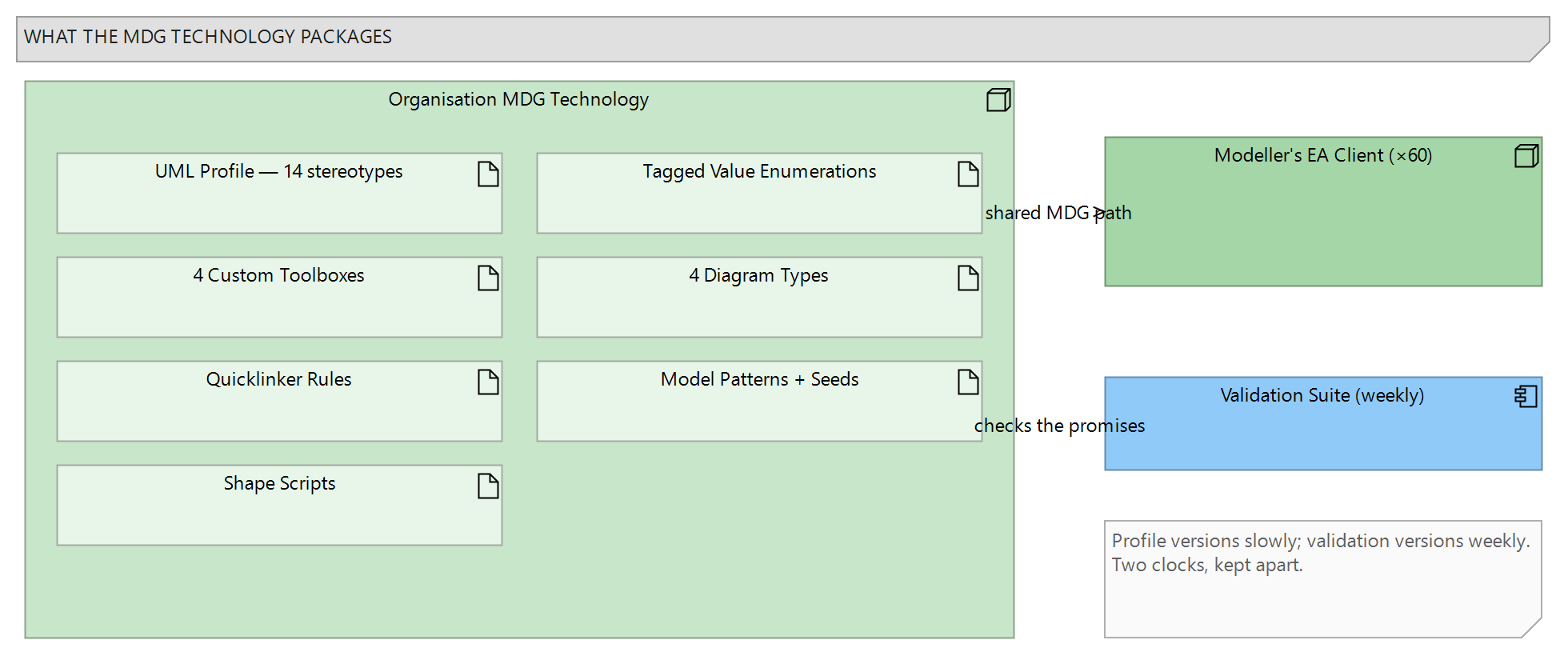
Two further pieces round out the technology, shown in Figure 1. Model patterns give every new programme the same starting skeleton: a model wizard entry creates the agreed package structure — context, interfaces, logical design, deployment, decisions — with a seeded example diagram in each. The blank-repository problem, where every project invents its own filing system in week one and lives with it for five years, went away for the price of one pattern package.
The seeded diagrams are worth a sentence each, because their job is subtle: every one is a small, correct example — a context diagram with three placeholder systems properly stereotyped, an interface definition with its tagged values filled in plausibly — that a modeller edits rather than deletes. People extend what is in front of them far more reliably than they follow what was described to them, and the seeded examples are the conventions demonstrating themselves in the modeller's own package. The placeholders carry deliberately silly names precisely so nobody ships one unedited; nobody has, though one programme kept "Example Ground Station B" as an in-joke until a review caught it, which we count as the mechanism working socially as well as technically.
Shape scripts carry the conventions onto the diagrams themselves. Elements render with a coloured status band driven by their lifecycle tagged value and show their export marking in the top corner — which means an element missing its marking is visibly incomplete in every meeting, not just in a validation report. We kept the scripts deliberately simple after load-testing them on the largest programme diagrams; elaborate shape scripts are charming on twenty elements and a rendering tax on four hundred. That trade-off is real and we tuned for the big diagrams, because the big diagrams are where reviews happen.
Deploying and versioning the technology
An MDG Technology is, in the end, an XML file, and treating it like software is what keeps it alive. The technology is generated from a source model under version control, built into its XML by script, and deployed through the MDG Technologies path every EA client already reads from a shared location — so a release reaches all sixty modellers by being placed in one folder, and nobody installs anything by hand. Each release carries a version number, release notes, and, when a definition changed shape, a migration script.
The migration scripts matter more than the releases. Renaming a stereotype or retiring a tagged value does not touch the thousands of elements that already carry the old one — the repository keeps its history unless someone moves it forward. So every breaking change ships as a pair: the new technology version, and an automation script that walks the affected elements, moves values to the new definitions, and writes a report of what it changed. The first such migration — consolidating those three historical lifecycle tagged value names into one — updated a little over four thousand elements in an afternoon, with a diffable log, and bought the profile more credibility with the sceptics than any workshop had.
Coexisting with the built-in technologies
An organisation's own MDG lands in clients that already carry dozens of built-in technologies, and the sixty modellers' day-to-day experience depends on that cohabitation being tidied. We configured a shared perspective that puts the organisation's diagram types first and hides the built-in technologies nobody had used in years — the repository's own history told us which — so the new-diagram dialog leads with the four sanctioned types instead of burying them under SysML variants and database modelling entries no one needed. The standard UML and ArchiMate technologies stay enabled, deliberately: programmes still model deployment topologies and the occasional state machine, and a profile that tries to replace the whole modelling language rather than extend it collapses under its own ambition. The boundary we drew is simple to state — the organisation's concepts get organisation types; everything else uses the standard palette — and the perspective makes that boundary the default view rather than a rule to remember.
One practical note for anyone attempting the same: test each release against the oldest EA client version in the fleet before deploying. One of our point releases used a newer predefined tagged value type that current clients handled gracefully and a client three major versions older rendered as an empty properties tab; the fix was trivial, but only because the release checklist caught it before sixty people did.
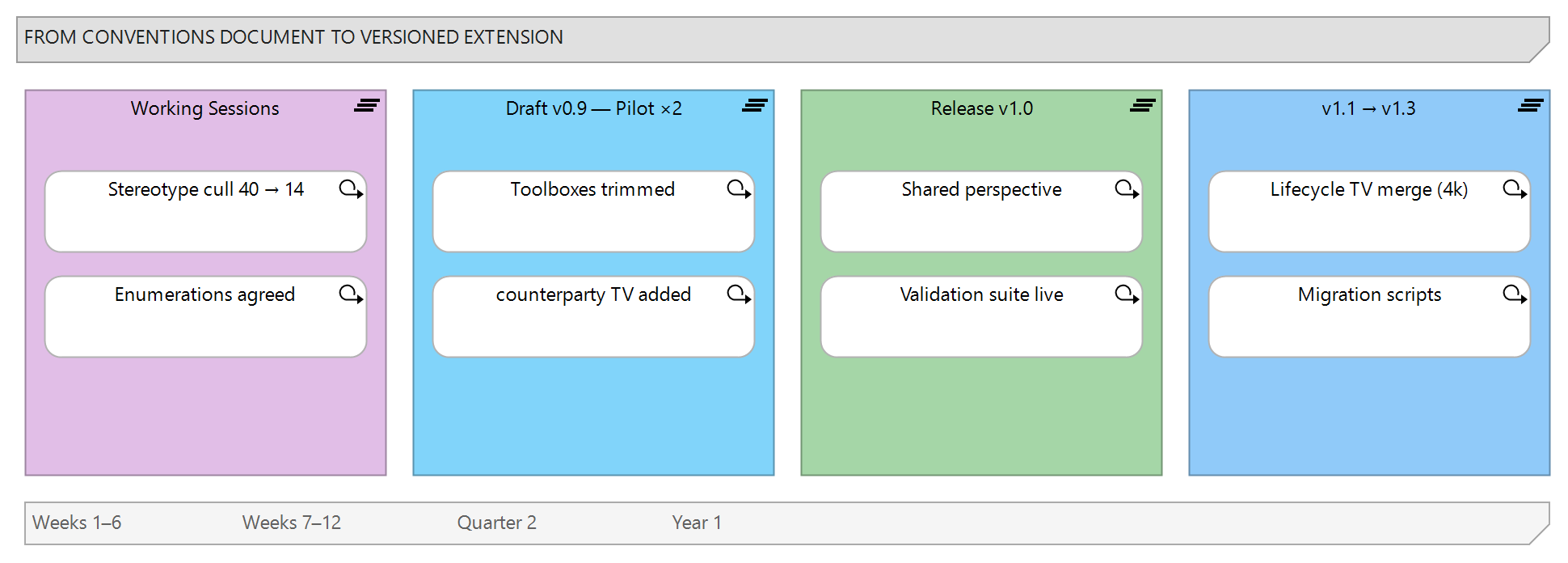
Figure 2 shows the cycle we left behind. The draft technology ran on two pilot programmes for six weeks before the first general release, and the pilots changed real things: one toolbox lost half its contents as genuinely unused, and the interface stereotype gained the counterparty attribute the pilots kept writing into notes fields. Piloting an MDG is not optional politeness — it is where the conventions meet modellers who were not in the room.
Validation that travels with the profile
Definitions make the right thing easy; validation makes the missing thing visible. Alongside the technology we delivered a validation suite — model searches and an automation script runnable by any modeller and scheduled weekly against the repository from a utility machine — checking exactly the promises the profile makes: mandatory tagged values present and drawn from their enumerations, stereotyped elements appearing only on sanctioned diagram types, packages following the pattern structure. Findings are written to a report grouped by package owner, which turns "the model has issues" into "these eleven elements of yours are missing their export marking", a sentence that gets acted on.
The weekly report went from four hundred findings in its first run to under forty within a quarter — most of the first wave cleared by the migration scripts rather than by hand — and it has stayed at that level since, which is what a convention that maintains itself looks like. The approach follows the same lines as our broader model validation practice in Sparx EA.
We deliberately kept validation outside the technology's XML rather than using EA's in-model validation hooks for everything, for one operational reason: the rules change faster than the profile does. A new compliance question adds a check; a check that cries wolf gets retired; none of that should require re-releasing the technology to sixty clients. The profile versions slowly and defines what things are; the validation suite versions weekly if it needs to and reports on how things stand. Keeping those two release rhythms apart is a small design decision that has saved the client several releases a year.
What changed for the client
The quarterly model reviews, which used to open with notation corrections, now open with content. The compliance team gets its export-marking coverage from a scheduled report instead of an annual archaeology exercise. New joiners produce convention-conformant models in their first week, because the toolbox in front of them offers little else — one site lead told us onboarding a modeller had gone from "months of correcting habits" to "show them which diagram type to open". And the conventions document itself shrank from thirty pages to eight: what remains is the reasoning — why these types, why these attributes — while the rules themselves moved into the technology, where they execute instead of persuade.
Adoption followed the path pilots usually predict. The two pilot programmes carried on; the next wave came from programmes starting fresh, for whom the pattern skeleton and ready-made toolboxes were simply less work than improvising; the holdouts were, as ever, the programmes with the largest existing models, and they came across when the migration scripts demonstrated — on a copy of their own package, in front of their own lead — that conversion was an afternoon and not a quarter. A year after the first release the weekly validation report covered the whole repository, and the technology was on version 1.3: two point releases driven by modeller feedback and one small breaking change, shipped with its migration script, absorbed without ceremony. Conventions had become infrastructure.
A conventions document tells people what the organisation would prefer. An MDG Technology changes what the tool offers. The second one wins, not because people are careless readers, but because sixty modellers under deadline will always take the path the tool makes shortest.
What an MDG cannot do
Three honest limits. First, an MDG narrows the easy path; it does not fence the repository. The standard UML and ArchiMate toolboxes remain available in the product, and a determined modeller can still drop an unstereotyped component into a diagram. Perspectives and diagram-type restrictions shrink that surface, and validation catches what slips through — but the guarantee is statistical, not absolute, and organisations expecting a locked metamodel from an MDG are expecting more than the mechanism provides.
Second, the technology binds the organisation to maintaining it. Conventions now change through releases, with a build, a pilot and sometimes a migration script — deliberate friction that makes changes considered, but friction all the same. An MDG owned by nobody rots exactly like the document it replaced; the client staffed an owner, and that decision matters more than any XML we wrote.
Third, the sessions that produced fourteen stereotypes were the actual work, and no amount of profile engineering substitutes for them. We have seen MDG Technologies built straight from an unexamined conventions document, and they automate the confusion. If your organisation's conventions live in a document that everyone endorses and nobody follows, the tooling is the second step — we can help with both, starting from a look at your repository through our Sparx EA consulting practice, or via the contact page.
This case study describes a representative engagement pattern. Organisational details are illustrative and do not identify a specific client.