Start with what is already there
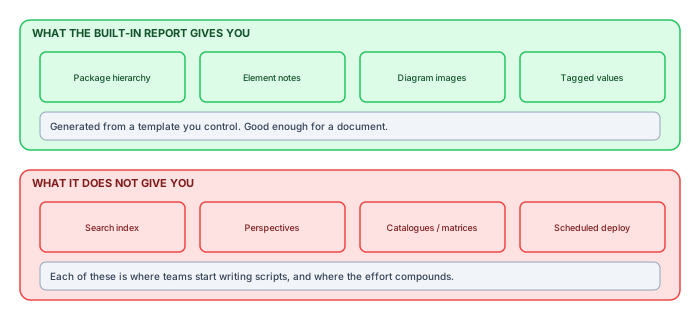
Before evaluating any publishing tool, it is worth being precise about what Sparx already does, because a significant number of teams buy or build something they did not need. EA's HTML report generation walks a package, renders each element with its notes and tagged values, exports diagram images, and writes a linked set of pages against a template you can edit.
For a bounded deliverable — one package, handed to one audience, once — that is genuinely sufficient. If that is your situation, stop reading and use it.
Where it stops
Search
The generated output has no index. A reader looking for an application by name uses the browser's find-on-page, which only searches the page they are already on. On a repository of any size this is the first thing readers complain about, and it is not fixable from the template — a usable search needs an index built at generation time and a client-side engine to query it.
Audience scoping
A report covers the packages you point it at. If four audiences need four different subsets, you generate four reports and maintain four configurations. The subsets overlap, so elements appear in several outputs, and keeping the definitions consistent becomes its own job.
Tabular views
Element-by-element pages answer "tell me about X". They do not answer "list every application holding personal data with its owner and review date", which is the question that actually arrives. That needs a catalogue built across elements, sortable and filterable, which means generating tables from tagged values rather than rendering one page per element.
Automation and deployment
Report generation runs from the GUI. Getting it to run unattended, deploy the result somewhere, and record what it did means scripting it against the automation interface and scheduling that script yourself — at which point you own a small piece of software with no tests.
WebEA and Prolaborate change the comparison
Sparx's own ecosystem does not stop at the HTML report, and an honest survey has to place its two other publishing answers before comparing anything external. Both ride on Pro Cloud Server, and both answer a different question than the report does.
WebEA gives browser access to the live repository — no generation step, no staleness, the model as it is right now, viewable by anyone with a licence seat and a URL. Prolaborate curates the same live repository into dashboards and audience-specific views, and adds the discussion and review features that make business stakeholders participants rather than spectators. If your need is "stakeholders should see and comment on current work", these are strong answers and buying them is far saner than building one.
What neither provides is a publication in the sense this article has been circling: a dated, reproducible, self-contained snapshot that can be cited as evidence, hosted anywhere, and handed to audiences who will never have accounts. Live views are always current and therefore never citable — the page an auditor saw in March is not retrievable, because March's model is gone. The distinction between live access and published snapshot is not a tooling gap but a genuine fork in requirements, and plenty of estates correctly need both: Prolaborate for the working conversation, a generated portal for the record. The mistake is expecting either to do the other's job, and the built-in HTML report, WebEA and Prolaborate triangulate three different corners of that requirement space — which is precisely why "does Sparx do publishing?" has no one-word answer.
The build-it-yourself trap
What usually happens next is instructive. A capable architect writes a script. It works. Then the requests arrive: can it also do a search box, can it match our brand, can it run on Fridays, can it exclude the archive package, can it produce a version we can hand to the auditor.
Each is a day of work. Together they are a product, and it is now on one person's laptop with no handover. The cost is not the first script; it is the eighteen months of small requests after it.
A rough test: if the list of things you want beyond the built-in report is longer than four items, you are specifying a product. Decide deliberately whether to build or buy it, rather than arriving there one script at a time.
What "good" looks like beyond the built-in report
If you do go further — built or bought — these are the capabilities that separate a report from a portal, roughly in the order readers notice their absence:
- Search that runs in the browser, with facets by type and package.
- Perspectives — one generation producing several scoped views, so four audiences do not mean four configurations.
- Catalogues and matrices for the lookup questions.
- Diagrams that behave — interactive rather than flat images, with shapes linking to their elements.
- Scheduling and deployment, so freshness is a property of the system rather than of someone's memory.
- A publication report recording what was included and what was skipped, because a portal you cannot audit is a portal you cannot cite.
The honest recommendation
Use the built-in report when the deliverable is a document. Move beyond it when the deliverable is an audience — a standing group of people who need to answer their own questions, repeatedly, without asking you.
That transition point is usually visible in your inbox. When the same three questions arrive every month from different people, the repository is being used as a service and needs to be published like one.
Squeezing the most from the built-in report
If the built-in report is your correct answer, it can be made noticeably better than its defaults, and the improvements are cheap enough that skipping them is negligence rather than economy.
The template deserves an hour. Hide the sections that render empty for your metamodel — the reader who scrolls past "Scenarios: none" on four hundred consecutive pages draws conclusions about the whole artefact. Add a tagged-value table to the element template limited to the keys your practice actually maintains, so owner and lifecycle appear as data rather than being buried in prose. And put the generation date and source package in the header of every page, because the report will be forwarded as a zip, live on a share for a year, and be quoted long after anyone remembers which week it described — the one-line provenance stamp is what keeps that quoting honest.
Generation can leave the GUI behind: the automation interface exposes the report generator, so a short script can produce the same output unattended — which converts the report from an artefact someone remembers to make into a publication with a cadence, and that single change addresses the freshness half of the report's reputation problem. Deploy the output to a real web location rather than a file share while you are at it; browsers treat network-share HTML with security restrictions that quietly break navigation, and "the report is broken" complaints are frequently "the report is on a share" complaints in costume.
What these improvements cannot do is cross the line the earlier sections drew — no template edit produces a search index, and no scheduling script produces a cross-element catalogue. The point of polishing the built-in report is not to sneak past that line; it is to be certain that when you do cross it, you are crossing it for the capabilities that need the crossing, not for irritations an afternoon of template work would have cured.
What the template can and cannot reach
Since the built-in report is template-driven, it is worth knowing where the template's reach ends — that boundary is what determines whether a given request is an afternoon or a project.
Templates work well for anything that is a property of the element being rendered: name, notes, tagged values, its own connectors, the diagrams it appears on. They struggle with anything requiring a view across elements, because the generation model is fundamentally one-element-at-a-time.
| Request | Template? | Why |
|---|---|---|
| Show each element's tagged values | Yes | Local to the element |
| Show incoming and outgoing relationships | Yes | Available on the element |
| List all applications with no owner | No | Requires aggregation across elements |
| A requirement-to-test coverage matrix | No | Two-dimensional, cross-element |
| Restyle to match brand | Yes, with effort | It is HTML and CSS underneath |
| Search across the output | No | Needs an index built at generation time |
The scripting escape hatch
Once a request falls outside the template, the natural next step is EA's scripting engine, and it is genuinely capable — the automation interface gives you the whole model.
Two cautions from watching this play out repeatedly. First, scripts that generate output tend to accumulate presentation logic, and presentation logic in a scripting language with no tests is where these efforts go to die. Second, the script has to run somewhere on a schedule, which means it is now a small piece of production software owned by whoever wrote it.
If you go down this path, keep the extraction and the rendering separate from the start. Extract to a structured file, render from that file. It sounds like overhead on day one and it is the difference between something maintainable and something nobody dares touch in year two.
The cost conversation, with real numbers in it
Build-versus-buy for this capability is usually argued with the wrong ledger, so it is worth writing the entries down. The built-in report costs nothing and does what it does. The in-house script costs its author perhaps two weeks to reach "works", which is the number everyone remembers — and then, on the evidence of every estate we have seen run one, two to four days a month indefinitely: the brand tweak, the new perspective, the EA upgrade that moved something, the Friday the schedule silently stopped. Over eighteen months that is another two to three person-months, spent by the practice's most senior modeller, plus the risk column that never makes the spreadsheet: the product has one maintainer, no tests, and a bus factor of exactly one.
A commercial platform inverts the shape: a licence line that procurement can see, near-zero build, and configuration measured in days. The honest fine print on that side is that configuration is not zero — scoping, branding and metadata mapping still need someone who knows the repository — and that a platform's roadmap is not your roadmap, so the one exotic requirement your practice cherishes may never come. The crossover arithmetic is unromantic: an in-house pipeline is defensible when the practice contains someone whose actual job description includes maintaining it, and rarely otherwise. "Someone technical is enthusiastic" is how the eighteen-month trap in the previous section gets its first tenant.
There is a special case worth naming because it is this article's most frequent reader: the consultancy or the one-architect practice serving several clients. There, the economics flip — the pipeline is built once and amortised across every client, maintenance is the business rather than a distraction from it, and the in-house route becomes a product decision instead of a trap. The difference between that situation and the enterprise team is not skill; it is whether publication machinery is the day job or the hobby, and the eighteen-month rule only punishes hobbies.
A reasonable stopping point
Not every organisation needs a portal. If your architecture audience is a dozen people who all have EA, the built-in report for the occasional handover is genuinely the right answer, and the time saved by not building anything is real.
The signal to go further is the one described above: the same questions arriving repeatedly from people who cannot answer them themselves. Until that is happening, the built-in report is not a compromise — it is correctly sized.
When the auditor asks for last March
One scenario separates the report-as-document from the portal-as-system more sharply than any feature list, and it arrives in every regulated estate eventually: someone official asks what the architecture said at a specific point in the past. With the built-in report, the answer depends on whether the zip from that week still exists on someone's drive, whether it was the version actually circulated, and whether anyone can say what packages it covered — three questions whose honest answers are usually "maybe", "unclear" and "no".
A publication system answers differently because it keeps a manifest: each run records when it ran, from which repository state, with which scope and configuration, what the quality gate found, and what was deliberately excluded. Pair the manifest with retained snapshots and the March question becomes a lookup followed by a reproduction, not an archaeology project. The manifest costs almost nothing to produce — the pipeline knows all of these facts at the moment of publication — and it is the single feature on the earlier capability list that the built-in report cannot approximate even with heroic template work, because the report generator has no concept of the run as an event worth recording.
This is worth weighing early rather than late, because it is the requirement that tends to arrive suddenly, with a deadline, attached to someone humourless. Practices that chose their publishing approach purely on reader experience sometimes rebuild it eighteen months later on evidence grounds; practices that knew an audit was in their future chose accordingly the first time. If your architecture function exists partly because a regulator expects it to, the citability column is not an optional extra — it is the requirement wearing a quiet disguise.
The comparison on one page
Compressed for the meeting where this gets decided:
| Need | Built-in report | In-house script | Publishing platform |
|---|---|---|---|
| One package, one audience, once | Right answer | Overkill | Overkill |
| Search, facets, catalogues | No | Months of work | Core feature |
| Several scoped audiences | Parallel configs | Possible, fragile | Core feature |
| Scheduled, gated, deployed | Script it yourself | You own it | Core feature |
| Audit-grade manifest and replay | No | Rarely built | Ask the vendor to show it |
| Up-front cost | None | Weeks, then forever | Licence |
| Who maintains it | Sparx | One colleague | Vendor |
The rows are the article; the columns are the honest options. Most practices belong in the first column longer than their enthusiasm suggests, and should leave it later than boredom but earlier than the audit — the two mistimings this comparison exists to prevent.