The same data, two doors
If you are reading a Sparx repository from code, there are two supported routes: the COM automation interface on a machine with EA installed, or Pro Cloud Server's HTTP interface. Both give you the model. The choice is almost entirely about where your code has to run and what your organisation already has.
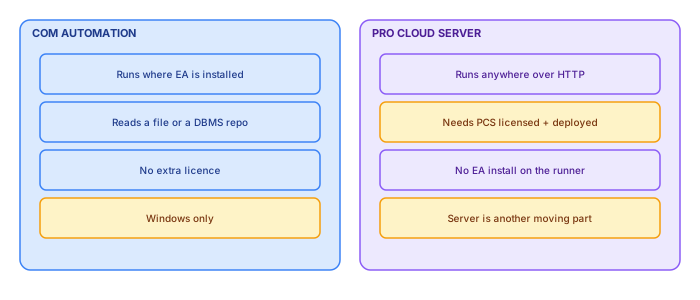
COM: no new infrastructure
The case for COM is that it adds nothing. If you have EA, you have the API. There is no server to license, deploy, patch or get through a security review, and it works against whatever repository your team already uses — a file, a SQL Server instance, whatever.
The constraints are real but narrow. It runs on Windows, on a machine with EA installed, which in practice means a Windows scheduled task on a server or a build agent that someone has to maintain. And it is out-of-process COM, so it is slower per operation than an HTTP call returning a batch.
Pro Cloud Server: no EA on the runner
The case for PCS is architectural. Your extraction code becomes an HTTP client, which means it can run in a container, on Linux, in a CI pipeline, anywhere. No EA installation, no Windows dependency, no COM.
The cost is that PCS is a licensed, deployed component with its own lifecycle. If you already run it — many organisations do, for WebEA or for shared repository access — then using it costs nothing extra and is clearly the better path. If you do not, standing it up to enable a publication job is a large amount of machinery for the outcome.
How to decide
| If… | Then |
|---|---|
| You already run Pro Cloud Server | Use it. The decision is made. |
| Your CI runs Linux containers only | PCS, or accept a Windows agent |
| Single repository, Windows estate, no PCS | COM. Do not deploy a server for this. |
| Multiple repositories across teams | PCS starts to pay for itself |
| Air-gapped or tightly restricted network | COM on a machine that already has access |
The thing that actually differs
Beyond deployment, one practical difference is worth planning for: concurrency behaviour.
COM extraction opens the repository the way a user would. On a file-based repository that can contend with an architect who has it open. PCS is designed for concurrent access and does not have that problem, which matters if your publication has to run during working hours.
If you are on COM against a shared file repository, schedule outside working hours and fail loudly on a lock error rather than retrying silently. A publication that quietly skipped because someone had the model open is worse than one that visibly failed.
Testing without either
Whichever you choose, do not couple your generation logic to it. Put an adapter behind an interface, and add a third implementation that reads a captured snapshot from disk.
That third one earns its keep immediately: templates, branding and layout can then be iterated in seconds against real data without touching a repository at all. It also makes the rendering testable in CI on any platform, which neither COM nor PCS allows.
A note on choosing later
Because both paths produce the same model, the choice is genuinely reversible if you keep the adapter boundary clean. That is worth protecting: teams that inline COM calls through their generation code end up unable to move to PCS when their estate grows, and the rewrite is larger than the original build.
The adapter boundary
Since the choice is genuinely reversible, it is worth being precise about what the boundary should look like — because a leaky one is how teams end up unable to move.
The adapter's job is to return a complete snapshot of the model in your own vocabulary, and nothing else. It should not decide what to include, apply scoping rules, format anything, or know that a portal exists.
class RepositoryAdapter(Protocol):
    def open(self) -> None: ...
    def snapshot(self, scope: Scope) -> RepositorySnapshot: ...
    def close(self) -> None: ...

# three implementations, one interface
#   ComAdapter       — EA automation, Windows
#   PcsAdapter       — Pro Cloud Server over HTTP
#   SnapshotAdapter  — a captured file, for tests and fast iteration
The third implementation is the one that proves the boundary is real. If you can render a complete portal from a file with no modelling tool present, the coupling is genuinely gone.
What differs between the two in practice
Beyond deployment, expect small behavioural differences that are worth discovering in testing rather than in production: identifier formats, how tagged values with very long values are returned, and whether diagram geometry comes back in the same coordinate convention.
None is difficult. All are the kind of thing that produces a subtly wrong portal if you assume the two paths are identical and never verify it against the same repository.
What the runner needs in each case
The choice is usually presented as a capability question and is more often decided by what the machine running the extraction is allowed to have on it, which is an infrastructure conversation with different people in it.
A COM extraction needs Enterprise Architect installed on the runner, a licence available to it, and a 32-bit process able to talk to the registered automation server. That means a Windows machine, a licence consumed while the job runs, and an EA upgrade schedule the pipeline has to follow.
A Pro Cloud Server extraction needs network access to an HTTPS endpoint and credentials. The runner can be anything, including a Linux container in whatever CI system the organisation already uses, which removes an entire class of platform argument.
In organisations where getting a Windows VM with EA installed and licensed takes six weeks of procurement, this is not a technical trade-off at all — it decides the answer before anyone compares features.
Performance, and where the time actually goes
Both paths feel slow the first time and for different reasons, and the instinct to optimise the wrong half is strong.
COM is chatty. Every property access is a cross-process call, and walking a model element by element produces tens of thousands of them. The cost is per call, not per byte, so the fix is fetching collections rather than iterating and re-querying — and where the API allows a direct query against the repository, using it instead of walking the object model is often an order of magnitude.
The Pro Cloud Server path is request-bound. Latency per request dominates, and the fix is fewer, larger requests plus parallelism where the server tolerates it. What kills throughput here is a pattern of one request per element, which is the natural way to write it and the wrong one.
Both end up in the same place: extract in bulk, assemble in memory, and treat the source as something you visit as few times as possible. A well-written extraction of a large enterprise model should be minutes, not hours, and an extraction taking hours is almost always making one call per element somewhere.
Failure modes that differ
The two paths break differently, and the difference matters for unattended runs more than for anything you watch.
COM fails in ways that need a human on the machine. A dialog opens because a model needs an upgrade decision and the process waits forever. A licence is unavailable because another session took the last one. The EA process is left running after a crash and the next run finds a lock. None of these produce a clean error code, and a scheduled job that hangs silently is worse than one that fails.
Pro Cloud Server fails like a web service, which is to say recoverably: timeouts, authentication expiry, HTTP status codes. Those are all things a pipeline can retry, alert on, and reason about.
The practical mitigation for COM is a hard timeout around the whole extraction and a kill of any orphaned process before starting. Both are unglamorous and both are the difference between a scheduled publication that runs for a year and one that stops in week three without telling anyone.
Credentials and what each path exposes
Whichever path is chosen, the extraction runs unattended and holds credentials, and that is worth a moment of design rather than a connection string in a script.
The COM path typically holds database credentials, because EA connects to the repository directly. Those credentials usually have more privilege than the extraction needs — often write access to the whole repository — because they are the same credentials a modeller would use. A read-only database account for the extraction is straightforward and rarely done.
The Pro Cloud Server path holds an application credential, which can be scoped to a model and to read access by the server itself. That is a meaningfully better position, and it is one of the stronger arguments for the server path in a regulated environment.
In both cases the credential belongs in whatever secret store the organisation already runs, and the extraction log should record that it ran and against what, but never the credential or a connection string containing one — a surprisingly common leak into build logs that are readable by everybody.
Keeping the choice reversible
The decision does not have to be permanent, and estates that treat it as permanent end up rewriting a publication pipeline when the infrastructure position changes.
What makes it reversible is an adapter boundary drawn at the right place: the extractor returns a plain in-memory representation of the model, and everything downstream — rendering, catalogues, search index, deployment — consumes that and knows nothing about where it came from.
The temptation to leak the source through that boundary is constant, usually as a small optimisation: fetching one more attribute lazily, or passing a connector object through because the renderer needs something the representation does not carry. Every one of those makes the swap harder, and they accumulate quietly.
A cheap test keeps it honest: write a third implementation of the adapter that reads from a fixture file, and run the whole pipeline against it. If that works, the boundary holds, and it also gives you a test suite that runs without EA or a server anywhere near it.
What neither path gives you
Both extract the model. Neither extracts the things a publication usually turns out to need, and discovering that late is the most common cause of a pipeline that works and produces a portal nobody finds useful.
- Meaning for tagged values. You get names and values. Which of them are lifecycle, which are criticality, and what the permitted values mean is a mapping that lives in your configuration.
- Audience scoping. The extraction returns everything the credential can see. Deciding what a given perspective publishes is a separate layer, and it has to run before the search index is built.
- Diagram legibility. Both give you the elements and their positions. Whether the result is readable at portal width is a rendering problem the extraction has no opinion about.
Running it on a schedule that people trust
Whichever path is chosen, the extraction ends up on a timer, and the thing that determines whether the published portal is trusted is not the extraction technology — it is whether failures are visible.
A pipeline that fails silently produces the worst outcome available: a portal that looks current, is three weeks stale, and nobody knows. Readers make decisions from it and are wrong for reasons they cannot see. This is meaningfully worse than a portal that is obviously broken, and it is the default behaviour of most scheduled jobs.
Three things prevent it, and none needs much work. The publication carries its extraction timestamp on every page, so staleness is visible to any reader. A failed run alerts a named person rather than a mailbox nobody reads. And a run that has not completed within a sensible window alerts too — because the COM failure mode is a process that hangs rather than one that exits, and a job that never finishes never fails.
Writing the decision down
Whichever door you choose, the choice deserves a one-page decision record, because this is exactly the class of decision that gets relitigated — by a new team member who prefers the other path, by a vendor renewal that changes the economics, by an incident that makes the road not taken look retrospectively obvious. A written record converts each of those moments from an argument into a review.
The record's shape is standard and the content writes itself from the sections above: the context (estate size, runner constraints, licence position, who operates what); the decision, in one sentence; the drivers that actually decided it — be honest if it was "we already had a Windows box and nobody wanted to talk to procurement", because that is a real driver with a real expiry date; the consequences accepted, including the ones that stung, like owning EA upgrades on the runner or paying for PCS seats; and the revisit triggers, named concretely. The triggers are the part future readers will thank you for: "revisit if the runner's maintenance exceeds a day a month, if PCS arrives in the estate for other reasons, if extraction time crosses thirty minutes, or if the team loses its Windows-comfortable operator."
File it wherever the practice keeps its other architecture decisions — which, in a pleasing bit of recursion, is the repository itself, where the decision about how to read the repository becomes one more element with an owner, a date and a lifecycle. The adapter boundary made the choice technically reversible; the decision record makes it organisationally reversible, which is the harder and more valuable property. Choices age; recorded choices age gracefully.
Both doors open onto the same room; the choice is about which corridor your organisation walks most comfortably. Decide on operations, record the reasons, keep the adapter honest — and revisit without drama when the triggers fire, because the best extraction path is the one that is still boring in three years.
The estate changes, the team changes, and one day the other door will be the right one — which is why the adapter, not the choice, is the real deliverable.