The desktop problem
Enterprise single sign-on assumes a browser. There is a redirect, a session cookie, and a server that can keep a client secret. A desktop modelling tool has none of those: no cookie jar the IdP will recognise, nowhere to hide a secret, and no server-side session.
The result is that desktop tools often end up outside SSO entirely — a separate username and password, provisioned separately, deprovisioned never. In a regulated environment that is exactly the gap an access review finds.
The flow that works
OAuth 2.0 for Native Apps settles this, and the answer is the Authorization Code Flow with PKCE, driven through the system browser.
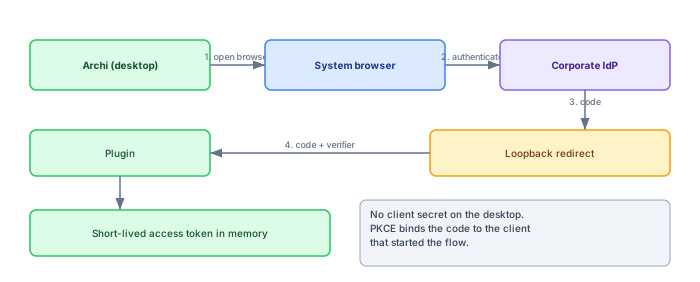
- The plugin generates a random verifier and its hash, the challenge.
- It opens the system browser at the IdP, passing the challenge and a loopback redirect URI.
- The user authenticates in the browser, where their existing corporate session, MFA and conditional access all apply.
- The IdP redirects to
http://127.0.0.1:{port}, where the plugin is briefly listening, delivering an authorization code. - The plugin exchanges the code plus the original verifier for tokens.
PKCE is what makes step five safe without a client secret: only the process that generated the verifier can redeem the code, so an attacker who intercepts the code cannot use it.
The loopback listener, done carefully
Step four of the flow hides most of the implementation detail, and the detail is where desktop SSO integrations go wrong in practice. The plugin has to stand up a tiny HTTP listener for the redirect, and a listener written casually is a listener that fails a security review.
Bind to 127.0.0.1 explicitly, never to all interfaces — the difference between "receives one redirect from the local browser" and "accepts connections from the network" is one constructor argument, and it is the first thing a reviewer checks. Ask the operating system for an ephemeral port rather than hard-coding one, because whatever port you hard-code will be taken on somebody's machine by an agent you have never heard of; the redirect URI is assembled after the port is known, which is precisely why the native-apps profile lets loopback redirects vary by port. The listener should accept exactly one request and shut down, with a timeout measured in a couple of minutes so that an abandoned login does not leave a socket open all afternoon.
Carry a random state value out to the IdP and verify it on the way back, so a stray or malicious request to the port cannot be confused with the login you actually started. And spend the twenty minutes on the page the browser lands on: "Signed in — you can close this tab and return to Archi" with the right branding is the difference between a flow that feels engineered and one that feels improvised. It is the only part of the whole integration most users ever see.
None of this is exotic. It is all written down in RFC 8252, which is short, readable, and the single most useful document to send to anyone who doubts that a desktop tool can do OAuth respectably.
Registering the client with the identity team
The technical flow is a solved problem; the organisational flow is where the calendar time goes. Somebody has to register the application with the identity provider, and that somebody is usually an identity team with a form that assumes you are either a web application or a mobile app from a store. A desktop modelling tool is neither, and the conversation goes better if you arrive knowing exactly what to ask for.
The request is: a public client registration — no client secret, because a desktop application cannot keep one — with PKCE required, the authorization code grant only, and a loopback redirect URI. Entra ID, Okta and Keycloak all support registering the loopback host without pinning the port; if the identity team balks at the varying port, RFC 8252 section 7.3 is the citation that says this is how native apps are supposed to work, not a workaround you invented. Ask for the minimal scopes — OpenID, profile, the groups claim — and nothing that smells like directory-wide read access, because that request is what turns a two-day approval into a two-month one.
Register one client per environment rather than reusing production's registration for the test server. It costs nothing at the IdP and it means conditional access policies, token lifetimes and group claims can be tightened in production without breaking every experiment. And give the registration a name a stranger can decode in the IdP's portal three years from now — "Archi collaboration — production" ages better than the project codename that stopped meaning anything when the project ended.
Use the system browser, not an embedded one
It is tempting to embed a web view inside the application. It looks better and keeps the user in the tool. It is the wrong choice for three reasons.
- No SSO. An embedded view has its own cookie jar, so the user's existing corporate session does not apply and they log in again.
- Conditional access breaks. Device compliance and certificate-based policies frequently do not evaluate correctly in an embedded browser.
- The user cannot verify anything. There is no address bar, so the one defence against a phished login screen is removed. Many IdPs now refuse embedded views for exactly this reason.
What not to store
A desktop application cannot protect a secret from the user or from anything running as the user. That constrains what is acceptable to keep:
| Item | Where | Why |
|---|---|---|
| Access token | Memory only | Short-lived; re-obtaining it is cheap |
| Refresh session | Server-side, rotating | The client holds a handle, not a long-lived credential |
| Client secret | Nowhere | Public clients do not have one; PKCE replaces it |
| Anything in the model file | Never | Model files get emailed, committed and shared |
The last row is the one specific to modelling tools and the one worth being emphatic about. A token written into a model file leaves the building the first time someone attaches that model to an email.
Rolling it out without breaking Monday
The integration is done; forty architects are using local accounts today. The cutover deserves the same care as the code, because the first morning someone cannot open a model is the morning the whole initiative gets its reputation.
Run both schemes in parallel for a period, with SSO as the default and local login demoted to a visible-but-secondary path. Match identities by email address ahead of the switch and surface the matches to each user on first SSO login — "we have linked this account to your existing work" — rather than silently creating duplicates, because two identities per architect means split edit histories and a reconciliation job nobody enjoys. Watch one number during the parallel period: the count of local logins per week. It falls fast, and the stragglers it exposes are nearly always service scripts and shared machines — precisely the cases that need an explicit decision rather than a surprise on cutover day.
Then actually finish. Announce a date, disable local login for humans on that date, and keep only the break-glass accounts described above. Parallel schemes left running indefinitely combine the audit story of neither; the deprovisioning benefit only exists once the directory is the sole way in.
The emergency account
Every SSO integration needs an answer to "the identity provider is down". For a modelling tool the honest answer is usually a small number of local accounts, used only for that case.
If you have them, treat them as break-glass: named, individually owned, logged loudly on every use, reviewed quarterly, and with no ability to administer the platform. The failure mode is that emergency accounts become convenient, get shared, and quietly become the normal way people log in.
Group mapping
Authentication is the easy half. The reason to integrate with the IdP is usually authorization: mapping group membership to roles, so that access follows the joiner-mover-leaver process rather than a spreadsheet.
One practical note: map groups to roles inside your platform rather than relying on the IdP to send exactly the claims you want. Group claims get truncated when a user is in many groups, naming conventions change, and the mapping is a piece of configuration your administrators should be able to see and change without a ticket to the identity team.
Token lifetimes, and what breaks
Short-lived access tokens are correct and interact awkwardly with how modelling actually happens.
An architect opens a model at nine and publishes at half past eleven. If the access token expired at half past nine and the client did not renew silently, the publish fails at the worst possible moment — after the work, not before it.
The pattern that works: short access tokens, a server-side refresh session that rotates, and a client that renews proactively rather than reactively. Renewing when a token is half expired, in the background, means the failure surfaces while the architect is still working rather than at publish time.
Proxies, TLS inspection and the awkward fifth of machines
On four machines out of five the flow above just works. The fifth machine is the one the rollout will be judged on, and its problems are almost always network-shaped rather than OAuth-shaped.
Corporate TLS inspection is the usual suspect. The plugin's call to the token endpoint goes through a proxy that re-signs the traffic with the company's own certificate authority, and if the plugin ships with a pinned or bundled trust store instead of using the operating system's, the exchange fails with an error message that mentions certificates and helps nobody. Use the platform trust store, and this class of problem disappears — the machines are already provisioned to trust the proxy.
The second suspect is the proxy that requires authentication of its own, which desktop Java applications famously handle half-heartedly. Respect the system proxy settings rather than inventing a configuration file; the difference shows up on exactly the locked-down machines whose owners are least equipped to debug it. The loopback redirect itself, usefully, is immune to all of this — traffic from the browser to 127.0.0.1 never leaves the machine, and no proxy configuration in the world can misroute it.
Then there is the machine that is simply offline — the train, the client site with guest Wi-Fi that blocks everything. A modelling tool is not a web page; architects expect to open a local copy and work. The honest design accepts that: authentication gates access to the shared repository, not to the tool, and an expired session while offline means working locally and reconciling when the network returns — the same posture as any other disconnected-editing question, and one more reason the client should never treat "cannot reach the IdP" as a fatal error.
What this looks like in Archi specifically
Everything so far applies to any desktop tool; it is worth being concrete about the one this article is actually about. Archi has no native SSO — the open-source tool assumes files on disk, and identity only enters the picture when the models outgrow those files and a shared server appears behind the tool. At that point the natural shape is a small Archi plugin that owns the login flow and a server that owns everything secret.
The division of labour matters. The plugin generates the verifier, opens the system browser, catches the loopback redirect and holds the access token in memory — nothing else. The server holds the rotating refresh sessions, validates tokens on every call, and maps group claims to scoped permissions on the estate. Nothing that outlives the process ever sits on the workstation, which keeps the workstation out of scope for most of the questions a security review asks.
The pleasant surprise for architects is that the experience is better than what it replaces, not worse. The browser opens, the corporate session is already there, MFA happens where MFA always happens, and the tool is signed in before they have finished reaching for the password they no longer need. Adoption objections evaporate on contact with a flow that is faster than typing credentials.
What the audit sees
A last argument for doing this properly, aimed at whoever approves the effort. The moment authentication runs through the corporate IdP, every sign-in to the modelling platform lands in the identity provider's logs — the same logs the security team already monitors, correlates and retains. Who signed in, from which device, under which conditional access policy: answered by infrastructure you did not have to build.
Pair that with the platform recording what each identity did — who changed which model, who published, who exported — and an access review stops being an archaeology project. The reviewer asks who has access: the answer is a directory group. They ask who had access in March: the IdP has it. They ask what those people touched: the platform's own records have it, keyed to the same identities. Local accounts can be made to tell a story this coherent only with discipline that, in our experience, no organisation sustains past the first reorganisation.
Deprovisioning is the point
It is worth remembering why this integration is worth the effort, because the effort is real and the benefit is easy to forget.
With local accounts, someone leaving the organisation requires a manual step in your platform. That step is missed regularly — not through negligence but because the leaver process covers the systems the identity team knows about. An architecture repository acquired by one team is rarely on that list.
With SSO and group-mapped authorization, removing someone from the directory removes their access everywhere, including here, on the day it happens. That is the control an access review is looking for, and it is much easier to demonstrate than a manual process nobody performs consistently.
Six questions to ask any tool that claims SSO
If you are evaluating rather than building, the same material compresses into questions whose answers separate an integration from a checkbox. Does the login use the system browser, or an embedded view? Is the client registered as a public client with PKCE, or does the desktop app ship a client secret it cannot protect? Where do refresh sessions live, and do they rotate? What exactly is written to disk on the workstation after a successful login — the acceptable answer is close to nothing. Can group claims drive authorization inside the tool, and is the mapping visible to your administrators? And what happens when the identity provider is unreachable — is there a break-glass path, and is it loud?
A vendor who answers these in specifics has done the work described in this article. A vendor who answers "we support SSO" has answered a different question, and the difference will surface in your first access review rather than in the demo.