The options, honestly ranked
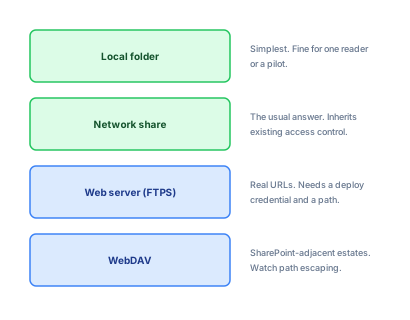
A static portal is a folder of files, so deployment means getting a folder somewhere readers can reach. The options are unglamorous and the differences between them are mostly organisational rather than technical.
Network shares are underrated
The instinct is to want a real URL. It is worth resisting long enough to ask what a share would cost, because in a corporate environment it has three properties that are hard to get any other way.
- Access control already exists. The share inherits your directory groups. Nobody has to design an authorisation model for the portal, and nobody has to review one.
- No new infrastructure. No web server, no certificate, no firewall rule, no service to monitor.
- It is already backed up. Whatever protects your file estate protects the portal.
The trade-off is that file:// links are awkward to share in chat and email, and some browsers restrict what a page loaded from a share can do. If your portal relies on fetching a search index at runtime, test it from the share before committing — that is exactly the kind of thing that works on a developer's machine and fails for everyone else.
Web targets and the credential problem
FTPS and WebDAV both give you a real URL, which is what most organisations eventually want. Both introduce the same operational problem: a credential that has to be stored somewhere the scheduled job can read.
Two rules keep this from becoming an incident. Use an account that can write only to the portal's directory and nothing else. And store the secret in the platform's credential store rather than in a config file next to the job — on Windows that means Credential Manager or DPAPI, not a line in a script.
The failure mode to plan for is not theft, it is expiry. A rotated password silently breaks the deployment while generation continues to succeed, so the job reports success and the portal stops updating. Alert on the deploy step specifically.
The atomic replace problem
Here is the operational detail that catches almost everyone, and it has nothing to do with which target you chose.
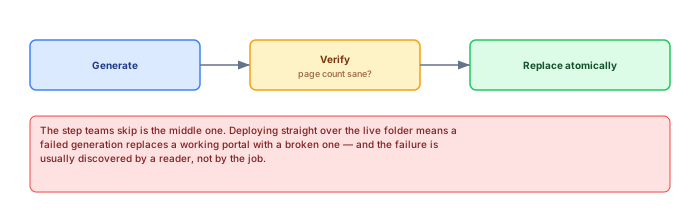
A publication run generates a few thousand files and copies them over the previous ones. If the generation half-failed — the repository was locked, a diagram failed to render, the extraction timed out — you have just replaced a working portal with a partial one. Readers find out before you do.
The fix is cheap: generate to a staging directory, sanity-check the result, and only then replace. A page-count check against the previous run catches most of it — if you published 1,897 pages last week and this run produced 12, something is wrong and the deployment should not proceed.
Cleaning the target
A subtler variant: if you copy over the target without clearing it, deleted content lingers. An element removed from the repository keeps its page, still reachable by anyone holding the link, indefinitely.
Clearing the target before deploying fixes that but makes the atomic-replace problem worse, because now there is a window where the portal is empty. Deploying to a new directory and switching a pointer — a symlink, a virtual directory, or simply a dated folder plus an index that links to the current one — avoids both.
Keep the old ones
Deploy to a dated folder and retain them. Storage is trivial next to the value of being able to say what the architecture looked like in March, and it turns a rolling current-state portal into something that can be cited by date in a decision record or an audit response.
Serving from a share, in practice
Because the network share is so often the right answer, it is worth being specific about what breaks there and what does not.
Plain navigation works. Relative links between pages work. Images and stylesheets load. What is unreliable is anything the page fetches with JavaScript at runtime — which, for an architecture portal, usually means the search index and a lazily-loaded repository tree. Browsers apply different origin rules to file://, and the behaviour varies between browsers and between versions.
Two ways through. Either inline the data the page needs into the page itself — larger pages, no fetches — or serve the same folder over HTTP from an existing internal web server, which is often a five-minute change to a configuration file rather than a new piece of infrastructure.
Retention and naming
If you keep dated publications, the naming convention matters more than it seems, because it is what people will link to.
A stable /current/ path plus dated archives works well: people who want the latest link to the stable path, people citing evidence link to the dated one, and both keep working. The alternative — only dated folders — means every link people share goes stale, and they will notice and stop sharing them.
Getting a URL people will paste
The deployment target decides whether the portal becomes a reference or stays a curiosity, and the mechanism is unglamorous: whether someone can paste a link into a chat message and have it work for the person who receives it.
A UNC path fails this in a specific way. It works for the sender, it works for anyone on the same network with the same drive mapping, and it fails silently for everyone else. The recipient sees an error that says nothing about permissions or mapping, concludes the portal is broken, and does not try again.
An HTTP URL on an internal hostname works for everybody who can reach the host, produces a comprehensible error for everybody who cannot, and survives being forwarded. That difference is worth more than any feature comparison between deployment targets, and it is the strongest argument for putting a web server in front of a share even when the share would technically do.
Stable URLs across republication
A portal republished monthly is a set of files replaced monthly, and the question nobody asks until it bites is whether an element keeps the same URL from one publication to the next.
If URLs are derived from element identifiers, they are stable and everything works: a link shared in March still resolves in November. If they are derived from names or from a position in the package tree, they change whenever someone renames or reorganises, and every link anyone shared is dead without notice.
Identifier-based URLs are ugly and correct. The compromise that keeps both properties is a readable slug with the identifier in it, so the URL is legible and still stable under renaming. Whichever is chosen, it has to be chosen before anyone shares a link, because changing it later breaks every reference at once.
Serving it from cloud storage
Object storage with static hosting is a natural fit for a generated portal and it introduces two problems that the on-premises options do not have.
The first is access control. Object storage is public or authenticated by mechanisms that are not the corporate identity provider, and bridging that gap needs something in front — an identity-aware proxy, or the platform's own access product. Skipping it produces the failure mode where an architecture register is one guessed URL away from anyone on the internet.
The second is that object storage has no directories, only key prefixes, which means there is no atomic rename and therefore no clean way to swap one publication for another. A partial upload is visible to readers as a half-updated portal. Writing to a new prefix and repointing the front end afterwards restores atomicity and is worth the extra step.
What breaks when the portal moves
Portals get relocated: from a share to a web server, from one host to another during a data centre migration, from on-premises to cloud. The move is simple and the fallout is not.
Every link anyone has shared points at the old location. Every bookmark. Every reference in a document, a wiki, a ticket. Nobody has a list, and the people affected are exactly the readers you spent a year acquiring.
The mitigation is to leave a redirect at the old location for at least a year, and to have anticipated the problem by publishing through a stable hostname from the beginning. A hostname that names the service rather than the machine costs one DNS entry and makes every future move invisible to readers, which is the cheapest insurance available here.
Portals in more than one environment
Estates that take publication seriously end up with more than one portal: a production one from a baseline and a preview one from head, so changes can be seen before they are published to everybody.
The value is real — reviewing a rendering change against production content beats discovering it after publication — and it introduces a confusion that will bite somebody: two portals that look identical, one of which is not the published architecture.
Making them visually distinguishable is not optional. A coloured banner on the preview, on every page, saying what it is. The alternative is a screenshot from the preview environment reaching a steering committee, which happens exactly once and is remembered for years.
How much it costs to host
Static portals are cheap and it is worth having the number, because the hosting question is often raised as an objection by someone assuming a server and a database.
A generated portal for a substantial estate — a few thousand elements, several hundred diagrams — is typically tens to low hundreds of megabytes, most of it images. Twelve monthly retained publications is a few gigabytes. There is no runtime, no database, and no scaling concern, because serving static files to a few hundred internal readers is not a workload.
The real costs are elsewhere: the extraction runner, whatever authenticates the front end, and the time of whoever maintains the pipeline. Naming those explicitly moves the conversation off hosting, which was never the expensive part.
Deploying from the pipeline rather than by hand
The first few publications are copied manually and it works, so the manual step persists. What ends it is not effort but reliability: a person copying files does it slightly differently each time, forgets occasionally, and cannot do it while on leave.
Automating the deployment step is usually simpler than automating the extraction, and it is where the reliability actually comes from. The requirements are modest: credentials in a secret store, an atomic swap at the target, a record of what was deployed where, and an alert if it fails.
The one thing worth resisting is deploying on every successful extraction without a gate. A publication that failed validation should not reach readers just because the pipeline ran, and the decision about what constitutes a blocking failure belongs to whoever owns the content rather than to whoever wrote the script.
Who to tell when it changes
A monthly republication is invisible. Readers do not know it happened, cannot tell what changed, and gradually stop treating the portal as live.
A short note on each publication fixes this cheaply, and the content matters: not a change log of every element, which nobody reads, but three or four lines naming what a reader would care about. A new domain published. A catalogue that is now complete. A correction to something that was wrong.
Where this is most valuable is the negative case. A publication with nothing worth reporting should still be announced, because a portal that visibly republishes on schedule with no changes is a portal readers trust to be current. Silence is indistinguishable from neglect.
The deployment checklist
Collected from the sections above into the form that actually gets used — a list to walk before the first deployment and skim before every change to the target:
- The deploy is atomic: build beside, switch once, never modify in place while readers are on it.
- The previous outputs are kept — at least three — and putting one back has been tried, once, on purpose.
- The target is cleaned by replacement, not accumulation; orphaned files from three publications ago are not still reachable.
- The URL is short, stable, memorable, and printed on the portal itself so readers can find their way back to it from a PDF.
- Deep links survive republication — page paths derive from stable identifiers, not from anything that renumbers.
- Credentials for the target live in the pipeline's secret store, not in a script, and they can write to exactly one place.
- The share or bucket serving the files is read-only to everything except the pipeline.
- Someone has opened the deployed portal from a normal workstation, on the corporate network, in the browser people actually use — after every change to where or how it is hosted.
- The generation timestamp is visible on the pages that got deployed, and it says today.
Nine lines, none clever, and every one of them is a real incident from a real estate compressed into an imperative. Deployment is the least interesting stage of the pipeline right up until it is the only thing anyone is talking about; the checklist is how it stays uninteresting, which for infrastructure is the entire job description.
Deployment is where the static model's promise is either kept or quietly broken. Files that land atomically, at a stable address, with their predecessors retained, honour everything the pipeline upstream worked for; a copy script pointed at a share honours none of it. The difference is an afternoon of care, spent once — which, for the stage of the pipeline that readers actually touch, is the cheapest afternoon in the whole system.
And if the choice of target ever feels finely balanced, weight it toward wherever the organisation's other documents already live and get found. A portal on the intranet everyone opens daily beats a technically superior bucket nobody's bookmarks reach; distribution is a habit question before it is an infrastructure one, and the readers' existing habits are free infrastructure. The best deployment target is boring, close to the audience, and already trusted by the security team — a combination that usually points at the least fashionable option on the list.